
POPSpring动画参数详解
POPSpring动画参数详解
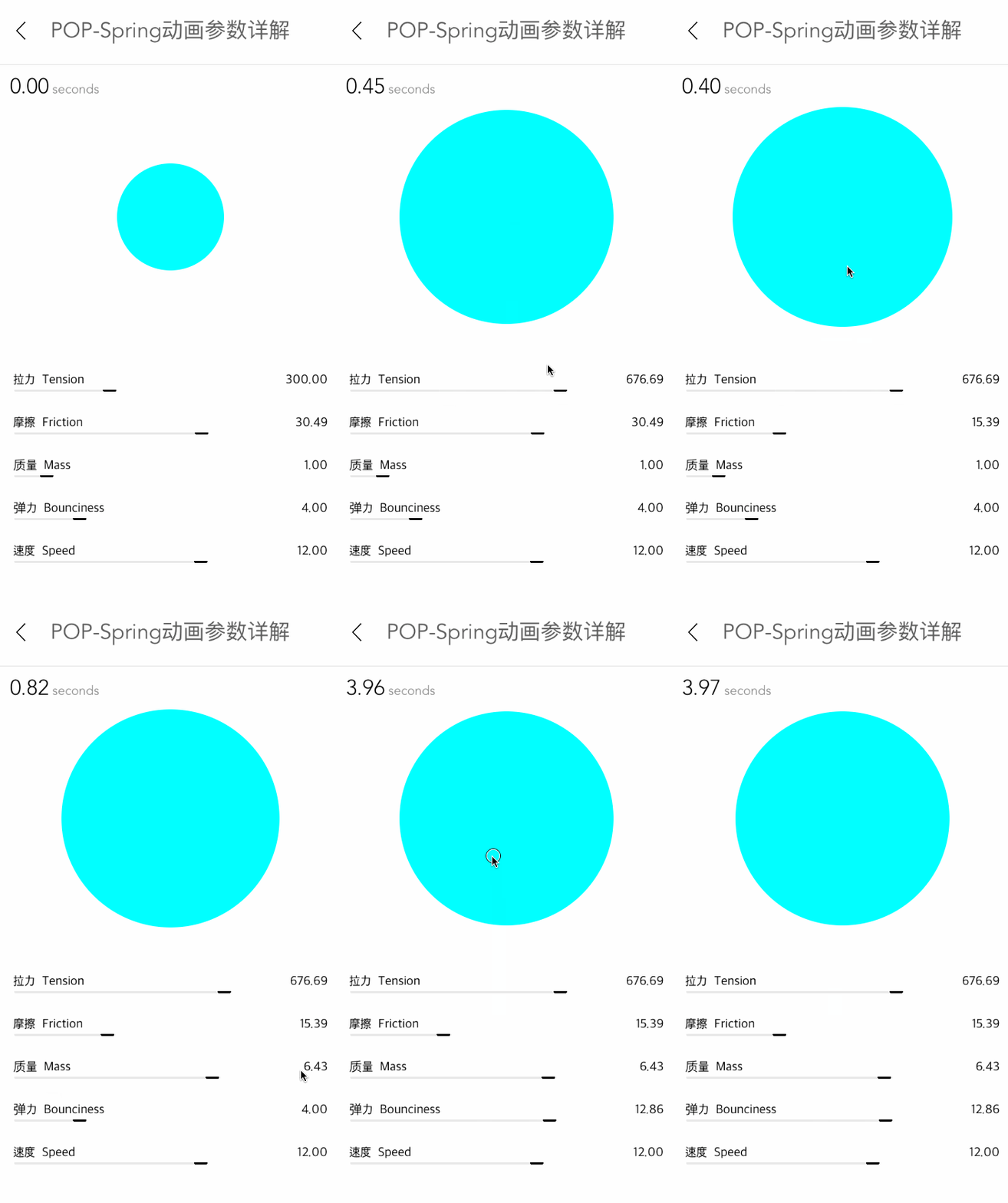
效果
源码
https://github.com/YouXianMing/Animations
//

//  POPSpringParameterController.m

//  Animations

//

//  Created by YouXianMing on 15/11/29.

//  Copyright © 2015年 YouXianMing. All rights reserved.

//

#import "POPSpringParameterController.h"

#import "RangeValueView.h"

#import "UIView+SetRect.h"

#import "POP.h"

#import "FontAttribute.h"

#import "ForegroundColorAttribute.h"

#import "NSMutableAttributedString+StringAttribute.h"

#define  Width   [UIScreen mainScreen].bounds.size.width

#define  Height  [UIScreen mainScreen].bounds.size.height

@interface POPSpringParameterController ()

@property (nonatomic, strong) UILabel  *secondsLabel;

@property (nonatomic, strong) NSDate   *dateStart;

@property (nonatomic, strong) RangeValueView *rangeSpeed;

@property (nonatomic, strong) RangeValueView *rangeBounciness;

@property (nonatomic, strong) RangeValueView *rangeMass;

@property (nonatomic, strong) RangeValueView *rangeFriction;

@property (nonatomic, strong) RangeValueView *rangeTension;

@property (nonatomic, strong) UIButton *showView;

@end

@implementation POPSpringParameterController

- (void)viewDidLoad {

    [super viewDidLoad];

}

- (void)setup {

    [super setup];

    [self initSecondLabel];

    [self initButton];

    [self initRangeViews];

    [self bringTitleViewToFront];

}

- (void)initSecondLabel {

    self.secondsLabel                = [[UILabel alloc] initWithFrame:CGRectMake(,  + , , )];

    self.secondsLabel.attributedText = [self stringWithFloat:.f];

    [self.view addSubview:self.secondsLabel];

}

- (NSAttributedString *)stringWithFloat:(CGFloat)value {

    // 字符串

    NSString *stringValue  = [NSString stringWithFormat:@"%.2f", value];

    NSString *secondString = [NSString stringWithFormat:@"seconds"];

    NSString *totalString  = [NSString stringWithFormat:@"%@ %@", stringValue, secondString];

    // 字体

    UIFont *allFont        = Font_Avenir();

    UIFont *numFont        = Font_Avenir_Light();

    FontAttribute *totalFont = [FontAttribute new];

    totalFont.font           = allFont;

    totalFont.effectRange    = NSMakeRange(, totalString.length);

    FontAttribute *valueFont = [FontAttribute new];

    valueFont.font           = numFont;

    valueFont.effectRange    = [totalString rangeOfString:stringValue];

    ForegroundColorAttribute *textColor = [ForegroundColorAttribute new];

    textColor.color                     = [UIColor grayColor];

    textColor.effectRange               = NSMakeRange(, totalString.length);

    ForegroundColorAttribute *numColor = [ForegroundColorAttribute new];

    numColor.color                     = [UIColor blackColor];

    numColor.effectRange               = [totalString rangeOfString:stringValue];

    NSMutableAttributedString *attributeString = [[NSMutableAttributedString alloc] initWithString:totalString];

    [attributeString addStringAttribute:totalFont];

    [attributeString addStringAttribute:valueFont];

    [attributeString addStringAttribute:textColor];

    [attributeString addStringAttribute:numColor];

    return attributeString;

}

- (void)initButton {

    CGFloat gap = Height -  - * - ;

    CGFloat width                    = .f;

    self.showView                    = [[UIButton alloc] initWithFrame:CGRectMake(, , width, width)];

    self.showView.center             = CGPointMake(self.view.middleX,  + gap / .f);

    self.showView.backgroundColor    = [UIColor cyanColor];

    self.showView.layer.cornerRadius = self.showView.width / .f;

    [self.view addSubview:self.showView];

    [self.showView addTarget:self

                      action:@selector(doAnimation)

            forControlEvents:UIControlEventTouchUpInside];

}

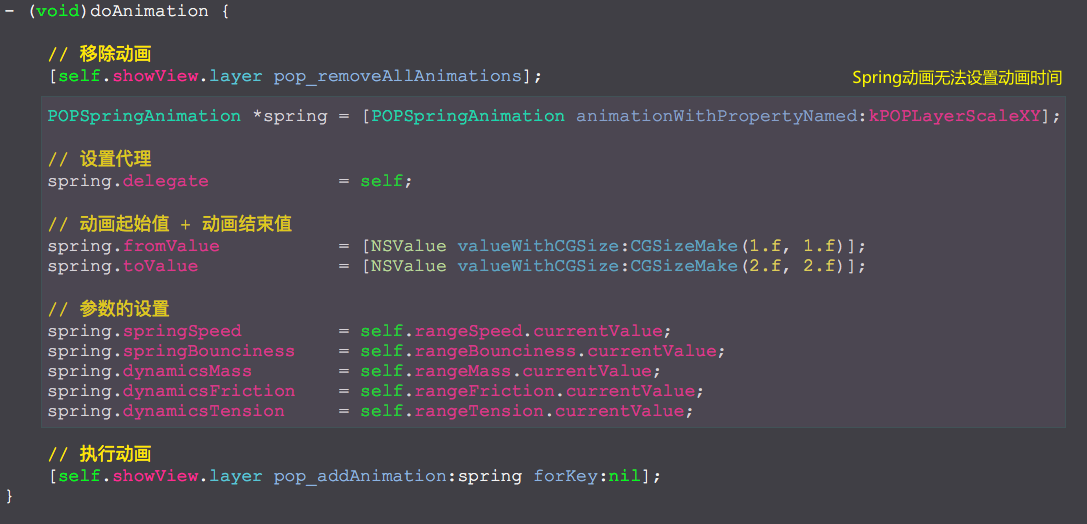
- (void)doAnimation {

    // 移除动画

    [self.showView.layer pop_removeAllAnimations];

    POPSpringAnimation *spring = [POPSpringAnimation animationWithPropertyNamed:kPOPLayerScaleXY];

    // 设置代理

    spring.delegate            = self;

    // 动画起始值 + 动画结束值

    spring.fromValue           = [NSValue valueWithCGSize:CGSizeMake(.f, .f)];

    spring.toValue             = [NSValue valueWithCGSize:CGSizeMake(.f, .f)];

    // 参数的设置

    spring.springSpeed         = self.rangeSpeed.currentValue;

    spring.springBounciness    = self.rangeBounciness.currentValue;

    spring.dynamicsMass        = self.rangeMass.currentValue;

    spring.dynamicsFriction    = self.rangeFriction.currentValue;

    spring.dynamicsTension     = self.rangeTension.currentValue;

    // 执行动画

    [self.showView.layer pop_addAnimation:spring forKey:nil];

}

- (void)pop_animationDidStart:(POPAnimation *)anim {

    self.dateStart = [NSDate date];

}

- (void)pop_animationDidApply:(POPAnimation *)anim {

    CGFloat seconds                  = -[self.dateStart timeIntervalSinceNow];

    self.secondsLabel.attributedText = [self stringWithFloat:seconds];

}

- (void)pop_animationDidStop:(POPAnimation *)anim finished:(BOOL)finished {

    CGFloat seconds                  = -[self.dateStart timeIntervalSinceNow];

    self.secondsLabel.attributedText = [self stringWithFloat:seconds];

}

- (void)initRangeViews {

    self.rangeSpeed = [RangeValueView rangeValueViewWithFrame:CGRectMake(, Height - , Width - , )

                                                         name:@"速度  Speed"

                                                     minValue:.f

                                                     maxValue:.f

                                                 defaultValue:.f];

    [self.view addSubview:self.rangeSpeed];

    self.rangeBounciness = [RangeValueView rangeValueViewWithFrame:CGRectMake(, Height -  - , Width - , )

                                                              name:@"弹力  Bounciness"

                                                          minValue:.f

                                                          maxValue:.f

                                                      defaultValue:.f];

    [self.view addSubview:self.rangeBounciness];

    self.rangeMass = [RangeValueView rangeValueViewWithFrame:CGRectMake(, Height -  - *, Width - , )

                                                        name:@"质量  Mass"

                                                    minValue:0.1

                                                    maxValue:.f

                                                defaultValue:.f];

    [self.view addSubview:self.rangeMass];

    self.rangeFriction = [RangeValueView rangeValueViewWithFrame:CGRectMake(, Height -  - *, Width - , )

                                                            name:@"摩擦  Friction"

                                                        minValue:

                                                        maxValue:

                                                    defaultValue:30.486980];

    [self.view addSubview:self.rangeFriction];

    self.rangeTension = [RangeValueView rangeValueViewWithFrame:CGRectMake(, Height -  - *, Width - , )

                                                           name:@"拉力  Tension"

                                                       minValue:

                                                       maxValue:

                                                   defaultValue:];

    [self.view addSubview:self.rangeTension];

}

@end
细节
POPSpring动画参数详解的更多相关文章
- iOS:核心动画的详解介绍:CAAnimation(抽象类)及其子类
核心动画的详解介绍:CAAnimation(抽象类) 1.核心动画基本概念 Core Animation是一组非常强大的动画处理API,使用它能做出非常炫丽的动画效果,而且往往是事半功倍! 使用它 ...
- Android Animations 视图动画使用详解!!!
转自:http://www.open-open.com/lib/view/open1335777066015.html Android Animations 视图动画使用详解 一.动画类型 Andro ...
- VLC命令行参数详解
VLC命令行参数详解 2012-11-29 14:00 6859人阅读 评论(0) 收藏 举报 Usage: vlc [options] [stream] ...You can specify mul ...
- Android基础夯实--重温动画(五)之属性动画 ObjectAnimator详解
只有一种真正的英雄主义 一.摘要 ObjectAnimator是ValueAnimator的子类,它和ValueAnimator一样,同样具有计算属性值的功能,但对比ValueAnimator,它会更 ...
- Nginx主配置参数详解,Nginx配置网站
1.Niginx主配置文件参数详解 a.上面博客说了在Linux中安装nginx.博文地址为:http://www.cnblogs.com/hanyinglong/p/5102141.html b.当 ...
- iptables参数详解
iptables参数详解 搬运工:尹正杰 注:此片文章来源于linux社区. Iptalbes 是用来设置.维护和检查Linux内核的IP包过滤规则的. 可以定义不同的表,每个表都包含几个内部的链,也 ...
- chattr的常用参数详解
chattr的常用参数详解 作者:尹正杰 版权声明:原创作品,谢绝转载!否则将追究法律责任. 在实际生产环境中,有的运维工程师不得不和开发和测试打交道,在我们公司最常见的就是部署接口.每天每个人部署的 ...
- mha配置参数详解
mha配置参数详解: 参数名字 是否必须 参数作用域 默认值 示例 hostname Yes Local Only - hostname=mysql_server1, hostname=192.168 ...
- $.ajax()方法所有参数详解;$.get(),$.post(),$.getJSON(),$.ajax()详解
[一]$.ajax()所有参数详解 url: 要求为String类型的参数,(默认为当前页地址)发送请求的地址. type: 要求为String类型的参数,请求方式(post或get)默认为get.注 ...
随机推荐
- SQL之DELETE
在SQL中DELETE语句用于删除表中的行. 语法 1.删除特定行 DELETE FROM 表名称 WHERE 列名称 = 值 2.删除所有行:在不删除表的情况下删除所有的行.删除之后表的结构.属性和 ...
- 一步一步学习IdentityServer3 (9)
idr添加验证码,授权方法中获取不到session,而且没有login页面的post方法,只有一个视图,而且是先加载视图,生成不了验证码 我的解决方法是将验证写一个自定义mvc控件 利用 viewd ...
- 自定义Adapter为什么会重复多轮调用getView?——原来是ListView.onMeasure在作祟
相信很多人在使用自定义Adapter的时候都遇到这样的问题: 假设Adapter数据源中只有30个Item,理论上每显示一个新的Item的时候就会调用一次getView,均显示一次的话是要调用getV ...
- require demo 记录备份
预览地址 http://127.0.0.1:8020/requireDemo/myNEW/index.html 注意 远程的 非模块的 empty: demo2
- lr参数化取值与连接数据库
TXT文本,EXCEL表格以及数据库中的表都可以作为参数的数据集载体,LR都是支持的. 特别提醒: 1.在形成数据池之后,数据库中的数据变化不会影响数据池中的数据. 2.数据文件一定要以一个空行结束, ...
- poj1970 The Game(DFS)
题目链接 http://poj.org/problem?id=1970 思路 题目的意思是判断五子棋棋局是否有胜者,有的话输出胜者的棋子类型,并且输出五个棋子中最左上的棋子坐标:没有胜者输出0. 这道 ...
- Bootstrap进阶六:动态样式语言LESS简介
LESS 将 CSS 赋予了动态语言的特性,如 变量, 继承, 运算, 函数. LESS 既可以在 客户端 上运行 (支持IE 6+, Webkit, Firefox),也可以借助Node.js或者R ...
- eNSP仿真学习和VLAN配置
路由&交换机基本命令 sys #切换到系统视图(修改配置),Ctrl+Z 返回用户视图 sysname SW1 #设备重命名为SW1 int g0/0/1 #进入接口视图 VLAN配置 首先连 ...
- MySQL 关于索引那点事
索引 其实数据库中的数据是按页存放的其实索引也是按页存放的所以本质上索引也占硬盘空间(以最小的消耗,换取最大的利益) 索引是一种有效组合数据的方式!为快速查找到指定记录做铺垫 目的就是快速或者某个记录 ...
- iOS 11开发教程(五)iOS11模拟器介绍二
iOS 11开发教程(五)iOS11模拟器介绍二 3.iOS11模拟器中设置语言 对于不同国家的人来说,使用到的语言是不一样的.一般情况下iOS11模拟器默认使用的English(英语).对于英文不好 ...