
【Android】17.3 Activity与StartedService的绑定
分类:C#、Android、VS2015;
创建日期:2016-03-03
一、简介
除了上一节介绍的基本绑定以外,你还可以创建一个同时支持started和bound的服务。也就是说,服务可以通过调用 StartService() 来启动,这会使它一直保持运行,同时它也允许客户端通过调用BindService() 来与之绑定。
虽然你通常应该要实现 OnBind() 或 OnStartCommand() 中的一个,但有时需要同时实现两者。比如,音乐播放器的服务也许就需要同时实现后台运行和支持绑定。这样,activity就可以启动服务来播放音乐,并且音乐会一直播放下去,即使用户离开该应用程序也没关系,这个activity可以绑定播放服务来重新获得播放控制权。
另外,如果你的服务是started和bound的,那么服务启动后,系统将不会在所有客户端解除绑定时销毁它。取而代之的是,你必须通过调用StopSelf() 或 StopService() 显式终止此服务。
服务只在为绑定的应用程序组件工作时才会存活,因此,只要没有组件绑定到服务,系统就会自动销毁服务(你不需要像started服务中那样通过OnStartCommand()来终止一个bound服务)。
一旦OnBind方法返回绑定的实例,Android就会引发实现IServiceConnection接口的对象的ServiceConnected事件,然后,客户端就可以通过Binder引用它。
多个客户端可以同时连接到同一个服务上。不过,只有在第一个客户端绑定时,系统才会调用服务的 OnBind() 方法来获取 IBinder 。然后,系统会向后续请求绑定的客户端传送这同一个 IBinder ,而不再调用 OnBind() 。当最后一个客户端解除绑定后,系统会自动销毁服务(除非服务是同时通过 StartService() 启动的)。
二、示例2运行截图
该例子演示如何绑定到一个started服务。
单击【启动服务】按钮后,就会在左上角出现一个通知图标,下拉展开该图标,就可以看到来自服务的通知信息。
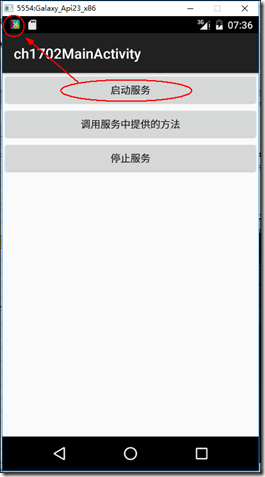
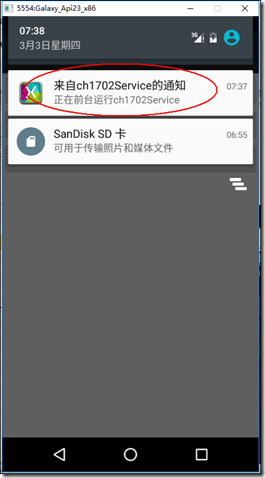
单击【调用服务中提供的方法】按钮,会显示调用服务中对应方法返回的结果,单击【停止服务】按钮,左上角的通知图标也会同时消失。
三、主要设计步骤
1、添加ch1702_main.xml
<?xml version="1.0" encoding="utf-8"?>

<LinearLayout xmlns:android="http://schemas.android.com/apk/res/android"

    android:orientation="vertical"

    android:layout_width="fill_parent"

    android:layout_height="fill_parent">

    <Button

        android:id="@+id/ch1702_startService"

        android:layout_width="fill_parent"

        android:layout_height="wrap_content"

        android:text="启动服务" />

    <Button

        android:id="@+id/ch1702_callService"

        android:layout_width="fill_parent"

        android:layout_height="wrap_content"

        android:text="调用服务中提供的方法" />

    <Button

        android:id="@+id/ch1702_stopService"

        android:layout_width="fill_parent"

        android:layout_height="wrap_content"

        android:text="停止服务" />

</LinearLayout>
2、添加ch1702Service.cs
using Android.App;

using Android.Content;

using Android.OS;

using Android.Widget;

using System.Threading;

namespace MyDemos.SrcDemos

{

    [Service]

    [IntentFilter(new string[] { action })]

    public class ch1702Service : Service

    {

        public const string action = "ServiceDemo.ch1702Service";

        ch1702ServiceBinder binder;

        public override StartCommandResult OnStartCommand(Intent intent, StartCommandFlags flags, int startId)

        {

            Notification notification = GetNotification();

            //启动前台任务

            StartForeground((int)NotificationFlags.ForegroundService, notification);

            var t = new Thread(() =>

            {

                //发送通知

                var m = (NotificationManager)GetSystemService(NotificationService);

                m.Notify((int)NotificationFlags.ForegroundService, notification);

                Thread.Sleep();  //延时50秒模拟长时间运行的服务

                //停止前台任务

                StopForeground(true);

                //停止后台服务

                StopSelf();

            });

            t.Start();

            return StartCommandResult.NotSticky;

        }

        private Notification GetNotification()

        {

            var pendingIntent = PendingIntent.GetActivity(this,

                (int)NotificationFlags.ForegroundService,

                new Intent(this, typeof(MainActivity)),

                PendingIntentFlags.UpdateCurrent);

            Notification.Builder builder = new Notification.Builder(this)

                .SetContentTitle("来自ch1702Service的通知")

                .SetContentText("正在前台运行ch1702Service")

                .SetContentIntent(pendingIntent)

                .SetSmallIcon(Resource.Drawable.Icon);

            Notification notification = builder.Build();

            return notification;

        }

        public override IBinder OnBind(Android.Content.Intent intent)

        {

            binder = new ch1702ServiceBinder(this);

            return binder;

        }

        public string GetText()

        {

            return "这是来自ch1702Service的信息";

        }

        public override void OnDestroy()

        {

            var myHandler = new Handler();

            myHandler.Post(() =>

            {

                Toast.MakeText(this, "正在停止ch1702Service", ToastLength.Long).Show();

            });

            base.OnDestroy();

        }

    }

    public class ch1702ServiceBinder : Binder

    {

        ch1702Service service;

        public ch1702ServiceBinder(ch1702Service service)

        {

            this.service = service;

        }

        public ch1702Service GetMyService()

        {

            return service;

        }

    }

}
3、添加ch1702MainActivity.cs
using Android.App;

using Android.Content;

using Android.OS;

using Android.Widget;

using Android.Content.Res;

namespace MyDemos.SrcDemos

{

    [Activity(Label = "ch1702MainActivity")]

    public class ch1702MainActivity : Activity

    {

        bool isBound = false;

        bool isConfigurationChange = false;

        ch1702ServiceBinder binder;

        ch1702ServiceConnection myServiceConnection;

        Intent serviceIntent;

        protected override void OnCreate(Bundle savedInstanceState)

        {

            base.OnCreate(savedInstanceState);

            SetContentView(Resource.Layout.ch1702_main);

            var start = FindViewById<Button>(Resource.Id.ch1702_startService);

            start.Click += delegate

            {

                serviceIntent = new Intent(ch1702Service.action);

                StartService(serviceIntent);

            };

            var callService = FindViewById<Button>(Resource.Id.ch1702_callService);

            callService.Click += delegate

            {

                if (isBound)

                {

                    RunOnUiThread(() =>

                    {

                        string text = binder.GetMyService().GetText();

                        Toast.MakeText(this, text, ToastLength.Short).Show();

                    });

                }

            };

            var stop = FindViewById<Button>(Resource.Id.ch1702_stopService);

            stop.Click += delegate

            {

                StopService(serviceIntent);

                if (isBound)

                {

                    UnbindService(myServiceConnection);

                    isBound = false;

                }

            };

            // 如果配置改变了(比如旋转了屏幕),则恢复连接

            if (myServiceConnection != null)

            {

                binder = myServiceConnection.Binder;

            }

        }

        protected override void OnStart()

        {

            base.OnStart();

            var myServiceIntent = new Intent(ch1702Service.action);

            myServiceConnection = new ch1702ServiceConnection(this);

            BindService(myServiceIntent, myServiceConnection, Bind.AutoCreate);

        }

        public override void OnConfigurationChanged(Configuration newConfig)

        {

            isConfigurationChange = true;

            base.OnConfigurationChanged(newConfig);

        }

        protected override void OnDestroy()

        {

            base.OnDestroy();

            if (!isConfigurationChange)

            {

                if (isBound)

                {

                    UnbindService(myServiceConnection);

                    isBound = false;

                }

            }

        }

        private class ch1702ServiceConnection : Java.Lang.Object, IServiceConnection

        {

            private ch1702MainActivity activity;

            public ch1702ServiceBinder Binder { get; private set; }

            public ch1702ServiceConnection(ch1702MainActivity activity)

            {

                this.activity = activity;

            }

            public void OnServiceConnected(ComponentName name, IBinder service)

            {

                var myServiceBinder = service as ch1702ServiceBinder;

                if (myServiceBinder != null)

                {

                    activity.binder = myServiceBinder;

                    activity.isBound = true;

                    // 即使配置发生了改变,仍保持绑定到该实例

                    Binder = myServiceBinder;

                }

            }

            public void OnServiceDisconnected(ComponentName name)

            {

                activity.isBound = false;

            }

        }

    }

}
【Android】17.3 Activity与StartedService的绑定的更多相关文章
- 【Android】17.4 Activity与IntentService的绑定
分类:C#.Android.VS2015: 创建日期:2016-03-03 一.简介 本示例通过AlarmManager类以固定的时间间隔调用服务(每隔2秒更新一次随机生成的股票数据).如果将此示例的 ...
- Android 组件系列-----Activity的传值和回传值
在这篇随笔里将讲解Activity的传值和回传值. 一.通过startActivity来进行Activity的传值 在Android中,如果我们要通过一个Activity来启动另一个Activity, ...
- Android Service与Activity之间通信的几种方式
在Android中,Activity主要负责前台页面的展示,Service主要负责需要长期运行的任务,所以在我们实际开发中,就会常常遇到Activity与Service之间的通信,我们一般在Activ ...
- 【原创】Android 从一个Activity跳转到另外一个Activity
Android四大组件activity使用,实现两个activity之间的跳转 基本流程:创建两个activity-将其中一个activity中组件作为事件源-通过组件事件的处理借助intent对象实 ...
- Android中半透明Activity效果另法
Android中的Activity有没有类似于像Windows程序样的窗口式显示呢? 答案当然是有. 下图就是一个窗口式Activity的效果图: 下面就说说实现过程: 首先看看AndroidMani ...
- [Android笔记1]Activity+Layout+Button
线性布局(LinearLayout)是指view对象在父view中可按水平或垂直方向线性排列. 相对布局(RelativeLayout)是指view对象的排列依赖于各对象之间的相对位置. 下面是展示两 ...
- android 基础02 - Activity 的生命周期及状态
返回栈 Android 中的 Activity 是可以层叠的,当我们启动一个新的 Activity 时,就会覆盖在原有的 Activity 之上, 点击 Back 会销毁当前 Activity,下面的 ...
- Android application 和 activity 标签详解
extends:http://blog.csdn.net/self_study/article/details/54020909 Application 标签 android:allowTaskRep ...
- 【Android实验】第一个Android程序与Activity生命周期
目录 第一个Android程序和Activity生命周期 实验目的 实验要求 实验过程 1. 程序正常启动与关闭 2. 外来电话接入的情况 3. 外来短信接入的情况 4. 程序运行中切换到其他程序(比 ...
随机推荐
- TextView跑步灯效果及在特殊情况下无效的解决方式
概述: 关于在TextView中使用跑马灯效果的样例在网上一搜一大把.他们可能会让你像以下这样来在xml中定义TextView控件的属性.而事实也确是如此. 只是我不知道他们有没有遇到和我一样的问题( ...
- Effective C++ 38-42
38.绝不要又一次定义继承而来的缺省參数值. 又一次定义函数缺省參数值意味着又一次定义函数.而非虚函数不能又一次定义,所以将就考虑不能又一次定义虚函数的缺省參数值的原因:虚函数是动态绑定的而缺省參数值 ...
- tar 归档中找不到
今天在解压tar.gz包时遇到的错误: 刚开始以为是路径的问题,然后感觉是tar.gz包的问题,后来查了一下才知道,记录一下: 一定要加上那个-C 参数表示更换目录的意识 -C --dire ...
- js 垃圾回收机制与内存管理
1.原理 js按照固定的时间间隔找到不在继续使用的变量,释放其占用的内存. 2.实现方式 (1)标记清除 垃圾收集器给存储在内存上的所有变量都加上标记: 之后,去掉环境中的变量以及被环境引用变量的标记 ...
- 几款Android开发人员必备小工具
在这里我介绍一下我常常在Android Studio里面使用的小工具吧,这些工具都能够在plugin里面搜索到. (当然了哈.我也是从网上找的.用着挺方便的,在这里总结一下) Gsonformat: ...
- 源码安装和配置zabbix 3.0 LST
Zabbix是什么 Zabbix 是由Alexei Vladishev创建,目前由Zabbix SIA在持续开发和支持. Zabbix 是一个企业级的分布式开源监控方案. Zabbix是一款能够监控各 ...
- HDU 3974 Assign the task(dfs时间戳+线段树成段更新)
题意:给定点的上下级关系,规定假设给i分配任务a.那么他的全部下属.都停下手上的工作,開始做a. 操作 T x y 分配x任务y,C x询问x的当前任务: Sample Input 1 5 4 3 3 ...
- java上传excel文件及解析
java上传excel文件及解析 CreateTime--2018年3月5日16:25:14 Author:Marydon 一.准备工作 1.1 文件上传插件:swfupload: 1.2 文件上 ...
- 图标、图片、logo地址
阿里通信图标库 http://www.iconfont.cn/collections/show/29
- 超酷的Android 侧滑(双向滑动菜单)效果
下面看看我们如何使用它,达到我们想要的效果 public class MainActivity extends Activity { /** * 双向滑动菜单布局 */ private SliderM ...