
【Android】17.3 Activity与StartedService的绑定
分类:C#、Android、VS2015;
创建日期:2016-03-03
一、简介
除了上一节介绍的基本绑定以外,你还可以创建一个同时支持started和bound的服务。也就是说,服务可以通过调用 StartService() 来启动,这会使它一直保持运行,同时它也允许客户端通过调用BindService() 来与之绑定。
虽然你通常应该要实现 OnBind() 或 OnStartCommand() 中的一个,但有时需要同时实现两者。比如,音乐播放器的服务也许就需要同时实现后台运行和支持绑定。这样,activity就可以启动服务来播放音乐,并且音乐会一直播放下去,即使用户离开该应用程序也没关系,这个activity可以绑定播放服务来重新获得播放控制权。
另外,如果你的服务是started和bound的,那么服务启动后,系统将不会在所有客户端解除绑定时销毁它。取而代之的是,你必须通过调用StopSelf() 或 StopService() 显式终止此服务。
服务只在为绑定的应用程序组件工作时才会存活,因此,只要没有组件绑定到服务,系统就会自动销毁服务(你不需要像started服务中那样通过OnStartCommand()来终止一个bound服务)。
一旦OnBind方法返回绑定的实例,Android就会引发实现IServiceConnection接口的对象的ServiceConnected事件,然后,客户端就可以通过Binder引用它。
多个客户端可以同时连接到同一个服务上。不过,只有在第一个客户端绑定时,系统才会调用服务的 OnBind() 方法来获取 IBinder 。然后,系统会向后续请求绑定的客户端传送这同一个 IBinder ,而不再调用 OnBind() 。当最后一个客户端解除绑定后,系统会自动销毁服务(除非服务是同时通过 StartService() 启动的)。
二、示例2运行截图
该例子演示如何绑定到一个started服务。
单击【启动服务】按钮后,就会在左上角出现一个通知图标,下拉展开该图标,就可以看到来自服务的通知信息。
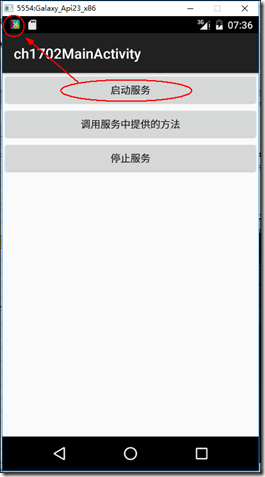
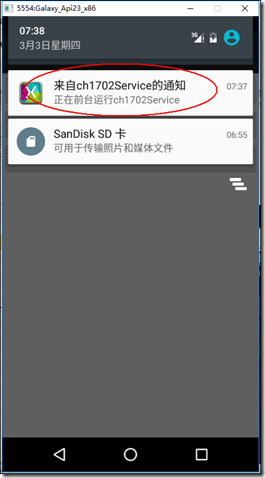
单击【调用服务中提供的方法】按钮,会显示调用服务中对应方法返回的结果,单击【停止服务】按钮,左上角的通知图标也会同时消失。
三、主要设计步骤
1、添加ch1702_main.xml
<?xml version="1.0" encoding="utf-8"?>

<LinearLayout xmlns:android="http://schemas.android.com/apk/res/android"

    android:orientation="vertical"

    android:layout_width="fill_parent"

    android:layout_height="fill_parent">

    <Button

        android:id="@+id/ch1702_startService"

        android:layout_width="fill_parent"

        android:layout_height="wrap_content"

        android:text="启动服务" />

    <Button

        android:id="@+id/ch1702_callService"

        android:layout_width="fill_parent"

        android:layout_height="wrap_content"

        android:text="调用服务中提供的方法" />

    <Button

        android:id="@+id/ch1702_stopService"

        android:layout_width="fill_parent"

        android:layout_height="wrap_content"

        android:text="停止服务" />

</LinearLayout>
2、添加ch1702Service.cs
using Android.App;

using Android.Content;

using Android.OS;

using Android.Widget;

using System.Threading;

namespace MyDemos.SrcDemos

{

    [Service]

    [IntentFilter(new string[] { action })]

    public class ch1702Service : Service

    {

        public const string action = "ServiceDemo.ch1702Service";

        ch1702ServiceBinder binder;

        public override StartCommandResult OnStartCommand(Intent intent, StartCommandFlags flags, int startId)

        {

            Notification notification = GetNotification();

            //启动前台任务

            StartForeground((int)NotificationFlags.ForegroundService, notification);

            var t = new Thread(() =>

            {

                //发送通知

                var m = (NotificationManager)GetSystemService(NotificationService);

                m.Notify((int)NotificationFlags.ForegroundService, notification);

                Thread.Sleep();  //延时50秒模拟长时间运行的服务

                //停止前台任务

                StopForeground(true);

                //停止后台服务

                StopSelf();

            });

            t.Start();

            return StartCommandResult.NotSticky;

        }

        private Notification GetNotification()

        {

            var pendingIntent = PendingIntent.GetActivity(this,

                (int)NotificationFlags.ForegroundService,

                new Intent(this, typeof(MainActivity)),

                PendingIntentFlags.UpdateCurrent);

            Notification.Builder builder = new Notification.Builder(this)

                .SetContentTitle("来自ch1702Service的通知")

                .SetContentText("正在前台运行ch1702Service")

                .SetContentIntent(pendingIntent)

                .SetSmallIcon(Resource.Drawable.Icon);

            Notification notification = builder.Build();

            return notification;

        }

        public override IBinder OnBind(Android.Content.Intent intent)

        {

            binder = new ch1702ServiceBinder(this);

            return binder;

        }

        public string GetText()

        {

            return "这是来自ch1702Service的信息";

        }

        public override void OnDestroy()

        {

            var myHandler = new Handler();

            myHandler.Post(() =>

            {

                Toast.MakeText(this, "正在停止ch1702Service", ToastLength.Long).Show();

            });

            base.OnDestroy();

        }

    }

    public class ch1702ServiceBinder : Binder

    {

        ch1702Service service;

        public ch1702ServiceBinder(ch1702Service service)

        {

            this.service = service;

        }

        public ch1702Service GetMyService()

        {

            return service;

        }

    }

}
3、添加ch1702MainActivity.cs
using Android.App;

using Android.Content;

using Android.OS;

using Android.Widget;

using Android.Content.Res;

namespace MyDemos.SrcDemos

{

    [Activity(Label = "ch1702MainActivity")]

    public class ch1702MainActivity : Activity

    {

        bool isBound = false;

        bool isConfigurationChange = false;

        ch1702ServiceBinder binder;

        ch1702ServiceConnection myServiceConnection;

        Intent serviceIntent;

        protected override void OnCreate(Bundle savedInstanceState)

        {

            base.OnCreate(savedInstanceState);

            SetContentView(Resource.Layout.ch1702_main);

            var start = FindViewById<Button>(Resource.Id.ch1702_startService);

            start.Click += delegate

            {

                serviceIntent = new Intent(ch1702Service.action);

                StartService(serviceIntent);

            };

            var callService = FindViewById<Button>(Resource.Id.ch1702_callService);

            callService.Click += delegate

            {

                if (isBound)

                {

                    RunOnUiThread(() =>

                    {

                        string text = binder.GetMyService().GetText();

                        Toast.MakeText(this, text, ToastLength.Short).Show();

                    });

                }

            };

            var stop = FindViewById<Button>(Resource.Id.ch1702_stopService);

            stop.Click += delegate

            {

                StopService(serviceIntent);

                if (isBound)

                {

                    UnbindService(myServiceConnection);

                    isBound = false;

                }

            };

            // 如果配置改变了(比如旋转了屏幕),则恢复连接

            if (myServiceConnection != null)

            {

                binder = myServiceConnection.Binder;

            }

        }

        protected override void OnStart()

        {

            base.OnStart();

            var myServiceIntent = new Intent(ch1702Service.action);

            myServiceConnection = new ch1702ServiceConnection(this);

            BindService(myServiceIntent, myServiceConnection, Bind.AutoCreate);

        }

        public override void OnConfigurationChanged(Configuration newConfig)

        {

            isConfigurationChange = true;

            base.OnConfigurationChanged(newConfig);

        }

        protected override void OnDestroy()

        {

            base.OnDestroy();

            if (!isConfigurationChange)

            {

                if (isBound)

                {

                    UnbindService(myServiceConnection);

                    isBound = false;

                }

            }

        }

        private class ch1702ServiceConnection : Java.Lang.Object, IServiceConnection

        {

            private ch1702MainActivity activity;

            public ch1702ServiceBinder Binder { get; private set; }

            public ch1702ServiceConnection(ch1702MainActivity activity)

            {

                this.activity = activity;

            }

            public void OnServiceConnected(ComponentName name, IBinder service)

            {

                var myServiceBinder = service as ch1702ServiceBinder;

                if (myServiceBinder != null)

                {

                    activity.binder = myServiceBinder;

                    activity.isBound = true;

                    // 即使配置发生了改变,仍保持绑定到该实例

                    Binder = myServiceBinder;

                }

            }

            public void OnServiceDisconnected(ComponentName name)

            {

                activity.isBound = false;

            }

        }

    }

}
【Android】17.3 Activity与StartedService的绑定的更多相关文章
- 【Android】17.4 Activity与IntentService的绑定
分类:C#.Android.VS2015: 创建日期:2016-03-03 一.简介 本示例通过AlarmManager类以固定的时间间隔调用服务(每隔2秒更新一次随机生成的股票数据).如果将此示例的 ...
- Android 组件系列-----Activity的传值和回传值
在这篇随笔里将讲解Activity的传值和回传值. 一.通过startActivity来进行Activity的传值 在Android中,如果我们要通过一个Activity来启动另一个Activity, ...
- Android Service与Activity之间通信的几种方式
在Android中,Activity主要负责前台页面的展示,Service主要负责需要长期运行的任务,所以在我们实际开发中,就会常常遇到Activity与Service之间的通信,我们一般在Activ ...
- 【原创】Android 从一个Activity跳转到另外一个Activity
Android四大组件activity使用,实现两个activity之间的跳转 基本流程:创建两个activity-将其中一个activity中组件作为事件源-通过组件事件的处理借助intent对象实 ...
- Android中半透明Activity效果另法
Android中的Activity有没有类似于像Windows程序样的窗口式显示呢? 答案当然是有. 下图就是一个窗口式Activity的效果图: 下面就说说实现过程: 首先看看AndroidMani ...
- [Android笔记1]Activity+Layout+Button
线性布局(LinearLayout)是指view对象在父view中可按水平或垂直方向线性排列. 相对布局(RelativeLayout)是指view对象的排列依赖于各对象之间的相对位置. 下面是展示两 ...
- android 基础02 - Activity 的生命周期及状态
返回栈 Android 中的 Activity 是可以层叠的,当我们启动一个新的 Activity 时,就会覆盖在原有的 Activity 之上, 点击 Back 会销毁当前 Activity,下面的 ...
- Android application 和 activity 标签详解
extends:http://blog.csdn.net/self_study/article/details/54020909 Application 标签 android:allowTaskRep ...
- 【Android实验】第一个Android程序与Activity生命周期
目录 第一个Android程序和Activity生命周期 实验目的 实验要求 实验过程 1. 程序正常启动与关闭 2. 外来电话接入的情况 3. 外来短信接入的情况 4. 程序运行中切换到其他程序(比 ...
随机推荐
- 怎样查看class文件的jdk版本号
1.事先编译好一个class文件.如:TestVersion.class 2.使用UltraEdit或Editplus打开class文件,我这里使用的editplus,如图: 3.打开时Encodin ...
- C和C++静态检查规范
- eclipse 如何对maven项目进行打包?
eclipse 如何对maven项目进行打包? CreateTime--2018年4月19日22:02:50 Author:Marydon 1.方式一:使用eclipse中的maven插件(命令) ...
- 16、java包装类
一.包装类的由来: JAVA是面向对象的编程语言,但它也包含了8种基本数据类型,这8个基本数据类型不支持面向对象的编程机制,基本数据类型的数据也不具备“对象”的特性:没有属性,方法可以被调用.JAVA ...
- 金山PDF
金山是个很不错的软件公司,金山出PDF,纯粹是完善生态圈!毕竟没FoxitReader专业对PDF的处理上! 官网:芝麻开门 下载:http://wdl1.cache.wps.cn/wps/downl ...
- CSS3制作Freebie标签
<!DOCTYPE HTML> <html lang="en-US"> <head> <meta charset="UTF-8& ...
- PHP反射获取当前函数的内容
<?php $test = function () { echo 'hello world'; }; function closure_dump($closure) { try { $func ...
- Oracle自治事务实际用例
如下,新建两个存储过程: 在主自治事务中,我们插入一条记录,然后在自治事务中,查看表中行数,然后尝试插入三条记录,查看行数,最后rollback 查看行数,最后返回主事务,查看行数. 1.如下代码: ...
- html5中的FileReader对象
表单中有图片选项,选中图片文件之后要求可以预览.这个功能很多控件都封装好了,但是它们的底层都是FileReader对象. FileReader对象提供了丰富的功能,包括以二进制.以文本方式读取文件内容 ...
- 使用springboot遇到的的异常
Unregistering JMX-exposed beans on shutdown <dependency> <groupId>org.springframework.bo ...