
Android数据适配-ExpandableListView
Android中ListView的用法基本上学的时候都会使用,其中可以使用ArrayAdapter,SimpleAdapter,BaseAdapter去实现,这次主要使用的ExpandableListView展示一种两层的效果,ExpandableListView是android中可以实现下拉list的一个控件类似于QQ那种我好友之后就是一排自己的好友,就是两层效果,实现的话使用SimpleExpandableListAdapter即可。
布局文件
先看下效果:

main中xml代码:
  <Button

        android:onClick="test"

        android:layout_width="fill_parent"

        android:layout_height="wrap_content"

        android:text="FlyElephant" />

    <ExpandableListView

        android:id="@id/android:list"

        android:layout_width="fill_parent"

        android:layout_height="fill_parent"

        android:drawSelectorOnTop="false" />
定义一个省份的province.xml:
<?xml version="1.0" encoding="utf-8"?>

<LinearLayout xmlns:android="http://schemas.android.com/apk/res/android"

    android:layout_width="match_parent"

    android:layout_height="match_parent"

    android:orientation="vertical" >

    <TextView

        android:id="@+id/list_provinceText"

        android:layout_width="fill_parent"

        android:layout_height="fill_parent"

        android:paddingBottom="8px"

        android:paddingLeft="30px"

        android:paddingRight="5px"

        android:paddingTop="8px"

        android:textSize="20sp" />

</LinearLayout>
定义了一个地区的child.xml:
<?xml version="1.0" encoding="utf-8"?>

<LinearLayout xmlns:android="http://schemas.android.com/apk/res/android"

    android:layout_width="match_parent"

    android:layout_height="match_parent"

    android:orientation="vertical" >

       <TextView

        android:id="@+id/child_text"

        android:layout_width="fill_parent"

        android:layout_height="fill_parent"

        android:paddingBottom="8px"

        android:paddingLeft="30px"

        android:paddingRight="5px"

        android:paddingTop="8px"

        android:textSize="20sp" />

</LinearLayout>
Demo实现
主要实现代码,代码中都已经注释,其中最主要的SimpleExpandableListAdapter中的参数,这个参数太多,很容易弄错,可以看下注释或者API文档:
       // 创建一级条目

        List<Map<String, String>> provinces = new ArrayList<Map<String, String>>();

        //创建两个省份一级条目

        Map<String, String> firstProvince= new HashMap<String, String>();

        firstProvince.put("province", "河南");

        Map<String, String> secondProvince= new HashMap<String, String>();

        secondProvince.put("province", "北京");

        provinces.add(firstProvince);

        provinces.add(secondProvince);

        // 创建一级条目下的的二级地区条目

        List<Map<String, String>> childList1= new ArrayList<Map<String, String>>();

        //同样是在一级条目目录下创建两个对应的二级条目目录

        Map<String, String> child1= new HashMap<String, String>();

        child1.put("child", "郑州");

        Map<String, String> child2 = new HashMap<String, String>();

        child2.put("child", "开封");

        childList1.add(child1);

        childList1.add(child2);

        //同上

        List<Map<String, String>> childList2 = new ArrayList<Map<String, String>>();

        Map<String, String> child3 = new HashMap<String, String>();

        child3.put("child", "海淀");

        Map<String, String> child4 = new HashMap<String, String>();

        child4.put("child", "昌平");

        childList2.add(child3);

        childList2.add(child4);

        // 将二级条目放在一个集合里,供显示时使用

        List<List<Map<String, String>>> childs = new ArrayList<List<Map<String, String>>>();

        childs.add(childList1);

        childs.add(childList2);

        /**

         * 使用SimpleExpandableListAdapter显示ExpandableListView

         * 参数1.上下文对象Context

         * 参数2.一级条目目录集合

         * 参数3.一级条目对应的布局文件

         * 参数4.fromto,就是map中的key,指定要显示的对象

         * 参数5.与参数4对应,指定要显示在groups中的id

         * 参数6.二级条目目录集合

         * 参数7.二级条目对应的布局文件

         * 参数8.fromto,就是map中的key,指定要显示的对象

         * 参数9.与参数8对应,指定要显示在childs中的id

         */

        SimpleExpandableListAdapter adapter = new SimpleExpandableListAdapter(

                this, provinces, R.layout.list_group, new String[] { "province" },

                new int[] { R.id.list_groupText }, childs, R.layout.child,

                new String[] { "child" }, new int[] { R.id.child_text });

        setListAdapter(adapter);
这个mainActivity需要继承ExpandableListActivity,当然你可以设置其中的点击事件,只要重写一下方法即可:
    /**

     * 设置哪个二级目录被默认选中

     */

    @Override

    public boolean setSelectedChild(int groupPosition, int childPosition,

            boolean shouldExpandGroup) {

            //do something

        return super.setSelectedChild(groupPosition, childPosition,

                shouldExpandGroup);

    }

    /**

     * 设置哪个一级目录被默认选中

     */

    @Override

    public void setSelectedGroup(int groupPosition) {

        //do something

        super.setSelectedGroup(groupPosition);

    }

    /**

     * 当二级条目被点击时响应

     */

    @Override

    public boolean onChildClick(ExpandableListView parent, View v,

            int groupPosition, int childPosition, long id) {

            //do something

        return super.onChildClick(parent, v, groupPosition, childPosition, id);

    }
效果如下:
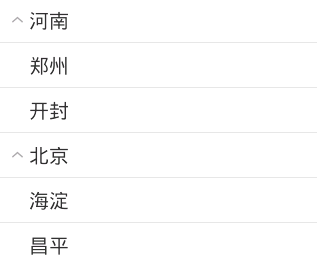
上面这个例子写的有点单调,其实第二个你子的布局直接是空的也行,例如定义一个images.xml
<?xml version="1.0" encoding="utf-8"?>

<LinearLayout xmlns:android="http://schemas.android.com/apk/res/android"

    android:layout_width="wrap_content"

    android:layout_height="wrap_content"

    android:orientation="horizontal" >

    <ImageView

        android:src="@drawable/open"

        android:layout_width="20dp"

        android:layout_height="20dp" />

    <TextView

        android:id="@+id/txtName"

       android:paddingLeft="10dp"

        android:layout_width="wrap_content"

        android:layout_height="wrap_content" />

</LinearLayout>
然后定义一个items.xml
<?xml version="1.0" encoding="utf-8"?>

<TextView xmlns:android="http://schemas.android.com/apk/res/android"

    android:id="@+id/items"

    android:layout_width="wrap_content"

    android:layout_height="wrap_content" >

</TextView>
代码调用:
public class MyExpandleActivity extends Activity {

	/**

	 * 实现可扩展展开列ExpandableListView的三种方式

	 * 一是使用SimpleExpandableListAdpater将两个List集合包装成ExpandableListView 二是

	 * 扩展BaseExpandableListAdpter

	 * 三是使用simpleCursorTreeAdapter将Cursor中的数据包装成SimpleCuroTreeAdapter

	 */

	private String[] names = { "腾讯", "百度", "阿里巴巴" };

	private String[][] childnames = { { "马化腾", "张小龙","社交"},

			{ "李彦宏", "马东敏","搜索" }, { "马云", "陆兆禧","电商" } };

	private ExpandableListView ep;

	@Override

	protected void onCreate(Bundle savedInstanceState) {

		super.onCreate(savedInstanceState);

		setContentView(R.layout.activity_my_expandle);

		// 定义父列表项List数据集合

		List<Map<String, String>> group = new ArrayList<Map<String, String>>();

		// 定义子列表项List数据集合

		List<List<Map<String, String>>> ss = new ArrayList<List<Map<String, String>>>();

		for (int i = 0; i < names.length; i++) {

			// 提供父列表的数据

			Map<String, String> maps = new HashMap<String, String>();

			maps.put("names", names[i]);

			group.add(maps);

			// 提供当前父列的子列数据

			List<Map<String, String>> child = new ArrayList<Map<String, String>>();

			for (int j = 0; j < names.length; j++) {

				Map<String, String> mapsj = new HashMap<String, String>();

				mapsj.put("map", childnames[i][j]);

				child.add(mapsj);

			}

			ss.add(child);

		}

		/**

		 * 第一个参数 应用程序接口 this 第二个父列List<?extends Map<String,Object>>集合 为父列提供数据

		 * 第三个参数 父列显示的组件资源文件 第四个参数 键值列表 父列Map字典的key 第五个要显示的父列组件id 第六个 子列的显示资源文件

		 * 第七个参数 键值列表的子列Map字典的key 第八个要显示子列的组件id

		 */

		SimpleExpandableListAdapter expand = new SimpleExpandableListAdapter(

				this, group, R.layout.images, new String[] { "names" },

				new int[] { R.id.txtName }, ss, R.layout.items,

				new String[] { "map" }, new int[] { R.id.items });

		ep = (ExpandableListView) findViewById(R.id.expanable_mylist);

		ep.setAdapter(expand);

	}

}
效果跟上面相同:

Android数据适配-ExpandableListView的更多相关文章
- Android中使用ExpandableListView实现微信通讯录界面(完善仿微信APP)
之前的博文<Android中使用ExpandableListView实现好友分组>我简单介绍了使用ExpandableListView实现简单的好友分组功能,今天我们针对之前的所做的仿微信 ...
- Android中使用ExpandableListView实现好友分组
一个视图显示垂直滚动两级列表中的条目.这不同于列表视图,允许两个层次,类似于QQ的好友分组.要实现这个效果的整体思路为: 1.要给ExpandableListView 设置适配器,那么必须先设置数据源 ...
- 【收藏】Android屏幕适配全攻略(最权威的Google官方适配指导)
来源:http://blog.csdn.net/zhaokaiqiang1992 更多:Android AutoLayout全新的适配方式, 堪称适配终结者 Android的屏幕适配一直以来都在折磨着 ...
- Android屏幕适配全攻略(最权威的官方适配指导)(转),共大家分享。
Android的屏幕适配一直以来都在折磨着我们这些开发者,本篇文章以Google的官方文档为基础,全面而深入的讲解了Android屏幕适配的原因.重要概念.解决方案及最佳实践,我相信如果你能认真的学习 ...
- Android屏幕适配dp、px两套解决办法
"又是屏幕适配,这类文章网上不是很多了吗?" 我也很遗憾,确实又是老问题.但本文重点对网上的各种方案做一个简短的总结,和具体使用方法. 若想了解具体Android设备适配的前世因果 ...
- Android屏幕适配全攻略(最权威的官方适配指导) (转)
招聘信息: Cocos2d-X 前端主程 [新浪微博]手机客户端iOS研发工程师 20k-40k iOS 开发工程师 iOS高级开发工程师(中国排名第一的企业级移动互联网云计算公司 和创科技 红圈营销 ...
- Android多分辨率适配
前一阶段开发android项目,由于客户要求进行多分辨率适配,能够支持国内主流的分辨率手机.因此经过了几次开发走了很多弯路,目前刚刚领略了android多分辨率适配的一些方法. 先介绍一下所走的弯路, ...
- 【转】Android屏幕适配全攻略(最权威的官方适配指导)
原文网址:http://blog.csdn.net/jdsjlzx/article/details/45891551 Android的屏幕适配一直以来都在折磨着我们这些开发者,本篇文章以Google的 ...
- android开发之ExpandableListView的使用,实现类似QQ好友列表
由于工作需要,今天简单研究了一下ExpandableListView,做了一个类似QQ列表的Demo,和大家分享一下. 效果图如下: 先来看看主布局文件: <RelativeLayout xml ...
随机推荐
- HAproxy 代理技术原理探究
HAproxy 技术分享 简介 HAProxy是一款提供高可用性.负载均衡以及基于TCP(第四层)和HTTP(第七层)应用的代理软件 Features 1.免费 2.能够做到4层以上代理 3.高性能 ...
- python装饰器原理
妙处在于装饰器的两个return 1.装饰器 # 使用闭包 def wrap(fun): def check(): print("正在检查用户权限!") fun() return ...
- wpf企业应用之SelectButton(用于列表页之类的选择)
在企业级应用中,通常我们会遇到这样的需求,需要点击一个按钮选择列表中的一项或者多项,然后将结果显示到按钮中.这里我给自己的控件命名为SelectButton,具体效果见 wpf企业级开发中的几种常见业 ...
- 「JSOI2018」战争
「JSOI2018」战争 解题思路 我们需要每次求给一个凸包加上一个向量后是否与另外一个凸包相交,也就是说是否存在 \[ b\in B,(b+w)\in A \] 这里 \(A, B\) 表示凸包内部 ...
- ROS知识(20)----使用Master_API查询Master管理的节点话题服务内容
在一些应用中会需要获取master的uri地址,发布的话题,订阅的话题,发布的服务,节点的信息等等.这些功能我们通常可一通过rosnode list, rosnode info, rostopic l ...
- Linux命令service - 系统服务管理(转)
用途说明 service命令用于对系统服务进行管理,比如启动(start).停止(stop).重启(restart).查看状态(status)等.相关的命令还包括chkconfig.ntsysv等,c ...
- 【ButterKnife】 安卓程序猿的一大利器
注:近期才看到的这个类库,来自于jakewharton大神的力作,安卓里面的视图注入库 另小弟水平有限,翻译的不好,还请多多指正 首先是地址(托管在github上):http://jakewharto ...
- SyncthingTray -- Syncthing wrapper for Windows
SyncthingTray Syncthing wrapper for Windows. Includes a small interface to configure start on boot a ...
- ANSI、GBK、GB2312、UTF-8、GB18030和 UNICODE
http://www.chinaz.com/web/2012/1119/282540.shtml 编码一直是让新手头疼的问题,特别是 GBK.GB2312.UTF-8 这三个比较常见的网页编码的区别, ...
- docker 图解学习
http://www.cnblogs.com/bethal/tag/docker/