
微信小程序:input输入框和form表单几种传值和取值方式
1、传值:index下标传值、页面navigator传值
1、index下标

实现方式是:data-index="{{index}}"挖坑及e.currentTarget.dataset.index来填坑即可

2、<navigator>标签

<navigator url="../enlist/enlist?unitPrice={{common.act_fee}}&is_home=0&a_id={{common.a_id}}">

或者

<view class="container" data-index="{{index}}" bindtap="edit"><image src="../../../images/icon_edit.png" /><text>编辑</text></view>

edit: function (e) {

  var that = this;

  // 取得下标

  wx.navigateTo({

    url: '../add/add?objectId='+objectId

  });

},
2、取值:form表单取值、input框绑定取值
1、 form表单取值

1.1 方式一,通过<form bindsubmit="formSubmit">与<button formType="submit">标签配合使用

formSubmit: function(e) {

  // detail

  var detail = e.detail.value.detail;

  // realname

  var realname = e.detail.value.realname;

  // mobile

  var mobile = e.detail.value.mobile;

}

2、方式二,通过<input bindblur="realnameConfirm">实现:失去焦点bindblur、数值变化bindchange等方法

realnameConfirm: function(e) {

  var that = this;

   that.setData({

      realname:e.detail.value

   })

}

//然后可以在页面其他地方用到了,改校验的校验,改发送给后台的发送,等等
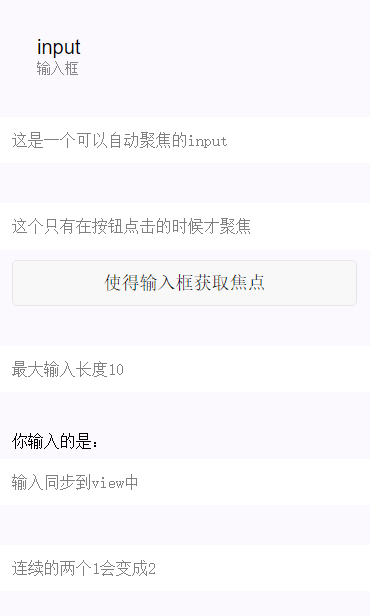
微信小程序输入框input
| 属性名 | 类型 | 默认值 | 说明 |
|---|---|---|---|
| value | String | 输入框的内容 | |
| type | String | text | input的类型,有效值:text,number,idcard,digit,time,date |
| password | Boolean | false | 是否是密码类型 |
| placeholder | String | 输入框为空时占位符 | |
| placeholder-style | String | 指定placeholder的样式 | |
| placeholder-class | String | input-placeholder | 指定placeholder的样式类 |
| disabled | Boolean | false | 是否禁用 |
| maxlength | Number | 140 | 最大输入长度,设置为0的时候不限制最大长度 |
| auto-focus | Boolean | false | 自动聚焦,拉起键盘。页面中只能有一个input设置auto-focus属性 |
| focus | Boolean | false | 使得input获取焦点 |
| bindchange | EventHandle | 输入框失去焦点时,触发bindchange事件,event.detail={value:value} | |
| bindinput | EventHandle | 除了date/time类型外的输入框,当键盘输入时,触发input事件,event.detail={value:value},处理函数可以直接return一个字符串,将替换输入框的内容。 | |
| bindfocus | EventHandle | 输入框聚焦时触发,event.detail = {value:value} | |
| bindblur | EventHandle | 输入框失去焦点时触发,event.detail = {value:value} |
|
1
2
3
4
5
6
7
8
9
10
11
12
13
14
15
16
17
18
19
20
21
22
23
24
25
26
27
28
29
30
31
32
33
34
35
36
37
38
39
40
41
|
<!--input.wxml--><view class="section"> <input placeholder="这是一个可以自动聚焦的input" auto-focus/></view><view class="section"> <input placeholder="这个只有在按钮点击的时候才聚焦" focus="{{focus}}" /> <view class="btn-area"> <button bindtap="bindButtonTap">使得输入框获取焦点</button> </view></view><view class="section"> <input maxlength="10" placeholder="最大输入长度10" /></view><view class="section"> <view class="section__title">你输入的是:{{inputValue}}</view> <input bindinput="bindKeyInput" placeholder="输入同步到view中"/></view><view class="section"> <input bindinput="bindReplaceInput" placeholder="连续的两个1会变成2" /></view><view class="section"> <input bindinput="bindHideKeyboard" placeholder="输入123自动收起键盘" /></view><view class="section"> <input type="emoji" placeholder="这是一个带有表情的输入框" /></view><view class="section"> <input password type="number" /></view><view class="section"> <input password type="text" /></view><view class="section"> <input type="digit" placeholder="带小数点的数字键盘"/></view><view class="section"> <input type="idcard" placeholder="身份证输入键盘" /></view><view class="section"> <input placeholder-style="color:red" placeholder="占位符字体是红色的" /></view> |
|
1
2
3
4
5
6
7
8
9
10
11
12
13
14
15
16
17
18
19
20
21
22
23
24
25
26
27
28
29
30
31
32
33
34
35
36
37
38
39
40
41
42
|
//input.jsPage({ data:{ focus:false, inputValue:"" }, bindButtonTap:function(){ this.setData({ focus:Date.now() }) }, bindKeyInput:function(e){ this.setData({ inputValue:e.detail.value }) }, bindReplaceInput:function(e){ var value = e.detail.value; var pos = e.detail.cursor; if(pos != -1){ //光标在中间 var left = e.detail.value.slice(0,pos); //计算光标的位置 pos = left.replace(/11/g,'2').length; } //直接返回对象,可以对输入进行过滤处理,同时可以控制光标的位置 return { value:value.replace(/11/g,'2'), cursor:pos } //或者直接返回字符串,光标在最后边 //return value.replace(/11/g,'2'), }, bindHideKeyboard:function(e){ if(e.detail.value === "123"){ //收起键盘 wx.hideKeyboard(); } }}) |
微信小程序:input输入框和form表单几种传值和取值方式的更多相关文章
- 微信小程序开发4之form表单与弹出层
第一 表单的提交和重置 第二 radio组件 第三 checkbox组件 第四 loading组件 第五 toast组件 第六 modal组件
- 微信小程序获取输入框(input)内容
微信小程序---获取输入框(input)内容 wxml <input placeholder="请输入手机号码" maxlength="11" type= ...
- 微信小程序input组件抖动及textarea组件光标错位解决方案
问题一: 使用微信小程序input组件时,在移动端唤起focus或blur事件时,因光标占位导致内容出现叠影及抖动现象. 解决方案: 用<textarea>组件代替了<input/& ...
- 微信小程序从零开始开发步骤(六)4种页面跳转的方法
用法:用于页面跳转,相当于html里面的<a></a>标签. API教程:https://mp.weixin.qq.com/debug/wxadoc/dev/component ...
- laravel中form表单,ajax传值没反应
laravel中form表单,ajax传值没反应时,可能是令牌有问题. form中添加: {{csrf_token()}} ajax中添加: data: {'page': page, '_token' ...
- form表单在发送到服务器时候编码方式
enctype(编码方式):规定了form表单在发送到服务器时候编码方式.有如下的三个值可选: 1.application/x-www-form-urlencoded.默认的编码方式.但是在用文本的传 ...
- 在IOS设备上POST提交form表单,后台接收不到值怎么办?
原文:https://blog.csdn.net/xhaimail/article/details/90440029 最近在工作上遇到一个奇葩问题,在Android和Windows平台上做请求时参数都 ...
- 微信小程序 input 的 type属性 text、number、idcard、digit 区别
微信小程序的 input 有个属性叫 type,这个 type 有几个可选值: text:不必解释 number:数字键盘(无小数点) idcard:数字键盘(无小数点.有个 X 键) digit:数 ...
- 微信自带浏览器不支持form表单post提交方案解决
微信自带浏览器form表单post提交,Java控制后台获取不到值得解决方案: 第一种:把post改成get请求,但是改后另一个问题来了就是,数据不安全了,连接上都能看到,导致数据会流失,Java ...
随机推荐
- 追MM和Java的23种设计模式
我在Java论坛看到这篇文章,作者以轻松的语言比喻了java的32种模式,有很好的启发作用,但可惜没有给出具体的意思,我就在后边加上了.这些都是最简单的介绍,要学习的话建议你看一下阎宏博士的<J ...
- [PHP] ubuntu16.04配置Lamp环境(搭建linux+apache+mysql+php7环境)
reference : http://blog.csdn.net/Abyss_sliver/article/details/77621404 好久没有在Linux环境下进行开发了,比较常用的还是win ...
- linux常用C函数目录
字符测试篇 isalnum isalpha isascii iscntrl isdigit isgraphis islower isprint isspace ispunct isupper isxd ...
- 跟我学AngularJs:AngularJs入门及第一个实例
林炳文Evankaka原创作品.转载请注明出处http://blog.csdn.net/evankaka 摘要:主要给大家介绍了AngularJs及其特性,并以3个实例来做说明. 本教程使用Angul ...
- 【BZOJ】【1089】【SCOI2003】严格n元树
高精度/递推 Orz Hzwer…… 然而我想多了…… 理解以后感觉黄学长的递推好精妙啊 顺便学到了一份高精度的板子= =233 引用下题解: f[i]=f[i-1]^n+1 ans=f[d]-f[d ...
- C++11学习
转自: https://www.cnblogs.com/llguanli/p/8732481.html Boost教程: http://zh.highscore.de/cpp/boost/ 本章目的: ...
- 第二十三章 springboot + 全局异常处理
一.单个controller范围的异常处理 package com.xxx.secondboot.web; import org.springframework.web.bind.annotation ...
- 第十一章 自己实现一致性hash算法
关于一致性hash算法的意义以及其相对于简单求余法(除数求余法)的好处,查看第六章 memcached剖析 注意:真实的hash环的数据结构是二叉树,这里为了简便使用了列表List 1.一致性hash ...
- 第九章 JVM调优推荐
说明:本文主要参考自<分布式Java应用:基础与实践> 1.JVM的调优主要是内存的调优,主要调两个方面: 各个代的大小 垃圾收集器选择 2.各个代的大小 常用的调节参数 -Xmx -Xm ...
- 【计算机网络】详解网络层(二)ARP和RARP
ARP ARP(Address Resolution Protocol,地址解析协议)是将IP地址解析为以太网MAC地址(物理地址)的协议.在局域网中,当主机或其他网络设备有数据要发送给另一个主机或设 ...