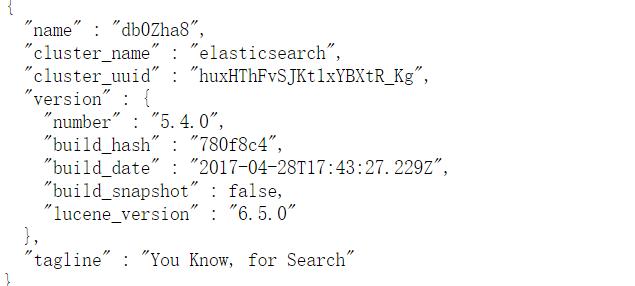
Elasticsearch是基于Lucene分布式、实时查询的搜索分析引擎。我目前应用在日志集中化处理上。。。
01、下载elasticsearch5.4
02、jdk配置
03、修改系统参数
vi /etc/security/limits.conf #限制调整
* soft nofile 65536
* hard nofile 131072
* soft nproc 2048
* hard nproc 4096
vi /etc/security/limits.d/90-nproc.conf
* soft nproc 2048
vi /etc/sysctl.conf #内核参数调整
vm.max_map_count=655350
sysctl -p #刷新参数,立即生效
04、建立elk用户
tar zxf elasticsearch-5.4.0.tar.gz
useradd elk
chown -R elk.elk elasticsearch-5.4.0
05、修改es配置
vim elasticsearch.yml
[root@25 config]# cat elasticsearch.yml
# ======================== Elasticsearch Configuration =========================
#
# NOTE: Elasticsearch comes with reasonable defaults for most settings.
# Before you set out to tweak and tune the configuration, make sure you
# understand what are you trying to accomplish and the consequences.
#
# The primary way of configuring a node is via this file. This template lists
# the most important settings you may want to configure for a production cluster.
#
# Please consult the documentation for further information on configuration options:
# https://www.elastic.co/guide/en/elasticsearch/reference/index.html
#
# ---------------------------------- Cluster -----------------------------------
#
# Use a descriptive name for your cluster:
#
#cluster.name: my-application
#
# ------------------------------------ Node ------------------------------------
#
# Use a descriptive name for the node:
#
#node.name: node-1
#默认下满的没写,默认true
#node.master: true
#node.data: true
# Add custom attributes to the node:
#
#node.attr.rack: r1
#
# ----------------------------------- Paths ------------------------------------
#
# Path to directory where to store the data (separate multiple locations by comma):
#
#path.data: /path/to/data
#
# Path to log files:
#
#path.logs: /path/to/logs
#
# ----------------------------------- Memory -----------------------------------
#
# Lock the memory on startup:
#内核35.以下不支持内存锁定
bootstrap.memory_lock: false
bootstrap.system_call_filter: false
#
# Make sure that the heap size is set to about half the memory available
# on the system and that the owner of the process is allowed to use this
# limit.
#
# Elasticsearch performs poorly when the system is swapping the memory.
#
# ---------------------------------- Network -----------------------------------
#
# Set the bind address to a specific IP (IPv4 or IPv6):
#
network.host: 172.24.0.25
#
# Set a custom port for HTTP:
#
#http.port: 9200
#
# For more information, consult the network module documentation.
#
# --------------------------------- Discovery ----------------------------------
#
# Pass an initial list of hosts to perform discovery when new node is started:
# The default list of hosts is ["127.0.0.1", "[::1]"]
#多节点需要配置单播地址
#discovery.zen.ping.unicast.hosts: ["host1", "host2"]
#
# Prevent the "split brain" by configuring the majority of nodes (total number of master-eligibl
e nodes / 2 + 1):#
#discovery.zen.minimum_master_nodes: 3
#
# For more information, consult the zen discovery module documentation.
#
# ---------------------------------- Gateway -----------------------------------
#
# Block initial recovery after a full cluster restart until N nodes are started:
#
#gateway.recover_after_nodes: 3
#
# For more information, consult the gateway module documentation.
#
# ---------------------------------- Various -----------------------------------
#
# Require explicit names when deleting indices:
#
#action.destructive_requires_name: true
配置虚拟内存
[root@25 config]# cat jvm.options
## JVM configuration
################################################################
## IMPORTANT: JVM heap size
################################################################
##
## You should always set the min and max JVM heap
## size to the same value. For example, to set
## the heap to 4 GB, set:
##
## -Xms4g
## -Xmx4g
##
## See https://www.elastic.co/guide/en/elasticsearch/reference/current/heap-size.html
## for more information
##
################################################################
# Xms represents the initial size of total heap space
# Xmx represents the maximum size of total heap space
#根据服务器的配置适当调整,后续还有GC的调整
-Xms1g
-Xmx1g
06、启动
su - elk
./bin/elasticsearch
[elk@25 elasticsearch-5.4.0]$ ./bin/elasticsearch
[2017-05-14T15:09:33,260][INFO ][o.e.n.Node ] [] initializing ...
[2017-05-14T15:09:33,411][INFO ][o.e.e.NodeEnvironment ] [db0Zha8] using [1] data paths, moun
ts [[/ (/dev/sda2)]], net usable_space [25.3gb], net total_space [38.3gb], spins? [possibly], types [ext4][2017-05-14T15:09:33,411][INFO ][o.e.e.NodeEnvironment ] [db0Zha8] heap size [1015.6mb], comp
ressed ordinary object pointers [true][2017-05-14T15:09:33,414][INFO ][o.e.n.Node ] node name [db0Zha8] derived from nod
e ID [db0Zha8iQzSDCMcBL8bqiA]; set [node.name] to override[2017-05-14T15:09:33,415][INFO ][o.e.n.Node ] version[5.4.0], pid[5685], build[780
f8c4/2017-04-28T17:43:27.229Z], OS[Linux/2.6.32-431.el6.x86_64/amd64], JVM[Oracle Corporation/Java HotSpot(TM) 64-Bit Server VM/1.8.0_131/25.131-b11][2017-05-14T15:09:35,090][INFO ][o.e.p.PluginsService ] [db0Zha8] loaded module [aggs-matrix
-stats][2017-05-14T15:09:35,091][INFO ][o.e.p.PluginsService ] [db0Zha8] loaded module [ingest-comm
on][2017-05-14T15:09:35,091][INFO ][o.e.p.PluginsService ] [db0Zha8] loaded module [lang-expres
sion][2017-05-14T15:09:35,091][INFO ][o.e.p.PluginsService ] [db0Zha8] loaded module [lang-groovy
][2017-05-14T15:09:35,091][INFO ][o.e.p.PluginsService ] [db0Zha8] loaded module [lang-mustac
he][2017-05-14T15:09:35,092][INFO ][o.e.p.PluginsService ] [db0Zha8] loaded module [lang-painle
ss][2017-05-14T15:09:35,092][INFO ][o.e.p.PluginsService ] [db0Zha8] loaded module [percolator]
[2017-05-14T15:09:35,096][INFO ][o.e.p.PluginsService ] [db0Zha8] loaded module [reindex]
[2017-05-14T15:09:35,096][INFO ][o.e.p.PluginsService ] [db0Zha8] loaded module [transport-n
etty3][2017-05-14T15:09:35,096][INFO ][o.e.p.PluginsService ] [db0Zha8] loaded module [transport-n
etty4][2017-05-14T15:09:35,098][INFO ][o.e.p.PluginsService ] [db0Zha8] no plugins loaded
[2017-05-14T15:09:38,305][INFO ][o.e.d.DiscoveryModule ] [db0Zha8] using discovery type [zen]
[2017-05-14T15:09:39,494][INFO ][o.e.n.Node ] initialized
[2017-05-14T15:09:39,495][INFO ][o.e.n.Node ] [db0Zha8] starting ...
[2017-05-14T15:09:39,773][INFO ][o.e.t.TransportService ] [db0Zha8] publish_address {172.24.0.
25:9300}, bound_addresses {172.24.0.25:9300}[2017-05-14T15:09:39,794][INFO ][o.e.b.BootstrapChecks ] [db0Zha8] bound or publishing to a n
on-loopback or non-link-local address, enforcing bootstrap checks
测试
_cat命令
07、脚本
#!/bin/bash
#判断用户
if [ `id -u` -eq 0 ]; then
echo "Not permit root"
exit 1
fi
#启动
start(){
cd /xxx/elasticsearch-5.3.0 #es家目录
./bin/elasticsearch -d #后台运行
}
#关闭
stop(){
ps -ef | grep elasticsearch | grep -v grep |awk '{print $2}' |xargs kill -9
}
case "$1" in
start)
start
;;
stop)
stop
;;
*)
echo "Use $0 start | stop"
esac
#官方指导说明
- 在Linux上安装Elasticsearch5.x
这里使用elasticsearch做全文检索,不是ELK日志采集. elasticsearch作为全文检索,必须服务端和客服端的版本一致,所以在安装elasticsearch时,要注意版本问题. 前言 ...
- Elasticsearch之elasticsearch5.x 新特性
其实,elasticsearch5.x 和 elasticsearch2.x 并不区别很大. 是因为,ELK里之前版本各种很混乱,直接升级到5.0了. 其实,elasticsearch5.x 按理来说 ...
- CentOS7下安装ELK(nginx 、elasticsearch-5.1.1、logstash-5.1.1、kibana-5.1.1)
nginx: #直接yum安装: [root@elk-node1 ~]# yum install nginx -y 官方文档:http://nginx.org/en/docs/http/ngx_htt ...
- Android UI体验之全屏沉浸式透明状态栏效果
前言: Android 4.4之后谷歌提供了沉浸式全屏体验, 在沉浸式全屏模式下, 状态栏. 虚拟按键动态隐藏, 应用可以使用完整的屏幕空间, 按照 Google 的说法, 给用户一种 身临其境 的体 ...
- 移动端之Android开发的几种方式的初步体验
目前越来越多的移动端混合开发方式,下面列举的大多数我都略微的尝试过,就初步的认识写个简单的心得: 开发方式 开发环境 是否需要AndroidSDK 支持跨平台 开发语言&技能 MUI Win+ ...
- TODO:小程序开发过程之体验者
TODO:小程序开发过程之体验者 1. 小程序开发过程,先下载开发者并安装开发者工具,现在腾讯开放测试了,普通用户也可以登录开发者工具,如图普通用户登录为调试类型,但是只能建立无AppID的项目 如果 ...
- 微信小程序体验(2):驴妈妈景区门票即买即游
驴妈妈因为出色的运营能力,被腾讯选为首批小程序内测单位.驴妈妈的技术开发团队在很短的时间内完成了开发任务,并积极参与到张小龙团队的内测问题反馈.驴妈妈认为,移动互联网时代,微信是巨大的流量入口,也是旅 ...
- 一起学微软Power BI系列-使用技巧(3)Power BI安卓手机版安装与体验
Power BI有手机版,目前支持安卓,苹果和WP,不过没有WP手机,苹果在国内还不能用,要FQ和用就不测试了.安卓的我也也是费了九牛二虎之力才把app下载下来,把方法分享给大家. FQ太麻烦,所以建 ...
- .NET平台开源项目速览(15)文档数据库RavenDB-介绍与初体验
不知不觉,“.NET平台开源项目速览“系列文章已经15篇了,每一篇都非常受欢迎,可能技术水平不高,但足够入门了.虽然工作很忙,但还是会抽空把自己知道的,已经平时遇到的好的开源项目分享出来.今天就给大家 ...
随机推荐
- 什么是软件project?
Normal 0 7.8 pt 0 2 false false false MicrosoftInternetExplorer4 /* Style Definitions */ table.MsoNo ...
- velocity的一些优化记录
背景 前段时间做了个项目,主要优化一个产品页面.整个优化过程中,针对velocity的分析过程占了比较大的比重,这里做一下整理和记录. 描述 velocity版本: <dependency> ...
- Nodejs开发人脸识别系统-教你实现高大上的人工智能
Nodejs开发人脸识别系统-教你实现高大上的人工智能 一.缘起缘生 前段时间有个H5很火,上传个头像就可以显示自己穿军装的样子,无意中看到了一篇帖子叫 全民刷军装背后的AI技术及简单实现 ,里面 ...
- python异常信息获取
1.python调试的时候获取异常信息 import traceback print '######################################################## ...
- go语言基础之append扩容特点
1.append扩容特点 示例: package main //必须有个main包 import "fmt" func main() { //如果超过原来的容量,通常以2倍容量扩容 ...
- 你可能不知道的5 个强大的HTML5 API 函数
HTML5提供了一些非常强大的JavaScript和HTML API,来帮助开发者构建精彩的桌面和移动应用程序.本文将介绍5个新型的API,希望对你的开发工作有所帮助. 1. 全屏API(Fulls ...
- 一键切换皮肤的解决思想及iframe嵌套时寻找下级iframe的方法
项目中有个一键切换皮肤的功能,感觉还不错,记录下,就是各颜色样式设置起来太复杂了,不知道有没有更简便的方法: 1.切换皮肤结构层 <li title="<s:text name= ...
- Android之批量加载图片OOM问题解决方案
一.OOM问题出现的场景和原因 一个好的app总少不了精美的图片,所以Android开发中图片的加载总是避免不了的,而在加载图片过程中,如果处理不当则会出现OOM的问题.那么如何彻底解决这个问题呢?本 ...
- 使用Gnupg对Linux系统中的文件进行加密
GnuPG(GNU Privacy Guard或GPG)是一个以GNU通用公共许可证释出的开放源码用于加密或签名的软件,可用来取代PGP.大多数gpg软件仅支持命令行方式,一般人较难掌握.由于gpg软 ...
- eclipse全屏模式