
java集合系列之三(ArrayList)
上一章,我们学习了Collection的架构。这一章开始,我们对Collection的具体实现类进行讲解;首先,讲解List,而List中ArrayList又最为常用。因此,本章我们讲解ArrayList。先对ArrayList有个整体认识,再学习它的源码,最后再通过例子来学习如何使用它。内容包括:
第1部分 ArrayList简介
第2部分 ArrayList数据结构
第3部分 ArrayList源码解析(基于JDK1.6.0_45)
第4部分 ArrayList遍历方式
第5部分 toArray()异常
第6部分 ArrayList示例
转载请注明出处:http://www.cnblogs.com/skywang12345/p/3308556.html
第1部分 ArrayList介绍
ArrayList简介
ArrayList 是一个数组队列,相当于 动态数组。与Java中的数组相比,它的容量能动态增长。它继承于AbstractList,实现了List, RandomAccess, Cloneable, java.io.Serializable这些接口。
ArrayList 继承了AbstractList,实现了List。它是一个数组队列,提供了相关的添加、删除、修改、遍历等功能。
ArrayList 实现了RandmoAccess接口,即提供了随机访问功能。RandmoAccess是java中用来被List实现,为List提供快速访问功能的。在ArrayList中,我们即可以通过元素的序号快速获取元素对象;这就是快速随机访问。稍后,我们会比较List的“快速随机访问”和“通过Iterator迭代器访问”的效率。
ArrayList 实现了Cloneable接口,即覆盖了函数clone(),能被克隆。
ArrayList 实现java.io.Serializable接口,这意味着ArrayList支持序列化,能通过序列化去传输。
和Vector不同,ArrayList中的操作不是线程安全的!所以,建议在单线程中才使用ArrayList,而在多线程中可以选择Vector或者CopyOnWriteArrayList。
ArrayList构造函数
// 默认构造函数

ArrayList()

// capacity是ArrayList的默认容量大小。当由于增加数据导致容量不足时,容量会添加上一次容量大小的一半。

ArrayList(int capacity)

// 创建一个包含collection的ArrayList

ArrayList(Collection<? extends E> collection)
ArrayList的API
// Collection中定义的API

boolean             add(E object)

boolean             addAll(Collection<? extends E> collection)

void                clear()

boolean             contains(Object object)

boolean             containsAll(Collection<?> collection)

boolean             equals(Object object)

int                 hashCode()

boolean             isEmpty()

Iterator<E>         iterator()

boolean             remove(Object object)

boolean             removeAll(Collection<?> collection)

boolean             retainAll(Collection<?> collection)

int                 size()

<T> T[]             toArray(T[] array)

Object[]            toArray()

// AbstractCollection中定义的API

void                add(int location, E object)

boolean             addAll(int location, Collection<? extends E> collection)

E                   get(int location)

int                 indexOf(Object object)

int                 lastIndexOf(Object object)

ListIterator<E>     listIterator(int location)

ListIterator<E>     listIterator()

E                   remove(int location)

E                   set(int location, E object)

List<E>             subList(int start, int end)

// ArrayList新增的API

Object               clone()

void                 ensureCapacity(int minimumCapacity)

void                 trimToSize()

void                 removeRange(int fromIndex, int toIndex)
第2部分 ArrayList数据结构
ArrayList的继承关系
java.lang.Object

   ↳     java.util.AbstractCollection<E>

         ↳     java.util.AbstractList<E>

               ↳     java.util.ArrayList<E>

public class ArrayList<E> extends AbstractList<E>

        implements List<E>, RandomAccess, Cloneable, java.io.Serializable {}
ArrayList与Collection关系如下图:
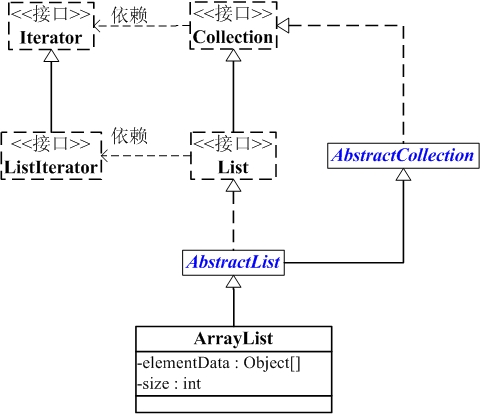
ArrayList包含了两个重要的对象:elementData 和 size。
(01) elementData 是"Object[]类型的数组",它保存了添加到ArrayList中的元素。实际上,elementData是个动态数组,我们能通过构造函数 ArrayList(int initialCapacity)来执行它的初始容量为initialCapacity;如果通过不含参数的构造函数ArrayList()来创建ArrayList,则elementData的容量默认是10。elementData数组的大小会根据ArrayList容量的增长而动态的增长,具体的增长方式,请参考源码分析中的ensureCapacity()函数。
(02) size 则是动态数组的实际大小。
第3部分 ArrayList源码解析(基于JDK1.6.0_45)
为了更了解ArrayList的原理,下面对ArrayList源码代码作出分析。ArrayList是通过数组实现的,源码比较容易理解。
 package java.util;

 public class ArrayList<E> extends AbstractList<E>

         implements List<E>, RandomAccess, Cloneable, java.io.Serializable

 {

     // 序列版本号

     private static final long serialVersionUID = 8683452581122892189L;

     // 保存ArrayList中数据的数组

     private transient Object[] elementData;

     // ArrayList中实际数据的数量

     private int size;

     // ArrayList带容量大小的构造函数。

     public ArrayList(int initialCapacity) {

         super();

         if (initialCapacity < 0)

             throw new IllegalArgumentException("Illegal Capacity: "+

                                                initialCapacity);

         // 新建一个数组

         this.elementData = new Object[initialCapacity];

     }

     // ArrayList构造函数。默认容量是10。

     public ArrayList() {

         this(10);

     }

     // 创建一个包含collection的ArrayList

     public ArrayList(Collection<? extends E> c) {

         elementData = c.toArray();

         size = elementData.length;

         // c.toArray might (incorrectly) not return Object[] (see 6260652)

         if (elementData.getClass() != Object[].class)

             elementData = Arrays.copyOf(elementData, size, Object[].class);

     }

     // 将当前容量值设为 =实际元素个数

     public void trimToSize() {

         modCount++;

         int oldCapacity = elementData.length;

         if (size < oldCapacity) {

             elementData = Arrays.copyOf(elementData, size);

         }

     }

     // 确定ArrarList的容量。

     // 若ArrayList的容量不足以容纳当前的全部元素,设置 新的容量=“(原始容量x3)/2 + 1”

     public void ensureCapacity(int minCapacity) {

         // 将“修改统计数”+1

         modCount++;

         int oldCapacity = elementData.length;

         // 若当前容量不足以容纳当前的元素个数,设置 新的容量=“(原始容量x3)/2 + 1”

         if (minCapacity > oldCapacity) {

             Object oldData[] = elementData;

             int newCapacity = (oldCapacity * 3)/2 + 1;

             if (newCapacity < minCapacity)

                 newCapacity = minCapacity;

             elementData = Arrays.copyOf(elementData, newCapacity);

         }

     }

     // 添加元素e

     public boolean add(E e) {

         // 确定ArrayList的容量大小

         ensureCapacity(size + 1);  // Increments modCount!!

         // 添加e到ArrayList中

         elementData[size++] = e;

         return true;

     }

     // 返回ArrayList的实际大小

     public int size() {

         return size;

     }

     // 返回ArrayList是否包含Object(o)

     public boolean contains(Object o) {

         return indexOf(o) >= 0;

     }

     // 返回ArrayList是否为空

     public boolean isEmpty() {

         return size == 0;

     }

     // 正向查找,返回元素的索引值

     public int indexOf(Object o) {

         if (o == null) {

             for (int i = 0; i < size; i++)

             if (elementData[i]==null)

                 return i;

             } else {

                 for (int i = 0; i < size; i++)

                 if (o.equals(elementData[i]))

                     return i;

             }

             return -1;

         }

         // 反向查找,返回元素的索引值

         public int lastIndexOf(Object o) {

         if (o == null) {

             for (int i = size-1; i >= 0; i--)

             if (elementData[i]==null)

                 return i;

         } else {

             for (int i = size-1; i >= 0; i--)

             if (o.equals(elementData[i]))

                 return i;

         }

         return -1;

     }

     // 反向查找(从数组末尾向开始查找),返回元素(o)的索引值

     public int lastIndexOf(Object o) {

         if (o == null) {

             for (int i = size-1; i >= 0; i--)

             if (elementData[i]==null)

                 return i;

         } else {

             for (int i = size-1; i >= 0; i--)

             if (o.equals(elementData[i]))

                 return i;

         }

         return -1;

     }

     // 返回ArrayList的Object数组

     public Object[] toArray() {

         return Arrays.copyOf(elementData, size);

     }

     // 返回ArrayList的模板数组。所谓模板数组,即可以将T设为任意的数据类型

     public <T> T[] toArray(T[] a) {

         // 若数组a的大小 < ArrayList的元素个数;

         // 则新建一个T[]数组,数组大小是“ArrayList的元素个数”,并将“ArrayList”全部拷贝到新数组中

         if (a.length < size)

             return (T[]) Arrays.copyOf(elementData, size, a.getClass());

         // 若数组a的大小 >= ArrayList的元素个数;

         // 则将ArrayList的全部元素都拷贝到数组a中。

         System.arraycopy(elementData, 0, a, 0, size);

         if (a.length > size)

             a[size] = null;

         return a;

     }

     // 获取index位置的元素值

     public E get(int index) {

         RangeCheck(index);

         return (E) elementData[index];

     }

     // 设置index位置的值为element

     public E set(int index, E element) {

         RangeCheck(index);

         E oldValue = (E) elementData[index];

         elementData[index] = element;

         return oldValue;

     }

     // 将e添加到ArrayList中

     public boolean add(E e) {

         ensureCapacity(size + 1);  // Increments modCount!!

         elementData[size++] = e;

         return true;

     }

     // 将e添加到ArrayList的指定位置

     public void add(int index, E element) {

         if (index > size || index < 0)

             throw new IndexOutOfBoundsException(

             "Index: "+index+", Size: "+size);

         ensureCapacity(size+1);  // Increments modCount!!

         System.arraycopy(elementData, index, elementData, index + 1,

              size - index);

         elementData[index] = element;

         size++;

     }

     // 删除ArrayList指定位置的元素

     public E remove(int index) {

         RangeCheck(index);

         modCount++;

         E oldValue = (E) elementData[index];

         int numMoved = size - index - 1;

         if (numMoved > 0)

             System.arraycopy(elementData, index+1, elementData, index,

                  numMoved);

         elementData[--size] = null; // Let gc do its work

         return oldValue;

     }

     // 删除ArrayList的指定元素

     public boolean remove(Object o) {

         if (o == null) {

                 for (int index = 0; index < size; index++)

             if (elementData[index] == null) {

                 fastRemove(index);

                 return true;

             }

         } else {

             for (int index = 0; index < size; index++)

             if (o.equals(elementData[index])) {

                 fastRemove(index);

                 return true;

             }

         }

         return false;

     }

     // 快速删除第index个元素

     private void fastRemove(int index) {

         modCount++;

         int numMoved = size - index - 1;

         // 从"index+1"开始,用后面的元素替换前面的元素。

         if (numMoved > 0)

             System.arraycopy(elementData, index+1, elementData, index,

                              numMoved);

         // 将最后一个元素设为null

         elementData[--size] = null; // Let gc do its work

     }

     // 删除元素

     public boolean remove(Object o) {

         if (o == null) {

             for (int index = 0; index < size; index++)

             if (elementData[index] == null) {

                 fastRemove(index);

             return true;

             }

         } else {

             // 便利ArrayList,找到“元素o”,则删除,并返回true。

             for (int index = 0; index < size; index++)

             if (o.equals(elementData[index])) {

                 fastRemove(index);

             return true;

             }

         }

         return false;

     }

     // 清空ArrayList,将全部的元素设为null

     public void clear() {

         modCount++;

         for (int i = 0; i < size; i++)

             elementData[i] = null;

         size = 0;

     }

     // 将集合c追加到ArrayList中

     public boolean addAll(Collection<? extends E> c) {

         Object[] a = c.toArray();

         int numNew = a.length;

         ensureCapacity(size + numNew);  // Increments modCount

         System.arraycopy(a, 0, elementData, size, numNew);

         size += numNew;

         return numNew != 0;

     }

     // 从index位置开始,将集合c添加到ArrayList

     public boolean addAll(int index, Collection<? extends E> c) {

         if (index > size || index < 0)

             throw new IndexOutOfBoundsException(

             "Index: " + index + ", Size: " + size);

         Object[] a = c.toArray();

         int numNew = a.length;

         ensureCapacity(size + numNew);  // Increments modCount

         int numMoved = size - index;

         if (numMoved > 0)

             System.arraycopy(elementData, index, elementData, index + numNew,

                  numMoved);

         System.arraycopy(a, 0, elementData, index, numNew);

         size += numNew;

         return numNew != 0;

     }

     // 删除fromIndex到toIndex之间的全部元素。

     protected void removeRange(int fromIndex, int toIndex) {

     modCount++;

     int numMoved = size - toIndex;

         System.arraycopy(elementData, toIndex, elementData, fromIndex,

                          numMoved);

     // Let gc do its work

     int newSize = size - (toIndex-fromIndex);

     while (size != newSize)

         elementData[--size] = null;

     }

     private void RangeCheck(int index) {

     if (index >= size)

         throw new IndexOutOfBoundsException(

         "Index: "+index+", Size: "+size);

     }

     // 克隆函数

     public Object clone() {

         try {

             ArrayList<E> v = (ArrayList<E>) super.clone();

             // 将当前ArrayList的全部元素拷贝到v中

             v.elementData = Arrays.copyOf(elementData, size);

             v.modCount = 0;

             return v;

         } catch (CloneNotSupportedException e) {

             // this shouldn't happen, since we are Cloneable

             throw new InternalError();

         }

     }

     // java.io.Serializable的写入函数

     // 将ArrayList的“容量,所有的元素值”都写入到输出流中

     private void writeObject(java.io.ObjectOutputStream s)

         throws java.io.IOException{

     // Write out element count, and any hidden stuff

     int expectedModCount = modCount;

     s.defaultWriteObject();

         // 写入“数组的容量”

         s.writeInt(elementData.length);

     // 写入“数组的每一个元素”

     for (int i=0; i<size; i++)

             s.writeObject(elementData[i]);

     if (modCount != expectedModCount) {

             throw new ConcurrentModificationException();

         }

     }

     // java.io.Serializable的读取函数:根据写入方式读出

     // 先将ArrayList的“容量”读出,然后将“所有的元素值”读出

     private void readObject(java.io.ObjectInputStream s)

         throws java.io.IOException, ClassNotFoundException {

         // Read in size, and any hidden stuff

         s.defaultReadObject();

         // 从输入流中读取ArrayList的“容量”

         int arrayLength = s.readInt();

         Object[] a = elementData = new Object[arrayLength];

         // 从输入流中将“所有的元素值”读出

         for (int i=0; i<size; i++)

             a[i] = s.readObject();

     }

 }
总结:
(01) ArrayList 实际上是通过一个数组去保存数据的。当我们构造ArrayList时;若使用默认构造函数,则ArrayList的默认容量大小是10。
(02) 当ArrayList容量不足以容纳全部元素时,ArrayList会重新设置容量:新的容量=“(原始容量x3)/2 + 1”。
(03) ArrayList的克隆函数,即是将全部元素克隆到一个数组中。
(04) ArrayList实现java.io.Serializable的方式。当写入到输出流时,先写入“容量”,再依次写入“每一个元素”;当读出输入流时,先读取“容量”,再依次读取“每一个元素”。
第4部分 ArrayList遍历方式
ArrayList支持3种遍历方式
(01) 第一种,通过迭代器遍历。即通过Iterator去遍历。
Integer value = null;

Iterator iter = list.iterator();

while (iter.hasNext()) {

    value = (Integer)iter.next();

}
(02) 第二种,随机访问,通过索引值去遍历。
由于ArrayList实现了RandomAccess接口,它支持通过索引值去随机访问元素。
Integer value = null;

int size = list.size();

for (int i=0; i<size; i++) {

    value = (Integer)list.get(i);

}
(03) 第三种,for循环遍历。如下:
Integer value = null;

for (Integer integ:list) {

    value = integ;

}
下面通过一个实例,比较这3种方式的效率,实例代码(ArrayListRandomAccessTest.java)如下(省略):
由此可见,遍历ArrayList时,使用随机访问(即,通过索引序号访问)效率最高,而使用迭代器的效率最低!
第5部分 toArray()异常
当我们调用ArrayList中的 toArray(),可能遇到过抛出“java.lang.ClassCastException”异常的情况。下面我们说说这是怎么回事。
ArrayList提供了2个toArray()函数:
Object[] toArray()

<T> T[] toArray(T[] contents)
调用 toArray() 函数会抛出“java.lang.ClassCastException”异常,但是调用 toArray(T[] contents) 能正常返回 T[]。
toArray() 会抛出异常是因为 toArray() 返回的是 Object[] 数组,将 Object[] 转换为其它类型(如如,将Object[]转换为的Integer[])则会抛出“java.lang.ClassCastException”异常,因为Java不支持向下转型。具体的可以参考前面ArrayList.java的源码介绍部分的toArray()。
解决该问题的办法是调用 <T> T[] toArray(T[] contents) , 而不是 Object[] toArray()。
调用 toArray(T[] contents) 返回T[]的可以通过以下几种方式实现。
// toArray(T[] contents)调用方式二。最常用!

public static Integer[] vectorToArray2(ArrayList<Integer> v) {

    Integer[] newText = (Integer[])v.toArray(new Integer[0]);

    return newText;

}
java集合系列之三(ArrayList)的更多相关文章
- Java 集合系列 03 ArrayList详细介绍(源码解析)和使用示例
java 集合系列目录: Java 集合系列 01 总体框架 Java 集合系列 02 Collection架构 Java 集合系列 03 ArrayList详细介绍(源码解析)和使用示例 Java ...
- java集合系列之ArrayList源码分析
java集合系列之ArrayList源码分析(基于jdk1.8) ArrayList简介 ArrayList时List接口的一个非常重要的实现子类,它的底层是通过动态数组实现的,因此它具备查询速度快, ...
- 【Java集合系列】---ArrayList
开篇前言--ArrayList中的基本方法 前面的博文中,小编主要简单介绍java集合的总体架构,在接下来的博文中,小编将详细介绍里面的各个类,通过demo.对比,来对java集合类进行更加深入的理解 ...
- Java集合系列[1]----ArrayList源码分析
本篇分析ArrayList的源码,在分析之前先跟大家谈一谈数组.数组可能是我们最早接触到的数据结构之一,它是在内存中划分出一块连续的地址空间用来进行元素的存储,由于它直接操作内存,所以数组的性能要比集 ...
- Java 集合系列之三:Set基本操作
1. Java Set 1. Java Set 重要观点 Java Set接口是Java Collections Framework的成员. Set不允许出现重复元素-----------无重复 Se ...
- Java 集合系列 07 List总结(LinkedList, ArrayList等使用场景和性能分析)
java 集合系列目录: Java 集合系列 01 总体框架 Java 集合系列 02 Collection架构 Java 集合系列 03 ArrayList详细介绍(源码解析)和使用示例 Java ...
- Java 集合系列 09 HashMap详细介绍(源码解析)和使用示例
java 集合系列目录: Java 集合系列 01 总体框架 Java 集合系列 02 Collection架构 Java 集合系列 03 ArrayList详细介绍(源码解析)和使用示例 Java ...
- Java 集合系列 10 Hashtable详细介绍(源码解析)和使用示例
java 集合系列目录: Java 集合系列 01 总体框架 Java 集合系列 02 Collection架构 Java 集合系列 03 ArrayList详细介绍(源码解析)和使用示例 Java ...
- Java 集合系列 17 TreeSet
java 集合系列目录: Java 集合系列 01 总体框架 Java 集合系列 02 Collection架构 Java 集合系列 03 ArrayList详细介绍(源码解析)和使用示例 Java ...
随机推荐
- Strusts2笔记9--防止表单重复提交和注解开发
防止表单重复提交: 用户可能由于各种原因,对表单进行重复提交.Struts2中使用令牌机制防止表单自动提交.以下引用自北京动力节点:
- java 面试题总结(一)
从网上找了些面试题,自己手工总结了理解了一下,如有理解错误,还请指正. java基础 1.String 为什么是final的? https://www.zhihu.com/question/3 ...
- SolrJ API 官方文档最佳实践
以下内容译自Solr Wiki官方文档,版权没有,随意转载. Solrj 是一个访问solr的Java客户端.它提供了一个java接口用于添加更新和查询solr索引.本页面介绍SolrJ最新版本1.4 ...
- Linux内核跟踪之syscall tracer 【转】
转自:http://blog.chinaunix.net/uid-20543183-id-1930847.html ------------------------------------------ ...
- OpenStack 监控解决方案
正如你们看到的那样,到目前为止(OpenStack Kilo),OpenStack自己的监控组件Telemetry并不是完美, 获取的监控数据以及制作出来的图表有时候让人匪夷所思,因其重点并不是监控而 ...
- java基础32 List集合下的ArrayList集合
单例集合体系: ---------| collection 单例集合的根接口--------------| List 如果实现了list接口的集合类,具备的特点:有序,可重复 注:集合 ...
- 整理一下关于Crypto加密的坑
之前写接口一般不用加密(做了权限处理),最近公司要求接口加密,我开始了入坑之路 因为公司其他人用的AES和DES加密,我就在网上查了下关于这方面的使用方法. 首先安装Crypto pip instal ...
- Linux学习笔记:nohup & 后台任务
在linux中,使用nohup xxx.sh &可以将前台任务变成后台任务执行,如果只使用&的话,在突然断网或者关闭启动终端时,内核会向后台任务发送sighup信号,从而导致后台任务停 ...
- 在EC2上创建root用户,并使用root用户登录
今天开始研究亚马逊的云主机EC2,遇到了一个问题,我需要在EC2上安装tomcat,但是yum命令只能是root用户才可以运行,而EC2默认是以ec2-user用户登录的,所以需要切换到root用户登 ...
- RCTF2015 pwn试题分析
pwn200 漏洞给的很明显,先是读到了main的局部数组中,然后在子函数中向子函数的局部数组栈里复制. 总体思路是leak system的地址,然后再向一个固定地址写入/bin/sh,最后执行sys ...