
yum 报错:centos yum (28, 'Connection time-out') Trying other mirror.
问题:
在本地的虚拟机使用yum安装软件时,经常出现 centos yum (28, 'Connection time-out') Trying other mirror. 或下面的那样情况imeout on http://mirrors.aliyun.com/centos/6/os/x86_64/repodata/repomd.xml: (28, 'Connection time-out') Trying other mirror.
在centOs上安装软件时。提示超时,或链接不上的信息:

http://mirrors.aliyun.com/centos/6/os/x86_64/repodata/repomd.xml: [Errno 12] Timeout on http://mirrors.aliyun.com/centos/6/os/x86_64/repodata/repomd.xml: (28, 'Connection time-out')

Trying other mirror.

http://mirrors.aliyuncs.com/centos/6/os/x86_64/repodata/repomd.xml: [Errno 12] Timeout on http://mirrors.aliyuncs.com/centos/6/os/x86_64/repodata/repomd.xml: (28, 'Connection time-out')

Trying other mirror.

http://mirrors.cloud.aliyuncs.com/centos/6/os/x86_64/repodata/repomd.xml: [Errno 14] PYCURL ERROR 6 - "Couldn't resolve host 'mirrors.cloud.aliyuncs.com'"

Trying other mirror.

http://mirrors.aliyun.com/epel/6/x86_64/repodata/repomd.xml: [Errno 12] Timeout on http://mirrors.aliyun.com/epel/6/x86_64/repodata/repomd.xml: (28, 'Connection time-out')

Trying other mirror.
当你用排查ping 网络时发现又是通的,浏览器访问链接也是通的。这就奇怪了,为什么yum一安装就说超时报错。换了阿里,网易好几个源都是一个问题,注意了,这可能不是repo源的问题,而是你DNS解析设置的问题。
我们知道网卡的DNS设置是首先生效的 /etc/sysconfig/network-scripts/ifcfg-eth0 然后才是全局的DNS配置文件 /etc/resolv.conf
可能你都都习惯这样设置(在网卡上直接配置外网的DNS解析地址),这样设置在你的公网服务器(如VPS,云服务器等环境)是没有问题的,可当在本地环境(如:虚拟机,本地网络)时就会造成了我们yum安装超时报错。
下面的就是常见不靠谱的DNS配置,
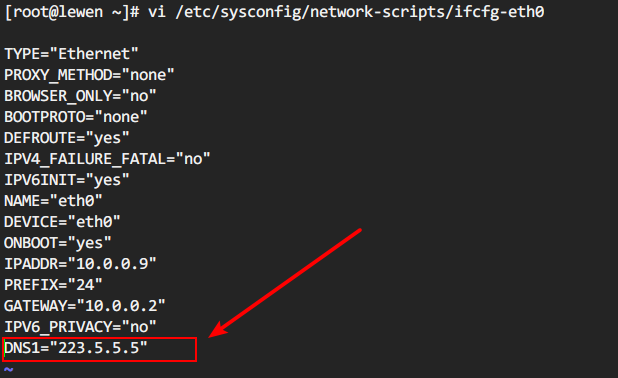

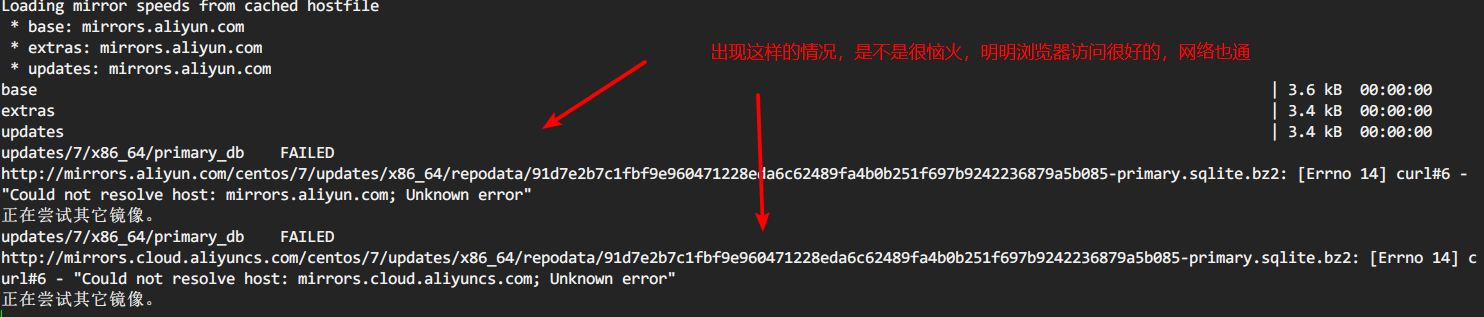
当你在你的虚拟机网卡设置成外网的DNS,网络好时没事,一不稳定,虚拟机网关在转发请求时,就容易掉,超时就会导致你安装软件失败。
而本地虚拟机DNS1设置为网关地址,请求通过网关出去会自己找本地的DNS服务器去解析,然后返回给本机。
解决方案:
建议本地虚拟机环境,设置DNS1为网关地址,DNS2 为 223.5.5.5 等其他公网DNS
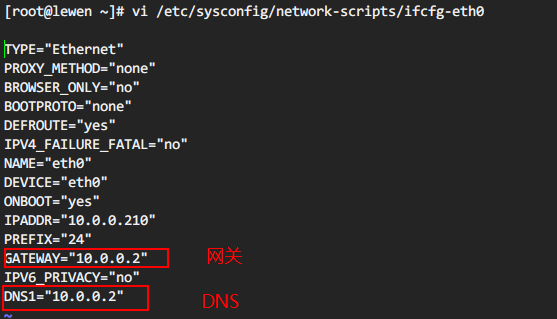
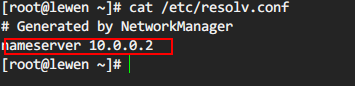
划线的地址要填你自己虚拟机的网关地址。
虚拟机的网关在网卡信息和相应软件的网络管理中可以找到。
我的本地虚拟机常用的DNS设置,可以参考
[root@web- ~]# cat /etc/sysconfig/network-scripts/ifcfg-eth0

TYPE="Ethernet"

BROWSER_ONLY="no"

BOOTPROTO="none"

DEFROUTE="yes"

DEVICE="eth0"

ONBOOT="yes"

IPADDR="10.0.0.6"

PREFIX=""

GATEWAY="10.0.0.2"

DNS1=10.0.0.2          # DNS1 设置为网关地址

DNS2=223.5.5.5         #DNS2设置为阿里DNS,或其他的如8.8.8.8

这样网卡的DNS设置就双保险了

[root@web- ~]# cat /etc/resolv.conf

# Generated by NetworkManager

nameserver 10.0.0.2

nameserver 8.8.8.8
换源
搞清楚自己的DNS设置后在设置repo源的问题。
注意上面提到的,自己网卡的DNS设置好后!! 然后再换源,不然换完还是超时报错,会很崩溃
这里是CentOS换国内阿里云yum源
1、备份
2、下载新的CentOS-Base.repo 到/etc/yum.repos.d/
CentOS

wget -O /etc/yum.repos.d/CentOS-Base.repo http://mirrors.aliyun.com/repo/Centos-5.repo

或者

curl -o /etc/yum.repos.d/CentOS-Base.repo http://mirrors.aliyun.com/repo/Centos-5.repo

CentOS

wget -O /etc/yum.repos.d/CentOS-Base.repo http://mirrors.aliyun.com/repo/Centos-6.repo

或者

curl -o /etc/yum.repos.d/CentOS-Base.repo http://mirrors.aliyun.com/repo/Centos-6.repo

CentOS

wget -O /etc/yum.repos.d/CentOS-Base.repo http://mirrors.aliyun.com/repo/Centos-7.repo

或者

curl -o /etc/yum.repos.d/CentOS-Base.repo http://mirrors.aliyun.com/repo/Centos-7.repo
3、之后运行yum makecache生成缓存
yum 报错:centos yum (28, 'Connection time-out') Trying other mirror.的更多相关文章
- yum报错 , yum相关配置信息,yum重装
docker源的问题 yum有很多错,比如网络问题,dns问题,timeout 错,还有不知道什么错误 网上有很多,网络问题,dns问题,但是我ping www.baidu.com通,所以不是这个问题 ...
- centOS下yum报错
CentOS下yum报错 备注:当我们在CentOS下使用yum命令的时候,会报一些错误,一下是我总结的几个解决问题的方法.(保证自己的服务器可以上网) 一.关于Loaded plugins: fas ...
- yum报错: Error: Cannot retrieve metalink for repository: epel. Please verify its path and try again
在Centos 5.x或6.x上安装RHEL EPEL Repo repository,资源库,源的意思.RHEL EPEL(Extra Packages for Enterprise Linux) ...
- 运行yum报错Error: Cannot retrieve metalink for reposit
http://www.netpc.com.cn/593.html 运行yum报错Error: Cannot retrieve metalink for reposit 今天给Centos通过rpm - ...
- 转:运行yum报错Error: Cannot retrieve metalink for reposit
http://www.netpc.com.cn/593.html 运行yum报错Error: Cannot retrieve metalink for repository: epel. Please ...
- rhel yum报错
用yum报错 http://mirrors.aliyun.com/centos/%24releasever/addons/x86_64/repodata/repomd.xml: [Errno 12] ...
- yum报错:Error: Multilib version problems found. This often means that the root
使用yum安装一些依赖库报错: yum -y install gcc gcc-c++ pcre pcre-devel zlib zlib-devel openssl openssl-devel 错误信 ...
- 解决yum 不能更新问题 :yum 报错Loaded plugins: fastestmirror, refresh-packagekit, security
2018-07-02 21:43:13 Yum报错 [root@db yum.repos.d]# yum makecache Loaded plugins: fastestmirror, ...
- Centos7.0安装python2.7后yum报错
yum报错: vi /usr/libexec/urlgrabber-ext-down 把头部的Python改成和/usr/bin/yum中一样的
- yum报错File "/usr/bin/yum", line 30 except KeyboardInterrupt, e:
原因:学python的时候,把centos7自带的python2.7改成了python3.6.2.而yum使用的是python2,所以会出现yum报错. 解决方法: 在文件/usr/bin/yum./ ...
随机推荐
- Spring MVC 基本储备
@RequestMapping value, method, params 必须存在参数, headers: 请求头部必须是啥样 @PathVariable 绑定URL参数 HiddenHttpMet ...
- UI5-文档-4.2-Bootstrap
在使用SAPUI5做一些事情之前,我们需要加载并初始化它.加载和初始化SAPUI5的过程称为引导.一旦引导完成,我们只需显示一个警告. Preview An alert "UI5 is re ...
- 【342】Linear Regression by Python
Reference: 用scikit-learn和pandas学习线性回归 首先获取数据存储在 pandas.DataFrame 中,获取途径(CSV 文件.Numpy 创建) 将数据分成 X 和 y ...
- while
public class TestWhile { /** * 测试循环 */ public static void main(String[] args) { int a=1; while(a< ...
- linux 杂
set -e表示一旦脚本中有命令的返回值为非0,则脚本立即退出,后续命令不再执行; set -o pipefail表示在管道连接的命令序列中,只要有任何一个命令返回非0值,则整个管道返回非0值,即使最 ...
- zabbix超级乱码解决问题
个人而言,网上那些方法并不顶什么用,研究了一番总结出了自己的一个方法. 像这种,出现了严重乱码,也不是像网上说的那样把楷体复制过去就好.事实证明我复制过去好多次了,然而并没有什么用. 下面是我自己总结 ...
- java学习笔记----@Override的作用
初学java或多或少都会有这样的疑问,@Override有什么用,有的时候写,有的时候又不写,搞的初学者甚是郁闷. 做了一两年的开发说起这个问题不一定能够对答如流.小弟才疏学浅,花了点时间,看了一下资 ...
- JPA报错, PersistenceException_Unable to build Hibernate SessionFactory
javax.persistence.PersistenceException: [PersistenceUnit: TestJPA] Unable to build Hibernate Session ...
- nyoj528-找球号(三) 【位运算】
http://acm.nyist.net/JudgeOnline/problem.php?pid=528 找球号(三) 时间限制:2000 ms | 内存限制:3000 KB 难度:2 描述 ...
- Median(二分+二分)
Median http://poj.org/problem?id=3579 Time Limit: 1000MS Memory Limit: 65536K Total Submissions: 1 ...