
使用JS实现2048小游戏
JS实现2048小游戏源码
效果图:
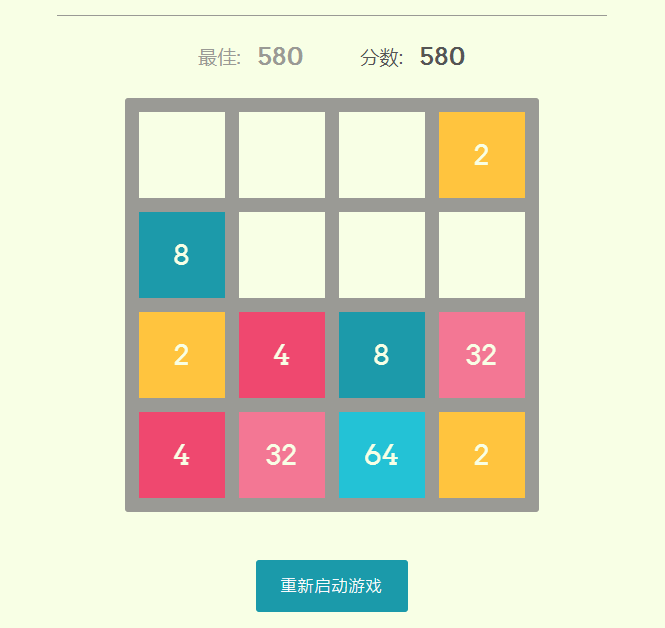
代码如下,复制即可使用:
(适用浏览器:360、FireFox、Chrome、Opera、傲游、搜狗、世界之窗. 不支持Safari、IE8及以下浏览器。)
<!DOCTYPE html>

<html>

<head>

<meta http-equiv="Content-Type" content="text/html; charset=utf-8">

<meta name="viewport" content="width=device-width,initial-scale=1.0,maximum-scale=1.0,minimum-scale=1.0,user-scalable=0">

<title>使用JS实现2048小游戏</title>

<!-- 此处需要自己修改为自己的css路径  -->

<link rel="stylesheet" href="css/reset.min.css">

<link rel="stylesheet" href="css/style.css">

</head>

<body>

<header>

    <div class="container">

        <h1><span>2</span><span>0</span><span>4</span><span>8</span></h1>

        <p class="inspired">by the原2048的灵感。</p>

    </div>

</header>

<div class="container">

    <div class="directions">

        <p><strong>如何玩:</strong> 使用你的箭头键移动瓷砖。当两个瓦片相互滑动时,它们合并成一个!</p>

    </div>

    <div class="scores">

        <div class="score-container best-score">

            最佳:

            <div class="score">

                <div id="bestScore">0</div>

            </div>

        </div>

        <div class="score-container">

            分数:

            <div class="score">

                <div id="score">0</div>

                <div class="add" id="add"></div>

            </div>

        </div>

    </div>

    <div class="game">

        <div id="tile-container" class="tile-container"></div>

        <div class="end" id="end">游戏结束<div class="monkey"></div><button class="btn not-recommended__item js-restart-btn" id="try-again">再试一次</button></div>

    </div>

    <div class="not-recommended">

        <button class="btn not-recommended__item js-restart-btn" id="restart">重新启动游戏</button>

    </div>

</div>

<!-- 此处需要自己修改JS路径 -->

<script src="js/index.js"></script>

<div style="text-align:center;margin:10px 0; font:normal 14px/24px 'MicroSoft YaHei';">

<p>适用浏览器:360、FireFox、Chrome、Opera、傲游、搜狗、世界之窗. 不支持Safari、IE8及以下浏览器。</p>

</div>

</body>

</html>
reset.min.css
html,body,div,span,applet,object,iframe,h1,h2,h3,h4,h5,h6,p,blockquote,pre,a,abbr,acronym,address,big,cite,code,del,dfn,em,img,ins,kbd,q,s,samp,small,strike,strong,sub,sup,tt,var,b,u,i,center,dl,dt,dd,ol,ul,li,fieldset,form,label,legend,table,caption,tbody,tfoot,thead,tr,th,td,article,aside,canvas,details,embed,figure,figcaption,footer,header,hgroup,menu,nav,output,ruby,section,summary,time,mark,audio,video{margin:0;padding:0;border:0;font-size:100%;font:inherit;vertical-align:baseline}article,aside,details,figcaption,figure,footer,header,hgroup,menu,nav,section{display:block}body{line-height:1}ol,ul{list-style:none}blockquote,q{quotes:none}blockquote:before,blockquote:after,q:before,q:after{content:'';content:none}table{border-collapse:collapse;border-spacing:0}
style.css
@charset "UTF-8";
* {
box-sizing: border-box;
} a {
color: #1B9AAA;
text-decoration: none;
border-bottom: 1px solid currentColor;
}
a:hover {
color: #14727e;
}
a:focus, a:active {
color: #0d4a52;
} body,
html {
position: relative;
width: 100%;
height: 100%;
display: -webkit-box;
display: -ms-flexbox;
display: flex;
-webkit-box-orient: vertical;
-webkit-box-direction: normal;
-ms-flex-direction: column;
flex-direction: column;
font-family: "Arvo", Helvetica, sans-serif;
font-family: 12px;
color: #555;
background: #F8FFE5;
} strong {
font-weight: bold;
} p {
line-height: 1.6;
} .inspired {
margin-top: 1em;
font-size: 0.9rem;
color: #9a9a95;
} header {
color: #F8FFE5;
text-align: center;
}
header span {
display: inline-block;
box-sizing: border-box;
width: 4rem;
height: 4rem;
line-height: 4rem;
margin: 0 0.4rem;
background: #FFC43D;
}
header span:nth-of-type(2) {
background: #EF476F;
}
header span:nth-of-type(3) {
background: #1B9AAA;
}
header span:nth-of-type(4) {
background: #06D6A0;
} h1 {
font-size: 2.2rem;
} .directions {
padding: 2rem;
border-top: 1px solid #9a9a95;
border-bottom: 1px solid #9a9a95;
} .container {
margin: 0 auto;
padding-bottom: 3.5rem;
-webkit-box-flex: 1;
-ms-flex: 1;
flex: 1;
width: 100%;
max-width: 550px;
text-align: center;
}
header .container {
padding: 0;
padding: 2rem 4rem;
max-width: 900px;
} .scores {
display: -webkit-box;
display: -ms-flexbox;
display: flex;
-webkit-box-pack: center;
-ms-flex-pack: center;
justify-content: center;
} .score-container {
display: -webkit-box;
display: -ms-flexbox;
display: flex;
-webkit-box-pack: center;
-ms-flex-pack: center;
justify-content: center;
-webkit-box-align: center;
-ms-flex-align: center;
align-items: center;
margin: 1.8rem;
font-size: 1.2rem;
line-height: 1;
color: #555;
}
.score-container.best-score {
color: #9a9a95;
} .score {
margin-left: 1rem;
position: relative;
font-weight: bold;
font-size: 1.5rem;
vertical-align: middle;
text-align: right;
} .game {
position: relative;
margin: 0 auto;
background: #9a9a95;
padding: 7px;
display: inline-block;
border-radius: 3px;
box-sizing: border-box;
} .tile-container {
border-radius: 6px;
position: relative;
width: 400px;
height: 400px;
} .tile, .background {
display: block;
color: #F8FFE5;
position: absolute;
width: 100px;
height: 100px;
box-sizing: border-box;
text-align: center;
} .background {
z-index: 1;
text-align: center;
border: 7px solid #9a9a95;
background-color: #F8FFE5;
} .tile {
opacity: 0;
z-index: 2;
background: #FFC43D;
color: #F8FFE5;
display: -webkit-box;
display: -ms-flexbox;
display: flex;
-webkit-box-align: center;
-ms-flex-align: center;
align-items: center;
-webkit-box-pack: center;
-ms-flex-pack: center;
justify-content: center;
font-size: 1.8rem;
align-items: center;
-webkit-transition: 110ms ease-in-out;
transition: 110ms ease-in-out;
border-radius: 3px;
border: 7px solid #9a9a95;
box-sizing: border-box;
}
.tile--4 {
background: #EF476F;
color: #F8FFE5;
}
.tile--8 {
background: #1B9AAA;
color: #F8FFE5;
}
.tile--16 {
background: #06D6A0;
color: #F8FFE5;
}
.tile--32 {
background: #f37694;
color: #F8FFE5;
}
.tile--64 {
background: #22c2d6;
color: #F8FFE5;
}
.tile--128 {
background: #17f8be;
color: #F8FFE5;
}
.tile--256 {
background: #ffd470;
color: #F8FFE5;
}
.tile--512 {
background: #eb184a;
color: #F8FFE5;
}
.tile--1024 {
background: #14727e;
color: #F8FFE5;
}
.tile--2048 {
background: #05a47b;
color: #F8FFE5;
}
.tile--pop {
-webkit-animation: pop 0.3s ease-in-out;
animation: pop 0.3s ease-in-out;
-webkit-animation-fill-mode: forwards;
animation-fill-mode: forwards;
}
.tile--shrink {
-webkit-animation: shrink 0.5s ease-in-out;
animation: shrink 0.5s ease-in-out;
-webkit-animation-fill-mode: forwards;
animation-fill-mode: forwards;
} .add {
position: absolute;
opacity: 0;
left: 120%;
top: 0;
font-size: 1rem;
color: #1B9AAA;
}
.add.active {
-webkit-animation: add 0.8s ease-in-out;
animation: add 0.8s ease-in-out;
} @-webkit-keyframes add {
0% {
opacity: 1;
top: 0;
}
100% {
opacity: 0;
top: -100%;
}
} @keyframes add {
0% {
opacity: 1;
top: 0;
}
100% {
opacity: 0;
top: -100%;
}
}
@-webkit-keyframes pop {
0% {
-webkit-transform: scale(0.5);
transform: scale(0.5);
opacity: 0;
}
90% {
-webkit-transform: scale(1.1);
transform: scale(1.1);
opacity: 1;
}
100% {
-webkit-transform: scale(1);
transform: scale(1);
opacity: 1;
}
}
@keyframes pop {
0% {
-webkit-transform: scale(0.5);
transform: scale(0.5);
opacity: 0;
}
90% {
-webkit-transform: scale(1.1);
transform: scale(1.1);
opacity: 1;
}
100% {
-webkit-transform: scale(1);
transform: scale(1);
opacity: 1;
}
}
@-webkit-keyframes shrink {
0% {
-webkit-transform: scale(1);
transform: scale(1);
opacity: 1;
}
100% {
-webkit-transform: scale(0.9);
transform: scale(0.9);
opacity: 0.9;
}
}
@keyframes shrink {
0% {
-webkit-transform: scale(1);
transform: scale(1);
opacity: 1;
}
100% {
-webkit-transform: scale(0.9);
transform: scale(0.9);
opacity: 0.9;
}
}
.end {
opacity: 0;
position: absolute;
top: 0;
left: 0;
width: 100%;
height: 100%;
z-index: -1;
display: -webkit-box;
display: -ms-flexbox;
display: flex;
-webkit-box-orient: vertical;
-webkit-box-direction: normal;
-ms-flex-direction: column;
flex-direction: column;
-webkit-box-pack: center;
-ms-flex-pack: center;
justify-content: center;
-webkit-box-align: center;
-ms-flex-align: center;
align-items: center;
background: rgba(85, 85, 85, 0.9);
color: white;
font-size: 2rem;
-webkit-transition: opacity 0.3s ease-in-out;
transition: opacity 0.3s ease-in-out;
}
.end btn {
margin-top: 1rem;
}
.end.active {
opacity: 1;
z-index: 1000;
} .monkey {
font-size: 3rem;
margin: 1rem 0;
} .btn {
font-family: inherit;
font-size: 1rem;
border: none;
background: #1B9AAA;
letter-spacing: 1px;
color: white;
font-weight: 300;
padding: 0.9em 1.5em;
border-radius: 3px;
border: 1px solid transparent;
cursor: pointer;
}
.btn:hover {
background-color: #14727e;
}
.btn:active {
background-color: #0d4a52;
}
.btn:focus {
box-shadow: 0 0 10px #0d4a52 inset;
outline: none;
} .not-recommended {
display: -webkit-box;
display: -ms-flexbox;
display: flex;
-webkit-box-pack: center;
-ms-flex-pack: center;
justify-content: center;
-webkit-box-align: center;
-ms-flex-align: center;
align-items: center;
margin-top: 3rem;
}
.not-recommended * + * {
margin-left: 10px;
}
.not-recommended__item + .not-recommended__annotation:before {
font-size: 30px;
content: "使用JS实现2048小游戏的更多相关文章
- 用js实现2048小游戏
用js实现2048小游戏 笔记仓库:https://github.com/nnngu/LearningNotes 1.游戏简介 2048是一款休闲益智类的数字叠加小游戏.(文末给出源代码和演示地址) ...
- js实现2048小游戏
这是学完javascript基础,编写的入门级web小游戏 游戏规则:在玩法规则也非常的简单,一开始方格内会出现2或者4等这两个小数字,玩家只需要上下左右其中一个方向来移动出现的数字,所有的数字就会想 ...
- js、jQuery实现2048小游戏
2048小游戏 一.游戏简介: 2048是一款休闲益智类的数字叠加小游戏 二. 游戏玩法: 在4*4的16宫格中,您可以选择上.下.左.右四个方向进行操作,数字会按方向移动,相邻的两个数字相同就会合 ...
- 【2048小游戏】——CSS/原生js爬坑之纯CSS模态对话框&游戏结束
引言:2048小游戏的结束界面,使用纯CSS制作模态对话框,一般做模态对话框都会使用BootStrap自带的模态对话框组件方便使用,但在制作要运行在移动端的小项目时,就不能使用BootStrap,因为 ...
- 【2048小游戏】——原生js爬坑之封装行的移动算法&事件
引言:2048小游戏的核心玩法是移动行,包括横行和纵行,玩家可以选择4个方向,然后所有行内的数字就会随着行的移动而向特定的方向移动.这个行的移动是一个需要重复调用的算法,所以这里就要将一行的移动算法封 ...
- 【2048小游戏】——原生js爬坑之遍历算法显示二维数组内容
引言:做2048小游戏会将横纵方向的数字内容,存储在一个二维数组中,要将这个二维数组中的内容显示在页面上,就一定要用遍历算法来实现了. 一.二维数组存储 首先考虑用二维数组存储所有行数,列数 ...
- jQuery实践-网页版2048小游戏
▓▓▓▓▓▓ 大致介绍 看了一个实现网页版2048小游戏的视频,觉得能做出自己以前喜欢玩的小游戏很有意思便自己动手试了试,真正的验证了这句话-不要以为你以为的就是你以为的,看视频时觉得看懂了,会写了, ...
- Qt 制作2048小游戏
相信大家都玩过2048把,下面是我用qt写得2048小游戏. 2048.pro HEADERS += \ Widget.h SOURCES += \ Widget.cpp \ main.cpp QT ...
- 基于jQuery的2048小游戏设计(网页版)
上周模仿一个2048小游戏,总结一下自己在编写代码的时候遇到的一些坑. 游戏规则:省略,我想大部分人都玩过,不写了 源码地址:https://github.com/xinhua6/2048game.g ...
随机推荐
- jq获取兄弟节点
$('#id').siblings() 当前元素所有的兄弟节点$('#id').prev() 当前元素前一个兄弟节点$('#id').prevaAll() 当前元素之前所有的兄弟节点$('#id'). ...
- SIFT算法学习
几个关于SIFT算法的blog,写的很好,链接学习一下 小北的家谈谈SIFT.PCA-SIFT.SURF及我的一点思考http://blog.csdn.net/ijuliet/article/deta ...
- day19 IO编程
文件:文件是数据源(保存数据的地方)的一种. 文件在程序中是以流的形式来操作的 内存(程序)到文件是输出流,文件到内存(程序)是输入流. 字节流:可用于读写的二进制文件及任何类型文件. 字符流:可以用 ...
- vue+element 切换正式和测试环境
1.package.json { "name": "element-starter", "description": "A Vue ...
- C语言中的指针和内存泄漏几种情况
引言 原文地址:http://www.cnblogs.com/archimedes/p/c-point-memory-leak.html,转载请注明源地址. 对于任何使用C语言的人,如果问他们C语言的 ...
- mysql手工注入步骤
1.一般用 ' " ) 等符号来闭合,再用%23(即#)来注释后面语句. 2.查找数据库,先用order by n猜字段,再用union select 1,2,3 ...n%23来查询. ...
- F. Make It Connected(krustra+)
题目链接:http://codeforces.com/contest/1095/problem/F 题目大意:首先给你n个点,然后给你每个点的权值,再给你m条边,这些边可以选也可以不选,然后问你要使这 ...
- 引发类型为“System.OutOfMemoryException”的异常
在运维工作中,经常能接到客户的反馈这个:引发类型为“System.OutOfMemoryException”的异常.客户反馈物理内存都还有富余,怎么报内存不足的错误呢! 什么时候会引发System.O ...
- UNIX环境高级编程 第7章 进程环境
本章涉及C/C++程序中main函数是如何被调用的.命令行参数如何传递给main函数.程序的内存空间布局.程序如何使用环境变量.程序如何终止退出. main函数 C程序或C++程序总是从main函数开 ...
- 2016.6.1——Min Stack
Min Stack 本题收获: 1.可以利用两个栈操作. 2.栈的基本操作. 题目: Design a stack that supports push, pop, top, and retrievi ...