
用UIScrollView产生视差效果
用UIScrollView产生视差效果
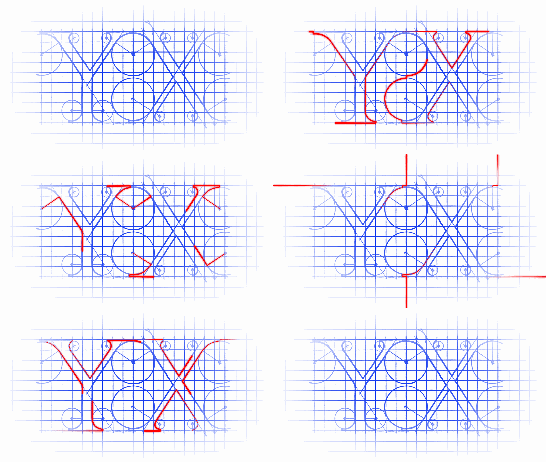
效果:

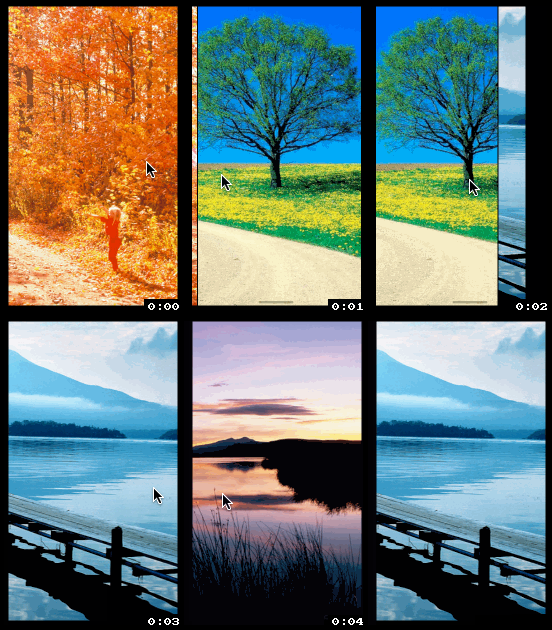

高级效果:

源码:
MoreInfoView.h + MoreInfoView.m
//

//  MoreInfoView.h

//  YXCell

//

//  Copyright (c) 2014年 Y.X. All rights reserved.

//

#import <UIKit/UIKit.h>

@interface MoreInfoView : UIView

@property (nonatomic, strong) UIImageView *imageView;

@end
//

//  MoreInfoView.m

//  YXCell

//

//  Copyright (c) 2014年 Y.X. All rights reserved.

//

#import "MoreInfoView.h"

@implementation MoreInfoView

- (id)initWithFrame:(CGRect)frame

{

    self = [super initWithFrame:frame];

    if (self)

    {

        CGRect rect = frame;

        self.layer.borderWidth = 0.5f;

        self.layer.borderColor = [UIColor blackColor].CGColor;

        self.layer.masksToBounds = YES;

        _imageView = [[UIImageView alloc] initWithFrame:CGRectMake(-, ,

                                                                   rect.size.width + *,

                                                                   rect.size.height)];

        [self addSubview:_imageView];

    }

    return self;

}

@end
RootViewController.m
//

//  RootViewController.m

//  YXCell

//

//  Copyright (c) 2014年 Y.X. All rights reserved.

//

#import "RootViewController.h"

#import "MoreInfoView.h"

@interface RootViewController ()<UIScrollViewDelegate>

@property (nonatomic, strong) UIScrollView  *scrollView;

@property (nonatomic, assign) CGFloat        k;

@property (nonatomic, assign) CGFloat        b;

@end

@implementation RootViewController

- (void)linearFunctionPointA:(CGPoint)pointA

                      pointB:(CGPoint)pointB

{

    CGFloat x1 = pointA.x; CGFloat y1 = pointA.y;

    CGFloat x2 = pointB.x; CGFloat y2 = pointB.y;

    _k = calculateSlope(x1, y1, x2, y2);

    _b = calculateConstant(x1, y1, x2, y2);

}

- (void)viewDidLoad

{

    [super viewDidLoad];

    self.view.backgroundColor = [UIColor blackColor];

    // 计算斜率

    [self linearFunctionPointA:CGPointMake(, -)

                        pointB:CGPointMake(, )];

    _scrollView = [[UIScrollView alloc] initWithFrame:self.view.bounds];

    _scrollView.delegate      = self;

    _scrollView.pagingEnabled = YES;

    [self.view addSubview:_scrollView];

    NSArray *picArray = @[[UIImage imageNamed:@""],

                          [UIImage imageNamed:@""],

                          [UIImage imageNamed:@""],

                          [UIImage imageNamed:@""],

                          [UIImage imageNamed:@""]];

    [picArray enumerateObjectsUsingBlock:^(id obj, NSUInteger idx, BOOL *stop) {

        MoreInfoView *show = \

        [[MoreInfoView alloc] initWithFrame:CGRectMake(idx*self.view.bounds.size.width, ,

                                                       self.view.bounds.size.width,

                                                       self.view.bounds.size.height)];

        show.imageView.image = obj;

        [_scrollView addSubview:show];

    }];

    _scrollView.contentSize = CGSizeMake(picArray.count*self.view.bounds.size.width,

                                         self.view.bounds.size.height);

}

- (void)scrollViewDidScroll:(UIScrollView *)scrollView

{

    CGFloat X = scrollView.contentOffset.x;

    [scrollView.subviews enumerateObjectsUsingBlock:^(id obj, NSUInteger idx, BOOL *stop) {

        MoreInfoView *tmp = obj;

        if ([tmp isKindOfClass:[MoreInfoView class]])

        {

            // 产生视差效果

            CGRect rect = tmp.imageView.frame;

            rect.origin.x = _k * (X - idx*) + _b;

            tmp.imageView.frame = rect;

        }

    }];

}

// 计算用

CGFloat calculateSlope(CGFloat x1, CGFloat y1, CGFloat x2, CGFloat y2)

{

    return (y2 - y1) / (x2 - x1);

}

CGFloat calculateConstant(CGFloat x1, CGFloat y1, CGFloat x2, CGFloat y2)

{

    return (y1*(x2 - x1) - x1*(y2 - y1)) / (x2 - x1);

}

@end
需要注意的地方:
1. 这个地方的值不是随便设定的哦:)
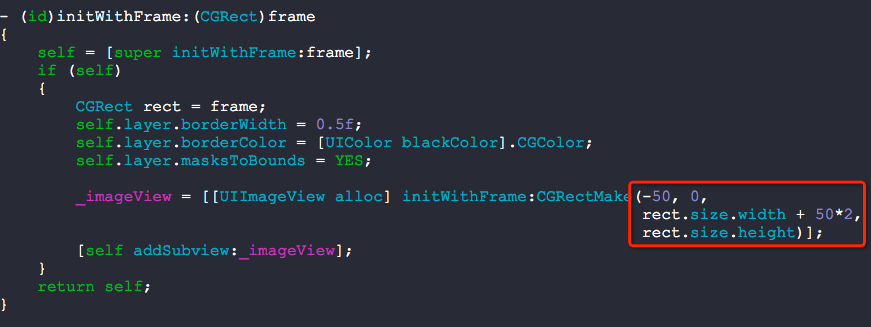
2. 修改那个270的值来达到上图显示的各种效果

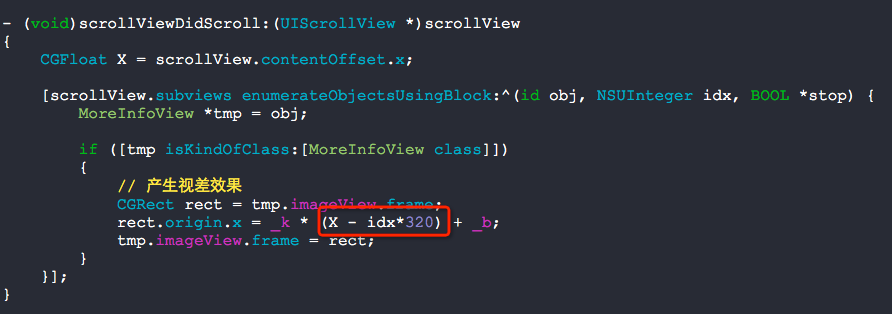
3. 下面的X - idx*320也是非常关键的哦
用UIScrollView产生视差效果的更多相关文章
- Swift - 用UIScrollView实现视差动画效果
Swift - 用UIScrollView实现视差动画效果 效果 源码 https://github.com/YouXianMing/Swift-Animations // // MoreInfoVi ...
- UIScrollView视差效果动画
UIScrollView视差效果动画 效果 源码 https://github.com/YouXianMing/Animations // // ScrollImageViewController.m ...
- 使用UITableView实现图片视差效果
使用UITableView实现图片视差效果 视差效果如下: 原理: 根据偏移量计算不同的移动速度,so easy! // // RootTableViewController.h // TableVi ...
- 滚动视差效果——background-attachment
滚动视差效果的实现原理是在同一个页面上将页面元素分为多层,例如可以分为背景.内容.贴图层,在滚动页面的时候让三者滚动的速度不一,从而在人的视觉上能够形成一种立体的近似效果.最近在做一个项目wiki的时 ...
- 基于Parallax设计HTML视差效果
年关将至,给大家拜年. 最近时间充裕了一点,给大家介绍一个比较有意思的控件:Parallax.它可以用来实现鼠标移动时,页面上的元素也做偏移的视差效果.在一些有表现层次,布局空旷的页面上,用来做Hea ...
- css中的视距perspective和视差效果
概述 之前觉得2个效果很叼,一个是3D翻转效果,另一个是视差效果.今天好好的研究一下,把心得记录下来,供以后开发时参考,相信对其他人也有用. 3D翻转 3D翻转效果其实非常简单,其实就是perspec ...
- banner 跟随鼠标呈现视差效果
参考 Element 官网,利用 js / jq 和 css3, 实现某图片随着鼠标移动呈现的视差效果. <!DOCTYPE html> <html> <head> ...
- 使用NestedScrollView+ViewPager+RecyclerView+SmartRefreshLayout打造酷炫下拉视差效果并解决各种滑动冲突
使用NestedScrollView+ViewPager+RecyclerView+SmartRefreshLayout打造酷炫下拉视差效果并解决各种冲突 如果你还在为处理滑动冲突而发愁,那么你需要静 ...
- UITableViewCell图片视差效果
UITableViewCell图片视差效果 效果 源码 https://github.com/YouXianMing/Animations 细节 OffsetImageCell.m OffsetCel ...
随机推荐
- 自然语言处理--TF-IDF(关键词提取)
TF-IDF算法 TF-IDF(词频-逆文档频率)算法是一种统计方法,用以评估一字词对于一个文件集或一个语料库中的其中一份文件的重要程度.字词的重要性随着它在文件中出现的次数成正比增加,但同时会随着它 ...
- 配置jenkins slave 问题,ERROR: Couldn't find any revision to build. Verify the repository and branch configuration for this job.
因为需要需要搭建一套自动化环境的windows电脑作为slave,简单的把原来用来mac上的job配置一模一样的配置了下,运行时遇到如上问题,google半天百思不得其解, 后来尝试把SCM里面的br ...
- 基于python的多线程暴破脚本
搭建了一个本地wordpress,写一个基于多线程异步I/O的暴力破解 1 测试 提交错误的表单数据时,查看请求参数 登录时发送的cookie 2 登录分析 经过多次测试,发现无论是输入正确的密码还是 ...
- Vertica示例数据库安装
1.示例数据库简介: Vertica跟传统数据库一样,自带了示例数据库--VMart示例数据库,是一个多架构数据库.该数据是大型超市(VMart)中可能会用到的数据库,可用来访问产品.客户.员工以及网 ...
- sql2000-text类型数据只能看到256个字节
工具只能看到256个字节,其实数据是完整的,可以自己写个程序取数据试一试
- 钉钉微应用接入钉钉免登陆配置记录。NET实现
在这里记录一下我配置的钉钉接入微应用遇到的坑.搞了我几天天才调通.头皮发麻,现在梳理一下,以免别人也入坑. 1.钉钉接入主要要获取钉钉企业员工的ID,然后去自己的应用的数据库里进行匹配然后实现免登陆的 ...
- [HTML5] Canvas绘制简单图片
获取Image对象,new出来 定义Image对象的src属性,参数:图片路径 定义Image对象的onload方法,调用context对象的drawImage()方法,参数:Image对象,x坐标, ...
- Mapped Statements collection does not contain value for 问题的解决
在做SSM项目的时候,遇到MyBatis抛出的一个异常: Mapped Statements collection does not contain value for org.lyk.vo.mapp ...
- windows多线程窗口程序设计
掌握windows基于消息驱动的窗口应用程序设计的基本方法,掌握窗口程序资源的概念与设计,掌握常用的消息的程序处理方法,掌握文字图形输出相关函数编程.掌握设计的基本方法(选项),掌握时钟消息设计动画程 ...
- SQL Server删除表及删除表中数据的方法
删除表的T-SQL语句为: drop table <表名> drop是丢弃的意思,drop table表示将一个表彻底删除掉. 删除表数据有两种方法:delete和truncate. de ...