
android 学习随笔二十三(动画:Fragment )
- Fragment
* 用途:在一个Activity里切换界面,切换界面时只切换Fragment里面的内容
* 在一个Activity中切换多个界面,每个界面就是一个Fragment
* Fragmnent的内容也是一个View对象
* 生命周期方法跟Activity一致,可以理解把其为就是一个Activity
* fragment切换时会销毁旧的,再创建新的
* 定义布局文件作为Fragment的显示内容
//此方法返回的View就会被显示在Fragment上
@Override
public View onCreateView(LayoutInflater inflater, ViewGroup container,
Bundle savedInstanceState) {
// TODO Auto-generated method stub
//用布局文件填充成一个View对象,返回出去,那么就显示在Fragment上了
View v = inflater.inflate(R.layout.fragment01, null);
return v;
}
* 把Fragment显示至指定ViewGroup中
//把fragment显示至界面
//new出fragment对象
Fragment01 fg = new Fragment01();
FragmentManager fm = getFragmentManager();
//开启事务
FragmentTransaction ft = fm.beginTransaction();
//把fragment对象显示到指定资源id的组件里面
ft.replace(R.id.fl, fg);
ft.commit();
package com.itheima.fragment;

import android.os.Bundle;

import android.annotation.SuppressLint;

import android.app.Activity;

import android.app.FragmentManager;

import android.app.FragmentTransaction;

import android.view.Menu;

import android.view.View;

public class MainActivity extends Activity {

    @Override

    protected void onCreate(Bundle savedInstanceState) {

        super.onCreate(savedInstanceState);

        setContentView(R.layout.activity_main);

        showfagment01();

    }

    private void showfagment01() {

        //1.创建fragment对象

        Fragment01 fragment1 = new Fragment01();

        //2.获取fragment管理器

        FragmentManager fm = getFragmentManager();

        //3.开启事务

        FragmentTransaction ft = fm.beginTransaction();

        //4.显示fragment

        //arg0:设置把fragment显示在哪个容器中

        ft.replace(R.id.fl, fragment1);

        //5.提交

        ft.commit();

    }

    public void click1(View v){

        showfagment01();

    }

    public void click2(View v){

        //1.创建fragment对象

        Fragment02 fragment2 = new Fragment02();

        //2.获取fragment管理器

        FragmentManager fm = getFragmentManager();

        //3.开启事务

        FragmentTransaction ft = fm.beginTransaction();

        //4.显示fragment

        //arg0:设置把fragment显示在哪个容器中

        ft.replace(R.id.fl, fragment2);

        //5.提交

        ft.commit();

    }

    public void click3(View v){

        //1.创建fragment对象

        Fragment03 fragment3 = new Fragment03();

        //2.获取fragment管理器

        FragmentManager fm = getFragmentManager();

        //3.开启事务

        FragmentTransaction ft = fm.beginTransaction();

        //4.显示fragment

        //arg0:设置把fragment显示在哪个容器中

        ft.replace(R.id.fl, fragment3);

        //5.提交

        ft.commit();

    }

}
MainActivity
package com.itheima.fragment;

import android.app.Fragment;

import android.os.Bundle;

import android.view.LayoutInflater;

import android.view.View;

import android.view.ViewGroup;

public class Fragment01 extends Fragment {

    //系统自动调用,返回的View对象作为Fragment的内容显示

    @Override

    public View onCreateView(LayoutInflater inflater, ViewGroup container,

            Bundle savedInstanceState) {

        View v = inflater.inflate(R.layout.fragment01, null);

        return v;

    }

}
Fragment01
package com.itheima.fragment;

import android.app.Fragment;

import android.os.Bundle;

import android.view.LayoutInflater;

import android.view.View;

import android.view.ViewGroup;

public class Fragment02 extends Fragment {

    //系统自动调用,返回的View对象作为Fragment的内容显示

    @Override

    public View onCreateView(LayoutInflater inflater, ViewGroup container,

            Bundle savedInstanceState) {

        View v = inflater.inflate(R.layout.fragment02, null);

        return v;

    }

}
Fragment02
package com.itheima.fragment;

import android.app.Fragment;

import android.os.Bundle;

import android.view.LayoutInflater;

import android.view.View;

import android.view.ViewGroup;

public class Fragment03 extends Fragment {

    //系统自动调用,返回的View对象作为Fragment的内容显示

    @Override

    public View onCreateView(LayoutInflater inflater, ViewGroup container,

            Bundle savedInstanceState) {

        View v = inflater.inflate(R.layout.fragment03, null);

        return v;

    }

}
Fragment03
<?xml version="1.0" encoding="utf-8"?>

<manifest xmlns:android="http://schemas.android.com/apk/res/android"

    package="com.itheima.fragment"

    android:versionCode="1"

    android:versionName="1.0" >

    <uses-sdk

        android:minSdkVersion="11"

        android:targetSdkVersion="17" />

    <application

        android:allowBackup="true"

        android:icon="@drawable/ic_launcher"

        android:label="@string/app_name"

        android:theme="@style/AppTheme" >

        <activity

            android:name="com.itheima.fragment.MainActivity"

            android:label="@string/app_name" >

            <intent-filter>

                <action android:name="android.intent.action.MAIN" />

                <category android:name="android.intent.category.LAUNCHER" />

            </intent-filter>

        </activity>

    </application>

</manifest>
AndroidManifest
<LinearLayout xmlns:android="http://schemas.android.com/apk/res/android"

    xmlns:tools="http://schemas.android.com/tools"

    android:layout_width="match_parent"

    android:layout_height="match_parent"

    android:paddingBottom="@dimen/activity_vertical_margin"

    android:paddingLeft="@dimen/activity_horizontal_margin"

    android:paddingRight="@dimen/activity_horizontal_margin"

    android:paddingTop="@dimen/activity_vertical_margin"

    tools:context=".MainActivity"

    android:orientation="horizontal"

    >

    <FrameLayout

        android:id="@+id/fl"

        android:layout_weight="1"

        android:layout_width="0dp"

        android:layout_height="match_parent"

        ></FrameLayout>

    <LinearLayout

        android:layout_width="wrap_content"

        android:layout_height="match_parent"

        android:orientation="vertical"

        >

        <Button

            android:layout_width="wrap_content"

            android:layout_height="wrap_content"

            android:text="界面1"

            android:onClick="click1"

            />

        <Button

            android:layout_width="wrap_content"

            android:layout_height="wrap_content"

            android:text="界面2"

            android:onClick="click2"

            />

        <Button

            android:layout_width="wrap_content"

            android:layout_height="wrap_content"

            android:text="界面3"

            android:onClick="click3"

            />

        </LinearLayout>

</LinearLayout>
activity_main
<?xml version="1.0" encoding="utf-8"?>

<LinearLayout xmlns:android="http://schemas.android.com/apk/res/android"

    android:layout_width="match_parent"

    android:layout_height="match_parent"

    android:orientation="vertical"

    android:background="#00ff00"

    >

    <TextView

        android:layout_width="wrap_content"

        android:layout_height="wrap_content"

        android:textSize="30sp"

        android:text="这是plus的帽子的绿色"

        />

</LinearLayout>
fragment01
<?xml version="1.0" encoding="utf-8"?>

<LinearLayout xmlns:android="http://schemas.android.com/apk/res/android"

    android:layout_width="match_parent"

    android:layout_height="match_parent"

    android:orientation="vertical"

    android:background="#ff0000"

    >

    <TextView

        android:layout_width="wrap_content"

        android:layout_height="wrap_content"

        android:textSize="30sp"

        android:text="这是热情的红色"

        />

</LinearLayout>
fragment02
<?xml version="1.0" encoding="utf-8"?>

<LinearLayout xmlns:android="http://schemas.android.com/apk/res/android"

    android:layout_width="match_parent"

    android:layout_height="match_parent"

    android:orientation="vertical"

    android:background="#0000ff"

    >

    <TextView

        android:layout_width="wrap_content"

        android:layout_height="wrap_content"

        android:textSize="30sp"

        android:text="这是plus戴上帽子的心情的蓝色"

        />

</LinearLayout>
fragment03
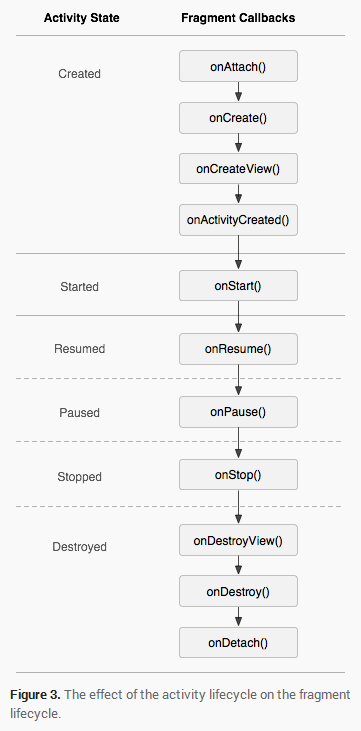
- 生命周期
* fragment切换时旧fragment对象会销毁,新的fragment对象会被创建
- 低版本兼容
* 在support-v4.jar包中有相关api,也就是说fragment可以在低版本模拟器运行
package com.itheima.fragment;

import android.os.Bundle;

import android.annotation.SuppressLint;

import android.support.v4.app.FragmentActivity;

import android.support.v4.app.FragmentManager;

import android.support.v4.app.FragmentTransaction;

import android.view.Menu;

import android.view.View;

public class MainActivity extends FragmentActivity {

    @Override

    protected void onCreate(Bundle savedInstanceState) {

        super.onCreate(savedInstanceState);

        setContentView(R.layout.activity_main);

        showfagment01();

    }

    private void showfagment01() {

        //1.创建fragment对象

        Fragment01 fragment1 = new Fragment01();

        //2.获取fragment管理器

        FragmentManager fm = getSupportFragmentManager();

        //3.开启事务

        FragmentTransaction ft = fm.beginTransaction();

        //4.显示fragment

        //arg0:设置把fragment显示在哪个容器中

        ft.replace(R.id.fl, fragment1);

        //5.提交

        ft.commit();

    }

    public void click1(View v){

        showfagment01();

    }

    public void click2(View v){

        //1.创建fragment对象

        Fragment02 fragment2 = new Fragment02();

        //2.获取fragment管理器

        FragmentManager fm = getSupportFragmentManager();

        //3.开启事务

        FragmentTransaction ft = fm.beginTransaction();

        //4.显示fragment

        //arg0:设置把fragment显示在哪个容器中

        ft.replace(R.id.fl, fragment2);

        //5.提交

        ft.commit();

    }

    public void click3(View v){

        //1.创建fragment对象

        Fragment03 fragment3 = new Fragment03();

        //2.获取fragment管理器

        FragmentManager fm = getSupportFragmentManager();

        //3.开启事务

        FragmentTransaction ft = fm.beginTransaction();

        //4.显示fragment

        //arg0:设置把fragment显示在哪个容器中

        ft.replace(R.id.fl, fragment3);

        //5.提交

        ft.commit();

    }

}
package com.itheima.fragment;

import android.os.Bundle;

import android.support.v4.app.Fragment;

import android.view.LayoutInflater;

import android.view.View;

import android.view.ViewGroup;

public class Fragment01 extends Fragment {

    //系统自动调用,返回的View对象作为Fragment的内容显示

    @Override

    public View onCreateView(LayoutInflater inflater, ViewGroup container,

            Bundle savedInstanceState) {

        View v = inflater.inflate(R.layout.fragment01, null);

        return v;

    }

}
Fragment01
- Fragment和Activity传递数据
package com.itheima.transmit;

import android.os.Bundle;

import android.annotation.SuppressLint;

import android.app.Activity;

import android.app.FragmentManager;

import android.app.FragmentTransaction;

import android.view.Menu;

import android.view.View;

import android.widget.EditText;

import android.widget.TextView;

public class MainActivity extends Activity {

    private Fragment01 fragment1;

    @Override

    protected void onCreate(Bundle savedInstanceState) {

        super.onCreate(savedInstanceState);

        setContentView(R.layout.activity_main);

        showfagment01();

    }

    private void showfagment01() {

        //1.创建fragment对象

        fragment1 = new Fragment01();

        //2.获取fragment管理器

        FragmentManager fm = getFragmentManager();

        //3.开启事务

        FragmentTransaction ft = fm.beginTransaction();

        //4.显示fragment

        //arg0:设置把fragment显示在哪个容器中

        ft.replace(R.id.fl, fragment1);

        //5.提交

        ft.commit();

    }

    public void click1(View v){

        showfagment01();

    }

    public void click2(View v){

        //1.创建fragment对象

        Fragment02 fragment2 = new Fragment02();

        //2.获取fragment管理器

        FragmentManager fm = getFragmentManager();

        //3.开启事务

        FragmentTransaction ft = fm.beginTransaction();

        //4.显示fragment

        //arg0:设置把fragment显示在哪个容器中

        ft.replace(R.id.fl, fragment2);

        //5.提交

        ft.commit();

    }

    public void click3(View v){

        //1.创建fragment对象

        Fragment03 fragment3 = new Fragment03();

        //2.获取fragment管理器

        FragmentManager fm = getFragmentManager();

        //3.开启事务

        FragmentTransaction ft = fm.beginTransaction();

        //4.显示fragment

        //arg0:设置把fragment显示在哪个容器中

        ft.replace(R.id.fl, fragment3);

        //5.提交

        ft.commit();

    }

    public void click4(View v){

        EditText et_main = (EditText) findViewById(R.id.et_main);

        String text = et_main.getText().toString();

        fragment1.setText(text);

    }

    public void setText(String text){

        TextView tv_main = (TextView) findViewById(R.id.tv_main);

        tv_main.setText(text);

    }

}
MainActivity
package com.itheima.transmit;

import android.app.Fragment;

import android.os.Bundle;

import android.view.LayoutInflater;

import android.view.View;

import android.view.ViewGroup;

import android.webkit.WebView.FindListener;

import android.widget.TextView;

public class Fragment01 extends Fragment {

    private TextView tv;

    //系统自动调用,返回的View对象作为Fragment的内容显示

    @Override

    public View onCreateView(LayoutInflater inflater, ViewGroup container,

            Bundle savedInstanceState) {

        View v = inflater.inflate(R.layout.fragment01, null);

        tv = (TextView) v.findViewById(R.id.tv_fragment1);

        return v;

    }

    public void setText(String text){

        tv.setText(text);

    }

}
Fragment01
package com.itheima.transmit;

import android.app.Fragment;

import android.os.Bundle;

import android.view.LayoutInflater;

import android.view.View;

import android.view.View.OnClickListener;

import android.view.ViewGroup;

import android.widget.Button;

import android.widget.EditText;

public class Fragment03 extends Fragment implements OnClickListener {

    private EditText et;

    //系统自动调用,返回的View对象作为Fragment的内容显示

    @Override

    public View onCreateView(LayoutInflater inflater, ViewGroup container,

            Bundle savedInstanceState) {

        View v = inflater.inflate(R.layout.fragment03, null);

        Button bt_fragment03 = (Button) v.findViewById(R.id.bt_fragment03);

        et = (EditText) v.findViewById(R.id.et_fragment03);

        bt_fragment03.setOnClickListener(this);

        return v;

    }

    @Override

    public void onClick(View v) {

        String text = et.getText().toString();

        ((MainActivity)getActivity()).setText(text);

    }

}
Fragment03
<LinearLayout xmlns:android="http://schemas.android.com/apk/res/android"

    xmlns:tools="http://schemas.android.com/tools"

    android:layout_width="match_parent"

    android:layout_height="match_parent"

    android:paddingBottom="@dimen/activity_vertical_margin"

    android:paddingLeft="@dimen/activity_horizontal_margin"

    android:paddingRight="@dimen/activity_horizontal_margin"

    android:paddingTop="@dimen/activity_vertical_margin"

    tools:context=".MainActivity"

    android:orientation="horizontal"

    >

    <FrameLayout

        android:id="@+id/fl"

        android:layout_weight="1"

        android:layout_width="0dp"

        android:layout_height="match_parent"

        ></FrameLayout>

    <LinearLayout

        android:layout_width="wrap_content"

        android:layout_height="match_parent"

        android:orientation="vertical"

        >

        <Button

            android:layout_width="wrap_content"

            android:layout_height="wrap_content"

            android:text="界面1"

            android:onClick="click1"

            />

        <Button

            android:layout_width="wrap_content"

            android:layout_height="wrap_content"

            android:text="界面2"

            android:onClick="click2"

            />

        <Button

            android:layout_width="wrap_content"

            android:layout_height="wrap_content"

            android:text="界面3"

            android:onClick="click3"

            />

        <EditText

            android:id="@+id/et_main"

            android:layout_width="match_parent"

            android:layout_height="wrap_content"

            />

        <Button

            android:layout_width="wrap_content"

            android:layout_height="wrap_content"

            android:text="提交"

            android:onClick="click4"

            />

        <TextView

            android:id="@+id/tv_main"

            android:layout_width="wrap_content"

            android:layout_height="wrap_content"

            />

        </LinearLayout>

</LinearLayout>
activity_main
<?xml version="1.0" encoding="utf-8"?>

<LinearLayout xmlns:android="http://schemas.android.com/apk/res/android"

    android:layout_width="match_parent"

    android:layout_height="match_parent"

    android:orientation="vertical"

    android:background="#00ff00"

    >

    <TextView

        android:layout_width="wrap_content"

        android:layout_height="wrap_content"

        android:textSize="30sp"

        android:text="这是plus的帽子的绿色"

        />

    <TextView

        android:id="@+id/tv_fragment1"

        android:layout_width="wrap_content"

        android:layout_height="wrap_content"

        />

</LinearLayout>
fragment01
<?xml version="1.0" encoding="utf-8"?>

<LinearLayout xmlns:android="http://schemas.android.com/apk/res/android"

    android:layout_width="match_parent"

    android:layout_height="match_parent"

    android:orientation="vertical"

    android:background="#0000ff"

    >

    <TextView

        android:layout_width="wrap_content"

        android:layout_height="wrap_content"

        android:textSize="30sp"

        android:text="这是plus戴上帽子的心情的蓝色"

        />

    <EditText

        android:id="@+id/et_fragment03"

        android:layout_width="match_parent"

        android:layout_height="wrap_content"

        />

    <Button

        android:id="@+id/bt_fragment03"

        android:layout_width="wrap_content"

        android:layout_height="wrap_content"

        android:text="提交"

        />

</LinearLayout>
fragment03
android 学习随笔二十三(动画:Fragment )的更多相关文章
- android 学习随笔二十六(动画:属性动画)
属性动画,属性动画是真正改变对象的某个属性的值 * 补间动画,只是一个动画效果,组件其实还在原来的位置上,xy没有改变1.位移:* 第一个参数target指定要显示动画的组件* 第二个参数proper ...
- android 学习随笔二十五(动画:补间动画)
补间动画(TweenAnimation) * 原形态变成新形态时为了过渡变形过程,生成的动画就叫补间动画(为了让对象从初始状态向结束状态改变的过程更加自然而自动生成的动画效果)* 位移.旋转.缩放.透 ...
- android 学习随笔二十四(动画:帧动画)
帧动画,一张张图片不断的切换,形成动画效果 * 在drawable目录下定义xml文件,子节点为animation-list,在这里定义要显示的图片和每张图片的显示时长 * FrameAnimatio ...
- android 学习随笔二十一(内容提供者 )
一.内容提供者* 应用的数据库是不允许其他应用访问的* 内容提供者的作用就是让别的应用访问到你的私有数据* 自定义内容提供者,继承ContentProvider类,重写增删改查方法,在方法中写增删改查 ...
- Android学习(二十三)SubMenu 子菜单
一.SubMenu子菜单 和功能菜单相似,但是可以添加子菜单. 二.实现步骤: 1.通过onCreateOptionsMenu方法创建子菜单,可以通过代码动态创建,也可以通过xml进行创建. 2.通过 ...
- android 学习随笔二十九(自定义监听 )
package com.itheima.momo.dialog; import com.itheima.momo.R; import android.app.AlertDialog; import a ...
- android 学习随笔二十八(应用小知识点小结 )
去掉标题栏的方法 第一种:也一般入门的时候经常使用的一种方法requestWindowFeature(Window.FEATURE_NO_TITLE);//去掉标题栏注意这句一定要写在setConte ...
- android 学习随笔二十二(小结)
ADB进程 * adb指令 * adb install xxx.apk * adb uninstall 包名 * adb devices * adb start-server * adb kill-s ...
- android 学习随笔二十(多媒体编程 )
1.图片处理 加载大图片 图片大小的计算 图片大小 = 图片的总像素 * 每个像素占用的大小 * 单色图:每个像素占用1/8个字节* 16色图:每个像素占用1/2个字节* 256色图:每个像素占用1个 ...
随机推荐
- js方法参数默认值设置
这里的默认值设置 很容易以为和php相似 function(v1,v2="test") { alert(v2); } 但这样是不对的,js方法,如需传参,甚至可以不用预定义(也就是 ...
- <dependency>spring-webmvc</dependency>
Spring 4.2.0.RELEASE版本: <dependency> <groupId>org.springframework</groupId> <ar ...
- LeetCode Fraction to Recurring Decimal
原题链接在这里:https://leetcode.com/problems/fraction-to-recurring-decimal/ 题目: Given two integers represen ...
- Android如何使用so文件和Android studio中导入so
Android中使用so文件: 做一个PDF阅读的功能,找到一个开源的库,mupdf.下载的是网上编译好的so库,导入到自己项目中的时候一直报错Java.lang.UnsatisfiedLinkErr ...
- python or not python
python or not python 我挺喜欢 python 这种编程语言,它本身的丰富的动态特性让这种语言的表达能力很强,基本上 python 上写的一行代码,可实现 java 上 1.5 到 ...
- Inside Kolla - 03 下载Kolla
下载 Kolla Kolla 目前托管在 github.com 上,项目仓库的 URL 是 https://github.com/stackforge/kolla. 下载 Kolla 时,可下载 gi ...
- PHP文件缓存与memcached缓存 相比 优缺点是什么呢【总结】
如果不考虑其他任何问题,只比较速度的话,那肯定是mem快,但他们各有优缺点.文件缓存优点:1.由于现在的硬盘都非常大,所有如果是大数据的时候,放硬盘里就比较合适,比如做一个cms网站,网站里有10万篇 ...
- loadView在App启动时到底都干了些什么?
loadView在App启动时到底都干了些什么? 查阅苹果官方文档如下: 1. 当你访问一个ViewController的view属性时,如果此时view的值是nil,那么,ViewControlle ...
- Power-BI 报表常用功能自适应设置
Power-BI 报表可以跨平台浏览,并自适应多种屏幕大小.在Power-BI 的开发界面下,就有多个属性用于设定在不同屏幕报表的展现方式,以达到更优的用户体验. 1.PC布局:设定报表在PC机上的布 ...
- python_字符串
1. 字符串的格式化 格式: 说明: (1)转换说明符 (2)格式化操作符右操作数可以是任何东西,如果是元组的话,每一个元素都会被单独格式化. 2. 字符串常用的方法 (1)find int = fi ...