
[游戏模版20] Win32 物理引擎 加速运动
>_<:Compared with previous talk,there will be taking about how to create an accelerated speed.Only a little change in the MyPaint(...) function.
>_<:resource
>_<:code
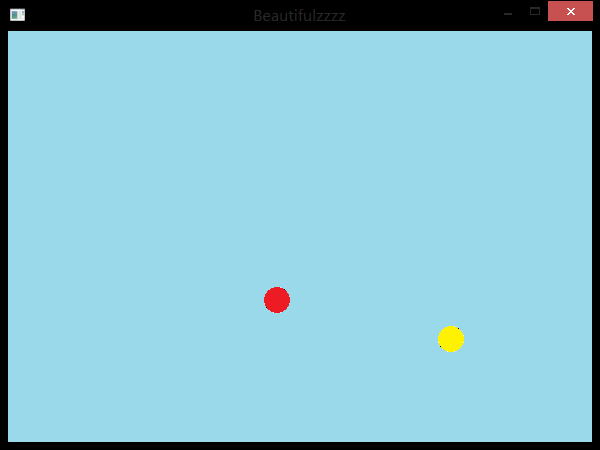
 #include <windows.h>

 // C 运行时头文件

 #include <stdlib.h>

 #include <cstdio>

 #include <malloc.h>

 #include <memory.h>

 #include <tchar.h>

 #include <time.h>

 #include <string>

 #include <cmath>

 // 全局变量:

 HINSTANCE hInst;                                // 当前实例

 HBITMAP bg , ball[];

 HDC hdc,mdc,bufdc;

 HWND hWnd;

 RECT rect;//窗口矩形

 int x[] , y[];//位置

 int vx[] , vy[];//速度

 int ax[] , ay[];//加速度

 int t=;//时间

 // 此代码模块中包含的函数的前向声明:

 ATOM                MyRegisterClass(HINSTANCE hInstance);

 BOOL                InitInstance(HINSTANCE, int);

 LRESULT CALLBACK    WndProc(HWND, UINT, WPARAM, LPARAM);

 INT_PTR CALLBACK    About(HWND, UINT, WPARAM, LPARAM);

 void                MyPaint(HDC hdc);

 int APIENTRY _tWinMain(HINSTANCE hInstance,

                      HINSTANCE hPrevInstance,

                      LPTSTR    lpCmdLine,

                      int       nCmdShow){

     MSG msg;

     MyRegisterClass(hInstance);

     // 执行应用程序初始化:

     if (!InitInstance (hInstance, nCmdShow)){

         return FALSE;

     }

     // 主消息循环:

     while (GetMessage(&msg, NULL, , )){

         TranslateMessage(&msg);

         DispatchMessage(&msg);

     }

     return (int) msg.wParam;

 }

 //  函数: MyRegisterClass()

 //

 //  目的: 注册窗口类。

 ATOM MyRegisterClass(HINSTANCE hInstance){

     WNDCLASSEX wcex;

     wcex.cbSize = sizeof(WNDCLASSEX);

     wcex.style            = CS_HREDRAW | CS_VREDRAW;

     wcex.lpfnWndProc    = WndProc;

     wcex.cbClsExtra        = ;

     wcex.cbWndExtra        = ;

     wcex.hInstance        = hInstance;

     wcex.hIcon            = NULL;

     wcex.hCursor        = LoadCursor(NULL, IDC_ARROW);

     wcex.hbrBackground    = (HBRUSH)(COLOR_WINDOW+);

     wcex.lpszMenuName    = "Beautifulzzzz";

     wcex.lpszClassName    = "Beautifulzzzz";

     wcex.hIconSm        = NULL;

     return RegisterClassEx(&wcex);

 }

 //

 //   函数: InitInstance(HINSTANCE, int)

 //

 //   目的: 保存实例句柄并创建主窗口

 //

 //   注释:

 //

 //        在此函数中,我们在全局变量中保存实例句柄并

 //        创建和显示主程序窗口。

 //        棋盘拼接以及调用InitGame()开始棋局

 BOOL InitInstance(HINSTANCE hInstance, int nCmdShow){

    HBITMAP bmp;

    hInst = hInstance; // 将实例句柄存储在全局变量中

    hWnd = CreateWindow("Beautifulzzzz","Beautifulzzzz", WS_OVERLAPPEDWINDOW,

       CW_USEDEFAULT, , CW_USEDEFAULT, , NULL, NULL, hInstance, NULL);

    if (!hWnd)

    {

       return FALSE;

    }

    MoveWindow(hWnd,,,,,true);

    ShowWindow(hWnd, nCmdShow);

    UpdateWindow(hWnd);

    hdc=GetDC(hWnd);

    mdc=CreateCompatibleDC(hdc);

    bufdc=CreateCompatibleDC(hdc);

    bmp=CreateCompatibleBitmap(hdc,,);

    SelectObject(mdc,bmp);

    bg=(HBITMAP)LoadImageA(NULL,"bg.bmp",IMAGE_BITMAP,,,LR_LOADFROMFILE);

    ball[]=(HBITMAP)LoadImageA(NULL,"ball0.bmp",IMAGE_BITMAP,,,LR_LOADFROMFILE);

    ball[]=(HBITMAP)LoadImageA(NULL,"ball1.bmp",IMAGE_BITMAP,,,LR_LOADFROMFILE);

    GetClientRect(hWnd,&rect);//取得内部窗口区域的大小;

    x[]=;y[]=;vx[]=;vy[]=;ax[]=;ay[]=;

    x[]=;y[]=;vx[]=-;vy[]=-;ax[]=;ay[]=;

    SetTimer(hWnd,,,NULL);

    MyPaint(hdc);

    return TRUE;

 }

 //

 //  函数: WndProc(HWND, UINT, WPARAM, LPARAM)

 //

 //  目的: 处理主窗口的消息。

 //

 //  WM_COMMAND    - 处理应用程序菜单

 //  WM_PAINT    - 绘制主窗口

 //  WM_DESTROY    - 发送退出消息并返回

 //

 LRESULT CALLBACK WndProc(HWND hWnd, UINT message, WPARAM wParam, LPARAM lParam){

     int wmId, wmEvent;

     PAINTSTRUCT ps;

     switch (message){

     case WM_TIMER:

         A:MyPaint(hdc);

         break;

     case WM_PAINT:

         hdc = BeginPaint(hWnd, &ps);

         goto A;// TODO: 在此添加任意绘图代码...

         EndPaint(hWnd, &ps);

         break;

     case WM_DESTROY:

         DeleteDC(mdc);

         DeleteDC(bufdc);

         DeleteObject(bg);

         DeleteObject(ball[]);

         DeleteObject(ball[]);

         KillTimer(hWnd,);

         ReleaseDC(hWnd,hdc);

         PostQuitMessage();

         break;

     default:

         return DefWindowProc(hWnd, message, wParam, lParam);

     }

     return ;

 }

 //MyPaint()

 //1、窗口贴图

 //2、计算小球贴图坐标并判断小球是否碰撞窗口边缘

 void MyPaint(HDC hdc){

     SelectObject(bufdc,bg);

     BitBlt(mdc,,,,,bufdc,,,SRCCOPY);

     SelectObject(bufdc,ball[]);

     BitBlt(mdc,x[],y[],,,bufdc,,,SRCAND);

     BitBlt(mdc,x[],y[],,,bufdc,,,SRCPAINT);

     SelectObject(bufdc,ball[]);

     BitBlt(mdc,x[],y[],,,bufdc,,,SRCAND);

     BitBlt(mdc,x[],y[],,,bufdc,,,SRCPAINT);

     BitBlt(hdc,,,,,mdc,,,SRCCOPY);

     for(int i=;i<;i++){

     //计算x轴方向贴图坐标与速度

         vx[i]+=t*ax[i];

         x[i]+=vx[i];

         if(x[i]<=){

             x[i]=;

             vx[i]=-vx[i];

         }else if(x[i]>=rect.right-){

             x[i]=rect.right-;

             vx[i]=-vx[i];

         }

         //计算y轴方向坐标及速度

         vy[i]+=t*ay[i];

         y[i]+=vy[i];

         if(y[i]<=){

             y[i]=;

             vy[i]=-vy[i];

         }else if(y[i]>=rect.bottom-){

             y[i]=rect.bottom-;

             vy[i]=-vy[i];

         }

     }

     if((x[]-x[])*(x[]-x[])+(y[]-y[])*(y[]-y[])<=){

         vx[]=-vx[];vy[]=-vy[];

         vx[]=-vx[];vy[]=-vy[];

     }

 }
[游戏模版20] Win32 物理引擎 加速运动的更多相关文章
- [游戏模版19] Win32 物理引擎 匀速运动
>_<:Learning the physical engine >_<:resource >_<:code #include <windows.h> ...
- [游戏模版21] Win32 物理引擎 能量守恒
>_<:Only a little change in the function of MyPaint(...),besides the initial value have some c ...
- [游戏模版2] Win32最小框架
>_<:Just the minimum Win32 frame don't have any other special function. //{{NO_DEPENDENCIES}} ...
- [游戏模版18] Win32 五子棋
>_<:Learning its AI logic. >_<:resource >_<:code: #include <windows.h> // C ...
- 【Unity3D】射箭打靶游戏(简单工厂+物理引擎编程)
打靶游戏: 1.靶对象为 5 环,按环计分: 2.箭对象,射中后要插在靶上: 3.游戏仅一轮,无限 trials: 增强要求: 添加一个风向和强度标志,提高难度 游戏成品图: U ...
- [游戏模版3] Win32 画笔 画刷 图形
>_<:introduce the functions of define\create\use pen and brush to draw all kinds of line and s ...
- [游戏模版4] Win32 显示鼠标位置
>_<:use MOUSE_MOVE message refresh the position information. >_<:use LOWORD(lParam) get ...
- [游戏模版5] Win32 折线 弧线
>_<:first build some points put in poly1[],poly2[] and poly3[] in the function of InitInstance ...
- [游戏模版6] Win32 graph
>_<:there in the MyPaint(...) function respectively use Ellipse(...) draw ellipse, use RoundRe ...
随机推荐
- jafka消息结构
- mysql 不允许连接
错误提示: ERROR 1130: Host '192.168.1.1' is not allowed to connect to this MySQL server的解决方法: 1.改表法.可能是你 ...
- sql语句备份
1.新采购需求查询 SELECT p.sku, g.GoodsName, w.WarehouseID, w.WarehouseName, s.FullNameFROM PurchaseRequires ...
- LoadRunner ---手动关联与预关联
手动关联 如果脚本很长,那么我们想找到一个脚本中哪些地方是需要关联的并不是一件容易的事情.这时,我们可以通过脚本对比的方法找 ...
- C++ dll 通用dll编写
头文件 extern "C" _declspec(dllexport)void AddFunction(); cpp文件 extern "C" _declspe ...
- JS复习
一.三个对话框1.alert("")警告对话框2.confirm("")确定对话框3.prompt("","")可输入内 ...
- centos 添加 composer
下载安装包 curl -sS https://getcomposer.org/installer | php 把 composer 把复制到 /usr/bin/composer mv composer ...
- SDWebImage实现原理--两张图带你看懂
SDWebImage底层实现有沙盒缓存机制,主要由三块组成:1.内存图片缓存,2.内存操作缓存,3.磁盘沙盒缓存 SDWebImage GitHub地址 版本4.0.0 一.SDWebImage时序图 ...
- TestNG中用Parameters或DataProvider为测试方法传入参数
转载于网络 一.设置参数 测试方法是可以带有参数的.每个测试方法都可以带有任意数量的参数,并且可以通过使用TestNG的@Parameters向方法传递正确的参数. 设置方式有两种方法:使用 te ...
- IOS 代码块传值
#import <UIKit/UIKit.h> typedef void (^MyBlock)(NSString*); @interface SecondViewController : ...