
[游戏模版20] Win32 物理引擎 加速运动
>_<:Compared with previous talk,there will be taking about how to create an accelerated speed.Only a little change in the MyPaint(...) function.
>_<:resource
>_<:code
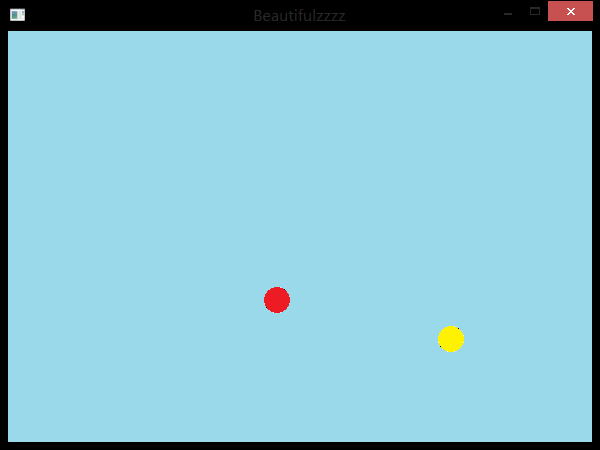
 #include <windows.h>

 // C 运行时头文件

 #include <stdlib.h>

 #include <cstdio>

 #include <malloc.h>

 #include <memory.h>

 #include <tchar.h>

 #include <time.h>

 #include <string>

 #include <cmath>

 // 全局变量:

 HINSTANCE hInst;                                // 当前实例

 HBITMAP bg , ball[];

 HDC hdc,mdc,bufdc;

 HWND hWnd;

 RECT rect;//窗口矩形

 int x[] , y[];//位置

 int vx[] , vy[];//速度

 int ax[] , ay[];//加速度

 int t=;//时间

 // 此代码模块中包含的函数的前向声明:

 ATOM                MyRegisterClass(HINSTANCE hInstance);

 BOOL                InitInstance(HINSTANCE, int);

 LRESULT CALLBACK    WndProc(HWND, UINT, WPARAM, LPARAM);

 INT_PTR CALLBACK    About(HWND, UINT, WPARAM, LPARAM);

 void                MyPaint(HDC hdc);

 int APIENTRY _tWinMain(HINSTANCE hInstance,

                      HINSTANCE hPrevInstance,

                      LPTSTR    lpCmdLine,

                      int       nCmdShow){

     MSG msg;

     MyRegisterClass(hInstance);

     // 执行应用程序初始化:

     if (!InitInstance (hInstance, nCmdShow)){

         return FALSE;

     }

     // 主消息循环:

     while (GetMessage(&msg, NULL, , )){

         TranslateMessage(&msg);

         DispatchMessage(&msg);

     }

     return (int) msg.wParam;

 }

 //  函数: MyRegisterClass()

 //

 //  目的: 注册窗口类。

 ATOM MyRegisterClass(HINSTANCE hInstance){

     WNDCLASSEX wcex;

     wcex.cbSize = sizeof(WNDCLASSEX);

     wcex.style            = CS_HREDRAW | CS_VREDRAW;

     wcex.lpfnWndProc    = WndProc;

     wcex.cbClsExtra        = ;

     wcex.cbWndExtra        = ;

     wcex.hInstance        = hInstance;

     wcex.hIcon            = NULL;

     wcex.hCursor        = LoadCursor(NULL, IDC_ARROW);

     wcex.hbrBackground    = (HBRUSH)(COLOR_WINDOW+);

     wcex.lpszMenuName    = "Beautifulzzzz";

     wcex.lpszClassName    = "Beautifulzzzz";

     wcex.hIconSm        = NULL;

     return RegisterClassEx(&wcex);

 }

 //

 //   函数: InitInstance(HINSTANCE, int)

 //

 //   目的: 保存实例句柄并创建主窗口

 //

 //   注释:

 //

 //        在此函数中,我们在全局变量中保存实例句柄并

 //        创建和显示主程序窗口。

 //        棋盘拼接以及调用InitGame()开始棋局

 BOOL InitInstance(HINSTANCE hInstance, int nCmdShow){

    HBITMAP bmp;

    hInst = hInstance; // 将实例句柄存储在全局变量中

    hWnd = CreateWindow("Beautifulzzzz","Beautifulzzzz", WS_OVERLAPPEDWINDOW,

       CW_USEDEFAULT, , CW_USEDEFAULT, , NULL, NULL, hInstance, NULL);

    if (!hWnd)

    {

       return FALSE;

    }

    MoveWindow(hWnd,,,,,true);

    ShowWindow(hWnd, nCmdShow);

    UpdateWindow(hWnd);

    hdc=GetDC(hWnd);

    mdc=CreateCompatibleDC(hdc);

    bufdc=CreateCompatibleDC(hdc);

    bmp=CreateCompatibleBitmap(hdc,,);

    SelectObject(mdc,bmp);

    bg=(HBITMAP)LoadImageA(NULL,"bg.bmp",IMAGE_BITMAP,,,LR_LOADFROMFILE);

    ball[]=(HBITMAP)LoadImageA(NULL,"ball0.bmp",IMAGE_BITMAP,,,LR_LOADFROMFILE);

    ball[]=(HBITMAP)LoadImageA(NULL,"ball1.bmp",IMAGE_BITMAP,,,LR_LOADFROMFILE);

    GetClientRect(hWnd,&rect);//取得内部窗口区域的大小;

    x[]=;y[]=;vx[]=;vy[]=;ax[]=;ay[]=;

    x[]=;y[]=;vx[]=-;vy[]=-;ax[]=;ay[]=;

    SetTimer(hWnd,,,NULL);

    MyPaint(hdc);

    return TRUE;

 }

 //

 //  函数: WndProc(HWND, UINT, WPARAM, LPARAM)

 //

 //  目的: 处理主窗口的消息。

 //

 //  WM_COMMAND    - 处理应用程序菜单

 //  WM_PAINT    - 绘制主窗口

 //  WM_DESTROY    - 发送退出消息并返回

 //

 LRESULT CALLBACK WndProc(HWND hWnd, UINT message, WPARAM wParam, LPARAM lParam){

     int wmId, wmEvent;

     PAINTSTRUCT ps;

     switch (message){

     case WM_TIMER:

         A:MyPaint(hdc);

         break;

     case WM_PAINT:

         hdc = BeginPaint(hWnd, &ps);

         goto A;// TODO: 在此添加任意绘图代码...

         EndPaint(hWnd, &ps);

         break;

     case WM_DESTROY:

         DeleteDC(mdc);

         DeleteDC(bufdc);

         DeleteObject(bg);

         DeleteObject(ball[]);

         DeleteObject(ball[]);

         KillTimer(hWnd,);

         ReleaseDC(hWnd,hdc);

         PostQuitMessage();

         break;

     default:

         return DefWindowProc(hWnd, message, wParam, lParam);

     }

     return ;

 }

 //MyPaint()

 //1、窗口贴图

 //2、计算小球贴图坐标并判断小球是否碰撞窗口边缘

 void MyPaint(HDC hdc){

     SelectObject(bufdc,bg);

     BitBlt(mdc,,,,,bufdc,,,SRCCOPY);

     SelectObject(bufdc,ball[]);

     BitBlt(mdc,x[],y[],,,bufdc,,,SRCAND);

     BitBlt(mdc,x[],y[],,,bufdc,,,SRCPAINT);

     SelectObject(bufdc,ball[]);

     BitBlt(mdc,x[],y[],,,bufdc,,,SRCAND);

     BitBlt(mdc,x[],y[],,,bufdc,,,SRCPAINT);

     BitBlt(hdc,,,,,mdc,,,SRCCOPY);

     for(int i=;i<;i++){

     //计算x轴方向贴图坐标与速度

         vx[i]+=t*ax[i];

         x[i]+=vx[i];

         if(x[i]<=){

             x[i]=;

             vx[i]=-vx[i];

         }else if(x[i]>=rect.right-){

             x[i]=rect.right-;

             vx[i]=-vx[i];

         }

         //计算y轴方向坐标及速度

         vy[i]+=t*ay[i];

         y[i]+=vy[i];

         if(y[i]<=){

             y[i]=;

             vy[i]=-vy[i];

         }else if(y[i]>=rect.bottom-){

             y[i]=rect.bottom-;

             vy[i]=-vy[i];

         }

     }

     if((x[]-x[])*(x[]-x[])+(y[]-y[])*(y[]-y[])<=){

         vx[]=-vx[];vy[]=-vy[];

         vx[]=-vx[];vy[]=-vy[];

     }

 }
[游戏模版20] Win32 物理引擎 加速运动的更多相关文章
- [游戏模版19] Win32 物理引擎 匀速运动
>_<:Learning the physical engine >_<:resource >_<:code #include <windows.h> ...
- [游戏模版21] Win32 物理引擎 能量守恒
>_<:Only a little change in the function of MyPaint(...),besides the initial value have some c ...
- [游戏模版2] Win32最小框架
>_<:Just the minimum Win32 frame don't have any other special function. //{{NO_DEPENDENCIES}} ...
- [游戏模版18] Win32 五子棋
>_<:Learning its AI logic. >_<:resource >_<:code: #include <windows.h> // C ...
- 【Unity3D】射箭打靶游戏(简单工厂+物理引擎编程)
打靶游戏: 1.靶对象为 5 环,按环计分: 2.箭对象,射中后要插在靶上: 3.游戏仅一轮,无限 trials: 增强要求: 添加一个风向和强度标志,提高难度 游戏成品图: U ...
- [游戏模版3] Win32 画笔 画刷 图形
>_<:introduce the functions of define\create\use pen and brush to draw all kinds of line and s ...
- [游戏模版4] Win32 显示鼠标位置
>_<:use MOUSE_MOVE message refresh the position information. >_<:use LOWORD(lParam) get ...
- [游戏模版5] Win32 折线 弧线
>_<:first build some points put in poly1[],poly2[] and poly3[] in the function of InitInstance ...
- [游戏模版6] Win32 graph
>_<:there in the MyPaint(...) function respectively use Ellipse(...) draw ellipse, use RoundRe ...
随机推荐
- 为什么V8引擎这么快?
目录(?)[-] 高速引擎的需求 语言本身的问题 JIT编译 JIT Compile 垃圾回收管理 内嵌缓存inline cache 隐藏类 内嵌缓存Inline Cache 机器语言的特性 附录熟悉 ...
- POJ1201 区间
题目大意: 给定n个整数区间[ai,bi]和n个整数ci,求一个最小集合Z,满足|Z∩[ai,bi]|>=ci(Z里边在闭区间[ai,bi]的个数不小于ci). 多组数据: n(1<=n& ...
- ZT “樱花小萝莉”走红网络 网友:好想生个女儿
“樱花小萝莉”走红网络 网友:好想生个女儿 投递人 itwriter 发布于 2014-04-02 17:39 评论(3) 有717人阅读 原文链接 [收藏] « » 近日,一组被网友亲切地称呼 ...
- C#动态执行字符串(动态创建代码)
在编写C#程序的时候,有时我们需要动态生成一些代码并执行.然而C#不像JavaScript有一个Eval函数,可以动态的执行代码.所有这些功能都要我们自己去完成.如下是实例. 动态创建代码: usin ...
- 高频交易策略之Penny Jump[z]
高频交易策略之Penny Jump 今天假设有一个笨笨的大型机构投资人(共同基金,银行,退休基金....),他想要买进一只股票,但又不想挂市价买进,所以就在市场里面挂了一张要买进的大单.这时候所有市场 ...
- LoadRunner录制不弹出IE浏览器,event=0
系统环境:win7,安装了IE.360.firefox.搜狗高速浏览器: 起初刚装完loadrunner11的时候,选了IE进行录制,就是不能打开IE,算了,那就用loadrunner默认的设置,居然 ...
- Spring 4 官方文档学习(十一)Web MVC 框架之异常处理
1.HandlerExceptionResolver Spring HandlerExceptionResolver的实现们会处理controller执行过程中发送的unexpected except ...
- each函数
- caffe 安装在win 7 vs2015 无gpu的安装方式-是无法安装 的
网上多数是vs2012或者vs2013上安装方式,带NA-显卡的需要安装CUDA7.5,安装cuDNN4,cuDNN. 一 :下载caffe源码(microsoft版) 下载地址:https://gi ...
- 20145225《Java程序设计》 第4周学习总结
20145225<Java程序设计> 第4周学习总结 教材学习内容总结 第六章 继承与多态 6.1继承 继承共同行为:存在着重复,可把相同的程序代码提升(pull up)为父类.exten ...