
OpenXml入门----给Word文档添加表格
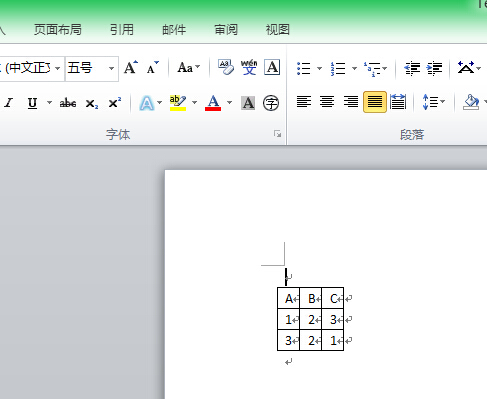
下面将展示如何使用Openxm向Word添加表格. 代码中表头和数据我用的同一个TableRow来添加,其实可以通过TableHeader来,其实都一样。后面教程我会给出如何设置单元格样式。表头那一行可以自己通过设置样式来控制
代码如下:
using System;

using System.Collections.Generic;

using System.Linq;

using System.Text;

using System.Threading.Tasks;

using DocumentFormat.OpenXml;

using DocumentFormat.OpenXml.Packaging;

using DocumentFormat.OpenXml.Wordprocessing;

namespace AddTableToWord

{

    public class Program

    {

        public static void Main(string[] args)

        {

            List<string[]> lstData = new List<string[]>() { new string[] { "", "", "" }, new string[] { "", "", "" } };

            string[] headerArray = new string[] { "A", "B", "C" };

            AddTable("Test.docx", lstData, headerArray);

        }

        /// <summary>

        /// word里面添加table

        /// </summary>

        /// <param name="wordPath">word文件路径</param>

        /// <param name="lstData">数据</param>

        /// <param name="headerArray">表头</param>

        public static void AddTable(string wordPath, List<string[]> lstData, string[] headerArray)

        {

            using (WordprocessingDocument doc = WordprocessingDocument.Open(wordPath, true))

            {

                TableGrid grid = new TableGrid();

                int maxColumnNum = lstData.Select(x => x.Count()).Max();

                for (int index = ; index < maxColumnNum; index++)

                {

                    grid.Append(new TableGrid());

                }

                // 设置表格边框

                TableProperties tblProp = new TableProperties(

                new TableBorders(

                new TopBorder() { Val = new EnumValue<BorderValues>(BorderValues.Single), Size =  },

                new BottomBorder() { Val = new EnumValue<BorderValues>(BorderValues.Single), Size =  },

                new LeftBorder() { Val = new EnumValue<BorderValues>(BorderValues.Single), Size =  },

                new RightBorder() { Val = new EnumValue<BorderValues>(BorderValues.Single), Size =  },

                new InsideHorizontalBorder() { Val = new EnumValue<BorderValues>(BorderValues.Single), Size =  },

                new InsideVerticalBorder() { Val = new EnumValue<BorderValues>(BorderValues.Single), Size =  }

                )

                );

                Table table = new Table();

                table.Append(tblProp);

                // 添加表头. 其实有TableHeader对象的,小弟用不来.

                TableRow headerRow = new TableRow();

                foreach (string headerStr in headerArray)

                {

                    TableCell cell = new TableCell();

                    cell.Append(new Paragraph(new Run(new Text(headerStr))));

                    headerRow.Append(cell);

                }

                table.Append(headerRow);

                // 添加数据

                foreach (string[] rowArray in lstData)

                {

                    TableRow row = new TableRow();

                    foreach (string strCell in rowArray)

                    {

                        TableCell cell = new TableCell();

                        cell.Append(new Paragraph(new Run(new Text(strCell))));

                        row.Append(cell);

                    }

                    table.Append(row);

                }

                doc.MainDocumentPart.Document.Body.Append(new Paragraph(new Run(table)));

            }

        }

    }

}
执行呈现结果如下:
OpenXml入门----给Word文档添加表格的更多相关文章
- OpenXml入门----给Word文档添加文字
使用OpenXml给word文档添加文字,每个模块都有自己对于的属性以及内容,要设置样式就先声明属性对象,将样式Append到属性里面,再将属性append到模块里面,那么模块里面的内容就具备该样式了 ...
- C# 给Word文档添加内容控件
C# 给Word文档添加内容控件 在MS Word中,我们可以通过内容控件来向word文档中插入预先定义好的模块,指定模块的内容格式(如图片.日期.列表或格式化的文本等),从而创建一个结构化的word ...
- 向Docx4j生成的word文档添加图片和布局--第一部分
原文标题:Adding images and layout to your Docx4j-generated word documents, part 1 原文链接:http://blog.iprof ...
- Java 如何给Word文档添加多行文字水印
前言 我在以往的文章中曾介绍过如何给Word文档添加文本水印和图片水印,及怎样删除文档中的水印.关于文本水印,之前那篇教程里主要指的是单行字体的水印,而在操作Word文档时,有时也会碰到需要添加多行文 ...
- OpenXml SDK 2.0 创建Word文档 添加页、段落、页眉和页脚
using (WordprocessingDocument objWordDocument = WordprocessingDocument.Create(@"C:\********.doc ...
- C# 操作Word 文档——添加Word页眉、页脚和页码
在Word文档中,我们可以通过添加页眉.页脚的方式来丰富文档内容.添加页眉.页脚时,可以添加时间.日期.文档标题,文档引用信息.页码.内容解释.图片/LOGO等多种图文信息.同时也可根据需要调整文字或 ...
- .NET 动态向Word文档添加数据
本文章主要用于在网页上填写数据动态填入Word模板中使用 首先要准备一个Word模板,然后在需要插入数据的位置插入书签,这样可以确定在网页上填入的数据可以插入到Word文档相应的位置. 在项目中要声明 ...
- C#/VB.NET 给Word文档添加/撤销书签
在现代办公环境中,阅读或者编辑较长篇幅的Word文档时,想要在文档中某一处或者几处留下标记,方便日后查找.修改时,需要在相对应的文档位置插入书签.那对于开发者而言,在C#或者VB.NET语言环境中,如 ...
- 将word文档A表格中的内容拷贝到word文档B表格中
Function IsFileExists(ByVal strFileName As String) As Boolean ) <> Empty Then IsFileExists = T ...
随机推荐
- JS获取屏幕高度
主要使用了document对象关于窗口的一些属性,这些属性的主要功能和用法如下. 要 得到窗口的尺寸,对于不同的浏览器,需要使用不同的属性和方法:若要检测窗口的真实尺寸,在netscape下需要使用w ...
- C# 快速反射 IL
public class FastInvoke { public delegate object FastInvokeHandler(object target, object[] paramters ...
- 205 Isomorphic Strings
Given two strings s and t, determine if they are isomorphic. Two strings are isomorphic if the chara ...
- 每个软件都自己把操作系统的host配置项加到内存中供频繁调用
nginx的转发,http_pass 转发到一个域名passport.ab.cn 那具体是到哪台机器上. 其实可以通过/etc/hosts文件来配置的. 可以理解,这个hosts文件是操作系统级别的, ...
- 【iOS】Quartz2D截屏
一.简单说明 在程序开发中,有时候需要截取屏幕上的某一块内容,比如捕鱼达人游戏.如图: 完成截屏功能的核心代码:- (void)renderInContext:(CGContextRef)ctx;调用 ...
- sublimeCodeIntel 的配置
在项目的根目录目录下建立.codeintel/config 但是在windows 需要进入dos 环境下建立.以点开头的文件夹和文件.资源管理器不允许创建点开头的文件或文件夹,但在命令提示符下是可以的 ...
- Head First Design Patterns学习笔记-观察者模式
认识观察者模式 首先来看看报纸订阅的过程 1.报社的业务就是出版报纸 2.向某家报社订阅报纸,只要他们有新报纸出版,就会送过来,只要你是他们的订户 3.当你不想再看报纸的时候,取消订阅,他们就不会再送 ...
- jQuery owlcarousel 旋转木马
owlcarousel是一款猫头鹰旋转木马插件.OwlCarousel优势兼容所有浏览器支持响应式支持 CSS3 过度支持触摸事件支持 JSON 及自定义 JSON 格式支持进度条支持自定义事件支持延 ...
- sqlserver 存储过程 try catch TRANSACTION (转)
CREATE PROCEDURE YourProcedure ASBEGIN SET NOCOUNT ON; BEGIN TRY---------------------开始捕捉异常 ...
- 浅谈ES6中的Proxy
Proxy是一个很有趣的对象,它能够修改某些操作的默认行为,等同于在语言层面做出修改,属于一种‘元编程’,即对编程语言进行编程. Proxy其实很好理解,就是在目标对象之前架设一层拦截,外界的访问都得 ...