
iOS Application Life Cycle 应用程序生命周期
应用程序的状态
IOS的应用程序一共有5种状态。
- Not running(未运行):程序未启动
- Inactive(未激活):其他两个状态切换时出现的短暂状态。唯一在此状态停留时间比较长的情况是:当用户锁屏时?或者系统提示用户去响应Alert窗口(如来电、信息)时
- Active(激活):在屏幕上显示的正常运行状态,该状态下可以接收用户输入并更新显示
- Backgroud(后台):程序在后台且能执行代码。用户按下Home键不久后进入此状态(先进入了Inactive状态,再进入Background状态),然后会迅速进入挂起状态(Suspended)。有的程序经过特殊的请求后可以长期处于Backgroud状态
- Suspended(挂起):程序在后台不能执行代码。普通程序在进入Background状态不久后就会进入此状态。当挂起时,程序还是停留在内存中的,当系统内存低时,系统就把挂起的程序清除掉,为前台程序提供更多的内存
这个图非常重要,每一个箭头都需要细细研读。
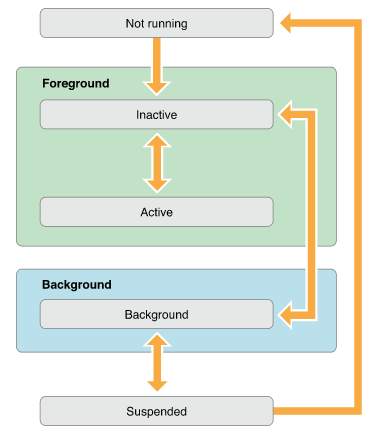
关于Active和Inactive的切换:
应用程序在前台时有2种状态:Active和Inactive。大多数情况下,Inactive状态只是其他两个状态切换时出现的短暂状态(不是任意两个状态之间的切换都会进入Inactive,见图),如打开应用,它会从Not Running先进入Inactive再进入Active;如前后台应用切换时,Inactive会在Active和Background之间短暂出现。
但是也有其他情况,Active和Inactive可以在前台运行时进行切换,比如系统弹出Alert,此时应用会从Active切换到Inactive,直到用户确认再返回Actvie;再如用户拉下通知页,也会发生Active和Inactive的切换;还有来电但拒接、双击Home键但返回原应用等都不进入Background,而只是在Active和Inactive切换。
如图,是否可以这样说,要想进入Active必须先进入Inactive。
入口函数
int main(int argc, char * argv[])

{

    @autoreleasepool {

        return UIApplicationMain(argc, argv, nil, NSStringFromClass([XYZAppDelegate class]));

    }

}
// If nil is specified for principalClassName, the value for NSPrincipalClass from the Info.plist is used. If there is no

// NSPrincipalClass key specified, the UIApplication class is used. The delegate class will be instantiated using init.

UIKIT_EXTERN int UIApplicationMain(int argc, char *argv[], NSString *principalClassName, NSString *delegateClassName);
argc和argv是为了与C语言保持一致,在这没用到,不详述。
后面两个参数为principalClassName(主要类名)和delegateClassName(委托类名)。
如果principalClassName是nil,那么它的值将从Info.plist中获取,如果Info.plist中没有,则默认为UIApplication。principalClass这个类除了管理整个程序的生命周期之外什么都不做,它只赋值监听事件然后交给delegateClass去做。
而delegateClass将在工程新建时实例化一个对象。
NSStringFromClass([XYZAppDelegate class])
相当于@"XYZAppDelegate"。
AppDelegate类六个方法
注意代码中的官方注释。
- (BOOL)application:(UIApplication *)application didFinishLaunchingWithOptions:(NSDictionary *)launchOptions

{

    // Override point for customization after application launch.

    NSLog(@"didFinishLaunchingWithOptions");

    return YES;

}

- (void)applicationWillResignActive:(UIApplication *)application

{

    // Sent when the application is about to move from active to inactive state. This can occur for certain types of temporary interruptions (such as an incoming phone call or SMS message) or when the user quits the application and it begins the transition to the background state.

    // Use this method to pause ongoing tasks, disable timers, and throttle down OpenGL ES frame rates. Games should use this method to pause the game.

    NSLog(@"WillResignActive");

}

- (void)applicationDidEnterBackground:(UIApplication *)application

{

    // Use this method to release shared resources, save user data, invalidate timers, and store enough application state information to restore your application to its current state in case it is terminated later.

    // If your application supports background execution, this method is called instead of applicationWillTerminate: when the user quits.

    NSLog(@"DidEnterBackground");

}

- (void)applicationWillEnterForeground:(UIApplication *)application

{

    // Called as part of the transition from the background to the inactive state; here you can undo many of the changes made on entering the background.

    NSLog(@"WillEnterForeground");

}

- (void)applicationDidBecomeActive:(UIApplication *)application

{

    // Restart any tasks that were paused (or not yet started) while the application was inactive. If the application was previously in the background, optionally refresh the user interface.

    NSLog(@"DidBecomeActive");

}

- (void)applicationWillTerminate:(UIApplication *)application

{

    // Called when the application is about to terminate. Save data if appropriate. See also applicationDidEnterBackground:.

    NSLog(@"WillTerminate");

}
启动程序
2014-07-28 15:22:39.883 LifeCycle[3024:a0b] didFinishLaunchingWithOptions
2014-07-28 15:22:39.887 LifeCycle[3024:a0b] DidBecomeActive
按下Home键
2014-07-28 15:22:43.130 LifeCycle[3024:a0b] WillResignActive
2014-07-28 15:22:43.131 LifeCycle[3024:a0b] DidEnterBackground
重新点击程序
2014-07-28 15:22:44.380 LifeCycle[3024:a0b] WillEnterForeground
2014-07-28 15:22:44.380 LifeCycle[3024:a0b] DidBecomeActive
注意:
- 启动程序并没有调用WillEnterForeground这个方法。
- 并不是所有状态切换都有相应的方法来通知,比如从Background到Suspended。所以当你按下Home键的时候,我们只知道调用了WillResignActive和DidEnterBackground方法,但其实应用程序会迅速从Background进入Suspended。
1.application:didFinishLaunchingWithOptions:
程序首次已经完成启动时执行,若直接启动,launchOptions中没有数据;否则,launchOptions将包含对应方式的内容(比如从微信中启动节奏大师--)。
2.applicationWillResignActive(将进入后台)
程序将要失去Active状态时调用,比如按下Home键或有电话信息进来。对应applicationWillEnterForeground(将进入前台),这个方法用来
- 暂停正在执行的任务;
- 禁止计时器;
- 减少OpenGL ES帧率;
- 若为游戏应暂停游戏;
总结为一个字:停!
3.applicationDidEnterBackground(已经进入后台)
程序已经进入后台时调用,对应applicationDidBecomeActive(已经变成前台),这个方法用来
- 释放共享资源;
- 保存用户数据(写到硬盘);
- 作废计时器;
- 保存足够的程序状态以便下次恢复;
总结为4个字:释放、保存!
4.applicationWillEnterForeground(将进入前台)
程序即将进去前台时调用,对应applicationWillResignActive(将进入后台)。这个方法用来撤销applicationWillResignActive中做的改变。
5.applicationDidBecomeActive(已经进入前台)
程序已经变为Active(前台)时调用。对应applicationDidEnterBackground(已经进入后台)。若程序之前在后台,最后在此方法内刷新用户界面。
6.applicationWillTerminate
程序即将退出时调用。记得保存数据,如applicationDidEnterBackground方法一样。
如果你的类是AppDelegate类(声明遵循UIApplicationDelegate协议),那么可以实现上面的6个方法,当App状态改变的时候相应的方法会被调用;如果你的类不是AppDelegate类,那么该类如何知道App的各种状态变化,以及如何使用这些函数呢?答案是使用NotificationCenter来通知。
[[NSNotificationCenter defaultCenter] addObserver:self selector:@selector(applicationWillResignActive) name:UIApplicationWillResignActiveNotification object:[UIApplication sharedApplication]];
然后实现applicationWillResignActive就行了
- (void)applicationWillResignActive        //自定义的函数

{

    NSLog(@"%@", NSStringFromSelector(_cmd));

}
参考文章
iOS Application Life Cycle 应用程序生命周期的更多相关文章
- 图解ios程序生命周期
图解ios程序生命周期 应用程序启动后状态有Active.Inactive.Background.Suspended.Not running这5种状态,几种状态的转换见下图: 在AppDelegate ...
- (转)iOS应用程序生命周期(前后台切换,应用的各种状态)详解
原文:http://blog.csdn.net/totogo2010/article/details/8048652 iOS应用程序生命周期(前后台切换,应用的各种状态)详解 分类: ...
- IOS应用程序生命周期&启动周期函数
—程序的生命周期 a.程序的生命周期是指应用程序启动到应用程序结束整个阶段的全过程 b.每一个IOS应用程序都包含一个UIApplication对象,IOS系统通过该U ...
- 转:iOS应用程序生命周期(前后台切换,应用的各种状态)详解
iOS应用程序生命周期(前后台切换,应用的各种状态)详解 分类: iOS开发进阶2012-10-08 15:35 42691人阅读 评论(30) 收藏 举报 iosapplication任务anima ...
- iOS学习笔记(四)——iOS应用程序生命周期
开发应用程序都要了解其生命周期,开始接触android时也是从应用程序生命周期开始的,android的应用程序生命周期更多是其组件的生命周期,例如Activity.Service.今天我们接触一下iO ...
- 【iOS开发-72】设置状态栏的两种方式、程序生命周期以及更好地理解几大类(对象)之间的关系
(1)设置状态栏的2种方式 --第一种方式就是我们在控制器中设置,系统默认就是交给视图控制器去管理的,这样不同视图控制器能够自己定义不同的状态栏例如以下: -(BOOL)prefersStatusBa ...
- IOS的工程目录结构和生命周期
IOS的工程目录结构和生命周期 ·simple table文件夹:工程相关源代码和配置文件 BIDAppDelegate : 委托的声明和实现 BIDViewController: 视图控 ...
- asp.net应用程序生命周期和asp.net网页的生命周期
一.asp.net应用程序生命周期 asp.net应用程序生命周期以浏览器向web服务器(比如IIS服务器)发送请求为起点,先后经历web服务器下的ISAPI(Internet Server Appl ...
- asp.net应用程序生命周期
asp.net应用程序生命周期(流程文字描述版) 请求——>IIS——>ISAPI映射——>交给asp.net(即为IIS的扩展)——>通知Application类创建一个应用 ...
随机推荐
- C语言 常用的时间函数
//时间函数的使用 #define _CRT_SECURE_NO_WARNINGS #include<stdio.h> #include<stdlib.h> #include& ...
- java中从1970-1-1到当前时间之间的毫秒数转换为oracle date
java中System.currentTimeMillis()取到的是从1970-01-01 00:00:00.000到当前时间的毫秒数,一个long类型的值. 现在oracle数据库中某表中存取的是 ...
- PowerDesigner16建表在SQL SERVER 2008报 对象名 'sysproperties' 无效。
http://blog.itpub.net/30150152/viewspace-1454979/
- Activiti系列:如何让Activiti-Explorer使用sql server数据库
从官网下载的Activiti-explorer的war文件内部默认是使用h2内存数据库的,如果想改用其他的数据库来做持久化,比如sql server,需要做如下配置. 1)修改db.propertie ...
- 第10章 系统级I/O
第10章 系统级I/O 10.1 Unix I/O 一个Unix文件就是一个m个字节的序列:B0,B1,…,BK,…,Bm-1 Unix I/O:一种将设备优雅地映射为文件的方式,允许Unix内核引出 ...
- 优秀技能经验及对java学习展望
你有什么技能比身边人强 我觉得我并没有什么技能能够比身边90%的人强,我认为我是一个平庸的人,和身边的人应该是互有长短,互相帮助的. 关于优秀技能的成功经验 我虽然没有一个强过身边90%的人的技能,但 ...
- Win7下手动卸载oracle 11G
由于安装过程中遇到的之前提到的那个问题,http://www.cnblogs.com/shenliang123/p/3141886.html 知道解决方法后,也只能将oracle重新卸载后再进行安装 ...
- 《TCP/IP详解卷1:协议》第17、18章 TCP:传输控制协议(1)-读书笔记
章节回顾: <TCP/IP详解卷1:协议>第1章 概述-读书笔记 <TCP/IP详解卷1:协议>第2章 链路层-读书笔记 <TCP/IP详解卷1:协议>第3章 IP ...
- javascript继承(七)—用继承的方式实现照片墙功能
照片墙DEMO下载 注意:图片有四种类型:1可放大:2可拖动:3既可放大也可拖动:4都不行.由于每个图片的构造函数不同而不同(目前在火狐上调试的,其它的浏览器可能不行,请见谅,主要讲继承的思想.以后会 ...
- RESTful WebService入门(转)
原创作品,允许转载,转载时请务必以超链接形式标明文章 原始出处 .作者信息和本声明.否则将追究法律责任.http://lavasoft.blog.51cto.com/62575/229206 REST ...