
Sping mvc 环境下使用kaptcha 生成验证码
一、kaptcha 的简介
kaptcha 是一个非常实用的验证码生成工具。有了它,你可以生成各种样式的验证码,因为它是可配置的。kaptcha工作的原理是调用 com.google.code.kaptcha.servlet.KaptchaServlet,生成一个图片。
同时将生成的验证码字符串放到 HttpSession中。
使用kaptcha可以方便的配置:
- 验证码的字体
- 验证码字体的大小
- 验证码字体的字体颜色
- 验证码内容的范围(数字,字母,中文汉字!)
- 验证码图片的大小,边框,边框粗细,边框颜色
- 验证码的干扰线(可以自己继承com.google.code.kaptcha.NoiseProducer写一个自定义的干扰线)
- 验证码的样式(鱼眼样式、3D、普通模糊……当然也可以继承com.google.code.kaptcha.GimpyEngine自定义样式)
二、生成验证码的案例
下面介绍一下用法:
1. 下载该依赖包
方式一:首先去官网下载jar:http://code.google.com/p/kaptcha/
建立一个web项目,导入 kaptcha-2.3.jar 到环境变量中。
方式二:网盘下载jar包: http://yunpan.cn/cdjzkrjKgQ7eD 访问密码 754f
没有翻墙的同学可以通过该路径下载。
2. 新建一个java web项目 SpringKaptcha ,并配置好Spring的环境。
可以参考:
基于XML配置的Spring MVC 简单的HelloWorld实例应用
基于注解配置的Spring MVC 简单的HelloWorld实例应用
spring-mvc.xml 配置文件:
<?xml version="1.0" encoding="UTF-8"?>

<beans xmlns="http://www.springframework.org/schema/beans" xmlns:xsi="http://www.w3.org/2001/XMLSchema-instance"

    xmlns:context="http://www.springframework.org/schema/context" xmlns:jdbc="http://www.springframework.org/schema/jdbc"

    xmlns:jee="http://www.springframework.org/schema/jee" xmlns:tx="http://www.springframework.org/schema/tx"

    xmlns:jpa="http://www.springframework.org/schema/data/jpa" xmlns:mvc="http://www.springframework.org/schema/mvc"

    xsi:schemaLocation="

        http://www.springframework.org/schema/beans http://www.springframework.org/schema/beans/spring-beans-3.2.xsd

        http://www.springframework.org/schema/context http://www.springframework.org/schema/context/spring-context-3.2.xsd

        http://www.springframework.org/schema/jdbc http://www.springframework.org/schema/jdbc/spring-jdbc-3.2.xsd

        http://www.springframework.org/schema/jee http://www.springframework.org/schema/jee/spring-jee-3.2.xsd

        http://www.springframework.org/schema/tx http://www.springframework.org/schema/tx/spring-tx-3.2.xsd

        http://www.springframework.org/schema/data/jpa http://www.springframework.org/schema/data/jpa/spring-jpa-1.3.xsd

        http://www.springframework.org/schema/mvc http://www.springframework.org/schema/mvc/spring-mvc-3.2.xsd">

    <context:component-scan base-package="com.souvc.controller"/>

    <mvc:annotation-driven/>

    <!-- 定义视图解析器ViewResolver -->

    <bean id="viewResolver"

        class="org.springframework.web.servlet.view.InternalResourceViewResolver">

        <property name="prefix" value="/WEB-INF/jsp/" />

        <property name="suffix" value=".jsp" />

    </bean>

</beans>
web.xml 配置文件:
<?xml version="1.0" encoding="UTF-8"?>

<web-app version="2.5" xmlns="http://java.sun.com/xml/ns/javaee"

    xmlns:xsi="http://www.w3.org/2001/XMLSchema-instance"

    xsi:schemaLocation="http://java.sun.com/xml/ns/javaee

    http://java.sun.com/xml/ns/javaee/web-app_2_5.xsd">

    <servlet>

        <servlet-name>springmvc</servlet-name>

        <servlet-class>

            org.springframework.web.servlet.DispatcherServlet

        </servlet-class>

        <!-- 指定Spring的配置文件 -->

        <init-param>

            <param-name>contextConfigLocation</param-name>

            <param-value>classpath:spring-mvc.xml</param-value>

        </init-param>

        <load-on-startup>1</load-on-startup>

    </servlet>

    <servlet-mapping>

        <servlet-name>springmvc</servlet-name>

        <url-pattern>*.form</url-pattern>

    </servlet-mapping>

    <filter>

        <filter-name>encodingFilter</filter-name>

        <filter-class>

            org.springframework.web.filter.CharacterEncodingFilter

        </filter-class>

        <init-param>

            <param-name>encoding</param-name>

            <param-value>UTF-8</param-value>

        </init-param>

        <init-param>

            <param-name>forceEncoding</param-name>

            <param-value>true</param-value>

        </init-param>

    </filter>

    <filter-mapping>

        <filter-name>encodingFilter</filter-name>

        <url-pattern>/*</url-pattern>

    </filter-mapping>

    <welcome-file-list>

        <welcome-file>index.jsp</welcome-file>

    </welcome-file-list>

</web-app>
3. 我们专注于验证码的生成工作。
(1)在spring-mvc.xml 中添加以下的配置。
<!-- 页面生成随机验证码 -->

    <bean id="captchaProducer" class="com.google.code.kaptcha.impl.DefaultKaptcha">

        <property name="config">

            <bean class="com.google.code.kaptcha.util.Config">

                <constructor-arg>

                    <props>

                        <prop key="kaptcha.border">no</prop>

                        <prop key="kaptcha.border.color">105,179,90</prop>

                        <prop key="kaptcha.textproducer.font.color">red</prop>

                        <prop key="kaptcha.image.width">250</prop>

                        <prop key="kaptcha.textproducer.font.size">80</prop>

                        <prop key="kaptcha.image.height">90</prop>

                        <prop key="kaptcha.session.key">code</prop>

                        <prop key="kaptcha.textproducer.char.length">4</prop>

                        <prop key="kaptcha.textproducer.font.names">宋体,楷体,微软雅黑</prop>

                    </props>

                </constructor-arg>

            </bean>

        </property>

    </bean>
(2)添加 生成验证码的 controller。
package com.souvc.app.base.captcha;

import java.awt.image.BufferedImage;

import javax.imageio.ImageIO;

import javax.servlet.ServletOutputStream;

import javax.servlet.http.HttpServletRequest;

import javax.servlet.http.HttpServletResponse;

import javax.servlet.http.HttpSession;

import org.springframework.beans.factory.annotation.Autowired;

import org.springframework.stereotype.Controller;

import org.springframework.web.bind.annotation.RequestMapping;

import org.springframework.web.servlet.ModelAndView;

import com.google.code.kaptcha.Constants;

import com.google.code.kaptcha.Producer;

/**

 * 防止Captcha机器人登陆

 * @author liuwang

 *

 */

@Controller

@RequestMapping("/kaptcha/*")

public class CaptchaController {

    @Autowired

    private Producer captchaProducer = null;

    @RequestMapping

    public ModelAndView getKaptchaImage(HttpServletRequest request, HttpServletResponse response) throws Exception {

        HttpSession session = request.getSession();

        String code = (String)session.getAttribute(Constants.KAPTCHA_SESSION_KEY);

        System.out.println("******************验证码是: " + code + "******************");

        response.setDateHeader("Expires", 0);

        // Set standard HTTP/1.1 no-cache headers.

        response.setHeader("Cache-Control", "no-store, no-cache, must-revalidate");

        // Set IE extended HTTP/1.1 no-cache headers (use addHeader).

        response.addHeader("Cache-Control", "post-check=0, pre-check=0");

        // Set standard HTTP/1.0 no-cache header.

        response.setHeader("Pragma", "no-cache");

        // return a jpeg

        response.setContentType("image/jpeg");

        // create the text for the image

        String capText = captchaProducer.createText();

        // store the text in the session

        session.setAttribute(Constants.KAPTCHA_SESSION_KEY, capText);

        // create the image with the text

        BufferedImage bi = captchaProducer.createImage(capText);

        ServletOutputStream out = response.getOutputStream();

        // write the data out

        ImageIO.write(bi, "jpg", out);

        try {

            out.flush();

        } finally {

            out.close();

        }

        return null;

    }

}
(3)jsp代码
<%@ page language="java" contentType="text/html; charset=UTF-8"

    pageEncoding="UTF-8"%>

<!DOCTYPE html PUBLIC "-//W3C//DTD HTML 4.01 Transitional//EN" "http://www.w3.org/TR/html4/loose.dtd">

<html>

<head>

<meta http-equiv="Content-Type" content="text/html; charset=UTF-8">

<script type="text/javascript" src="js/jquery.js"></script>

<script type="text/javascript" src="js/functions.js"></script>

<title>测试页面</title>

<script type="text/javascript">

$(function(){

    $('#kaptchaImage').click(function () {//生成验证码

        $(this).hide().attr('src', './kaptcha/getKaptchaImage.do?' + Math.floor(Math.random()*100) ).fadeIn();

        event.cancelBubble=true;

    });

});

window.onbeforeunload = function(){

    //关闭窗口时自动退出

    if(event.clientX>360&&event.clientY<0||event.altKey){

        alert(parent.document.location);

    }

};

function changeCode() {

    $('#kaptchaImage').hide().attr('src', './kaptcha/getKaptchaImage.do?' + Math.floor(Math.random()*100) ).fadeIn();

    event.cancelBubble=true;

}

</script>

</head>

<body>

<div class="chknumber">

      <label>验证码:

      <input name="kaptcha" type="text" id="kaptcha" maxlength="4" class="chknumber_input" />

      </label>

      <br />

      <img src="./kaptcha/getKaptchaImage.do" id="kaptchaImage"  style="margin-bottom: -3px"/>

      <a href="#" onclick="changeCode()">看不清?换一张</a>

</div>

</body>

</html>
简洁jsp 版本:
 <div class="lr-formWrap">

                        <input type="text" class="lr-input" placeholder="请输入图片验证码" style="width:145px;padding-left:15px" id="imageCode" name="imageCode" value="">

                        <div class="fn-right">

                           <img id="randImage" border="0" align="absmiddle" src="${basePath }/captcha-image" name="randImage"  alt="验证码"  width="115px" height="39px"/>

                        </div>

                         <p class="lr-tip" id="imageCode-lr-tip"></p>

                    </div>
简洁js版本 :
//生成验证码

            $('#randImage').click(function () {

                $(this).hide().attr('src', '${basePath}/captcha-image?' + Math.floor(Math.random()*100) ).fadeIn();

            });

            //刷新后,生成验证码

            $('#refreshCode').click(function () {

                $('#randImage').hide().attr('src', '${basePath}/captcha-image?' + Math.floor(Math.random()*100) ).fadeIn();

            });
温馨提示:
获取验证码的关键语句,如下:
String code =(String)session.getAttribute(com.google.code.kaptcha.Constants.KAPTCHA_SESSION_KEY);
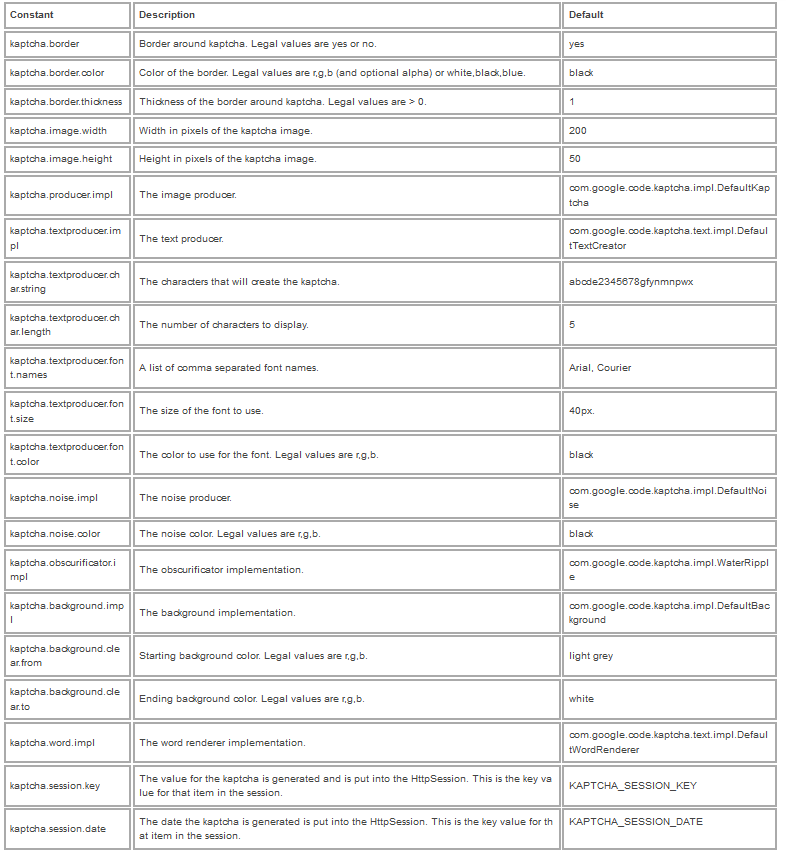
(4) kaptcha可配置项
kaptcha.border  是否有边框  默认为true  我们可以自己设置yes,no

kaptcha.border.color   边框颜色   默认为Color.BLACK

kaptcha.border.thickness  边框粗细度  默认为1

kaptcha.producer.impl   验证码生成器  默认为DefaultKaptcha

kaptcha.textproducer.impl   验证码文本生成器  默认为DefaultTextCreator

kaptcha.textproducer.char.string   验证码文本字符内容范围  默认为abcde2345678gfynmnpwx

kaptcha.textproducer.char.length   验证码文本字符长度  默认为5

kaptcha.textproducer.font.names    验证码文本字体样式  默认为new Font("Arial", 1, fontSize), new Font("Courier", 1, fontSize)

kaptcha.textproducer.font.size   验证码文本字符大小  默认为40

kaptcha.textproducer.font.color  验证码文本字符颜色  默认为Color.BLACK

kaptcha.textproducer.char.space  验证码文本字符间距  默认为2

kaptcha.noise.impl    验证码噪点生成对象  默认为DefaultNoise

kaptcha.noise.color   验证码噪点颜色   默认为Color.BLACK

kaptcha.obscurificator.impl   验证码样式引擎  默认为WaterRipple

kaptcha.word.impl   验证码文本字符渲染   默认为DefaultWordRenderer

kaptcha.background.impl   验证码背景生成器   默认为DefaultBackground

kaptcha.background.clear.from   验证码背景颜色渐进   默认为Color.LIGHT_GRAY

kaptcha.background.clear.to   验证码背景颜色渐进   默认为Color.WHITE

kaptcha.image.width   验证码图片宽度  默认为200

kaptcha.image.height  验证码图片高度  默认为50
(6)验证验证码是否正确的方法:
@RequestMapping(value = "/checkRandCode", method = RequestMethod.GET)

    public void checkRandCode(HttpServletRequest request,

            HttpServletResponse response) {

        Map<String, Object> map = new HashMap<String, Object>();

        try {

            String randCode = request.getParameter("randCode");

            logger.info("randCode: " +randCode);

            String status = "0";

            String code = (String)request.getSession().getAttribute(com.google.code.kaptcha.Constants.KAPTCHA_SESSION_KEY);

            if(randCode.toLowerCase().equals(code.toLowerCase()))status="1";

            map.put("status", status);

            map.put("description", "");

            String data = JSONObject.fromObject(map).toString();

            logger.info("返回给页面的数据为: " + data);

            response.getWriter().print(data);

            response.getWriter().flush();

            response.getWriter().close();

        } catch (Exception ex) {

            logger.error(ex.getMessage(), ex);

        }
(7) 默认值
Sping mvc 环境下使用kaptcha 生成验证码的更多相关文章
- Spring mvc框架下使用kaptcha生成验证码
1.下载jar包并导入. kaptcha-2.3.2.jar 2.spring 配置文件 applicationContext.xml. <bean id="captchaProduc ...
- Spring MVC 使用kaptcha生成验证码
Spring MVC 使用kaptcha生成验证码 1.下载kaptcha-2.3.2.jar(或直接通过该文章附件下载) http://code.google.com/p/kaptcha/downl ...
- 使用kaptcha生成验证码
原文:http://www.cnblogs.com/xdp-gacl/p/4221848.html kaptcha是一个简单好用的验证码生成工具,通过配置,可以自己定义验证码大小.颜色.显示的字符等等 ...
- 转】使用kaptcha生成验证码
原博文出自于: http://www.cnblogs.com/xdp-gacl/p/4221848.html 感谢! kaptcha是一个简单好用的验证码生成工具,通过配置,可以自己定义验证码大小.颜 ...
- Java Web学习总结(22)——使用kaptcha生成验证码
kaptcha是一个简单好用的验证码生成工具,通过配置,可以自己定义验证码大小.颜色.显示的字符等等.下面就来讲一下如何使用kaptcha生成验证码以及在服务器端取出验证码进行校验. 一.搭建测试环境 ...
- Spring Boot快速集成kaptcha生成验证码
Kaptcha是一个非常实用的验证码生成工具,可以通过配置生成多样化的验证码,以图片的形式显示,从而无法进行复制粘贴:下面将详细介绍下Spring Boot快速集成kaptcha生成验证码的过程. 本 ...
- 分布式环境下的id生成方法
分布式环境下的id生成方法 前几天研究数据库分表分库的问题,其中有一个关键的地方就是生成唯一键的问题,假如数据表有1亿条数据,而且还在不断的增加,这里我们就需要考虑到分表分库,假设我们采用Hash ...
- 分布式环境下Unique ID生成方法
ID即标示符,在某个搜索域内能唯一标示其中某个对象.在关系型数据库中每个表都需要定义一个主键来唯一标示一条记录.为了方便一般都会使用一个auto_increment属性的整形数做为ID.因为数据库本身 ...
- 利用kaptcha生成验证码的详细教程
kaptcha是一个简单好用的验证码生成工具,有了它,你可以生成各种样式的验证码,因为它是可配置的.kaptcha工作的原理是调用 com.google.code.kaptcha.servlet.Ka ...
随机推荐
- maven异常解决:编码GBK的不可映射字符
直接将项目改为UTF-8编码,无效!要通过修改pom.xml文件,告诉maven这个项目使用UTF-8来编译. 一.问题描述 今天在MyEclipse中使用Maven编译项目源代码时,结果如下了如下的 ...
- Mysql有没有语法可以在增加列前进行判断该列是否存在
Mysql没有直接的语法可以在增加列前进行判断该列是否存在,需要写一个存储过程完成同样任务,下面例子是:在sales_order表中增加一列has_sent列 drop procedure if ex ...
- Excel大数据量分段导入到Oracle
客户需要将一个具有2W多条数据的Excel表格中的数据导入到Oracle数据库的A表中,开始采用的是利用Oledb直接将数据读入到DataTable中,然后通过拼接InserInto语句来插入到数据库 ...
- AxWebBrowser与WebBrowserU盾登陆时的使用
PS:上个月为财务小妹做了个自动上传报表的工具,财务妹子表示调戏我很开心T_T~~. 由于该小程序涉及到登陆,准备用WebBroswer,这一下撞墙上了,无法展示U盾密码框. 我在博问上的问题 ...
- Windows nexus 启动失败
现象: nexus Windows系统服务安装成功,但启动失败 D:\nexus-2.10.0-02-bundle\nexus-2.10.0-02\bin>nexus.bat Usage: ne ...
- C++ 面向对象的三个特点--多态性(一)
C++的多态性定义 所谓多态性就是不同对象收到相同的消息产生不同的动作.通俗的说,多态性是指一个名字定义不同的函数,这些函数执行不同但又类似的操作,即用同样的接口访问功能不同的函数,从而实现“一个接口 ...
- C#源码500份
C Sharp 短信发送平台源代码.rar http://1000eb.com/5c6vASP.NET+AJAX基础示例 视频教程 http://1000eb.com/89jcC# Winform ...
- touch触摸事件
事件对象 事件对象是用来记录一些事件发生时的相关信息的对象.事件对象只有事件发生时才会产生,并且只能是事件处理函数内部访问,在所有事件处理函数运行结束后,事件对象就被销毁! W3C DOM把事件对象作 ...
- Oracle执行计划与统计信息的一些总结
[日期:2011-08-05]来源:Linux社区 作者:wangshengfeng1986211[字体:大 中 小] 2010-07-01 15:03 1.SET AUTOTRACE ON EXP ...
- Arcengine实现创建网络数据集札记(三)
后记 下面给出项目中用到的自定义的封装类. AE许可初始化封装类: public class AELicenseChecker { private static volatile AELicenseC ...