
Android 表格布局 TableLayout
属性介绍
stretchColumns:列被拉伸
shrinkColumns:列被收缩
collapseColumns:列被隐藏
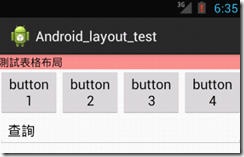
举例测试
    <TableLayout

        android:id="@+id/table1"

        android:layout_width="fill_parent"

        android:layout_height="wrap_content"

        android:stretchColumns="0" >

        <TableRow

            android:id="@+id/row1"

            android:layout_width="fill_parent"

            android:layout_height="wrap_content" >

            <TextView

                android:id="@+id/textView"

                android:layout_width="wrap_content"

                android:layout_height="wrap_content"

                android:background="#fd8d8d"

                android:text="測試表格布局"

                android:textColor="#000000" />

        </TableRow>

    </TableLayout>

    <TableLayout

        android:id="@+id/table2"

        android:layout_width="fill_parent"

        android:layout_height="wrap_content"

        android:shrinkColumns="0,1,2,3" >

        <TableRow

            android:id="@+id/row2"

            android:layout_width="fill_parent"

            android:layout_height="wrap_content" >

            <Button

                android:id="@+id/button1"

                android:layout_width="wrap_content"

                android:layout_height="wrap_content"

                android:text="button1" />

            <Button

                android:id="@+id/button2"

                android:layout_width="wrap_content"

                android:layout_height="wrap_content"

                android:text="button2" />

            <Button

                android:id="@+id/button3"

                android:layout_width="wrap_content"

                android:layout_height="wrap_content"

                android:text="button3" />

            <Button

                android:id="@+id/button4"

                android:layout_width="wrap_content"

                android:layout_height="wrap_content"

                android:text="button4" />

        </TableRow>

    </TableLayout>

    <TableLayout

        android:id="@+id/table3"

        android:layout_width="fill_parent"

        android:layout_height="wrap_content"

        android:stretchColumns="0" >

        <TableRow

            android:id="@+id/row3"

            android:layout_width="fill_parent"

            android:layout_height="wrap_content" >

            <EditText

                android:id="@+id/editText"

                android:layout_width="fill_parent"

                android:layout_height="wrap_content"

                android:text="查詢" />

        </TableRow>

    </TableLayout>
Android 表格布局 TableLayout的更多相关文章
- Android 表格布局<TableLayout>
表格布局即,tableLayout,表格布局通过行.列的形式来管理UI组件,TablelLayout并不需要明确地声明包含多少行.多少列,而是通过TableRow,以及其他组件来控制表格的行数和列数, ...
- .Net程序猿玩转Android开发---(8)表格布局TableLayout
表格布局TableLayout是Android中比較经常使用的一个布局控件,既然是表格,肯定有行和列,TableLayout中的行有TableRow组成.列依据每行控件的数量来确定 假如第一行有3个控 ...
- Android 自学之表格布局 TableLayout
表格布局(TableLayout),表格布局采用行.列的形式来管理UI组件,TableLayout并不需要明确的声明多少行,多少列,而是通过TableRow.其他组件来控制表格的行数和列数. 每次想T ...
- Android表格布局(Table Layout)
Android表格布局(Table Layout) 先来看布局管理器之间继承关系图: 图1 可知TableLayout继承了LinearLayout,所以表格布局本质上依然是线性管理器. 表格布局采用 ...
- Android表格布局之设置边框
Android表格布局本身没有边框,不过可以通过背景色的设置可以实现表格边框的显示. 首先可以设置TableRow的背景色,然后设置内容的背景色.根据它们的颜色差就出现了边框.只要微调Content与 ...
- Android课程---表格布局TableLayout
特别注意:由于表格布局继承自线性布局,因此并不显示表格线 示例代码: <?xml version="1.0" encoding="utf-8"?> ...
- Android布局_表格布局TableLayout
一.TableLayout概述 TableLayout表格布局模型以行列的形式管理子控件,每一行为一个TableRow的对象,当然也可以是一个View的对象 二.TableLayout的全局属性 1 ...
- Android开发5:布局管理器2(表格布局TableLayout)
版本:Android4.3 API18 学习整理:liuxinming 概念 TableLayout继承了LinearLayout,因此它的本质依然是线性布局管理器. 表格布局采 ...
- Android中的表格布局TableLayout
表格布局最基本的三个属性: XML代码实例: <?xml version="1.0" encoding="utf-8"?> <LinearLa ...
随机推荐
- 安装iris框架
1.导语 目前Go语言已经为大多数人所熟知,越来越多的开发人员选择使用Go语言来进行开发,但是如何使用 Go来进行web开发,在其他编程语言中都有对应的开发框架,当然在Go中也有,就是即将要介绍的-- ...
- 二进制安装 k8s 1.15.6 集群
目录: 第一篇 环境介绍与基础配置 第二篇 部署前期准备工作 第三篇 ETCD 集群部署 第四篇 master节点的部署介绍和前置工作 第五篇 kube-nginx 和 keepalived 部署安装 ...
- 阿里P7整理“硬核”面试文档:Java基础+数据库+算法+框架技术等
现在的程序员越来越多,大部分的程序员都想着自己能够进入大厂工作,但每个人的能力都是有差距的,所以并不是人人都能跨进BATJ.即使如此,但身在职场的我们一刻也不能懈怠,既然对BATJ好奇,那么就要朝这个 ...
- Django4模型(操作数据库)
模型入门同步数据库的两个指令创建模型注意事项1.外键ForeignKey 模型入门 同步数据库的两个指令 python manage.py makemigrations python manage.p ...
- builtins内建模块
builtins模块 为啥我们没有导入任何模块就能使用len(),str(),print()...等这么多的函数? 其实在我们运行python解释器的时候,他会自动导入一些模块,这些函数就是从这些地方 ...
- C# 轮流展示照片
代码 using System; using System.Collections.Generic; using System.ComponentModel; using System.Data; u ...
- WSGI到底是什么?
在用Python Web开发时经常会遇到WSGI,所以WSGI到底是什么呢?本文我们一起来揭开WSGI神秘的面纱! 先来看一下WSGI的介绍: 全称Python Web Server Gateway ...
- js的模糊查询
在项目中会用到模糊查询,之前在首页是用的element的tree显示的目录,会有用到搜索,但tree里边会有自带的模糊查询,用filter-node-method方法使用 但上次的项目中 又涉及到不试 ...
- C#程序编写高质量代码改善的157个建议[正确操作字符串、使用默认转型方法、却别对待强制转换与as和is]
前言 本文主要来学习记录前三个建议. 建议1.正确操作字符串 建议2.使用默认转型方法 建议3.区别对待强制转换与as和is 其中有很多需要理解的东西,有些地方可能理解的不太到位,还望指正. 建议1. ...
- 记录一些实用的小技巧-JS篇
1.16进制随机颜色 let color = '#'+Math.random().toString(16).slice(-6) 2.类型判断工具函数 function isType(target, t ...