
Spring MVC源码(二) ----- DispatcherServlet 请求处理流程 面试必问
前端控制器
前端控制器,即所谓的Front Controller,体现的是设计模式中的前端控制器模式。前端控制器处理所有从用户过来的请求。所有用户的请求都要通过前端控制器。SpringMVC框架和其他请求驱动的表示层框架一样,也是围绕一个将请求分发到相应控制器的核心Servlet来设计的。DispatcherServlet和其他框架中的Servlet不一样的地方在于,它和Spring容器无缝整合在了一起,因此你可以在SpringMVC中使用Spring容器所有的特性。
DispatcherServlet这个前端控制器,在SpringMVC中的作用,以官方文档中的配图来说明:
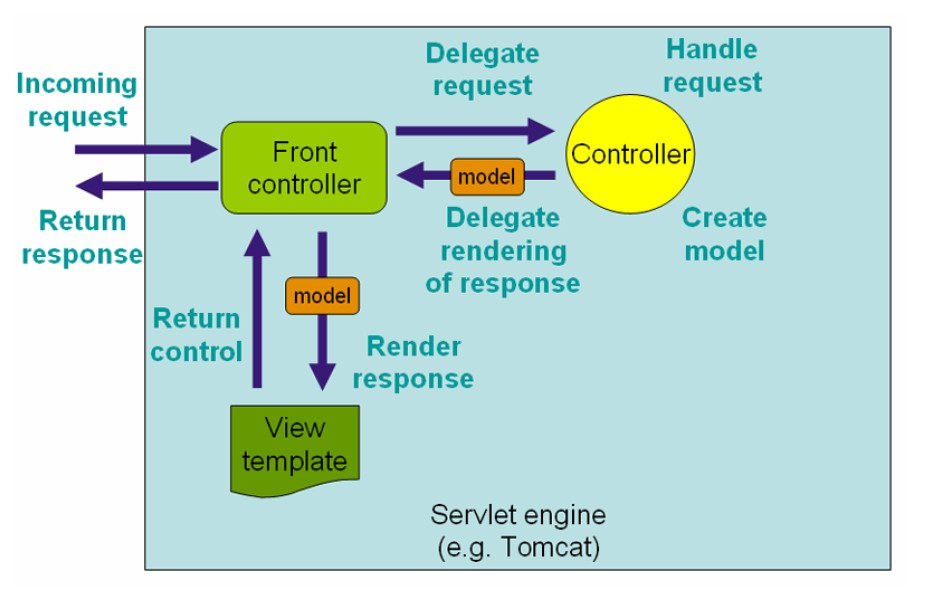
整个流程可以被大致描述为:一个http请求到达服务器,被DispatcherServlet接收。DispatcherServlet将请求委派给合适的处理器Controller,此时处理控制权到达Controller对象。Controller内部完成请求的数据模型的创建和业务逻辑的处理,然后再将填充了数据后的模型即model和控制权一并交还给DispatcherServlet,委派DispatcherServlet来渲染响应。DispatcherServlet再将这些数据和适当的数据模版视图结合,向Response输出响应。
DispatcherServlet
SpringMVC完成初始化流程之后,就进入Servlet标准生命周期的第二个阶段,即“service”阶段。在“service”阶段中,每一次Http请求到来,容器都会启动一个请求线程,通过service()方法,委派到doGet()或者doPost()这些方法,完成Http请求的处理。
在初始化流程中,SpringMVC巧妙的运用依赖注入读取参数,并最终建立一个与容器上下文相关联的Spring子上下文。这个子上下文,就像Struts2中xwork容器一样,为接下来的Http处理流程中各种编程元素提供了容身之所。如果说将Spring上下文关联到Servlet容器中,是SpringMVC框架的第一个亮点,那么在请求转发流程中,SpringMVC对各种处理环节编程元素的抽象,就是另外一个独具匠心的亮点。
Struts2采取的是一种完全和Web容器隔离和解耦的事件机制。诸如Action对象、Result对象、Interceptor对象,这些都是完全脱离Servlet容器的编程元素。Struts2将数据流和事件处理完全剥离开来,从Http请求中读取数据后,下面的事件处理流程就只依赖于这些数据,而完全不知道有Web环境的存在。
反观SpringMVC,无论HandlerMapping对象、HandlerAdapter对象还是View对象,这些核心的接口所定义的方法中,HttpServletRequest和HttpServletResponse对象都是直接作为方法的参数出现的。这也就意味着,框架的设计者,直接将SpringMVC框架和容器绑定到了一起。或者说,整个SpringMVC框架,都是依托着Servlet容器元素来设计的。下面就来看一下,源码中是如何体现这一点的。
请求转发的入口
就像任何一个注册在容器中的Servlet一样,DispatcherServlet也是通过自己的service()方法来接收和转发Http请求到具体的doGet()或doPost()这些方法的。以一次典型的GET请求为例,经过HttpServlet基类中service()方法的委派,请求会被转发到doGet()方法或者doPost()方法中。
protected void service(HttpServletRequest req, HttpServletResponse resp) throws ServletException, IOException {

    String method = req.getMethod();

    long lastModified;

    if (method.equals("GET")) {

        lastModified = this.getLastModified(req);

        if (lastModified == -1L) {

            this.doGet(req, resp);

        } else {

            long ifModifiedSince = req.getDateHeader("If-Modified-Since");

            if (ifModifiedSince < lastModified) {

                this.maybeSetLastModified(resp, lastModified);

                this.doGet(req, resp);

            } else {

                resp.setStatus();

            }

        }

    } else if (method.equals("HEAD")) {

        lastModified = this.getLastModified(req);

        this.maybeSetLastModified(resp, lastModified);

        this.doHead(req, resp);

    } else if (method.equals("POST")) {

        this.doPost(req, resp);

    } else if (method.equals("PUT")) {

        this.doPut(req, resp);

    } else if (method.equals("DELETE")) {

        this.doDelete(req, resp);

    } else if (method.equals("OPTIONS")) {

        this.doOptions(req, resp);

    } else if (method.equals("TRACE")) {

        this.doTrace(req, resp);

    } else {

        String errMsg = lStrings.getString("http.method_not_implemented");

        Object[] errArgs = new Object[]{method};

        errMsg = MessageFormat.format(errMsg, errArgs);

        resp.sendError(, errMsg);

    }

}
doGet() 和 doPost() 方法,在DispatcherServlet的父类FrameworkServlet类中被覆写。
protected final void doGet(HttpServletRequest request, HttpServletResponse response) throws ServletException, IOException {

    this.processRequest(request, response);

}

protected final void doPost(HttpServletRequest request, HttpServletResponse response) throws ServletException, IOException {

    this.processRequest(request, response);

}
可以看到,这里只是简单的转发到processRequest()这个方法。
protected final void processRequest(HttpServletRequest request, HttpServletResponse response)

        throws ServletException, IOException {

    long startTime = System.currentTimeMillis();

    Throwable failureCause = null;

    // Expose current LocaleResolver and request as LocaleContext.

    LocaleContext previousLocaleContext = LocaleContextHolder.getLocaleContext();

    LocaleContextHolder.setLocaleContext(buildLocaleContext(request), this.threadContextInheritable);

    // Expose current RequestAttributes to current thread.

    RequestAttributes previousRequestAttributes = RequestContextHolder.getRequestAttributes();

    ServletRequestAttributes requestAttributes = null;

    if (previousRequestAttributes == null || previousRequestAttributes.getClass().equals(ServletRequestAttributes.class)) {

        requestAttributes = new ServletRequestAttributes(request);

        RequestContextHolder.setRequestAttributes(requestAttributes, this.threadContextInheritable);

    }

    if (logger.isTraceEnabled()) {

        logger.trace("Bound request context to thread: " + request);

    }

    try {

        doService(request, response);

    }

    finally {

        // Clear request attributes and reset thread-bound context.

        LocaleContextHolder.setLocaleContext(previousLocaleContext, this.threadContextInheritable);

        if (requestAttributes != null) {

            RequestContextHolder.setRequestAttributes(previousRequestAttributes, this.threadContextInheritable);

            requestAttributes.requestCompleted();

        }

        if (this.publishEvents) {

            // Whether or not we succeeded, publish an event.

            long processingTime = System.currentTimeMillis() - startTime;

            this.webApplicationContext.publishEvent(

                    new ServletRequestHandledEvent(this,

                            request.getRequestURI(), request.getRemoteAddr(),

                            request.getMethod(), getServletConfig().getServletName(),

                            WebUtils.getSessionId(request), getUsernameForRequest(request),

                            processingTime, failureCause));

        }

    }

}
可以看到,processRequest()方法只是做了一些线程安全的隔离,真正的请求处理,发生在doService()方法中。点开FrameworkServlet类中的doService()方法。
protected abstract void doService(HttpServletRequest request, HttpServletResponse response)

        throws Exception;
又是一个抽象方法,这也是SpringMVC类设计中的惯用伎俩:父类抽象处理流程,子类给予具体的实现。真正的实现是在DispatcherServlet类中。
让我们接着看DispatcherServlet类中实现的doService()方法。
@Override

protected void doService(HttpServletRequest request, HttpServletResponse response) throws Exception {

    if (logger.isDebugEnabled()) {

        String requestUri = urlPathHelper.getRequestUri(request);

        logger.debug("DispatcherServlet with name '" + getServletName() + "' processing " + request.getMethod() +

                " request for [" + requestUri + "]");

    }

    // Keep a snapshot of the request attributes in case of an include,

    // to be able to restore the original attributes after the include.

    Map<String, Object> attributesSnapshot = null;

    if (WebUtils.isIncludeRequest(request)) {

        logger.debug("Taking snapshot of request attributes before include");

        attributesSnapshot = new HashMap<String, Object>();

        Enumeration<?> attrNames = request.getAttributeNames();

        while (attrNames.hasMoreElements()) {

            String attrName = (String) attrNames.nextElement();

            if (this.cleanupAfterInclude || attrName.startsWith("org.springframework.web.servlet")) {

                attributesSnapshot.put(attrName, request.getAttribute(attrName));

            }

        }

    }

    // Make framework objects available to handlers and view objects.

    request.setAttribute(WEB_APPLICATION_CONTEXT_ATTRIBUTE, getWebApplicationContext());

    request.setAttribute(LOCALE_RESOLVER_ATTRIBUTE, this.localeResolver);

    request.setAttribute(THEME_RESOLVER_ATTRIBUTE, this.themeResolver);

    request.setAttribute(THEME_SOURCE_ATTRIBUTE, getThemeSource());

    FlashMap inputFlashMap = this.flashMapManager.retrieveAndUpdate(request, response);

    if (inputFlashMap != null) {

        request.setAttribute(INPUT_FLASH_MAP_ATTRIBUTE, Collections.unmodifiableMap(inputFlashMap));

    }

    request.setAttribute(OUTPUT_FLASH_MAP_ATTRIBUTE, new FlashMap());

    request.setAttribute(FLASH_MAP_MANAGER_ATTRIBUTE, this.flashMapManager);

    try {

        doDispatch(request, response);

    }

    finally {

        // Restore the original attribute snapshot, in case of an include.

        if (attributesSnapshot != null) {

            restoreAttributesAfterInclude(request, attributesSnapshot);

        }

    }

}
几个requet.setAttribute()方法的调用,将前面在初始化流程中实例化的对象设置到http请求的属性中,供下一步处理使用,其中有容器的上下文对象、本地化解析器等SpringMVC特有的编程元素。不同于Struts2中的ValueStack,SpringMVC的数据并没有从HttpServletRequest对象中抽离出来再存进另外一个编程元素,这也跟SpringMVC的设计思想有关。因为从一开始,SpringMVC的设计者就认为,不应该将请求处理过程和Web容器完全隔离。
所以,你可以看到,真正发生请求转发的方法doDispatch()中,它的参数是HttpServletRequest和HttpServletResponse对象。这给我们传递的意思也很明确,从request中能获取到一切请求的数据,从response中,我们又可以往服务器端输出任何响应,Http请求的处理,就应该围绕这两个对象来设计。我们不妨可以将SpringMVC这种设计方案,是从Struts2的过度设计中吸取教训,而向Servlet编程的一种回归和简化。
而对请求的处理交给doDispatcher方法
protected void doDispatch(HttpServletRequest request, HttpServletResponse response) throws Exception {

    HttpServletRequest processedRequest = request;

    HandlerExecutionChain mappedHandler = null;

    boolean multipartRequestParsed = false;

    WebAsyncManager asyncManager = WebAsyncUtils.getAsyncManager(request);

    try {

        ModelAndView mv = null;

        Exception dispatchException = null;

        try {

            // 处理文件上传

            processedRequest = checkMultipart(request);

            multipartRequestParsed = (processedRequest != request);

            // 决定当前请求的Handler

            mappedHandler = getHandler(processedRequest);

            if (mappedHandler == null || mappedHandler.getHandler() == null) {

                noHandlerFound(processedRequest, response);

                return;

            }

            // 决定当前请求的HandlerAdapter

            HandlerAdapter ha = getHandlerAdapter(mappedHandler.getHandler());

            // 处理last-modified请求头

            String method = request.getMethod();

            boolean isGet = "GET".equals(method);

            if (isGet || "HEAD".equals(method)) {

                long lastModified = ha.getLastModified(request, mappedHandler.getHandler());

                if (logger.isDebugEnabled()) {

                    logger.debug("Last-Modified value for [" + getRequestUri(request) + "] is: " + lastModified);

                }

                if (new ServletWebRequest(request, response).checkNotModified(lastModified) && isGet) {

                    return;

                }

            }

            // 拦截器的前置处理

            if (!mappedHandler.applyPreHandle(processedRequest, response)) {

                return;

            }

            // Handler实际执行请求

            mv = ha.handle(processedRequest, response, mappedHandler.getHandler());

            if (asyncManager.isConcurrentHandlingStarted()) {

                return;

            }

            // 设置默认视图名

            applyDefaultViewName(processedRequest, mv);

            // 拦截器后置处理

            mappedHandler.applyPostHandle(processedRequest, response, mv);

        }

        catch (Exception ex) {

            dispatchException = ex;

        }

        catch (Throwable err) {

            // As of 4.3, we're processing Errors thrown from handler methods as well,

            // making them available for @ExceptionHandler methods and other scenarios.

            dispatchException = new NestedServletException("Handler dispatch failed", err);

        }

        // 选择视图并渲染视图

        processDispatchResult(processedRequest, response, mappedHandler, mv, dispatchException);

    }

    catch (Exception ex) {

        triggerAfterCompletion(processedRequest, response, mappedHandler, ex);

    }

    catch (Throwable err) {

        triggerAfterCompletion(processedRequest, response, mappedHandler,

                new NestedServletException("Handler processing failed", err));

    }

    finally {

        if (asyncManager.isConcurrentHandlingStarted()) {

            // Instead of postHandle and afterCompletion

            if (mappedHandler != null) {

                mappedHandler.applyAfterConcurrentHandlingStarted(processedRequest, response);

            }

        }

        else {

            // Clean up any resources used by a multipart request.

            if (multipartRequestParsed) {

                cleanupMultipart(processedRequest);

            }

        }

    }

}
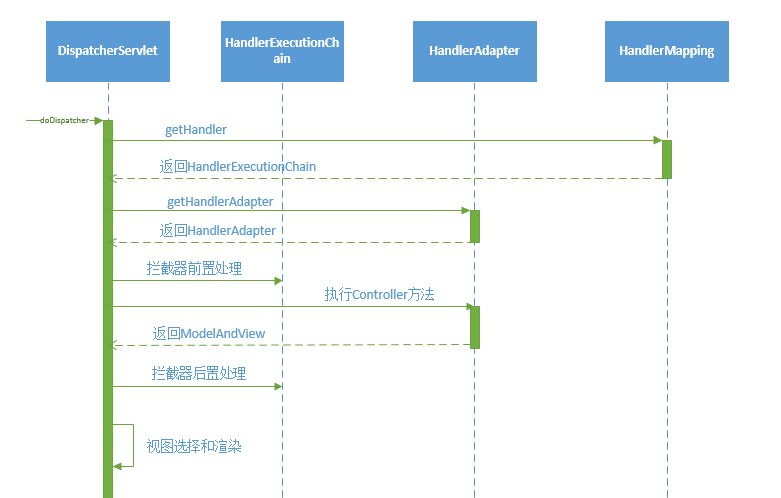
先看doDispatcher方法执行的主要操作时序图
请求路由
getHandler方法就是从HandlerMapping中查询匹配当前request的Handler。我们看到只要一匹配上 handler 就不再循环,直接返回
protected HandlerExecutionChain getHandler(HttpServletRequest request) throws Exception {

    for (HandlerMapping hm : this.handlerMappings) {

        HandlerExecutionChain handler = hm.getHandler(request);

        if (handler != null) {

            return handler;

        }

    }

    return null;

}
HandlerMapping的getHandler方法在抽象基类AbstractHandlerMapping
public final HandlerExecutionChain getHandler(HttpServletRequest request) throws Exception {

    // 由子类根据request获取Handler

    Object handler = getHandlerInternal(request);

    // 如果没匹配到,则获取默认Handler

    if (handler == null) {

        handler = getDefaultHandler();

    }

    if (handler == null) {

        return null;

    }

    // 如果返回的Handler为String,则使用Spring容器实例化

    if (handler instanceof String) {

        String handlerName = (String) handler;

        handler = getApplicationContext().getBean(handlerName);

    }

    // 查询匹配的拦截器,组装Handler生成HandlerExecutionChain

    HandlerExecutionChain executionChain = getHandlerExecutionChain(handler, request);

    if (CorsUtils.isCorsRequest(request)) {

        CorsConfiguration globalConfig = this.corsConfigSource.getCorsConfiguration(request);

        CorsConfiguration handlerConfig = getCorsConfiguration(handler, request);

        CorsConfiguration config = (globalConfig != null ? globalConfig.combine(handlerConfig) : handlerConfig);

        executionChain = getCorsHandlerExecutionChain(request, executionChain, config);

    }

    return executionChain;

}
最终返回的Handler是由拦截器链和Handler共同组成的,而具体匹配Handler的方法是交给子类来完成的。上一章组件初始化中提到生产环境下使用的是RequestMappingHandlerMapping,getHandlerInternal方法的实现在它的基类AbstractHandlerMethodMapping。
protected HandlerMethod getHandlerInternal(HttpServletRequest request) throws Exception {

    // 从request获取匹配url

    String lookupPath = getUrlPathHelper().getLookupPathForRequest(request);

    if (logger.isDebugEnabled()) {

        logger.debug("Looking up handler method for path " + lookupPath);

    }

    this.mappingRegistry.acquireReadLock();

    try {

        // 查询匹配的HandlerMethod

        HandlerMethod handlerMethod = lookupHandlerMethod(lookupPath, request);

        if (logger.isDebugEnabled()) {

            if (handlerMethod != null) {

                logger.debug("Returning handler method [" + handlerMethod + "]");

            }

            else {

                logger.debug("Did not find handler method for [" + lookupPath + "]");

            }

        }

        return (handlerMethod != null ? handlerMethod.createWithResolvedBean() : null);

    }

    finally {

        this.mappingRegistry.releaseReadLock();

    }

}
可以看到返回的Handler的类型为HandlerMethod,它对应于Controller中的方法。上一章也提过,在AbstractHandlerMethodMapping中有一个MappingRegistry,统一管理URL和Controller方法的映射关系,lookupHandlerMethod就是对MappingRegistry的操作。
protected HandlerMethod lookupHandlerMethod(String lookupPath, HttpServletRequest request) throws Exception {

    List<Match> matches = new ArrayList<Match>();

    // 从mappingRegistry获取匹配到的RequestMappingInfo

    List<T> directPathMatches = this.mappingRegistry.getMappingsByUrl(lookupPath);

    if (directPathMatches != null) {

        addMatchingMappings(directPathMatches, matches, request);

    }

    if (matches.isEmpty()) {

        // No choice but to go through all mappings...

        addMatchingMappings(this.mappingRegistry.getMappings().keySet(), matches, request);

    }

    // 对匹配项进行排序

    if (!matches.isEmpty()) {

        Comparator<Match> comparator = new MatchComparator(getMappingComparator(request));

        Collections.sort(matches, comparator);

        if (logger.isTraceEnabled()) {

            logger.trace("Found " + matches.size() + " matching mapping(s) for [" +

                    lookupPath + "] : " + matches);

        }

        Match bestMatch = matches.get();

        if (matches.size() > ) {

            if (CorsUtils.isPreFlightRequest(request)) {

                return PREFLIGHT_AMBIGUOUS_MATCH;

            }

            Match secondBestMatch = matches.get();

            if (comparator.compare(bestMatch, secondBestMatch) == ) {

                Method m1 = bestMatch.handlerMethod.getMethod();

                Method m2 = secondBestMatch.handlerMethod.getMethod();

                throw new IllegalStateException("Ambiguous handler methods mapped for HTTP path '" +

                        request.getRequestURL() + "': {" + m1 + ", " + m2 + "}");

            }

        }

        handleMatch(bestMatch.mapping, lookupPath, request);

        return bestMatch.handlerMethod;

    }

    else {

        // 无匹配项处理

        return handleNoMatch(this.mappingRegistry.getMappings().keySet(), lookupPath, request);

    }

}
通过mappingRegistry匹配返回RequestMappingInfo,对应于每个有@RequestMapping注解解析后的Method。
我们来看看,HandlerExecutionChain类的代码。
package org.springframework.web.servlet;

import java.util.ArrayList;

import java.util.Arrays;

import java.util.List;

import org.springframework.util.CollectionUtils;

public class HandlerExecutionChain {

    private final Object handler;

    private HandlerInterceptor[] interceptors;

    private List<HandlerInterceptor> interceptorList;

    public HandlerExecutionChain(Object handler) {

        this(handler, null);

    }

    public HandlerExecutionChain(Object handler, HandlerInterceptor[] interceptors) {

        if (handler instanceof HandlerExecutionChain) {

            HandlerExecutionChain originalChain = (HandlerExecutionChain) handler;

            this.handler = originalChain.getHandler();

            this.interceptorList = new ArrayList<HandlerInterceptor>();

            CollectionUtils.mergeArrayIntoCollection(originalChain.getInterceptors(), this.interceptorList);

            CollectionUtils.mergeArrayIntoCollection(interceptors, this.interceptorList);

        }

        else {

            this.handler = handler;

            this.interceptors = interceptors;

        }

    }

    public Object getHandler() {

        return this.handler;

    }

    public void addInterceptor(HandlerInterceptor interceptor) {

        initInterceptorList();

        this.interceptorList.add(interceptor);

    }

    public void addInterceptors(HandlerInterceptor[] interceptors) {

        if (interceptors != null) {

            initInterceptorList();

            this.interceptorList.addAll(Arrays.asList(interceptors));

        }

    }

    private void initInterceptorList() {

        if (this.interceptorList == null) {

            this.interceptorList = new ArrayList<HandlerInterceptor>();

        }

        if (this.interceptors != null) {

            this.interceptorList.addAll(Arrays.asList(this.interceptors));

            this.interceptors = null;

        }

    }

    public HandlerInterceptor[] getInterceptors() {

        if (this.interceptors == null && this.interceptorList != null) {

            this.interceptors = this.interceptorList.toArray(new HandlerInterceptor[this.interceptorList.size()]);

        }

        return this.interceptors;

    }

}
一个拦截器列表,一个执行对象,这个类的内容十分的简单,它蕴含的设计思想,却十分的丰富。
1.拦截器组成的列表,在执行对象被调用的前后,会依次执行。这里可以看成是一个的AOP环绕通知,拦截器可以对处理对象随心所欲的进行处理和增强。这里明显是吸收了Struts2中拦截器的设计思想。这种AOP环绕式的扩展点设计,也几乎成为所有框架必备的内容。
2.实际的处理对象,即handler对象,是由Object对象来引用的。
private final Object handler;
当我们拿到HandlerExecutionChain,就完成了request到Controller的路由操作。
适配器匹配
有了Handler后,需要合适的HandlerAdapter对其进行操作,因而就要根据Handler进行匹配。
protected HandlerAdapter getHandlerAdapter(Object handler) throws ServletException {

    for (HandlerAdapter ha : this.handlerAdapters) {

        if (logger.isTraceEnabled()) {

            logger.trace("Testing handler adapter [" + ha + "]");

        }

        if (ha.supports(handler)) {

            return ha;

        }

    }

    throw new ServletException("No adapter for handler [" + handler +

            "]: The DispatcherServlet configuration needs to include a HandlerAdapter that supports this handler");

}
HandlerAdapter接口中定义了supports方法,用于检测是否支持Handler。生产环境使用的RequestMappingHandlerAdapter在其基类AbstractHandlerMethodAdapter中实现了supports方法。
public final boolean supports(Object handler) {

    return (handler instanceof HandlerMethod && supportsInternal((HandlerMethod) handler));

}
supportsInternal方法在RequestMappingHandlerAdapter的实现里默认返回true。因而RequestMappingHandlerAdapter就是用来支持类型为HandlerMethod的Handler的处理的。
拦截器处理
在SpringMVC中的拦截器接口HandlerInterceptor中定义了三个方法
public interface HandlerInterceptor {

    // 在Handler找到后,执行前拦截

    boolean preHandle(HttpServletRequest request, HttpServletResponse response, Object handler)

            throws Exception;

    // 在Handler执行后,视图渲染前拦截

    void postHandle(

            HttpServletRequest request, HttpServletResponse response, Object handler, ModelAndView modelAndView)

            throws Exception;

    // 请求处理完成,视图渲染后执行资源清理等

    void afterCompletion(

            HttpServletRequest request, HttpServletResponse response, Object handler, Exception ex)

            throws Exception;

}
可以很清晰地对应到doDispatcher方法中。需要注意的有几点
- 前置处理preHandle,返回值为boolean。如果返回true,则执行下一个,如果返回false,则认为当前拦截器完成了请求,DispatcherServlet会直接返回,在返回前会调用所有拦截器的afterCompletion方法,完成清理工作。
- afterCompletion方法在遇到任何情况时都需要被执行,无论是成功返回还是抛出异常。
boolean applyPreHandle(HttpServletRequest request, HttpServletResponse response) throws Exception {

    HandlerInterceptor[] interceptors = this.getInterceptors();

    if (!ObjectUtils.isEmpty(interceptors)) {

        for(int i = 0; i < interceptors.length; this.interceptorIndex = i++) {

            HandlerInterceptor interceptor = interceptors[i];

            //遍历执行所有拦截器的preHandle方法

            if (!interceptor.preHandle(request, response, this.handler)) {

                this.triggerAfterCompletion(request, response, (Exception)null);

                return false;

            }

        }

    }

    return true;

}
执行请求
HandlerAdapter的handle方法完成请求的真正执行。在AbstractHandlerMethodAdapter中由handleInternal执行。
protected ModelAndView handleInternal(HttpServletRequest request,

        HttpServletResponse response, HandlerMethod handlerMethod) throws Exception {

    ModelAndView mav;

    checkRequest(request);

    // 执行HandlerMethod

    mav = invokeHandlerMethod(request, response, handlerMethod);

    // 处理缓存

    if (!response.containsHeader(HEADER_CACHE_CONTROL)) {

        if (getSessionAttributesHandler(handlerMethod).hasSessionAttributes()) {

            applyCacheSeconds(response, this.cacheSecondsForSessionAttributeHandlers);

        }

        else {

            prepareResponse(response);

        }

    }

    return mav;

}
在invokeHandlerMethod中,HandlerMethod被封装ServletInvocableHandlerMethod,包裹上方法执行需要的信息。
protected ModelAndView invokeHandlerMethod(HttpServletRequest request,

        HttpServletResponse response, HandlerMethod handlerMethod) throws Exception {

    ServletWebRequest webRequest = new ServletWebRequest(request, response);

    try {

        WebDataBinderFactory binderFactory = getDataBinderFactory(handlerMethod);

        ModelFactory modelFactory = getModelFactory(handlerMethod, binderFactory);

        // 封装HandlerMethod

        ServletInvocableHandlerMethod invocableMethod = createInvocableHandlerMethod(handlerMethod);

        invocableMethod.setHandlerMethodArgumentResolvers(this.argumentResolvers);

        invocableMethod.setHandlerMethodReturnValueHandlers(this.returnValueHandlers);

        invocableMethod.setDataBinderFactory(binderFactory);

        invocableMethod.setParameterNameDiscoverer(this.parameterNameDiscoverer);

        ModelAndViewContainer mavContainer = new ModelAndViewContainer();

        mavContainer.addAllAttributes(RequestContextUtils.getInputFlashMap(request));

        modelFactory.initModel(webRequest, mavContainer, invocableMethod);

        mavContainer.setIgnoreDefaultModelOnRedirect(this.ignoreDefaultModelOnRedirect);

        // 异步请求处理

        AsyncWebRequest asyncWebRequest = WebAsyncUtils.createAsyncWebRequest(request, response);

        asyncWebRequest.setTimeout(this.asyncRequestTimeout);

        WebAsyncManager asyncManager = WebAsyncUtils.getAsyncManager(request);

        asyncManager.setTaskExecutor(this.taskExecutor);

        asyncManager.setAsyncWebRequest(asyncWebRequest);

        asyncManager.registerCallableInterceptors(this.callableInterceptors);

        asyncManager.registerDeferredResultInterceptors(this.deferredResultInterceptors);

        if (asyncManager.hasConcurrentResult()) {

            Object result = asyncManager.getConcurrentResult();

            mavContainer = (ModelAndViewContainer) asyncManager.getConcurrentResultContext()[];

            asyncManager.clearConcurrentResult();

            if (logger.isDebugEnabled()) {

                logger.debug("Found concurrent result value [" + result + "]");

            }

            invocableMethod = invocableMethod.wrapConcurrentResult(result);

        }

        // 执行处理

        invocableMethod.invokeAndHandle(webRequest, mavContainer);

        if (asyncManager.isConcurrentHandlingStarted()) {

            return null;

        }

        // 封装数据和视图

        return getModelAndView(mavContainer, modelFactory, webRequest);

    }

    finally {

        webRequest.requestCompleted();

    }

}
再到ServletInvocableHandlerMethod的invokeAndHandle方法
public void invokeAndHandle(ServletWebRequest webRequest, ModelAndViewContainer mavContainer,

        Object... providedArgs) throws Exception {

    // 执行request

    Object returnValue = invokeForRequest(webRequest, mavContainer, providedArgs);

    setResponseStatus(webRequest);

    if (returnValue == null) {

        if (isRequestNotModified(webRequest) || getResponseStatus() != null || mavContainer.isRequestHandled()) {

            mavContainer.setRequestHandled(true);

            return;

        }

    }

    else if (StringUtils.hasText(getResponseStatusReason())) {

        mavContainer.setRequestHandled(true);

        return;

    }

    mavContainer.setRequestHandled(false);

    try {

        // 对返回值进行处理

        this.returnValueHandlers.handleReturnValue(

                returnValue, getReturnValueType(returnValue), mavContainer, webRequest);

    }

    catch (Exception ex) {

        if (logger.isTraceEnabled()) {

            logger.trace(getReturnValueHandlingErrorMessage("Error handling return value", returnValue), ex);

        }

        throw ex;

    }

}

public Object invokeForRequest(NativeWebRequest request, ModelAndViewContainer mavContainer,

        Object... providedArgs) throws Exception {

    // 执行方法参数

    Object[] args = getMethodArgumentValues(request, mavContainer, providedArgs);

    if (logger.isTraceEnabled()) {

        logger.trace("Invoking '" + ClassUtils.getQualifiedMethodName(getMethod(), getBeanType()) +

                "' with arguments " + Arrays.toString(args));

    }

    Object returnValue = doInvoke(args);

    if (logger.isTraceEnabled()) {

        logger.trace("Method [" + ClassUtils.getQualifiedMethodName(getMethod(), getBeanType()) +

                "] returned [" + returnValue + "]");

    }

    return returnValue;

}

protected Object doInvoke(Object... args) throws Exception {

    ReflectionUtils.makeAccessible(getBridgedMethod());

    return getBridgedMethod().invoke(getBean(), args);

}

需要说明的一点是方法执行完成的返回值通过返回值处理器HandlerMethodReturnValueHandler进行处理。在RequestMappingHandlerAdapter的初始化中,内置了众多的HandlerMethodReturnValueHandler来处理多种类型的返回值。
在完成请求执行后,doDispatcher方法中做了一个默认View的设置。
applyDefaultViewName(processedRequest, mv);

private void applyDefaultViewName(HttpServletRequest request, ModelAndView mv) throws Exception {

    if (mv != null && !mv.hasView()) {

        mv.setViewName(getDefaultViewName(request));

    }

}
而这个getDefaultViewName是通过RequestToViewNameTranslator的实现类来解析的
protected String getDefaultViewName(HttpServletRequest request) throws Exception {

    return this.viewNameTranslator.getViewName(request);

}
默认实现DefaultRequestToViewNameTranslator,根据配置的一些通用url进行匹配
public String getViewName(HttpServletRequest request) {

    String lookupPath = this.urlPathHelper.getLookupPathForRequest(request);

    return (this.prefix + transformPath(lookupPath) + this.suffix);

}
视图渲染
当请求完成后,返回的ModelAndView需要渲染到浏览器进行显示。doDispatcher方法中processDispatchResult用来处理视图。
private void processDispatchResult(HttpServletRequest request, HttpServletResponse response,

        HandlerExecutionChain mappedHandler, ModelAndView mv, Exception exception) throws Exception {

    boolean errorView = false;

    // 异常处理

    if (exception != null) {

        if (exception instanceof ModelAndViewDefiningException) {

            logger.debug("ModelAndViewDefiningException encountered", exception);

            mv = ((ModelAndViewDefiningException) exception).getModelAndView();

        }

        else {

            Object handler = (mappedHandler != null ? mappedHandler.getHandler() : null);

            mv = processHandlerException(request, response, handler, exception);

            errorView = (mv != null);

        }

    }

    // Did the handler return a view to render?

    if (mv != null && !mv.wasCleared()) {

        // 渲染执行

        render(mv, request, response);

        if (errorView) {

            WebUtils.clearErrorRequestAttributes(request);

        }

    }

    else {

        if (logger.isDebugEnabled()) {

            logger.debug("Null ModelAndView returned to DispatcherServlet with name '" + getServletName() +

                    "': assuming HandlerAdapter completed request handling");

        }

    }

    if (WebAsyncUtils.getAsyncManager(request).isConcurrentHandlingStarted()) {

        // Concurrent handling started during a forward

        return;

    }

    // 完成后执行拦截器的afterCompletion

    if (mappedHandler != null) {

        mappedHandler.triggerAfterCompletion(request, response, null);

    }

}
render方法执行渲染,最终由View实现类执行
view.render(mv.getModelInternal(), request, response);
抽象类AbstractView执行对数据进行组装,输出操作交由子类完成
public void render(Map<String, ?> model, HttpServletRequest request, HttpServletResponse response) throws Exception {

    if (logger.isTraceEnabled()) {

        logger.trace("Rendering view with name '" + this.beanName + "' with model " + model +

            " and static attributes " + this.staticAttributes);

    }

    // 组装数据

    Map<String, Object> mergedModel = createMergedOutputModel(model, request, response);

    prepareResponse(request, response);

    // 渲染输出

    renderMergedOutputModel(mergedModel, getRequestToExpose(request), response);

}
以通用的InternalResourceView举例
protected void renderMergedOutputModel(

        Map<String, Object> model, HttpServletRequest request, HttpServletResponse response) throws Exception {

    // Expose the model object as request attributes.

    exposeModelAsRequestAttributes(model, request);

    // Expose helpers as request attributes, if any.

    exposeHelpers(request);

    // Determine the path for the request dispatcher.

    String dispatcherPath = prepareForRendering(request, response);

    // Obtain a RequestDispatcher for the target resource (typically a JSP).

    RequestDispatcher rd = getRequestDispatcher(request, dispatcherPath);

    if (rd == null) {

        throw new ServletException("Could not get RequestDispatcher for [" + getUrl() +

                "]: Check that the corresponding file exists within your web application archive!");

    }

    // If already included or response already committed, perform include, else forward.

    if (useInclude(request, response)) {

        response.setContentType(getContentType());

        if (logger.isDebugEnabled()) {

            logger.debug("Including resource [" + getUrl() + "] in InternalResourceView '" + getBeanName() + "'");

        }

        rd.include(request, response);

    }

    else {

        // Note: The forwarded resource is supposed to determine the content type itself.

        if (logger.isDebugEnabled()) {

            logger.debug("Forwarding to resource [" + getUrl() + "] in InternalResourceView '" + getBeanName() + "'");

        }

        rd.forward(request, response);

    }

}
最终由java Servlet的RequestDispatcher完成输出。其实就是做了一个跳转
本章中以请求的正向主流程解析了DispatcherServlet及相关类完成此过程的源码,其主要过程则是HandlerExecutionChain,HandlerMapping,HandlerAdapter,View等组件的交互过程,贴两张网上的核心原理图,希望对大家理解SpringMVC的原理有帮助。


Spring MVC源码(二) ----- DispatcherServlet 请求处理流程 面试必问的更多相关文章
- 精尽Spring MVC源码分析 - HandlerMapping 组件(二)之 HandlerInterceptor 拦截器
该系列文档是本人在学习 Spring MVC 的源码过程中总结下来的,可能对读者不太友好,请结合我的源码注释 Spring MVC 源码分析 GitHub 地址 进行阅读 Spring 版本:5.2. ...
- 精尽Spring MVC源码分析 - HandlerAdapter 组件(二)之 ServletInvocableHandlerMethod
该系列文档是本人在学习 Spring MVC 的源码过程中总结下来的,可能对读者不太友好,请结合我的源码注释 Spring MVC 源码分析 GitHub 地址 进行阅读 Spring 版本:5.2. ...
- 精尽Spring MVC源码分析 - 寻找遗失的 web.xml
该系列文档是本人在学习 Spring MVC 的源码过程中总结下来的,可能对读者不太友好,请结合我的源码注释 Spring MVC 源码分析 GitHub 地址 进行阅读 Spring 版本:5.2. ...
- Spring MVC源码——Servlet WebApplicationContext
上一篇笔记(Spring MVC源码——Root WebApplicationContext)中记录了下 Root WebApplicationContext 的初始化代码.这一篇来看 Servlet ...
- 精尽Spring MVC源码分析 - 一个请求的旅行过程
该系列文档是本人在学习 Spring MVC 的源码过程中总结下来的,可能对读者不太友好,请结合我的源码注释 Spring MVC 源码分析 GitHub 地址 进行阅读 Spring 版本:5.2. ...
- 精尽Spring MVC源码分析 - MultipartResolver 组件
该系列文档是本人在学习 Spring MVC 的源码过程中总结下来的,可能对读者不太友好,请结合我的源码注释 Spring MVC 源码分析 GitHub 地址 进行阅读 Spring 版本:5.2. ...
- 精尽Spring MVC源码分析 - HandlerMapping 组件(一)之 AbstractHandlerMapping
该系列文档是本人在学习 Spring MVC 的源码过程中总结下来的,可能对读者不太友好,请结合我的源码注释 Spring MVC 源码分析 GitHub 地址 进行阅读 Spring 版本:5.2. ...
- 精尽Spring MVC源码分析 - HandlerMapping 组件(四)之 AbstractUrlHandlerMapping
该系列文档是本人在学习 Spring MVC 的源码过程中总结下来的,可能对读者不太友好,请结合我的源码注释 Spring MVC 源码分析 GitHub 地址 进行阅读 Spring 版本:5.2. ...
- 精尽Spring MVC源码分析 - HandlerAdapter 组件(一)之 HandlerAdapter
该系列文档是本人在学习 Spring MVC 的源码过程中总结下来的,可能对读者不太友好,请结合我的源码注释 Spring MVC 源码分析 GitHub 地址 进行阅读 Spring 版本:5.2. ...
随机推荐
- 百度蜘蛛ip段代表的不同含义
有时候我们在分析百度蜘蛛的时候,会发现很多的ip,这些个ip地址,根据后面的参数可以发现都是百度的.刚学习SEO不久的同学肯定要问:这些ip地址到底代表什么含义,是不是不同的ip地址所代表的含义不一样 ...
- TinyMCE插件CodeSample前后端应用
后端使用插件CodeSample方法: <html> <textarea id="editor_id" name="content" plac ...
- liunx 桥接 上网 ip配置 外部网络访问
一.设置VMware 在vmware的[编辑]-->[虚拟网络编辑器]设置:将VMnet0设置为“桥接”,并桥接到宿主机器的网卡(可以是有线或者无线网络). 二.设置虚拟机系统(以cento ...
- C#调用Delphi Dll返回字符串的示例(使用Move才能拷贝字符串)
//----------------------Delphi------------------- procedure GetSqlData(ASource: PChar; ADest: PChar; ...
- 记录一次PHP项目报502的问题
问题描述 最近有台服务器偶尔会报502错误,虽然量不多,每天就几十个,但是也必须得找到原因,避免让小问题变成大问题. 排查过程 502错误的原因,一般是对用户访问请求的响应超时造成的,一开始以为是请求 ...
- myeclipse2018的下载安装教程
首先注意事项!!!!!!! 在安装破解前是不可以打开软件的 jdk版本不能是10版本,1.8或1.9都可以 附上MyEclipse2018的百度云下载链接: 链接:https://pan.baidu. ...
- 【转载】Chrome使用自定义协议打开本地程序并运行IE打开网页
部分内容转载自: http://blog.sina.com.cn/s/blog_e2b8213a0102wqby.html 项目中遇到某需求:chorme要运行IE并打开网页.解决方案之一就是通过自定 ...
- spring 5.x 系列第8篇 —— 整合Redis客户端 Jedis和Redisson (代码配置方式)
文章目录 一.说明 1.1 Redis 客户端说明 1.2 Redis可视化软件 1.3 项目结构说明 1.3 依赖说明 二.spring 整合 jedis 2.1 新建基本配置文件和其映射类 2.2 ...
- spring cloud 系列第6篇 —— zuul 服务网关 (F版本)
源码Gitub地址:https://github.com/heibaiying/spring-samples-for-all 一.zuul简介 1.1 API 网关 api 网关是整个微服务系统的门面 ...
- Ubuntu 配置docker镜像加速器
1. 安装/升级Docker客户端 推荐安装1.10.0以上版本的Docker客户端,参考文档 docker-ce 2. 配置镜像加速器 针对Docker客户端版本大于 1.10.0 的用户 您可以通 ...