
Spring Cloud Config入门(本地配置)
spring cloud config 简介
- Spring Cloud Config为分布式系统中的外部化配置提供服务器和客户端支持。使用Config Server,您可以在所有环境中管理应用程序的外部属性。
- Spring Cloud Config 分为两个部分 ,server端和client端。
server端配置服务器,管理配置信息
client端获取配置信息
创建并运行一个Spring Cloud Config Server
- 创建一个名为config-server的应用,并添加spring-cloud-starter-parent,spring-cloud-config-server依赖,pom信息具体如下
<?xml version="1.0" encoding="UTF-8"?>

<project xmlns="http://maven.apache.org/POM/4.0.0"

         xmlns:xsi="http://www.w3.org/2001/XMLSchema-instance"

         xsi:schemaLocation="http://maven.apache.org/POM/4.0.0 http://maven.apache.org/xsd/maven-4.0.0.xsd">

    <modelVersion>4.0.0</modelVersion>

    <groupId>com.zcr.test</groupId>

    <artifactId>config-server</artifactId>

    <version>1.0-SNAPSHOT</version>

    <packaging>jar</packaging>

    <name>config-server</name>

    <description>Demo project for Spring Boot</description>

    <parent>

        <groupId>org.springframework.boot</groupId>

        <artifactId>spring-boot-starter-parent</artifactId>

        <version>1.5.2.RELEASE</version>

    </parent>

    <properties>

        <project.build.sourceEncoding>UTF-8</project.build.sourceEncoding>

        <project.reporting.outputEncoding>UTF-8</project.reporting.outputEncoding>

        <java.version>1.8</java.version>

    </properties>

    <dependencies>

        <dependency>

            <groupId>org.springframework.cloud</groupId>

            <artifactId>spring-cloud-config-server</artifactId>

        </dependency>

        <dependency>

            <groupId>org.springframework.boot</groupId>

            <artifactId>spring-boot-starter-test</artifactId>

            <scope>test</scope>

        </dependency>

        <dependency>

            <groupId>org.springframework.cloud</groupId>

            <artifactId>spring-cloud-starter-eureka</artifactId>

        </dependency>

    </dependencies>

    <dependencyManagement>

        <dependencies>

            <dependency>

                <groupId>org.springframework.cloud</groupId>

                <artifactId>spring-cloud-dependencies</artifactId>

                <version>Camden.SR6</version>

                <type>pom</type>

                <scope>import</scope>

            </dependency>

        </dependencies>

    </dependencyManagement>

    <build>

        <plugins>

            <plugin>

                <groupId>org.springframework.boot</groupId>

                <artifactId>spring-boot-maven-plugin</artifactId>

            </plugin>

        </plugins>

    </build>

</project> - 创建application主类,并添加@EnableConfigServer注解,代码如下
package com.zcr.spring;

import org.springframework.boot.SpringApplication;

import org.springframework.boot.autoconfigure.SpringBootApplication;

import org.springframework.cloud.config.server.EnableConfigServer;

@SpringBootApplication

@EnableConfigServer

public class ConfigServerApplication {

    public static void main(String[] args) {

        SpringApplication.run(ConfigServerApplication.class,args);

    }

} - 在本地创建一个配置文件db-service-dev.properties,格式如下
sck.type=sck

sck.url=jdbc:oracle:thin:@10.1.50.205:1521:orcl

sck.class=oracle.jdbc.driver.OracleDriver

sck.user=sddb

sck.password=sddb

eom.type=eom

eom.url=jdbc:oracle:thin:@10.1.50.205:1521:orcl

eom.class=oracle.jdbc.driver.OracleDriver

eom.user=eom

eom.password=eom - 在resources文件夹下创建application.properties,内容如下
#tomcat端口号

server.port=8888

#配置文件在本地

spring.profiles.active=native

#配置文件的目录

spring.cloud.config.server.native.search-locations=D:/workspace/GitHub/spring-config/config-file
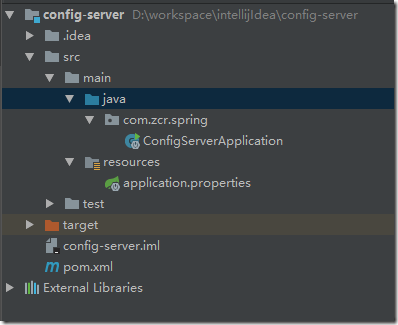
目录结构:
- 运行应用并打开网址http://localhost:8888/db-service/dev,出现如下页面,证明配置文件发布成功

创建并运行一个Spring Cloud Config Client
- 创建一个名为config-client的应用,并添加spring-cloud-starter-parent,spring-cloud-starter-config,spring-boot-starter-web依赖,pom信息具体如下
<?xml version="1.0" encoding="UTF-8"?>
<project xmlns="http://maven.apache.org/POM/4.0.0"
xmlns:xsi="http://www.w3.org/2001/XMLSchema-instance"
xsi:schemaLocation="http://maven.apache.org/POM/4.0.0 http://maven.apache.org/xsd/maven-4.0.0.xsd">
<modelVersion>4.0.0</modelVersion> <groupId>com.zcr.spring</groupId>
<artifactId>config-client</artifactId>
<version>1.0-SNAPSHOT</version>
<parent>
<groupId>org.springframework.boot</groupId>
<artifactId>spring-boot-starter-parent</artifactId>
<version>1.5.2.RELEASE</version>
</parent>
<properties>
<project.build.sourceEncoding>UTF-8</project.build.sourceEncoding>
<project.reporting.outputEncoding>UTF-8</project.reporting.outputEncoding>
<java.version>1.8</java.version>
</properties>
<dependencies>
<dependency>
<groupId>org.springframework.cloud</groupId>
<artifactId>spring-cloud-starter-config</artifactId>
</dependency> <dependency>
<groupId>org.springframework.boot</groupId>
<artifactId>spring-boot-starter-web</artifactId>
</dependency> <dependency>
<groupId>org.springframework.boot</groupId>
<artifactId>spring-boot-starter-test</artifactId>
<scope>test</scope>
</dependency>
<dependencyManagement>
<dependencies>
<dependency>
<groupId>org.springframework.cloud</groupId>
<artifactId>spring-cloud-dependencies</artifactId>
<version>Dalston.RC1</version>
<type>pom</type>
<scope>import</scope>
</dependency>
</dependencies>
</dependencyManagement> <build>
<plugins>
<plugin>
<groupId>org.springframework.boot</groupId>
<artifactId>spring-boot-maven-plugin</artifactId>
</plugin>
</plugins>
</build> <repositories>
<repository>
<id>spring-milestones</id>
<name>Spring Milestones</name>
<url>https://repo.spring.io/milestone</url>
<snapshots>
<enabled>false</enabled>
</snapshots>
</repository>
</repositories> </project> - 在resources中创建bootstrap.properties(bootstrap.yml会在应用启动之前读取),格式如下
#文件名

spring.application.name=db-service

#文件模式,默认为default

spring.cloud.config.profile=dev

#server端ip地址

spring.cloud.config.uri= http://localhost:8888/

#client端ip端口

server.port=8881 - 创建一个controller
package com.zcr.spring;

import org.springframework.beans.factory.annotation.Value;

import org.springframework.boot.SpringApplication;

import org.springframework.boot.autoconfigure.SpringBootApplication;

import org.springframework.web.bind.annotation.RequestMapping;

import org.springframework.web.bind.annotation.RestController;

@SpringBootApplication

@RestController

public class ConfigClientApplication {

    public static void main(String[] args) {

        SpringApplication.run(ConfigClientApplication.class, args);

    }

    @Value("${sck.user}")

    String sckUser;

    @Value("${sck.password}")

    String sckPassword;

    @RequestMapping("/hello")

    public String showUserAndPassword(){

        String sb = "username is " + sckUser + "," + "password is " +sckPassword;

        return sb;

    }

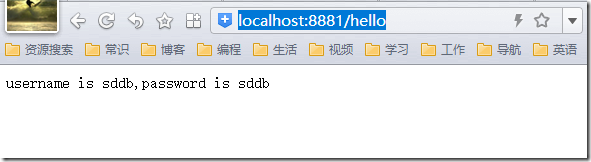
} - 启动Application,并访问http://localhost:8881/hello,出现如下界面,成功
遗留问题:1.初始化时,注入在static代码块之后,故静态代码块无法获取远程配置信息。
2.对spring了解浅。不懂内部原理,bug调试过程中比较费劲。
3.对spring中的注解不了解。
源码地址:https://github.com/310834626/spring-cloud-config
参考:http://www.jianshu.com/p/69dea19abf04
http://blog.didispace.com/springcloud4/
http://tech.lede.com/2017/06/12/rd/server/springCloudConfig/
Spring Cloud Config入门(本地配置)的更多相关文章
- SpringCloud实战之初级入门(三)— spring cloud config搭建git配置中心
目录 1.环境介绍 2.配置中心 2.1 创建工程 2.2 修改配置文件 2.3 在github中加入配置文件 2.3 修改启动文件 3. 访问配置中心 1.环境介绍 上一篇文章中,我们介绍了如何利用 ...
- 【Spring Cloud】Spring Cloud Config 实现分布式配置中心
Spring Cloud Config 实现分布式配置中心 一.分布式配置中心 分布式系统中,往往拥有大量的服务应用,而每个应用程序都需要有对应的配置文件来协助完成服务环境初始化.运行.因此生产了大量 ...
- 使用Spring Cloud Config统一管理配置,别再到处放配置文件了
1 前言 欢迎访问南瓜慢说 www.pkslow.com获取更多精彩文章! 可配置是一个成熟软件系统应该提供的特性,而配置管理对于大型系统就显得十分重要,特别是对于拥有多个应用的微服务系统.可喜的是, ...
- spring cloud config svn仓库配置
之前快速入门了一下spring cloud config 但是仓库用的别人博客上的git仓库,公司用的是svn项目管理中心,下面这个自己配置的时候出现的错误 You need to configure ...
- spring cloud config 入门
简介 Spring cloud config 分为两部分 server client config-server 配置服务端,服务管理配置信息 config-client 客户端,客户端调用serve ...
- .NET Core微服务之基于Steeltoe使用Spring Cloud Config统一管理配置
Tip: 此篇已加入.NET Core微服务基础系列文章索引 => Steeltoe目录快速导航: 1. 基于Steeltoe使用Spring Cloud Eureka 2. 基于Steelt ...
- Spring Cloud config之一:分布式配置中心入门介绍
Spring Cloud Config为服务端和客户端提供了分布式系统的外部化配置支持.配置服务器为各应用的所有环境提供了一个中心化的外部配置.它实现了对服务端和客户端对Spring Environm ...
- Spring Cloud Config(配置中心)
每天学习一点点 编程PDF电子书.视频教程免费下载:http://www.shitanlife.com/code 一.简介 Spring Cloud Config为分布式系统中的外部配置提供服务器和客 ...
- SpringCloud教程 | 第六篇: 分布式配置中心(Spring Cloud Config)
一.简介 在分布式系统中,由于服务数量巨多,为了方便服务配置文件统一管理,实时更新,所以需要分布式配置中心组件.在Spring Cloud中,有分布式配置中心组件spring cloud config ...
随机推荐
- [Part 4] 在Windows 10上源码编译PCL 1.8.1支持VTK和QT,可视化三维点云
本文首发于个人博客https://kezunlin.me/post/2d809f92/,欢迎阅读! Part-4: Compile pcl with vtk qt5 support from sour ...
- drf组件之jwt认证
drf组件之jwt认证模块 一.认证规则 全称:json web token 解释:加密字符串的原始数据是json,后台产生,通过web传输给前台存储 格式:三段式 - 头.载荷.签名 - 头和载荷才 ...
- python CGI编程-----简单的本地使用(1)
本章节需要安装python开发工具,window平台安装地址:https://www.python.org/downloads/windows/,linux安装地址:https://www.pytho ...
- 关于Java中2.0-1.1!=0.9的问题
关于Java中2.0-1.1!=0.9的问题 问题引出: 在<Java核心技术>中关于浮点数值计算部分提到,System.out.println(2.0-1.1)这条语句并不是想当然的0. ...
- RobotFramework自动化测试框架-Selenium Web自动化(三)关于在RobotFramework中如何使用Selenium很全的总结(下)
本文紧接着RobotFramework自动化测试框架-Selenium Web自动化(二)关于在RobotFramework中如何使用Selenium很全的总结(上)继续分享RobotFramewor ...
- CCNA 之 十三 广域网概述
广域网概述 为什么需要WAN ? 分区或分支机构的员工需要与总部通信并共享数据: 组织经常需要与其他组织远距离共享信息: 经常出差的员工需要访问公司网络信息: 什么事广域网链路? 用于连接LAN的.跨 ...
- #在windows上使用ngix重定向目录访问远程服务器文件详细实例
为了在开发环境保持于生产环境相同的访问远程服务器文件资源的目录配置,需要在开发环境(windows)在远程文件服务器使用nignx重定向文件目录,因为网上的资料大都是copy的,解释比较笼统,也没有具 ...
- Oracle temp table
Tow kinds of temp table data keep method. One is delete when commit Anothe one is preseve when commi ...
- Linux:AWK基础
AWK是一个强大的文本分析工具,算是Linux系统特别有用的命令了,在日志分析.文件内容分析中扮演特别重要的角色. AWK说明 简单来说awk就是把文件逐行的读入,以指定的分隔符将每行分割,分割后的部 ...
- python1:基础数据类型(上)
https://www.geekdigging.com/2019/10/13/2870915864/ 1.数字 在python的数字有4钟数据类型,分别是: int(有符号整型) long(长整型) ...