
SpringBoot系列——CORS(跨源资源共享)
前言
出于安全原因,浏览器禁止ajax调用当前源之外的资源(同源策略),我们之前也有写个几种跨域的简单实现(还在问跨域?本文记录js跨域的多种实现实例),本文主要详细介绍CORS,跨源资源共享,以及如何在SpringBoot的几种实现方式
这里主要参考spring的这篇:https://docs.spring.io/spring/docs/5.1.8.RELEASE/spring-framework-reference/web.html#mvc-cors
以及:https://developer.mozilla.org/zh-CN/docs/Web/HTTP/Access_control_CORS
CORS介绍
跨源资源共享(Cross-Origin Resource Sharing, CORS)是由大多数浏览器实现的W3C规范,它允许指定授权了哪种跨域请求,而不是使用基于IFRAME(内嵌框架)或JSONP的不太安全且功能不太强大的方法。
CORS分为简单请求、非简单请求两种跨域请求方式,Spring MVC HandlerMapping的实现提供了对CORS的内置支持。成功地将请求映射到处理程序之后,HandlerMapping的实现将检查CORS配置并不同的请求进行操作:预检请求直接处理,而简单请求和非简单请求被拦截、验证,并设置了所需的CORS响应头。为了启用跨源请求,您需要一些显式声明的CORS配置。如果没有找到匹配的CORS配置,预检请求将被拒绝。没有将CORS标头添加到简单、非简单CORS请求的响应中,浏览器会拒绝这个跨域请求。
简单请求不会触发预检请求,而非简单请求在发起之前会先发起预检请求,以获知服务器是否允许该实际请求,"预检请求“的使用,可以避免跨域请求对服务器的用户数据产生未预期的影响。
简单请求
若请求满足所有下述条件,则该请求可视为“简单请求”:
- 使用下列方法之一:
GETHEADPOST
- Fetch 规范定义了对 CORS 安全的首部字段集合,不得人为设置该集合之外的其他首部字段。该集合为:
AcceptAccept-LanguageContent-LanguageContent-Type(需要注意额外的限制)DPRDownlinkSave-DataViewport-WidthWidth
Content-Type的值仅限于下列三者之一:text/plainmultipart/form-dataapplication/x-www-form-urlencoded
- 请求中的任意
XMLHttpRequestUpload对象均没有注册任何事件监听器;XMLHttpRequestUpload对象可以使用XMLHttpRequest.upload属性访问。 - 请求中没有使用
ReadableStream对象。
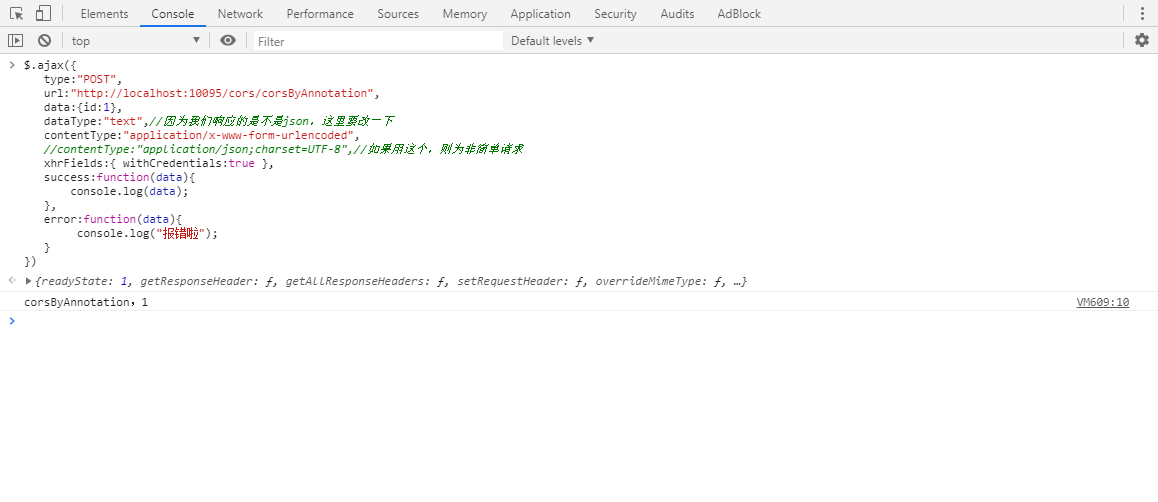
例如:

非简单请求
当请求满足下述任一条件时,即视为非简单请求,应首先发送预检请求:
- 使用了下面任一 HTTP 方法:
PUTDELETECONNECTOPTIONSTRACEPATCH
- 人为设置了对 CORS 安全的首部字段集合之外的其他首部字段。该集合为:
AcceptAccept-LanguageContent-LanguageContent-Type(需要注意额外的限制)DPRDownlinkSave-DataViewport-WidthWidth
Content-Type的值不属于下列之一:application/x-www-form-urlencodedmultipart/form-datatext/plain
- 请求中的
XMLHttpRequestUpload对象注册了任意多个事件监听器。 - 请求中使用了
ReadableStream对象。
例如:
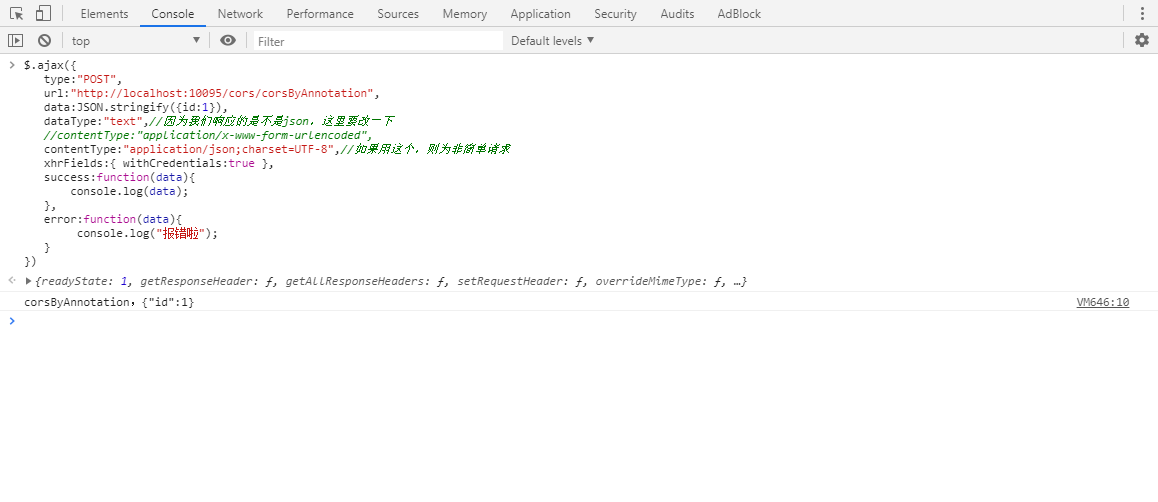
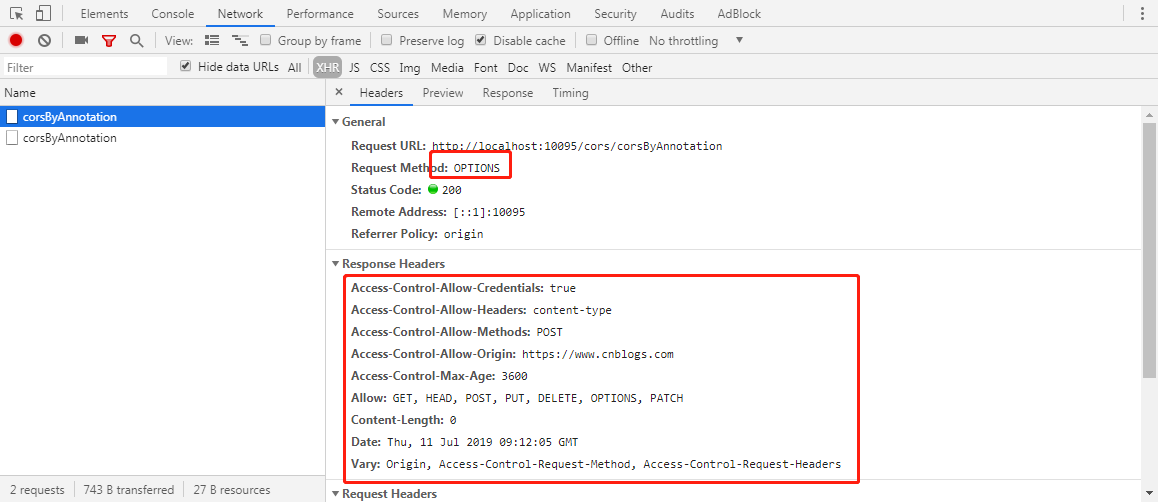
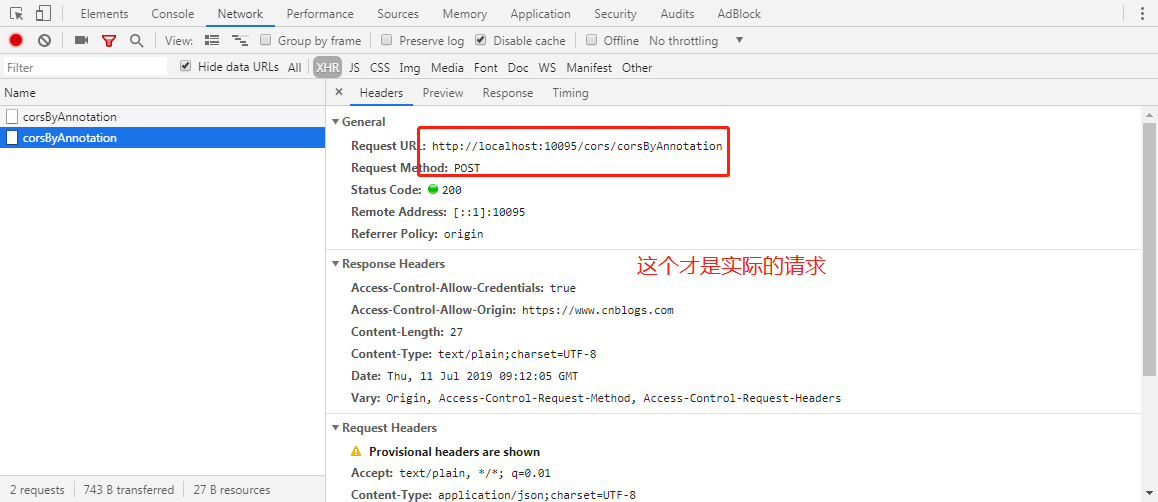
PS:如果ajax的contentType:"application/json;charset=UTF-8",设置成了json格式传输,那么你的data就要这样传JSON.stringify({id:1}),并且后端接参要加上@RequestBody,用对象去接MVC会帮我们自动注入参数,用字符串去接,会得到json字符串
附带身份凭证的请求
CORS 的一个有趣的特性是,可以基于 HTTP cookies 和 HTTP 认证信息发送身份凭证。一般而言,对于跨域 XMLHttpRequest请求,浏览器不会发送身份凭证信息。如果要发送凭证信息,需要设置 XMLHttpRequest的某个特殊标志位 withCredentials=true,就可以向服务器发送Cookies,但是,如果服务器端的响应中未携带 Access-Control-Allow-Credentials: true,浏览器将不会把响应内容返回给请求的发送者。
如果前端设置了true,后端为false,则会

实现方式
PS:不管是哪种方法,一定要看仔细前端的请求头中Origins的值到底是什么,前端的值与后端配置的值对应不上则无法跨域,比如前端是http://localhost:8080,而后端配置成IP,则无法跨域
@CrossOrigin
TestController接口测试
package cn.huanzi.qch.springbootcors.controller;

import org.springframework.web.bind.annotation.*;

@RequestMapping("cors/")

@RestController

public class TestController {

    /*

       通过注解配置CORS跨域测试

       $.ajax({

           type:"POST",

           url:"http://localhost:10095/cors/corsByAnnotation",

           data:{id:1},

           dataType:"text",//因为我们响应的是不是json,这里要改一下

           contentType:"application/x-www-form-urlencoded",

           //contentType:"application/json;charset=UTF-8",//如果用这个,则为非简单请求

           xhrFields:{ withCredentials:true },

           success:function(data){

               console.log(data);

           },

           error:function(data){

                console.log("报错啦");

           }

       })

    */

    @CrossOrigin(

            origins = "https://www.cnblogs.com",

            allowedHeaders = "*",

            methods = {RequestMethod.POST},

            allowCredentials = "true",

            maxAge = 3600

    )

    @PostMapping("corsByAnnotation")

    public String corsByAnnotation(String id) {

        return "corsByAnnotation," + id;

    }

}
如果@CrossOrigin注解在controller类上面声明,则整个controller类的接口都可以跨域调用
配置Config
Java Configuration
MyConfiguration配置类
package cn.huanzi.qch.springbootcors.config;

import org.springframework.context.annotation.Bean;

import org.springframework.context.annotation.Configuration;

import org.springframework.web.servlet.config.annotation.CorsRegistry;

import org.springframework.web.servlet.config.annotation.WebMvcConfigurer;

@Configuration

public class MyConfiguration {

    @Bean

    public WebMvcConfigurer corsConfigurer() {

        return new WebMvcConfigurer() {

            @Override

            public void addCorsMappings(CorsRegistry registry) {

                registry.addMapping("/cors/corsByConfig")

                        .allowedOrigins("https://www.cnblogs.com")

                        .allowedMethods("POST")

                        .allowedHeaders("*")

                        .allowCredentials(true).maxAge(3600);

            }

        };

    }

}
TestController接口测试
package cn.huanzi.qch.springbootcors.controller;

import org.springframework.web.bind.annotation.*;

@RequestMapping("cors/")

@RestController

public class TestController {

    /*

       通过Config配置CORS跨域测试

       $.ajax({

           type:"POST",

           url:"http://localhost:10095/cors/corsByConfig",

           data:{id:2},

           dataType:"text",//因为我们响应的是不是json,这里要改一下

           contentType:"application/x-www-form-urlencoded",

           //contentType:"application/json;charset=UTF-8",//如果用这个,则为非简单请求

           xhrFields:{ withCredentials:true },

           success:function(data){

               console.log(data);

           },

           error:function(data){

                console.log("报错啦");

           }

       })

    */

    @PostMapping("corsByConfig")

    public String corsByConfig(String id) {

        return "corsByConfig," + id;

    }

}
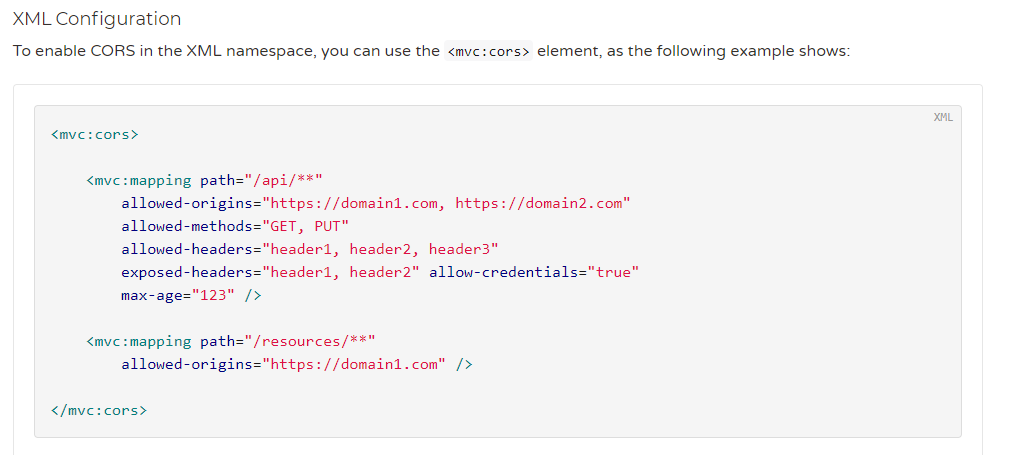
XML Configuration
xml格式我就不试了,大家看文档就好了:https://docs.spring.io/spring/docs/5.1.8.RELEASE/spring-framework-reference/web.html#mvc-cors-global-xml
CORS Filter
配置拦截器在启动项目的时候会报一个bean已存在,叫我们改名或启用覆盖默认bean
Description:

The bean 'myCorsFilter', defined in null, could not be registered. A bean with that name has already been defined in file [C:\Users\Administrator\Desktop\杂七杂八\springBoot\springboot-cors\target\classes\cn\huanzi\qch\springbootcors\filter\MyCorsFilter.class] and overriding is disabled.

Action:

Consider renaming one of the beans or enabling overriding by setting spring.main.allow-bean-definition-overriding=true
配置覆盖
#启用覆盖默认bean

spring.main.allow-bean-definition-overriding=true
MyCorsFilter
package cn.huanzi.qch.springbootcors.filter;

import org.springframework.boot.web.servlet.ServletComponentScan;

import org.springframework.stereotype.Component;

import org.springframework.util.StringUtils;

import javax.servlet.*;

import javax.servlet.annotation.WebFilter;

import javax.servlet.annotation.WebInitParam;

import javax.servlet.http.HttpServletRequest;

import javax.servlet.http.HttpServletResponse;

import java.io.IOException;

import java.util.Arrays;

import java.util.List;

@Component

@ServletComponentScan

@WebFilter(filterName = "myCorsFilter", //过滤器名称

        urlPatterns = "/cors/corsByMyCorsFilter",//url路径

        initParams = {

                @WebInitParam(name = "allowOrigin", value = "https://www.cnblogs.com"),//允许的请求源,可用,分隔,*表示所有

                @WebInitParam(name = "allowMethods", value = "POST"),//允许的请求方法,可用,分隔,*表示所有

                @WebInitParam(name = "allowCredentials", value = "true"),

                @WebInitParam(name = "allowHeaders", value = "*"),

                @WebInitParam(name = "maxAge", value = "3600"),//60秒 * 60,相当于一个小时

        })

public class MyCorsFilter implements Filter {

    private String allowOrigin;

    private String allowMethods;

    private String allowCredentials;

    private String allowHeaders;

    private String maxAge;

    @Override

    public void init(FilterConfig filterConfig) {

        //读取@WebFilter的initParams

        allowOrigin = filterConfig.getInitParameter("allowOrigin");

        allowMethods = filterConfig.getInitParameter("allowMethods");

        allowCredentials = filterConfig.getInitParameter("allowCredentials");

        allowHeaders = filterConfig.getInitParameter("allowHeaders");

        maxAge = filterConfig.getInitParameter("maxAge");

    }

    @Override

    public void doFilter(ServletRequest servletRequest, ServletResponse servletResponse, FilterChain filterChain) throws IOException, ServletException {

        HttpServletRequest request = (HttpServletRequest) servletRequest;

        HttpServletResponse response = (HttpServletResponse) servletResponse;

        if (!StringUtils.isEmpty(allowOrigin)) {

            if (allowOrigin.equals("*")) {

                response.setHeader("Access-Control-Allow-Origin", allowOrigin);

            } else {

                List<String> allowOriginList = Arrays.asList(allowOrigin.split(","));

                if (allowOriginList.size() > 0) {

                    //如果来源在允许来源内

                    String currentOrigin = request.getHeader("Origin");

                    if (allowOriginList.contains(currentOrigin)) {

                        response.setHeader("Access-Control-Allow-Origin", currentOrigin);

                    }

                }

            }

        }

        if (!StringUtils.isEmpty(allowMethods)) {

            response.setHeader("Access-Control-Allow-Methods", allowMethods);

        }

        if (!StringUtils.isEmpty(allowCredentials)) {

            response.setHeader("Access-Control-Allow-Credentials", allowCredentials);

        }

        if (!StringUtils.isEmpty(allowHeaders)) {

            response.setHeader("Access-Control-Allow-Headers", allowHeaders);

        }

        if (!StringUtils.isEmpty(maxAge)) {

            response.setHeader("Access-Control-Max-Age", maxAge);

        }

        //执行

        filterChain.doFilter(servletRequest, servletResponse);

    }

    @Override

    public void destroy() {

    }

}
TestController接口测试
package cn.huanzi.qch.springbootcors.controller;

import org.springframework.web.bind.annotation.*;

@RequestMapping("cors/")

@RestController

public class TestController {/*

       通过拦截器配置CORS跨域测试

       $.ajax({

           type:"POST",

           url:"http://localhost:10095/cors/corsByMyCorsFilter",

           data:{id:3},

           dataType:"text",//因为我们响应的是不是json,这里要改一下

           contentType:"application/x-www-form-urlencoded",

           //contentType:"application/json;charset=UTF-8",//如果用这个,则为非简单请求

           xhrFields:{ withCredentials:true },

           success:function(data){

               console.log(data);

           },

           error:function(data){

                console.log("报错啦");

           }

        })

    */

    @PostMapping("corsByMyCorsFilter")

    public String corsByMyCorsFilter(String id) {

        return "corsByMyCorsFilter," + id;

    }

}
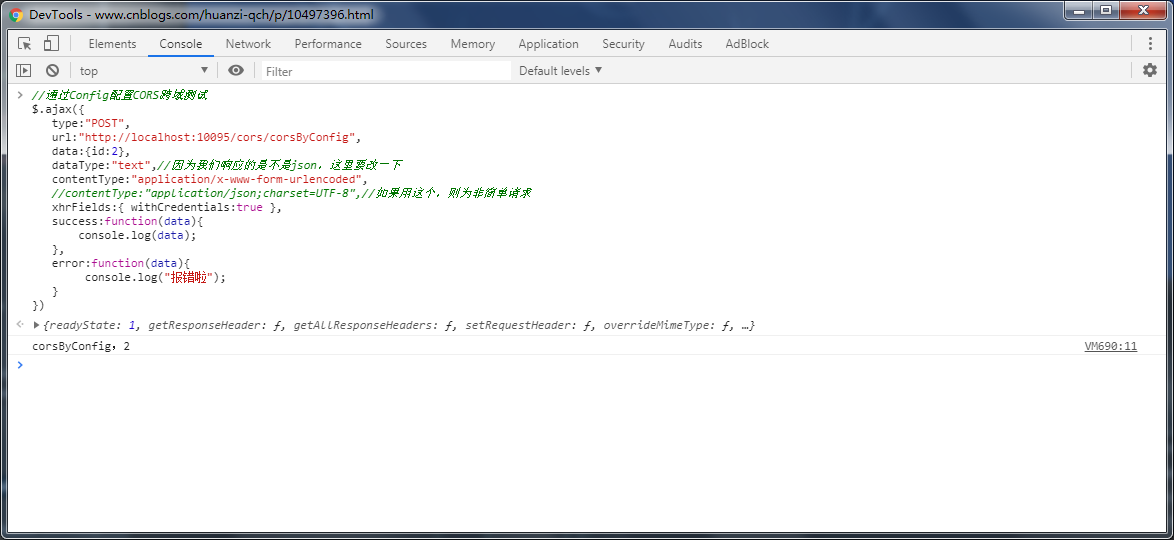
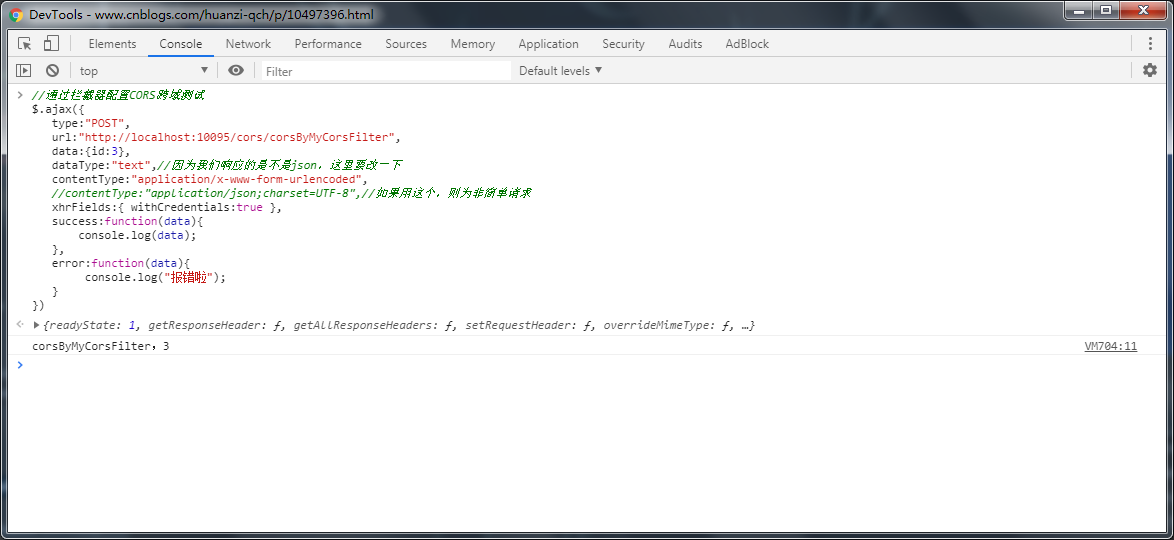
测试
打开博客园,F12打开控制台,开始测试
注解

java配置
corsFilter
后记
暂时记录到这里
代码开源
代码已经开源、托管到我的GitHub、码云:
GitHub:https://github.com/huanzi-qch/springBoot
码云:https://gitee.com/huanzi-qch/springBoot
SpringBoot系列——CORS(跨源资源共享)的更多相关文章
- 彻底掌握CORS跨源资源共享
本文来自于公众号链接: 彻底掌握CORS跨源资源共享 ) 本文接上篇公众号文章:彻底理解浏览器同源策略SOP 一.概述 在云时代,各种SAAS应用层出不穷,各种互联网API接口越来越丰富,H5技术在微 ...
- CORS跨源资源共享概念及配置(Kubernetes Ingress和Spring Cloud Gateway)
我最新最全的文章都在南瓜慢说 www.pkslow.com,欢迎大家来喝茶! 1 跨源资源共享CORS 跨源资源共享 (CORS) (或通俗地译为跨域资源共享)是一种基于HTTP 头的机制,该机制通过 ...
- JavaScript跨源资源共享
CORS(跨 源资源共享)基本思想,就是使用自定义的HTTP头部让浏览器与服务器进行沟通,从而决定请求或响应式应该成功还是失败 IE对CORS的实现 IE8引入了XDR类型,与XHR类似,但可以实现安 ...
- 跨源资源共享(CORS)概念、实现(用Spring)、起源介绍
本文内容引用自: https://howtodoinjava.com/spring5/webmvc/spring-mvc-cors-configuration/ https://developer.m ...
- CORS跨域资源共享你该知道的事儿
"唠嗑之前,一些客套话" CORS跨域资源共享,这个话题大家一定不陌生了,吃久了大转转公众号的深度技术好文,也该吃点儿小米粥溜溜胃里的缝儿了,今天咱们就再好好屡屡CORS跨域资源共 ...
- 在ASP.NET Web API中实现CORS(跨域资源共享)
默认情况下,是不允许网页从不同的域访问服务器资源的,访问遵循"同源"策略的原则. 会遇到如下的报错: XMLHttpRequest cannot load http://local ...
- JS高程3:Ajax与Comet-进度事件、跨源资源共享
有以下 6 个进度事件 loadstart:在接收到响应数据的第一个字节时触发. progress:在接收响应期间持续不断地触发. error:在请求发生错误时触发. abort:在因 ...
- CORS跨域资源共享漏洞
CORS漏洞其中已经存在很久了,但是国内了解的人不是很多,文章更是少只有少,漏洞平台也没有此分类. 在DefConChina之后写了一篇算是小科普的文章. 定义CORS,Cross-Origin Re ...
- 跨域漏洞丨JSONP和CORS跨域资源共享
进入正文之前,我们先来解决个小问题,什么是跨域? 跨域:指的是浏览器不能执行其它网站的脚本,它是由浏览器的同源策略造成的,是浏览器的安全限制! 跨域常见的两种方式,分别是JSONP和CORS. 今天i ...
随机推荐
- Layui 2.0.0 正式发布:潜心之作,开箱即用的前端UI框架(确实很多内容)
Hi,久违了.处暑逼近之际,潜水半年的 layui 是时候出来透透气了.我们带来的是全新的 2.0 版本,一次被我们定义为“破茧重生”的倾情之作.如果你已曾用过 layui,你将真正感受到一次因小而大 ...
- Emgu-WPF 激光雷达研究-移动物体跟踪2
原文:Emgu-WPF 激光雷达研究-移动物体跟踪2 初步实现了去燥跟踪,并用圆点标注障碍物 https://blog.csdn.net/u013224722/article/details/8078 ...
- WCF配置文件详解
今天来看看WCF的配置方法. 上图整理了服务配置过程中所用到的基本的元素,大致的步骤主要是首先要在调用服务的程序集中添加服务的一个引用,然后添加一个service并指定服务的名称.终结点,如果添加了b ...
- MVC EF Model First
1 在Models下新建实体数据模型Model.edmx 2 在Model.edmx中点右键建立各个实体,增加Scalar Property 3 空白处点右键,添加关系,勾选增加外键 4 保存Mode ...
- win10应用程序添加到开机启动项的两种解决办法
原文 win10应用程序添加到开机启动项的两种解决办法 在windows10系统中,如果想让应用程序在开机之后自动运行起来,可以怎么做呢? 方法一: 1.首先创建应用程序的快捷方式 找到自己想加入开机 ...
- 判断jQuery选择器结果为空 - CSDN博客
原文:判断jQuery选择器结果为空 - CSDN博客 jQuery选择器获取到的是一个对象,所以无论页面上存在或者不存在元素,这个对象都不为空.因此,如果要使用jQuery检查元素再给某个页面上是否 ...
- 修改GitHub上项目语言显示
问题 最近将自己以Scala为主语言写的博客放到github上了.由于使用了富文本编辑器.jQuery.Bootstrap等第三方插件,导致js.css等代码远远超过你自己写的代码. 于是也就成这样了 ...
- WCF研究-中篇
中篇 5.托管于宿主 6.消息模式 7.WCF行为-实例管理和并发控制 8.安全 5.托管于宿主 托管 宿主Host Ø承载WCF Service运行的环境 自承载方式 系统服务方式 IIS方式 WA ...
- qt获得本地IP的方法,qt中域名解析的方法
本文博客链接:http://blog.csdn.net/jdh99,作者:jdh,转载请注明. 环境:Ubuntu10.04 + Qt4.7.0 Linux获得本地IP的方法,我尝试了两种 1.用QH ...
- Qt按ESC关闭模态对话框不触发closeEvent()问题解析(ESC默认调用的是reject()函数,所以必须覆盖这个函数才会有效果)good
事情是这样的:今天调试窗体,突然发现按ESC键居然跳过closeEvent()关闭了对话框!我的关闭判断都在closeEvent()里,这直接导致非正常关闭了正在进行的工作.先重建下场景: 调用处: ...