
【linux】【mysql】mysql8.0开启远程访问及常见问题
1.连接数据库
 [root@localhost ~]# mysql -uroot -p

 Enter password:

 Welcome to the MySQL monitor.  Commands end with ; or \g.

 Your MySQL connection id is 17

 Server version: 8.0.17 MySQL Community Server - GPL

 Copyright (c) 2000, 2019, Oracle and/or its affiliates. All rights reserved.

 Oracle is a registered trademark of Oracle Corporation and/or its

 affiliates. Other names may be trademarks of their respective

 owners.

 Type 'help;' or '\h' for help. Type '\c' to clear the current input statement.

 mysql>
2.在mysql8版本中更改用户密码需要加入with mysql_native_password
 mysql>  alter user 'root'@'localhost' identified with mysql_native_password by '***
';

 Query OK, 0 rows affected (0.04 sec)
3.修改root用户的host为‘%’
 mysql> show databases;

 +--------------------+

 | Database           |

 +--------------------+

 | information_schema |

 | mysql              |

 | performance_schema |

 | sys                |

 +--------------------+

 4 rows in set (0.01 sec)

 mysql> use mysql;

 Reading table information for completion of table and column names

 You can turn off this feature to get a quicker startup with -A

 Database changed

 mysql> select user,host from user;

 +------------------+-----------+

 | user             | host      |

 +------------------+-----------+

 | mysql.infoschema | localhost |

 | mysql.session    | localhost |

 | mysql.sys        | localhost |

 | root             | localhost |

 +------------------+-----------+

 4 rows in set (0.00 sec)

 mysql> update user set host = '%' where user = 'root';

 Query OK, 1 row affected (0.00 sec)

 Rows matched: 1  Changed: 1  Warnings: 0

 mysql> flush privileges;

 Query OK, 0 rows affected (0.00 sec)
再查看root用户的host
 mysql> select user,host from user;

 +------------------+-----------+

 | user             | host      |

 +------------------+-----------+

 | root             | %         |

 | mysql.infoschema | localhost |

 | mysql.session    | localhost |

 | mysql.sys        | localhost |

 +------------------+-----------+

 4 rows in set (0.01 sec)
至此,root用户的远程访问已开启。
4.测试下navicat连接
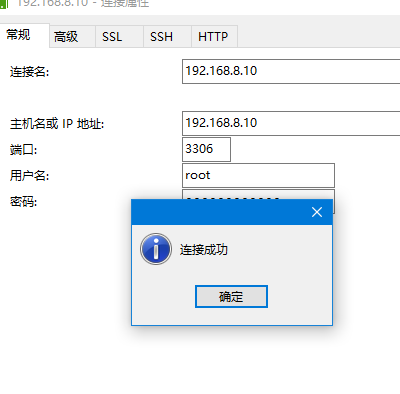
连接成功!
常见问题解决
1.解决sql_mode=only_full_group_by问题
[Err] 1055 - Expression #1 of SELECT list is not in GROUP BY clause and contains nonaggregated column 'mingbyte.u.USER_ID' which is not functionally dependent on columns in GROUP BY clause; this is incompatible with sql_mode=only_full_group_by
连接数据库,通过 select version(), @@sql_mode; 查看mode
 [root@localhost ~]# mysql -uroot -p

 Enter password:

 Welcome to the MySQL monitor.  Commands end with ; or \g.

 Your MySQL connection id is 89

 Server version: 8.0.17 MySQL Community Server - GPL

 Copyright (c) 2000, 2019, Oracle and/or its affiliates. All rights reserved.

 Oracle is a registered trademark of Oracle Corporation and/or its

 affiliates. Other names may be trademarks of their respective

 owners.

 Type 'help;' or '\h' for help. Type '\c' to clear the current input statement.

 mysql> select version(), @@sql_mode;

 +-----------+-----------------------------------------------------------------------------------------------------------------------+

 | version() | @@sql_mode                                                                                                            |

 +-----------+-----------------------------------------------------------------------------------------------------------------------+

 | 8.0.17    | ONLY_FULL_GROUP_BY,STRICT_TRANS_TABLES,NO_ZERO_IN_DATE,NO_ZERO_DATE,ERROR_FOR_DIVISION_BY_ZERO,NO_ENGINE_SUBSTITUTION |

 +-----------+-----------------------------------------------------------------------------------------------------------------------+

 1 row in set (0.00 sec)

 mysql>
发现上文中查看的mode中有ONLY_FULL_GROUP_BY。将其删除
sql_mode='STRICT_TRANS_TABLES,NO_ZERO_IN_DATE,NO_ZERO_DATE,ERROR_FOR_DIVISION_BY_ZERO,NO_ENGINE_SUBSTITUTION'
修改mysql的配置文件,重启依旧生效
- vi /etc/my.cnf
将上述sql_mode插入[mysqld]下方,保存,重启数据库,问题解决。
或者
 mysql> set global sql_mode='STRICT_TRANS_TABLES,NO_ZERO_IN_DATE,NO_ZERO_DATE,ERROR_FOR_DIVISION_BY_ZERO,NO_ENGINE_SUBSTITUTION';

 Query OK, 0 rows affected (0.01 sec)

 mysql> set session sql_mode='STRICT_TRANS_TABLES,NO_ZERO_IN_DATE,NO_ZERO_DATE,ERROR_FOR_DIVISION_BY_ZERO,NO_ENGINE_SUBSTITUTION';

 Query OK, 0 rows affected (0.00 sec)
问题解决。
【linux】【mysql】mysql8.0开启远程访问及常见问题的更多相关文章
- Linux安装Mysql8.0及SQL分类的补充
Linux安装Mysql8.0 参考文章:https://blog.csdn.net/qq_38570633/article/details/109257430 参考文献:https://blog.c ...
- 【转】mysql给root开启远程访问权限,修改root密码
好记性不如烂笔头,偶然用一直忘.... mysql给root开启远程访问权限,修改root密码 1.MySql-Server 出于安全方面考虑只允许本机(localhost, 127.0.0.1) ...
- Centos7 安装mysql服务器并开启远程访问功能
大二的暑假,波波老师送了一个华为云的服务器给我作测试用,这是我程序员生涯里第一次以root身份拥有一台真实的云服务器 而之前学习的linux知识在这时也派上了用场,自己的物理机用的是ubuntu系统, ...
- linux安装mysql8.0及开启远程访问
第一步:获取mysql8.0的yum源 进入mysql官网获取RPM包下载地址 https://dev.mysql.com/downloads/repo/yum/ 点击下载后, 右键复制链接地 ...
- linux 安装mysql8.0
linux下安装mysql8.0 下载mysql $ wget http://mirrors.ustc.edu.cn/mysql-ftp/Downloads/MySQL-8.0/mysql-8.0.4 ...
- ubuntu16.04下安装mysql,并开启远程访问
一.安装 apt-get install mysql-server 二.本地连接 mysql默认开启了本地连接 直接通过mysql -uuser -p,然后输入密码访问 三.开启远程访问 3.1.创建 ...
- 安装MySQL数据库并开启远程访问
一.安装MySQL数据库 MySQL安装在系统盘下(C:\Program Files),方便系统备份. 1.双击安装程序,勾选“I accept the license terms”,点击“Next” ...
- Linux安装Mysql8.0.20并配置主从复制(一主一从,双主双从)
1. 主从复制解释 将主数据库的增删改查等操作记录到二进制日志文件中,从库接收主库日志文件,根据最后一次更新的起始位置,同步复制到从数据库中,使得主从数据库保持一致. 2. 主从复制的作用 高可用 ...
- linux安装mysql8.0
linux 上安装mysql8.0 mysql版本8.0.16 MySQL Community 操作系统centos7 准备工作: mysql8.0 rpm文件 安装步骤: 1. 下载mysql的re ...
随机推荐
- Windows 10“数字权利激活”永久性激活!!!
直接运行软件即可自动激活,等出现"激活成功"即可关闭软件. 注意事项: 激活软件不会帮你打开Windows update服务,如关闭系统自动更细服务的需要先启动服务. 可以在小娜搜 ...
- 在github上搭建个人博客并在线更新
换博客比更博还勤的我终于决定写一篇博客搭建教程了.. FAQ Q:\(hexo\)需要本地编译.\(jekyll\)虽然可以直接上传\(md\)..但是如果在github上直接编译也太难受了叭,毕竟不 ...
- JavaScrip数据类型
数据类型: 基础数据类型: Number String Boolean Undefined Null 引用数据类型: Object Symbol
- 如何比较装X地回答问题 | 面试系列.1
公众号后台比较多同学让我写面试相关的文章,在<从面试官的角度谈谈大数据面试>也聊了很多,但是有同学吐槽说我没有把答案写上去,当时我的心里是拒绝写的,这有啥好写的,又不难,Google一大堆 ...
- shell中特殊符号的作用
linux中shell变量$#,$@,$0,$1,$2的含义解释: 变量说明: $$ Shell本身的PID(ProcessID) $! Shell最后运行的后台Process的PID $? 最后运行 ...
- 使用coding和hexo快速搭建博客
欢迎访问我的个人博客皮皮猪:http://www.zhsh666.xyz 今天教大家怎么用hexo快速搭建自己的博客.我不是专业人士,不懂前端知识,所以我十分讨厌那些专业术语,讲了一大堆,对于技术小白 ...
- IDEA-Maven项目的jdk版本设置
在 Intellij IDEA 中,我们需要设置 Settings 中的 Java Compiler 和 Project Structure 中的 Language Level 中的 jdk 版本为自 ...
- JVM体系结构详解
每个Java开发人员都知道字节码将由JRE (Java运行时环境)执行.但是很多人不知道JRE是Java Virtual Machine(JVM)的实现,它分析字节码.解释代码并执行代码.作为开发者, ...
- 关于turtle画蟒蛇小实例
import turtle turtle.setup(800,600) turtle.pensize(25) turtle.pencolor('blue') turtle.penup() #抬笔 tu ...
- 利用poi包装一个简单的Excel读取器.一(适配一个Reader并提供readLine方法)
通常,读文本我们会使用BufferedReader,它装饰或者说管理了InputStreamReader,同时提供readLine()简化了我们对文本行的读取.就像从流水线上获取产品一样,每当取完一件 ...