
Spring MVC整合FreeMarker
什么是Freemarker?
FreeMarker是一个用Java语言编写的模板引擎,它基于模板来生成文本输出。FreeMarker与Web容器无关,即在Web运行时,它并不知道Servlet或HTTP。它不仅可以用作表现层的实现技术,而且还可以用于生成XML,JSP或Java 等。
目前企业中:主要用Freemarker做静态页面或是页面展示
一.工程结构
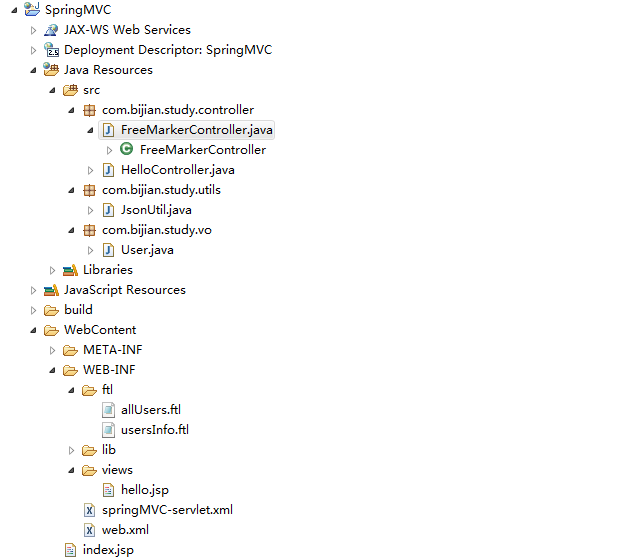
二.web.xml
 <?xml version="1.0" encoding="UTF-8"?>

 <web-app version="2.4" xmlns="http://java.sun.com/xml/ns/j2ee"

     xmlns:xsi="http://www.w3.org/2001/XMLSchema-instance"

     xsi:schemaLocation="http://java.sun.com/xml/ns/j2ee

    http://java.sun.com/xml/ns/j2ee/web-app_2_4.xsd">

     <display-name>SpringMVC</display-name>

     <context-param>

         <param-name>contextConfigLocation</param-name>

         <param-value>/WEB-INF/springMVC-servlet.xml</param-value>

     </context-param>

     <listener>

         <listener-class>org.springframework.web.context.ContextLoaderListener</listener-class>

     </listener>

     <filter>

         <filter-name>encodingFilter</filter-name>

         <filter-class>org.springframework.web.filter.CharacterEncodingFilter</filter-class>

         <init-param>

             <param-name>encoding</param-name>

             <param-value>UTF-8</param-value>

         </init-param>

         <init-param>

             <param-name>forceEncoding</param-name>

             <param-value>true</param-value>

         </init-param>

     </filter>

     <filter-mapping>

         <filter-name>encodingFilter</filter-name>

         <url-pattern>/*</url-pattern>

     </filter-mapping>

     <servlet>

         <servlet-name>springMVC</servlet-name>

         <servlet-class>org.springframework.web.servlet.DispatcherServlet</servlet-class>

         <load-on-startup>1</load-on-startup>

     </servlet>

     <servlet-mapping>

         <servlet-name>springMVC</servlet-name>

         <url-pattern>/</url-pattern>

     </servlet-mapping>

 </web-app>
三.springMVC-servlet.xml
 <?xml version="1.0" encoding="UTF-8"?>

 <beans xmlns="http://www.springframework.org/schema/beans"

     xmlns:context="http://www.springframework.org/schema/context" xmlns:p="http://www.springframework.org/schema/p"

     xmlns:mvc="http://www.springframework.org/schema/mvc" xmlns:xsi="http://www.w3.org/2001/XMLSchema-instance"

     xsi:schemaLocation="http://www.springframework.org/schema/beans

                     http://www.springframework.org/schema/beans/spring-beans-3.0.xsd

                     http://www.springframework.org/schema/context

                     http://www.springframework.org/schema/context/spring-context-3.0.xsd

                     http://www.springframework.org/schema/mvc

                     http://www.springframework.org/schema/mvc/spring-mvc-3.0.xsd

                     ">

     <!-- 自动扫描包 -->

     <context:component-scan base-package="com.bijian.study.controller"></context:component-scan>

     <!-- 默认注解映射支持 -->

     <mvc:annotation-driven></mvc:annotation-driven>

     <!--JSP视图解析器-->

     <bean id="viewResolverJsp" class="org.springframework.web.servlet.view.InternalResourceViewResolver">

         <property name="prefix" value="/WEB-INF/views/"/>

         <property name="suffix" value=".jsp"/>

         <property name="viewClass" value="org.springframework.web.servlet.view.InternalResourceView"/>

         <property name="order" value="1"/>

     </bean>

     <!-- 配置freeMarker视图解析器 -->

     <bean id="viewResolverFtl" class="org.springframework.web.servlet.view.freemarker.FreeMarkerViewResolver">

         <property name="viewClass" value="org.springframework.web.servlet.view.freemarker.FreeMarkerView"/>

         <property name="contentType" value="text/html; charset=UTF-8"/>

         <property name="exposeRequestAttributes" value="true" />

         <property name="exposeSessionAttributes" value="true" />

         <property name="exposeSpringMacroHelpers" value="true" />

         <property name="cache" value="true" />

         <property name="suffix" value=".ftl" />

         <property name="order" value="0"/>

     </bean>

     <!-- 配置freeMarker的模板路径 -->

     <bean id="freemarkerConfig" class="org.springframework.web.servlet.view.freemarker.FreeMarkerConfigurer">

         <property name="templateLoaderPath" value="/WEB-INF/ftl/"/>

         <property name="freemarkerVariables">

             <map>

                 <entry key="xml_escape" value-ref="fmXmlEscape" />

             </map>

         </property>

         <property name="defaultEncoding" value="UTF-8"/>

         <property name="freemarkerSettings">

             <props>

                 <prop key="template_update_delay">3600</prop>

                 <prop key="locale">zh_CN</prop>

                 <prop key="datetime_format">yyyy-MM-dd HH:mm:ss</prop>

                 <prop key="date_format">yyyy-MM-dd</prop>

                 <prop key="number_format">#.##</prop>

             </props>

         </property>

     </bean>

     <bean id="fmXmlEscape" class="freemarker.template.utility.XmlEscape"/>

 </beans>
在JSP和Freemarker的配置项中都有一个order property,上面例子是把freemarker的order设置为0,jsp为1,意思是找view时,先找ftl文件,再找jsp文件做为视图。这样Freemarker视图解析器就能与JSP视图解析器并存。
四.FreeMarkerController.java
 package com.bijian.study.controller;

 import java.util.ArrayList;

 import java.util.HashMap;

 import java.util.List;

 import java.util.Map;

 import javax.servlet.http.HttpServletRequest;

 import javax.servlet.http.HttpServletResponse;

 import org.springframework.stereotype.Controller;

 import org.springframework.web.bind.annotation.RequestMapping;

 import org.springframework.web.servlet.ModelAndView;

 import com.alibaba.fastjson.JSON;

 import com.bijian.study.utils.JsonUtil;

 import com.bijian.study.vo.User;

 @Controller

 public class FreeMarkerController {

     @RequestMapping("/get/usersInfo")

     public ModelAndView Add(HttpServletRequest request, HttpServletResponse response) {

         User user = new User();

         user.setUsername("zhangsan");

         user.setPassword("1234");

         User user2 = new User();

         user2.setUsername("lisi");

         user2.setPassword("123");

         List<User> users = new ArrayList<User>();

         users.add(user);

         users.add(user2);

         return new ModelAndView("usersInfo", "users", users);

     }

     @RequestMapping("/get/allUsers")

     public ModelAndView test(HttpServletRequest request, HttpServletResponse response) {

         List<User> users = new ArrayList<User>();

         User u1 = new User();

         u1.setUsername("王五");

         u1.setPassword("123");

         users.add(u1);

         User u2 = new User();

         u2.setUsername("张三");

         u2.setPassword("2345");

         users.add(u2);

         User u3 = new User();

         u3.setPassword("fgh");

         u3.setUsername("李四");

         users.add(u3);

         Map<String, Object> rootMap = new HashMap<String, Object>();

         rootMap.put("userList", users);

         Map<String, String> product = new HashMap<String, String>();

         rootMap.put("lastProduct", product);

         product.put("url", "http://www.baidu.com");

         product.put("name", "green hose");

         String result = JSON.toJSONString(rootMap);

         Map<String, Object> resultMap = new HashMap<String, Object>();

         resultMap = JsonUtil.getMapFromJson(result);

         return new ModelAndView("allUsers", "resultMap", resultMap);

     }

 }
五.JsonUtil.java
 package com.bijian.study.utils;

 import java.util.Map;

 import com.alibaba.fastjson.JSON;

 public class JsonUtil {

     public static Map<String, Object> getMapFromJson(String jsonString) {

         if (checkStringIsEmpty(jsonString)) {

             return null;

         }

         return JSON.parseObject(jsonString);

     }

     /**

      * 检查字符串是否为空

      * @param str

      * @return

      */

     private static boolean checkStringIsEmpty(String str) {

         if (str == null || str.trim().equals("") || str.equalsIgnoreCase("null")) {

             return true;

         }

         return false;

     }

 }
六.User.java
 ackage com.bijian.study.vo;

 public class User {

     private String username;

     private String password;

     public String getUsername() {

         return username;

     }

     public void setUsername(String username) {

         this.username = username;

     }

     public String getPassword() {

         return password;

     }

     public void setPassword(String password) {

         this.password = password;

     }

 }
七.usersInfo.ftl
 <!DOCTYPE html PUBLIC "-//W3C//DTD HTML 4.01 Transitional//EN" "http://www.w3.org/TR/html4/loose.dtd">

 <html>

 <head>

 <meta http-equiv="Content-Type" content="text/html; charset=UTF-8">

 <title>usersInfo</title>

 </head>

 <body>

 <#list users as user>

     <div>

         username : ${user.username},

         password : ${user.password}

     </div>

 </#list>

 </body>

 </html>
八.allUsers.ftl
<html>
<head>
<title>allUsers</title>
</head>
<body>
<#list resultMap.userList as user>
Welcome ${user.username}! id:${user.password}<br/>
</#list>
<p>Our latest product:
<a href="${resultMap.lastProduct.url}">${resultMap.lastProduct.name} </a>!
</body>
</html>
九.运行效果
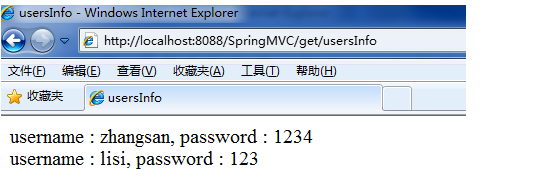

再输入http://localhost:8088/SpringMVC/greeting?name=zhangshan,JSP视图解析器运行依然正常。
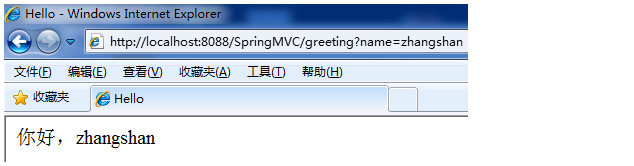
至此,就结束完成整合了!
Spring MVC整合FreeMarker的更多相关文章
- 【转载】Spring MVC 整合 Freemarker
前言 1.为什么要使用Spring MVC呢? 2.为什么要使用Freemarker呢? 3.为什么不使用Struts2呢? 此示例出现的原因就是发现了struts2的性能太差,所以学习Spring ...
- Spring MVC整合 freemarker
1.什么是Spring MVC? Spring MVC是一种基于Java的实现了Web MVC设计模式的请求驱动类型的轻量级Web框架,即使用了MVC架构模式的思想,将Web层进行职责解耦,基于请求驱 ...
- Spring mvc整合freemarker详解
1.什么是FreeMarker FreeMarker是一个模板引擎,一个基于模板生成文本输出的通用工具,使用纯Java编写 FreeMarker被设计用来生成HTML Web页面,特别是基于MVC模式 ...
- 【FreeMarker】Spring MVC与FreeMarker整合(二)
前一篇介绍了FreeMarker的基本使用,本例介绍Spring MVC与FreeMarker整合 不熟悉项目搭建,可参考 [FreeMarker]FreeMarker快速入门(一) 整合 1.新建S ...
- Spring mvc+hibernate+freemarker(实战)
Spring mvc+hibernate+freemarker(实战) 博客分类: Spring Spring mvchibernatefreemarkerwebjava 今天我为大家做了一个 sp ...
- Spring与Struts2整合VS Spring与Spring MVC整合
Spring与Struts2整合,struts.xml在src目录下 1.在web.xml配置监听器 web.xml <!-- 配置Spring的用于初始化ApplicationContext的 ...
- spring MVC 整合mongodb
Spring Mongodb 目录 1 SPRING整合MONGODB 1 1.1 环境准备 1 1.2 包依赖 1 1.3 配置 2 2 案列 5 2.1 SPRING MVC整合MONGODB代码 ...
- MyBatis+Spring+Spring MVC整合开发
MyBatis+Spring+Spring MVC整合开发课程观看地址:http://www.xuetuwuyou.com/course/65课程出自学途无忧网:http://www.xuetuwuy ...
- 【RabbitMQ系列】 Spring mvc整合RabbitMQ
一.linux下安装rabbitmq 1.安装erlang环境 wget http://erlang.org/download/otp_src_18.2.1.tar.gz tar xvfz otp_s ...
随机推荐
- Linux后台运行和关闭jar项目
直接用java -jar xxx.jar,当退出或关闭shell时,程序就会停止掉.以下方法可让jar运行后一直在后台运行. java -jar server.jar & 如果想要关闭java ...
- 微信 PC HOOK
一.概述 Web端有开源代码,但新用户登录不了 PC端也有开源代码,新老用户都能登录 市场上已有的产品:发卡机器人.多群转发机器人.营销管理机器人 基本的功能:收发消息,加人加群,收账抢红包 二.原理 ...
- 五、如何通过CT三维图像得到DRR图像
一.介绍 获取DRR图像是医疗图像配准里面的一个重要的前置步骤:它的主要目的是,通过CT三维图像,获取模拟X射线影像,这个过程也被称为数字影响重建. 在2D/3D的配准流程里面,需要首先通过CT三维图 ...
- 卸载/更新HP Client Security Manager失败的解决方案(解决错误1722:软件包存在问题……)
问题:当卸载较老版本/更新较老版本的HP Client Security Manager时可能会出现下图所示的错误: 解决方案:按Win+R键打开运行窗口,输入regedit回车进入注册表编辑器,依次 ...
- (day68)Vue-CLI项目、页面跳转和传参、生命周期钩子
目录 一.Vue-CLI (一)环境搭建 (二)项目的创建 (三)项目目录结构 (四)Vue组件(.vue文件) (五)全局脚本文件main.js(项目入口) (六)Vue请求生命周期 二.页面跳转和 ...
- 按位或:多项式,FWT,min-max容斥
Description: 刚开始你有一个数字0,每一秒钟你会随机选择一个$[0,2^n)$的数字,与你手上的数字进行或(C++, C 的 |, Pascal 的 or)操作. 选择数字i的概率是$p_ ...
- Java面试题和解答(五)
1.在Java中Executor和Executors的区别? Executor是线程池的顶层接口,它的实现类如下图所示: Executors是一个类,提供了多个静态方法,用于生成不同类型的线程池,如下 ...
- IT兄弟连 HTML5教程 多媒体应用 小结及习题
小结 在互联网上,图像和链接则是通过URL唯一确定信息资源的位置.URL分为绝对URL和相对URL.通过使用<img />标记在浏览器中显示一张图像.超文本具有的链接能力,可层层链接相关文 ...
- Go--实现两个大数相乘
----- import ( "bufio" "fmt" "os" "strings" ) func multi(str ...
- 在vue项目中的js文件里使用vue实例
参考的网址:https://blog.csdn.net/weixin_34353714/article/details/86958742 不为其他,就为了记录一下,方便以后查看: 第一种方法: 1.首 ...