
Flask报如下错误:SQLALCHEMY_TRACK_MODIFICATIONS adds significant overhead and will be disabled by default in the future. Set it to True or False to suppress this warning.
在同一个项目中由于flask_sqlalchemy版本不同,有时会报如下错误
错误信息如下:
flask_sqlalchemy\__init__.py:: UserWarning: SQLALCHEMY_TRACK_MODIFICATIONS adds significant overhead and will be disabled by default in the future. Set it to True to suppress this warning.

warnings.warn('SQLALCHEMY_TRACK_MODIFICATIONS adds significant overhead and will be disabled by default in the future. Set it to True to suppress this warning.')
错误信息提示的很明确,修改 SQLALCHEMY_TRACK_MODIFICATIONS 为True以移除这个警告。
去flask/lib/python2.7/site-packages/flask_sqlalchemy的init.py里面修改吧。
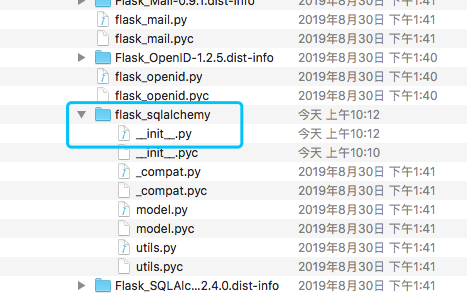
在init.py里面有init_app方法,修改下面的一行:
track_modifications = app.config.setdefault['SQLALCHEMY_TRACK_MODIFICATIONS', True]
然后保存,运行。
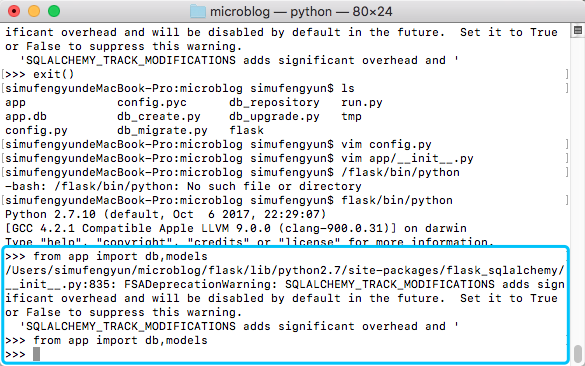
注意
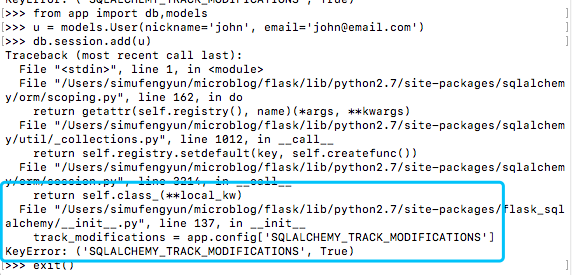
在后面程序中仍然出现错误
>>> from app import db,models

>>> u = models.User(nickname='john', email='john@email.com')

>>> db.session.add(u)

Traceback (most recent call last):

  File "<stdin>", line , in <module>

  File "/Users/simufengyun/microblog/flask/lib/python2.7/site-packages/sqlalchemy/orm/scoping.py", line , in do

    return getattr(self.registry(), name)(*args, **kwargs)

  File "/Users/simufengyun/microblog/flask/lib/python2.7/site-packages/sqlalchemy/util/_collections.py", line , in __call__

    return self.registry.setdefault(key, self.createfunc())

  File "/Users/simufengyun/microblog/flask/lib/python2.7/site-packages/sqlalchemy/orm/session.py", line , in __call__

    return self.class_(**local_kw)

  File "/Users/simufengyun/microblog/flask/lib/python2.7/site-packages/flask_sqlalchemy/__init__.py", line , in __init__

    #track_modifications = app.config['SQLALCHEMY_TRACK_MODIFICATIONS']

KeyError: ('SQLALCHEMY_TRACK_MODIFICATIONS', True)
图示如下
请参考如下文章进行修改:https://github.com/pallets/flask-sqlalchemy/issues/609
关于KeyError的错误:'SQLALCHEMY_TRACK_MODIFICATIONS'。

# __init__.py

class SignallingSession(SessionBase):

    def __init__(self, db, autocommit=False, autoflush=True, **options):

        #: The application that this session belongs to.

        self.app = app = db.get_app()

        track_modifications = app.config['SQLALCHEMY_TRACK_MODIFICATIONS']

        bind = options.pop('bind', None) or db.engine

        binds = options.pop('binds', db.get_binds(app))

        if track_modifications is None or track_modifications:

            _SessionSignalEvents.register(self)

        SessionBase.__init__(

            self, autocommit=autocommit, autoflush=autoflush,

            bind=bind, binds=binds, **options

        )

关键字“SQLALCHEMY_TRACK_MODIFICATIONS”不在app.config中,app.config在使用前未初始化。所以我建议稍微改变如下:

刚刚在“self.session = self.create_scoped_session(session_options)”之前初始化了“self.app = app”。

# __init__.py

class SQLAlchemy(object):

    """This class is used to control the SQLAlchemy integration to one

    or more Flask applications.  Depending on how you initialize the

    object it is usable right away or will attach as needed to a

    Flask application.

    ... ... ...

    .. versionchanged:: 3.0

       Utilise the same query class across `session`, `Model.query` and `Query`.

    """

    #: Default query class used by :attr:`Model.query` and other queries.

    #: Customize this by passing ``query_class`` to :func:`SQLAlchemy`.

    #: Defaults to :class:`BaseQuery`.

    Query = None

    def __init__(self, app=None, use_native_unicode=True, session_options=None,

                 metadata=None, query_class=BaseQuery, model_class=Model):

        self.app = app

        self.use_native_unicode = use_native_unicode

        self.Query = query_class

        self.session = self.create_scoped_session(session_options)

        self.Model = self.make_declarative_base(model_class, metadata)

        self._engine_lock = Lock()

        # self.app = app

        _include_sqlalchemy(self, query_class)

        if app is not None:

            self.init_app(app)

添加代码:

        if self.app is not None:

            return self.app

代码之前:

        if current_app:

            return current_app._get_current_object()

如下:

# __init__.py

    def get_app(self, reference_app=None):

        """Helper method that implements the logic to look up an

        application."""

        if reference_app is not None:

            return reference_app

        if self.app is not None:

            return self.app

        if current_app:

            return current_app._get_current_object()

        # if self.app is not None:

        #   return self.app

        raise RuntimeError(

            'No application found. Either work inside a view function or push'

            ' an application context. See'

            ' http://flask-sqlalchemy.pocoo.org/contexts/.'

        )

这样,“self.app = app = db.get_app()”将返回实例参数“app”通过“SQLAlchemy(app)”传输,而不是引发错误。

因为,代码中的“self.app”

        if self.app is not None:

            return self.app

不会是None,也不会出错。

现在我们可以在使用“db = SQLAlchemy(app)”作为下面的代码之前初始化“app.config”:

#coding:utf8

import pymysql

from flask_sqlalchemy import SQLAlchemy

from flask import Flask

app = Flask(__name__)

app.config["SQLALCHEMY_DATABASE_URI"] = "mysql+pymysql://root:whm@47.x.x.x:3306/artcs_pro"

app.config["SQLALCHEMY_TRACK_MODIFICATIONS"] = True

db = SQLAlchemy(app)
注意以上所有修改操作都要重新启动 flask/bin/python
Flask报如下错误:SQLALCHEMY_TRACK_MODIFICATIONS adds significant overhead and will be disabled by default in the future. Set it to True or False to suppress this warning.的更多相关文章
- 解决'SQLALCHEMY_TRACK_MODIFICATIONS adds significant overhead and '
懒癌晚期,直接贴图 然后就解决了!
- SQLALCHEMY_TRACK_MODIFICATIONS adds significant异常的解决方法
- LR报-27727错误解决办法
1.报如下错误:Action.c(4):Error-27727:Step download timeout(120 seconds) has expired when downloading reso ...
- Flask報錯 KeyError 'SQLALCHEMY_TRACK_MODIFICATIONS'.md
KeyError: 'SQLALCHEMY_TRACK_MODIFICATIONS' 关于flask-sqlalchemy中出现的 KeyError: 'SQLALCHEMY_TRACK_MODIFI ...
- Python Flask UnicodeDecodeError 编码错误解决
折腾Python做快速Web开发.最后定下来用Flask,相对教程全面. utf8编码上遇到问题,所有文件已经是utf8编码保存,加载css.js等静态文件,如果用GBK编码就正常:用utf8就报Un ...
- WinServer2008R2 + IIS 7.5 + .NET4.0 经典模式 运行WebAPI程序报404错误的解决方案
在Windows Server 2008 R2系统下,IIS 7.5 + .NET Framework 4.0的运行环境,以经典模式(Classic Mode)部署一个用.NET 4.0编译的 Web ...
- 启动mysql服务 报1067 错误
启动mysql 报1067 错误 一般报1067错误,先看一下data/my.ini配置文件 中的路径 datadir ,log-bin ,log-error 报1067错误原因 多种 ...
- MVC中使用jquery uploadify上传图片报302错误
使用jquery uploadify上传图片报302错误研究了半天,发现我上传的action中有根据session判断用户是否登录,如果没有登录就跳到登陆页,所以就出现了302跳转错误.原来更新了fl ...
- 开机报这个错误,然后 adobe软件无法使用
开机报这个错误,然后 adobe软件无法使用 按照此方法测试,无效,在原基础如下更改 /tmp 是连接文件找到根文件(/private/tmp)删除重新给予权限,重新建立连接恢复正常 使用到的命令 ...
随机推荐
- 制作excel下拉菜单
1.选中excel中需要制作下拉菜单的单元格/列/行,点击‘数据’——'数据验证': 2.允许选择'序列',来源中手动输入需要的内容,以逗号(,)分割: 3.如下图,此列都具有下拉选择的功能:
- C语言笔记 06_作用域&数组
作用域 任何一种编程中,作用域是程序中定义的变量所存在的区域,超过该区域变量就不能被访问.C 语言中有三个地方可以声明变量: 在函数或块内部的局部变量 在所有函数外部的全局变量 在形式参数的函数参数定 ...
- .NET 的未来:.NET 5
前言 不知不觉中,.NET Framework 已经更新到 4.8,.NET Core 也更新到了 3.0 版本.那么 .NET 的未来怎么样呢? 计划 2019 年 Build 大会上,微软宣布下一 ...
- MongoDB(一):NoSQL简介、MongoDB简介
1. NoSQL简介 1.1 什么是NoSQL NoSQL(NoSQL= Not Only SQL),意即“不仅仅是SQL",是一项全新的数据库理念,泛指非关系型的数据库. 1.2 为什么需 ...
- Make a List View Editable 使列表视图可编辑
In this lesson, you will learn how to make a List View editable. For this purpose, the DemoTask List ...
- mysql5.5下载安装教程
下载地址:https://dev.mysql.com/downloads/mysql/ 这里选择的是5.5的版本: 步骤1: 步骤2: 步骤三: 步骤四: 步骤5: 步骤6: 步骤7: 步骤8: 步骤 ...
- My Home Page
Recently I use github student pack to build my personal home page.
- JavaWeb 错误/异常时页面提示
经常我们会遇到发生页面404错误,服务器 500 异常,如果默认方式处理,则是将异常捕获之后跳到 Tomcat 缺省的异常页面,如下图所示.
- 【转载】Vue.js 安装及其环境搭建
注:最近在学习Vue,以下是环境搭配方法: ****************************************************************************** ...
- linux-认识vi vim
vi 编译器 Linux vi 命令非常强大,熟练地使用它可以高效的编辑代码,配置系统文件等 命令:vi [文件] vim [文件] vi 分为三种模式:命令模式.文字模式.末尾模式 -------- ...