
使用注解方式实现 AOP和IoC
使用注解方式实现AOP和IoC
IOC和DI的注解
IOC:
@Component:实现Bean组件的定义
@Repository:用于标注DAO类,功能与@Component作用相当
@Service:用于标注业务类
@Controller:用于标注控制器
DI:
@Resource(name="userService")
默认ByName方式,如果name确实默认按照ByType方式注入
@Autowired
默认ByType方式,如果出现同名类,则不能按照Type进行注入
需要使用@Qualifier 指明ID
1. 使用注解实现IoC案例
1.1 编写applicationContext.xm文件
<!--扫描注解:包扫描器-->
<context:component-scan base-package="cn.spring"/>
1.2创建mapper接口
public interface UserMapper {
    public int addUser(User user);
}
1.3 创建mapper接口实现类
@Repository
public class UserMapperImpl implements UserMapper {

    @Override
    public int addUser(User user) {
        System.out.println("添加成功");
        return 1;
    }
}
1.4创建Service接口
public interface UserService {
    public int addUser(User user);
}
1.5创建Service接口实现类
@Service("userServiceImpl")
public class UserServiceImpl implements UserService {
    //植入Dao层对象
    //@Resource默认是根据byName的方式,但是一旦名字为空 ,就根据byType
    @Autowired
    private UserMapper userMapper;
    @Override
    public int addUser(User user) {

        return userMapper.addUser(user);
    }

}
1.6 编写测试类
@org.junit.Test
public void test2() {
    ApplicationContext context = new ClassPathXmlApplicationContext("applicationContext.xml");
    //通过类型调度
    //UserInfoService userService=context.getBean(UserService.class);
    //指定@Service的value值后使用bean的id名称调度
    UserService userServiceImpl = (UserService) context.getBean("userServiceImpl");
    userServiceImpl.addUser(new User());
}
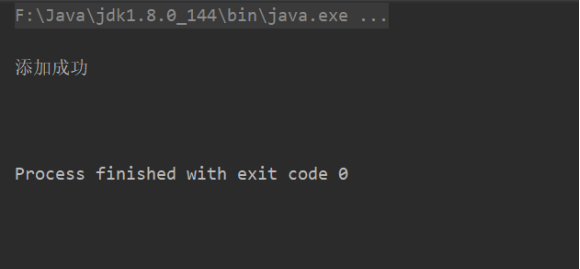
1.7 控制台
使用注解方式实现AOP
- 实现AOP的注解有
- @Aspect 声明切面
- @Ponitcut 声明公共的切点表达式
- @Before 前置增强
- @AfterReturning 后置增强
- @Around 环绕增强
- @AfterThrowing 异常抛出增强
- @After 最终增强
1.使用注解方式实现前置增强和后置增强
1.1 编写applicationContext.xml文件
<!--开启AOP注解支持-->
<aop:aspectj-autoproxy/>
1.2 创建Service类
@Service("IDoSomeService")
public class IDoSomeService {

    public void doSome(){
        System.out.println("业务类中dosome方法");
    }

    public void say(){
        System.out.println("业务类中say方法");
    }
}
1.3 编写切面类实现增强
@Aspect
@Component
public class MyAdvice {

@Pointcut("execution(* *..service.*.*(..))")
public void point(){

}

    @Before("point()")
    public void before(){
        System.out.println("前置增强");
    }

    @AfterReturning("execution(* *..service.*.*(..))")
    public void afterReturning(){
        System.out.println("后置增强");
    }

}
1.4 编写测试类
@org.junit.Test
public void test3(){
    ApplicationContext context=new ClassPathXmlApplicationContext("applicationContext.xml");
    IDoSomeService iDoSomeService = (IDoSomeService)context.getBean("IDoSomeService");
    iDoSomeService.doSome();
    iDoSomeService.say();
}
1.5 控制台

2. 使用注解方式实现环绕增强
2.1 编写applicationContext.xml文件
<!--扫描注解:包扫描器-->
<context:component-scan base-package="cn.spring"/>

<!--开启AOP注解支持-->
<aop:aspectj-autoproxy/>
2.2 创建Service类
@Service("IDoSomeService")
public class IDoSomeService {

    public void doSome(){
        System.out.println("业务类中dosome方法");
    }

    public void say(){
        System.out.println("业务类中say方法");
    }
}
2.3编写切面类实现增强
@Aspect
@Component
public class AroundAdvisor {

    @Around("execution(* *..service.*.*(..))")
    public void around(ProceedingJoinPoint PJ) throws Throwable {
        System.out.println("环绕增强");
        PJ.proceed();
        System.out.println("环绕增强");
    }
}
2.4编写测试类
@org.junit.Test
public void test3(){
    ApplicationContext context=new ClassPathXmlApplicationContext("applicationContext.xml");
    IDoSomeService iDoSomeService = (IDoSomeService)context.getBean("IDoSomeService");
    iDoSomeService.doSome();
    iDoSomeService.say();
}
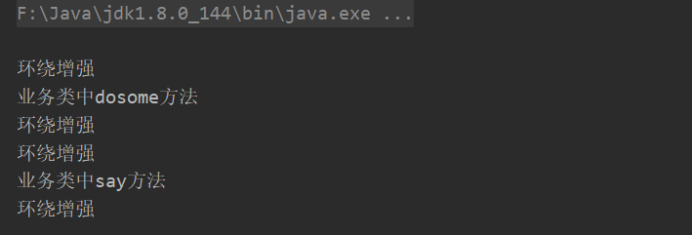
2.5控制台
3. 使用注解实现异常抛出增强
在exception包下完成对应的用例。
声明切面类
@Aspect
public class AroundLoggerAnno {
   @Around("execution(* com.cmy.service.*.*(..))")
   public Object aroundLogger(ProceedingJoinPoint jp) throws Throwable {
      System.out.println("调用 " + jp.getTarget() + " 的 " + jp.getSignature().getName()
            + " 方法。方法入参:" + Arrays.toString(jp.getArgs()));
      try {
         Object result = jp.proceed();
         System.out.println("调用 " + jp.getTarget() + " 的 "
               + jp.getSignature().getName() + " 方法。方法返回值:" + result);
         return result;
      } catch (Throwable e) {
         System.out.println(jp.getSignature().getName() + " 方法发生异常:" + e);
         throw e;
      } finally {
         System.out.println(jp.getSignature().getName() + " 方法结束执行。");
      }
   }
创建Spring的核心配置文件,开启Spring对IOC和AOP注解的支持
新增app-08.xml文件
<!--开启Spring IOC的注解支持 base-package 包扫描语句 com.cmy包下的注解-->
<context:component-scan base-package="com.cmy"/>
<!--配置增强类 交给Spring容器管理-->
<bean class="com.cmy.exception.ErrorLogger"></bean>
<!--开启Spring AOP注解的支持-->
<aop:aspectj-autoproxy />
编写测试用例,在DoSomeServiceImpl模拟异常
public class Demo2 {
    public static void main(String[] args) {
        //声明式增强 必须加载Spring容器
        ApplicationContext app = new ClassPathXmlApplicationContext("com/cmy/exception/app-08.xml");
        //获取代理对象
        DoSomeService doSomeService=(DoSomeService)app.getBean("doSomeService");
        doSomeService.say();
    }
}
4.使用注解实现最终增强
使用After包,增加切面类
/**
 * 通过注解实现最终增强
 */
@Aspect
public class AfterLoggerAnno {

   @After("execution(* com.cmy.service.*.*(..))")
   public void afterLogger(JoinPoint jp) {
      System.out.println(jp.getSignature().getName() + " 方法结束执行。");
   }
}
新建app-10.xml文件
<!--开启Spring IOC的注解支持 base-package 包扫描语句 com.cmy包下的注解-->
<context:component-scan base-package="com.cmy"></context:component-scan>
<!--配置增强类 交给Spring容器管理-->
<bean class="com.cmy.after.AfterLoggerAnno"></bean>
<!--开启Spring AOP注解的支持-->
<aop:aspectj-autoproxy />
创建测试用例
public class Demo2 {
    public static void main(String[] args) {
        //声明式增强 必须加载Spring容器
        ApplicationContext app = new ClassPathXmlApplicationContext("com/cmy/after/app-10.xml");
        //获取代理对象
        DoSomeService doSomeService=(DoSomeService)app.getBean("doSomeService");
        doSomeService.say();
    }
}
使用注解方式实现 AOP和IoC的更多相关文章
- (转)使用Spring的注解方式实现AOP入门
http://blog.csdn.net/yerenyuan_pku/article/details/52865330 首先在Eclipse中新建一个普通的Java Project,名称为spring ...
- 基于AspectJ的注解方式进行AOP开发
-------------------siwuxie095 基于 AspectJ 的注解方式进行 AOP 开发 ...
- (转)使用Spring的注解方式实现AOP的细节
http://blog.csdn.net/yerenyuan_pku/article/details/52879669 前面我们已经入门使用Spring的注解方式实现AOP了,现在我们再来学习使用Sp ...
- Spring系列之aAOP AOP是什么?+xml方式实现aop+注解方式实现aop
Spring系列之aop aop是什么?+xml方式实现aop+注解方式实现aop 什么是AOP? AOP为Aspect Oriented Programming 的缩写,意识为面向切面的编程,是通过 ...
- spring----IOC注解方式以及AOP
技术分析之Spring框架的IOC功能之注解的方式 Spring框架的IOC之注解方式的快速入门 1. 步骤一:导入注解开发所有需要的jar包 * 引入IOC容器必须的6个jar包 * 多引入一个:S ...
- Spring的注解方式实现AOP
Spring对AOP的实现提供了很好的支持.下面我们就使用Spring的注解来完成AOP做一个例子. 首先,为了使用Spring的AOP注解功能,必须导入如下几个包.aspectjrt.jar,asp ...
- 使用Spring的注解方式实现AOP
Spring对AOP的实现提供了很好的支持.下面我们就使用Spring的注解来完成AOP做一个例子. 首先,为了使用Spring的AOP注解功能,必须导入如下几个包.aspectjrt.jar,asp ...
- spring 纯注解方式 与AOP
spring注解方式 以前我也使用过纯注解方式.现在在这里做个记录 我们先认识几个我们都耳熟能详的注解 @configuration :从spring3.0这个注解就可以用于定义配置类,可以替换xml ...
- 注解方式实现AOP编程
步骤: 1) 先引入aop相关jar文件 (aspectj aop优秀组件) spring-aop-3.2.5.RELEASE.jar [spring3.2源码] aopal ...
随机推荐
- SCI-hub使用技巧(下载外文文献)
下载外文文献方法指南: (1)首先查找需要下载文献的DOI (2)在Sci-Hub主页搜索框输入URL.DOI或者PMID. (3)点击open即可看见下载界面. 参考文献:https://mp.we ...
- IdentityServer4 学习二
进入identityserver4的官网:https://identityserver.io/ 找到文档 从overview下开始按照官方文档练习: 安装自定义模板 dotnet new -i Ide ...
- python基础学习(八)
17.嵌套循环 # 嵌套循环 nested loop # 在一个循环中使用另外一个循环 num_list1 = [1, 2, 3, 4] num_list2 = [6, 7, 8, 9] # 组合li ...
- 批量删除c文件和h文件中的注释
不知道大家有没有批量删除c文件和h文件中注释的需要,说起来搞笑,偶然翻出来早先写的一份,首先楼猪不是闲的蛋疼写这东西,工作需要,哪里要砖就要搬.冷门的东西大家需要的时候也不一定好找,分享给大家,省的自 ...
- Linux基础-12-yum管理软件包
1. yum的功能 yum是Yellow dog Updater, Modified的缩写,目的就是为了解决RPM的依赖关系的问题,方便使用者进行软件的安装.升级等等工作. 2. 光盘挂载和镜像挂载 ...
- Redis string操作命令
字符串类型 string set 从v2.6.12版本开始,Redis增强了set功能, 语法如下: SET key value [EX seconds] [PX milliseconds] [NX ...
- nmap使用帮助翻译
Nmap 7.60 ( https://nmap.org )Usage: nmap [扫描类型] [操作] {目标说明}目标说明: 可以识别主机名.IP地址.网络,等等. 例如: scanme.n ...
- 【Leetcode】53. Maximum Subarray
题目地址: https://leetcode.com/problems/maximum-subarray/description/ 题目描述: 经典的求最大连续子数组之和. 解法: 遍历这个vecto ...
- "一起来捉妖"怎么从瘸腿中组合到最合心意的妖灵
背景: 最近两天活动,黑鬼白鬼合体觉醒秋容,陆无名,聂小倩,作为一个非土豪玩家,没有超高资质妖灵的我,想要在瘸腿妖灵中选取两个最佳选择,合体觉醒. 初选: 备选妖灵从5个维度录入数据,进行选择,分别为 ...
- mouseover mouseleave
mouseover在当鼠标移入元素或其子元素的时候都会触发,是一个重复触发,冒泡的过程.见下面例子,一个父元素包含一个子元素,在其父元素内滑动鼠标,超出子元素的范围时,也会触发事件. 而mouseen ...