
SpringBoot起飞系列-数据访问(九)
一、前言
前边我们已经学些了开发的基本流程,最重要的一步来了,怎么样和数据库交互才是最重要的,毕竟没有数据那就相当于什么也没做,本文我们来学习使用springboot整合jdbc、mybatis、jpa等我们常用的数据库持久化技术。
二、整合jdbc
2.1 引入maven依赖
整合jdbc我们需要两个依赖,一个是starter依赖,一个是mysql驱动(访问数据库驱动肯定是比不可少的),starter中我们指定了要使用的数据源。
  <dependency>

      <groupId>org.springframework.boot</groupId>

      <artifactId>spring-boot-starter-jdbc</artifactId>

  </dependency>

  <dependency>

      <groupId>mysql</groupId>

      <artifactId>mysql-connector-java</artifactId>

      <scope>runtime</scope>

  </dependency>
在application.yml或者application.properties中添加配置信息:
 spring:

   datasource:

     username: root

     password: root

     url: jdbc:mysql://localhost:3306/jdbctest?serverTimezone=UTC

     driver-class-name: com.mysql.cj.jdbc.Driver
2.2 测试数据库连接
在test中添加测试代码,来测试我们的数据库是否链接成功。
 @Autowired

 DataSource dataSource;

 //....

 @Test

 public void jdbcTest() {

     System.out.println(dataSource.getClass());

     try {

         System.out.println(dataSource.getConnection());

     } catch (SQLException e) {

         e.printStackTrace();

     }

 }
springboot整个jdbc,默认使用的是org.apache.tomcat.jdbc.pool.DataSource作为数据源,据源的相关配置都在DataSourceProperties里面。jdbc的自动配置原理在org.springframework.boot.autoconfigure.jdbc下。
2.3 使用数据
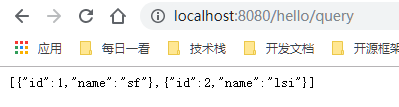
添加一个aciton,使用JdbcTemplate来查询数据:
 @Autowired

 private JdbcTemplate jdbcTemplate;

 @RequestMapping("/query")

  public List<Map<String, Object>> query() {

      List<Map<String, Object>> list = jdbcTemplate.queryForList("select * from `user`");

      return list;

  }
三、整合Druid数据源
这里我们整合Druid数据源,这是阿里巴巴的一个数据,整合之后我们可以跟踪sql日志,查询我们sql的执行情况。
3.1 添加pom依赖
 <!--引入druid数据源-->

 <!-- https://mvnrepository.com/artifact/com.alibaba/druid -->

 <dependency>

     <groupId>com.alibaba</groupId>

     <artifactId>druid</artifactId>

     <version>1.1.8</version>

 </dependency>
在config下添加一个配置项DruidConfig.java:
 package com.example.demo.config;

 import com.alibaba.druid.pool.DruidDataSource;

 import com.alibaba.druid.support.http.StatViewServlet;

 import com.alibaba.druid.support.http.WebStatFilter;

 import org.springframework.boot.context.properties.ConfigurationProperties;

 import org.springframework.boot.web.servlet.FilterRegistrationBean;

 import org.springframework.boot.web.servlet.ServletRegistrationBean;

 import org.springframework.context.annotation.Bean;

 import org.springframework.context.annotation.Configuration;

 import javax.sql.DataSource;

 import java.util.Arrays;

 import java.util.HashMap;

 import java.util.Map;

 @Configuration

 public class DruidConfig {

     @ConfigurationProperties(prefix = "spring.datasource")

     @Bean

     public DataSource druid(){

        return  new DruidDataSource();

     }

     //配置Druid的监控

     //1、配置一个管理后台的Servlet

     @Bean

     public ServletRegistrationBean statViewServlet(){

         ServletRegistrationBean bean = new ServletRegistrationBean(new StatViewServlet(), "/druid/*");

         Map<String,String> initParams = new HashMap<>();

         initParams.put("loginUsername","admin");

         initParams.put("loginPassword","123456");

         initParams.put("allow","");//默认就是允许所有访问

         initParams.put("deny","192.168.15.21");

         bean.setInitParameters(initParams);

         return bean;

     }

     //2、配置一个web监控的filter

     @Bean

     public FilterRegistrationBean webStatFilter(){

         FilterRegistrationBean bean = new FilterRegistrationBean();

         bean.setFilter(new WebStatFilter());

         Map<String,String> initParams = new HashMap<>();

         initParams.put("exclusions","*.js,*.css,/druid/*");

         bean.setInitParameters(initParams);

         bean.setUrlPatterns(Arrays.asList("/*"));

         return  bean;

     }

 }
其中statViewServlet是数据库管理后台,便于我们查看数据sql监控,webStatFilter添加一个过滤来使Druid知道哪些请求(附带sql查询的请求)需要捕获到,以便于记录sql日志。
但是Druid后台默认使用的日志框架是log4j,和当前版本你的springboot的日志框架不一样,直接启动会报错,需要再添加一个依赖。参考:https://blog.csdn.net/lyn_kk/article/details/89086476
  <dependency>

      <groupId>org.slf4j</groupId>

      <artifactId>slf4j-log4j12</artifactId>

  </dependency>
3.2 数据源配置参数
在yml添加Druid数据源额外的参数:
 spring:

   datasource:

     username: root

     password: root

     url: jdbc:mysql://localhost:3306/jdbctest?serverTimezone=UTC&useSSL=false

     driver-class-name: com.mysql.cj.jdbc.Driver

     #Druid数据源特有的配置

     initialSize: 5

     minIdle: 5

     maxActive: 20

     maxWait: 60000

     timeBetweenEvictionRunsMillis: 60000

     minEvictableIdleTimeMillis: 300000

     validationQuery: SELECT 1 FROM DUAL

     testWhileIdle: true

     testOnBorrow: false

     testOnReturn: false

     poolPreparedStatements: true

     #   配置监控统计拦截的filters,去掉后监控界面sql无法统计,'wall'用于防火墙

     filters: stat,wall,log4j

     maxPoolPreparedStatementPerConnectionSize: 20

     useGlobalDataSourceStat: true

     connectionProperties: druid.stat.mergeSql=true;druid.stat.slowSqlMillis=500
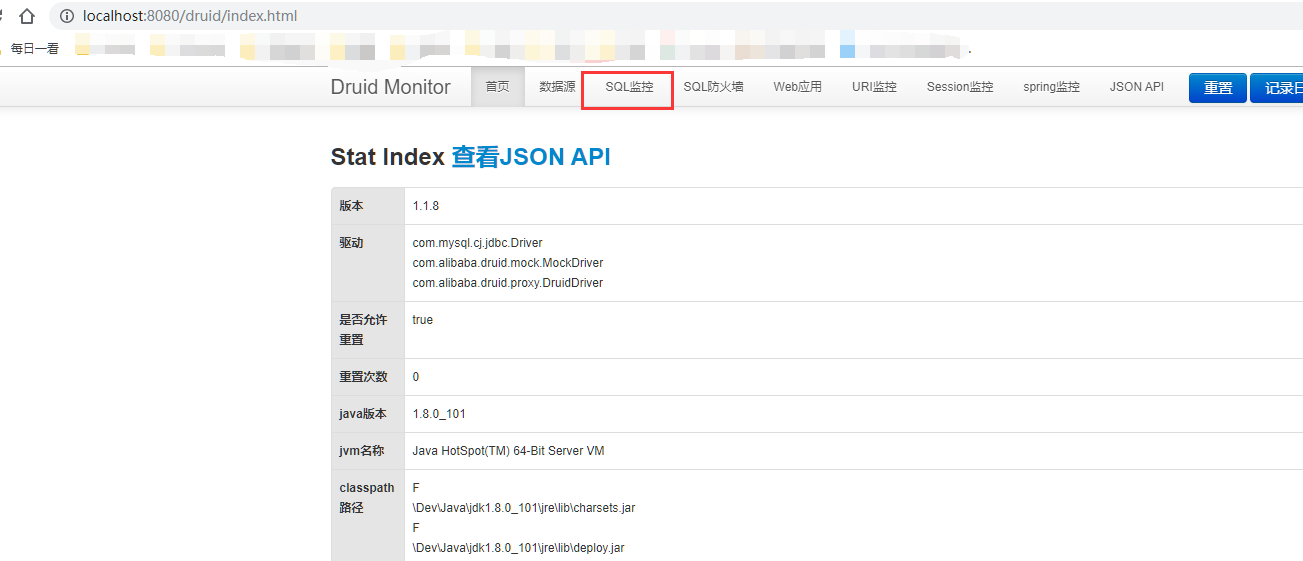
启动访问 http://localhost:8080/druid/index.html可以登录sql管理后台来查看监控,当我们访问一次数据库就会有一次监控。
四、整合Mybatis
前边我们已经整个了jdbc和druid数据源,下面我们就来使用一个操作数据库的框架,我们之前所熟悉的mybatis也整合进来。
4.1 添加依赖
接上边的依赖配置,我们添加mybatis的依赖:
 <!--引入mybatis-->

 <dependency>

     <groupId>org.mybatis.spring.boot</groupId>

     <artifactId>mybatis-spring-boot-starter</artifactId>

     <version>1.3.1</version>

 </dependency>
4.2 添加Mapper(注解版)
 package com.example.demo.mapper;

 import com.example.demo.domain.Department;

 import org.apache.ibatis.annotations.Mapper;

 import org.apache.ibatis.annotations.Select;

 import java.util.List;

 @Mapper

 public interface DepartmentMapper {

     @Select("select * from department")

     List<Department> getAll();

     @Select("select * from department where id=#{id}")

     Department getById(Integer id);

 }
添加对应的实体:
 public class Department {

     private Integer id;

     private  String name;

     public Integer getId() {

         return id;

     }

     public void setId(Integer id) {

         this.id = id;

     }

     public String getName() {

         return name;

     }

     public void setName(String name) {

         this.name = name;

     }

     public Department() {

     }

     public Department(Integer id, String name) {

         this.id = id;

         this.name = name;

     }

     @Override

     public String toString() {

         return "Department{" +

                 "id=" + id +

                 ", name='" + name + '\'' +

                 '}';

     }

 }
4.3 添加控制器访问
@RestController

@RequestMapping("/dept")

public class DepartmentController {

    @Autowired

    DepartmentMapper departmentMapper;

    @GetMapping("list")

    public Object getAll(){

        return departmentMapper.getAll();

    }

    @GetMapping("{id}")

    public Object getById(@PathVariable("id") Integer id){

        return departmentMapper.getById(id);

    }

}
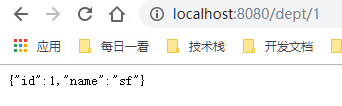
访问地址:http://localhost:8080/dept/1
使用@MapperScan注解指定包名,可以把该包下边的所有类注册为Mapper,使我们不用再每个类型写注解@Mapper。
 //使用MapperScan批量扫描所有的Mapper接口;

 @MapperScan(value = "com.example.demo.mapper")

 @SpringBootApplication

 public class DemoApplication {

     public static void main(String[] args) {

         SpringApplication.run(DemoApplication.class, args);

     }

 }
4.4 Xml配置版
我们可以在类路径下添加传统的mybatis配置文件,并在application.yml添加如下配置就可以实现配置文件方式的mybatis。
mybatis:

  config-location: classpath:mybatis/mybatis-config.xml 指定全局配置文件的位置

  mapper-locations: classpath:mybatis/mapper/*.xml  指定sql映射文件的位置
五、整合SpringData JPA
5.1 什么是SpringData JPA
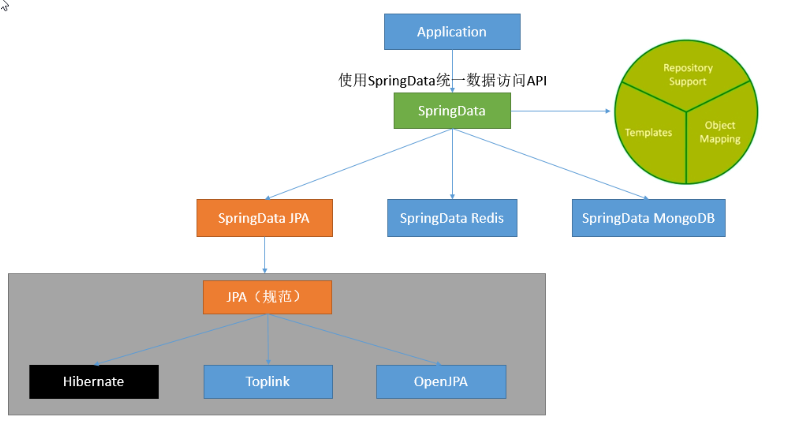
JPA(Java Persistence API)是Sun官方提出的Java持久化规范. 为Java开发人员提供了一种对象/关联映射工具来管理Java应用中的关系数据. 它的出现是为了简化现有的持久化开发工作和整合ORM技术. 结束各个ORM框架各自为营的局面。
JPA仅仅是一套规范,不是一套产品, 也就是说Hibernate, TopLink等是实现了JPA规范的一套产品。
Spring Data JPA是Spring基于ORM框架、JPA规范的基础上封装的一套JPA应用框架,是基于Hibernate之上构建的JPA使用解决方案,用极简的代码实现了对数据库的访问和操作,包括了增、删、改、查等在内的常用功能。
除此之外还有SpringData Redis、SpringData MongoDb。
5.2 引入依赖
  <!--整合jdbc-->

  <dependency>

      <groupId>org.springframework.boot</groupId>

      <artifactId>spring-boot-starter-jdbc</artifactId>

  </dependency>

  <dependency>

      <groupId>mysql</groupId>

      <artifactId>mysql-connector-java</artifactId>

      <scope>runtime</scope>

  </dependency>

  <!--引入springdata jpa-->

  <dependency>

      <groupId>org.springframework.boot</groupId>

      <artifactId>spring-boot-starter-data-jpa</artifactId>

  </dependency>
其中前两个都是访问数据库不可缺少的依赖,在整合mybatis的时候也有。
5.3 添加实体类
添加一个User类,添加相应注解,SpringData JPA会自动生成到数据库表。
 package com.example.demo.domain;

 import javax.persistence.*;

 @Entity

 public class User {

     @Id //表名这是一个主键

     @Column() //是数据库中的列,默认不写把属性名自动作为列,使用注解可以指定列明

     @GeneratedValue(strategy = GenerationType.IDENTITY) //主键自增

     private  Integer id;

     @Column(name = "user_name",length = 50) //这是和数据表对应的一个列

     private  String name;

     private  String  email;

     public String getEmail() {

         return email;

     }

     public void setEmail(String email) {

         this.email = email;

     }

     public Integer getId() {

         return id;

     }

     public void setId(Integer id) {

         this.id = id;

     }

     public String getName() {

         return name;

     }

     public void setName(String name) {

         this.name = name;

     }

 }
5.4 添加一个仓储
 package com.example.demo.repository;

 import com.example.demo.domain.User;

 import org.springframework.data.jpa.repository.JpaRepository;

 public interface UserRepository extends JpaRepository<User,Integer> {

 }
只要继承了JpaRepository<User,Integer>就行了,里边有封装好自带的访问数据库的方法。
5.5 添加一个控制器
 @RestController

 public class UserController {

     @Autowired

     UserRepository userRepository;

     @GetMapping("/user/{id}")

     public User getUser(@PathVariable("id") Integer id){

         Optional<User> optional = userRepository.findById(id);

         return optional.get();

     }

     @GetMapping("/user")

     public  User insertUser(User user){

         User save = userRepository.save(user);

         return save;

     }

 }
里边有一个插入的方法和一个获取的方法,我们可以先插入在访问获取方法。
访问:http://localhost:8080/user?name=dsff&email=526457385@qq.com来插入数据,访问:http://localhost:8080/user/1来获取数据。
六、总结
以上就是springboot对数据库访问的整合了,基本上学到这里就可以完全的使用springboot进行开发了,其他的一些细节问题会开发过程中遇见的时候再进行学习就行了。
SpringBoot起飞系列-数据访问(九)的更多相关文章
- SpringBoot起飞系列-Web开发(四)
一.前言 从今天你开始我们就开始进行我们的web开发,之前的一篇用SpringBoot起飞系列-使用idea搭建环境(二)已经说明了我们如何进行开发,当然这是搭建起步,接下来我们就开始进行详细的开发, ...
- SpringBoot起飞系列-国际化(六)
一.前言 国际化这个功能可能我们不常用,但是在有需要的地方还是必须要上的,今天我们就来看一下怎么在我们的web开发中配置国际化,让我们的网站可以根据语言来展示不同的形式.本文接续上一篇SpringBo ...
- SpringBoot+MyBatis简单数据访问应用
因为实习用的是MyBatis框架,所以写一篇关于SpringBoot整合MyBatis框架的总结. 一,Pom文件 <?xml version="1.0" encoding= ...
- 【SpringBoot实战】数据访问
前言 在开发中我们通常会对数据库的数据进行操作,SpringBoot对关系性和非关系型数据库的访问操作都提供了非常好的整合支持.SpringData是spring提供的一个用于简化数据库访问.支持云服 ...
- PHP设计模式系列 - 数据访问对象模式
数据访问对象模式 数据访问对象模式描述了如何创建透明访问数据源的对象. 场景设计 设计一个BaseDao基类,实现数据库操作基本的一些query,insert,update方法 在实际使用的过程中,继 ...
- SpringBoot起飞系列-入门(一)
一.SpringBoot简介 1.1 什么是SpringBoot 说到spring系列,可能大家都很熟悉,spring.springmvc,美之名曰:spring全家桶,那么springboot其实也 ...
- SpringBoot起飞系列-自定义starter(十)
一.前言 到现在,我们可以看出来,如果我们想用一些功能,基本上都是通过添加spring-boot-starter的方式来使用的,因为各种各样的功能都被封装成了starter,然后把相关服务注入到容器中 ...
- SpringBoot起飞系列-拦截器和统一错误处理(七)
一.前言 在前边部分我们已经学会了基本的web开发流程,在web开发中,我们通常会对请求做统一处理,比如未登录的用户要拦截掉相关请求,报错页面统一显示等等,这些都需要配置,可以大大简化我们的代码,实现 ...
- SpringBoot起飞系列-配置文件(三)
一.SpringBoot中的配置文件 说起到配置文件,大家并不陌生,早在springboot之前,我们用ssh,ssm框架开发的时候整天都要接触配置文件,那时候的配置文件基本上都是.propertie ...
随机推荐
- Cogs 734. [网络流24题] 方格取数问题(最大闭合子图)
[网络流24题] 方格取数问题 ★★☆ 输入文件:grid.in 输出文件:grid.out 简单对比 时间限制:1 s 内存限制:128 MB «问题描述: 在一个有m*n 个方格的棋盘中,每个方格 ...
- noi 第n小的质数
总时间限制: 1000ms 内存限制: 65536kB 描述 输入一个正整数n,求第n小的质数. 输入 一个不超过10000的正整数n. 输出 第n小的质数. 样例输入 10 样例输出 29 一定 ...
- 【csp模拟赛5】加减法--宽搜维护联通快
题目大意: 一开始想用并查集,发现很难维护联通块的代表元素,所以用了宽搜,开数组会炸,所以开一个优先队列维护,每扫完一个联通块,统计答案,清空优先队列,!!千万记住注意数组的大小!!! 代码: #in ...
- 【luoguP5550】Chino的数列
题目背景 没有背景 我写不出来了qwq 题目描述 Chino给定了nn个数a_1...a_na1...an,给定常数s,m,她会轮流对这nn个数做k组操作,每组操作包含以下几步: 1.swap(a ...
- openstack导入镜像
本文以制作CentOS7.2镜像为例,详细介绍手动制作OpenStack镜像详细步骤,解释每一步这么做的原因.镜像上传到OpenStack glance,支持以下几个功能: 支持密码注入功能(nova ...
- Hdu 5248
hdu5248-序列变换 题意: 给你一个序列A,要求改变序列A中的某些元素的顺序,形成一个新的数列B,并保证数列B严格单调递增,求出最小代价. 代价计算公式 $ cost(a,b)=max(|A_i ...
- IntelliJ IDEA-配置文件位置
关于配置文件的位置 一旦开始使用IDEA之后,就需要做很多的配置相关工作,使得IDEA越来越符合你的个人习惯,让你使用起来得心应手.而这些配置信息,都保存在C盘,比如我的就会默认保存在如图所示的位置 ...
- IDEA + tomcat 远程调试(JPDA)
一.修改 tomcat 配置,启动远程调试 Linux(bin\catalina.sh) # 将 localhost 改为 0.0.0.0 if [ -z "$JPDA_ADDRESS&qu ...
- 数据结构之栈(stack)
1,栈的定义 栈:先进后出的数据结构,如下图所示,先进去的数据在底部,最后取出,后进去的数据在顶部,最先被取出. 栈常用操作: s=Stack() 创建栈 s.push(item) 将数据item放在 ...
- linux下批量转换文件
一.背景 今天遇到windows下文件放置到ubuntu下后,使用vi打开文件,发现每一行结尾总是显示出^M,因此以下是批量转换成linux下格式的方法 二.批量转换成unix下的格式 find . ...