
ORA-01078: failure in processing system parameters LRM-00109: could not open parameter file '/u01/app/oracle/product/19.2.0/db_1/dbs/initsanshi.ora'报错
本人是在Linux安装Oracle19C之后,启动数据库时,XSHELL命令行窗口报的该错误,看了几个解决方案之后,总结如下

从字面的意思来看,是在dbs目录当中没有这个initsanshi.ora文件,这个文件的组成是init<sid>.ora,其中的sanshi是我的sid
在Xshell中输入命令查看sid
echo $ORACLE_SID

能够看到我的sid是sanshi
然后进入到$ORACLE_HOME/admin/ignite/pfile目录下面
cd $ORACLE_HOME/admin/ignite/pfile
如果找不到文件的话,进入这个目录
cd $ORACLE_BASE/admin
总之就是找到这个admin文件的位置,然后进入到pfile目录
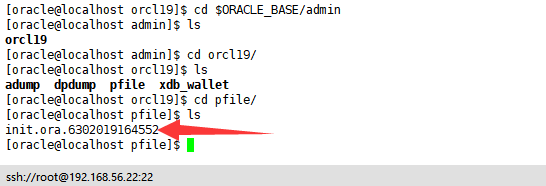
此时,我们就找到了这个init.ora.6302019164552文件,然后复制到dbs目录里面,并且更改文件的名字
cp init.ora.6302019164552  /u01/app/oracle/product/19.2./db_1/dbs/initsanshi.ora

SQL> startup
注意,复制到位置,是你自己的Linux的dbs的位置,与我的位置可能有一些差异,复制过去的文件名称中是你自己的sid.
ORA-01078: failure in processing system parameters LRM-00109: could not open parameter file '/u01/app/oracle/product/19.2.0/db_1/dbs/initsanshi.ora'报错的更多相关文章
- LRM-00109: could not open parameter file '/u01/app/oracle/product/12.1.0/db_1/dbs/initepps.ora'
安装好oracle后,起动时报如下错误: [oracle@Oracle-A ~]$ export ORACLE_SID=ORCL [oracle@Oracle-A ~]$ sqlplus / as s ...
- ORA-01078: failure in processing system parameters & LRM-00109: could not open parameter file
安装了Oracle 12C后,启动数据库的过程中出现如下错误 SQL> startup ORA-01078: failure in processing system parameters LR ...
- ORA-01078:failure in processing system parameters
一.使用环境操作系统:rhel 6.5 x64数据库:Oracle 11.2.0.1.0数据库主目录:/u01/app/oracle/product/11.2.0/ 二.问题描述用sys用户登录sql ...
- [解决思路]ORA-01078: failure in processing system parameters LRM-00109: could not open parameter file
oracle数据库,服务器异常断电,导致数据库不能启动.... 错误提示: SQL> startup ORA-01078: failure in processing system parame ...
- oracle 实例启动报错(ORA-01078: failure in processing system parameters )
在启动Oracle数据库时报错,如下: [oracle@localhost ~]$ sqlplus / as sysdba SQL*Plus: Release 11.2.0.1.0 Productio ...
- 启动Oracle时提示:ORA-01078:failure in processing system parameters
一.使用环境操作系统:CentOS release 6.2 (Final) 数据库:Oracle 12g数据库主目录:/ora12/product/product/12.1.0/db_1 二.问题描述 ...
- ORA-01078: failure in processing system parameters 问题的解决方法(oracle 11g)
https://blog.csdn.net/lzwgood/article/details/26358725
- 关于App自动化执行链接Appium服务包名正确但是报错An unknown server-side error occurred while processing the command
在执行链接Appium服务时连接失败可能原因: 1.报错截图: 2.先检查包名是否正确(正常情况下包名不会错误)通过命令行查看包名:aapt dump badging xxx.apk 3.检查对应包的 ...
- Oracle 12.2 报错:ORA-12012: error on auto execute of job "SYS"."ORA$AT_OS_OPT_SY_7458"
alert报错 2019-01-12T10:10:11.499130+08:00Errors in file /u01/app/oracle/diag/rdbms/rac1/rac112/trace/ ...
随机推荐
- 爬虫(五):PyQuery的使用
一:简介 PyQuery库是jQuery的Python实现,可以用于解析HTML网页内容,是一个非常强大又灵活的网页解析库. -->官方文档地址 -->jQuery参考文档 二:初始化 初 ...
- 【原创】go语言学习(十三)struct介绍2
目录: 方法的定义 函数和方法的区别 值类型和指针类型 面向对象和继承 结构体和json序列化 方法的定义 1.和其他语言不一样,Go的方法采⽤用另外一种方式实现. package main impo ...
- CSS 交集选择器和并集选择器
交集选择器是and 也就是要同时满足 且只能交2个只能交2个只能交2个,第一个是标记,第二个是class或者id,之间不可以有空格 eg: span.small-height 并集选择器是or,也就 ...
- Vue路由管理之Vue-router
一.Vue Router介绍 Vue Router 是 Vue.js 官方的路由管理器.它和 Vue.js 的核心深度集成,让构建单页面应用变得易如反掌.包含的功能有: 嵌套的路由/视图表 模块化的. ...
- RK3288 添加普通串口uart1和uart3
CPU:RK3288 系统:Android 5.1 diff --git a/device/rockchip/common/init.connectivity.rc b/device/rockchip ...
- this和super的用法
this关键字的使用: 1.成员变量和局部变量重名时,在方法中调用成员变量,需要使用this.调用. 2.把这个类自己的实例化对象当做参数进行传递时,使用this. 3.内部类中,调用外部类的方法或变 ...
- sql server management studio 连接时指定非默认端口 ,port
- 【Canvas】绘制几何级数Geometric series曲线 y=1+1/2+1/4+1/8+1/16+1/32+1/64+....
相关资料:https://baike.baidu.com/item/%E5%87%A0%E4%BD%95%E7%BA%A7%E6%95%B0/112584?fr=aladdin 图线: 代码: < ...
- LightGBM与评分卡
调参策略 最大化 off_ks + 0.8(off_ks-train_ks) import pandas as pd from sklearn.metrics import roc_auc_score ...
- vue+Typescript初级入门
Typescript 在前端圈已经逐渐普及,Vue 2.5.0 改进了类型声明,使得对 TypeScript 更加友好 不过要想在项目中直接使用 TypeScript 仍然需要对项目进行一些改造 PS ...