
WCF-初识DEMO
类库 System.ServiceModle
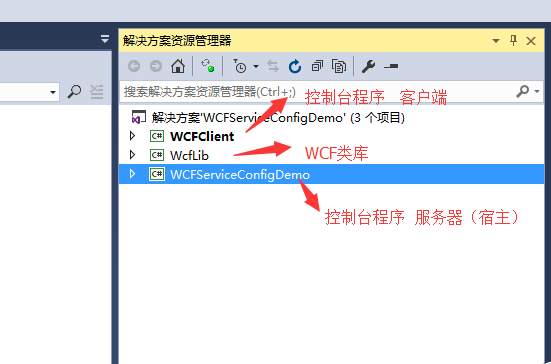
WCF类库
契约IUser1,实现User1
[ServiceContract]

    public interface IUser1

    {

        [OperationContract]

        string GetUser1Name(string name);

    }

    public class User1 : IUser1

    {

        public string GetUser1Name(string name)

        {

            return "我是usre1" + name;

        }

    }
契约IUser2 ,实现User2
    [ServiceContract]

    public interface IUser2

    {

        [OperationContract]

        string GetUser1Name(string name);

    }

    public class User2 : IUser2

    {

        public string GetUser1Name(string name)

        {

            return "我是user2" + name;

        }

    }
契约IUnity1和IUnity2,实现Unity(一个实现继承了两个契约,主意看一下配置文件如何配置)
    [ServiceContract]

    public interface IUnity1

    {

        [OperationContract]

        int GetUnityCount();

    }

    [ServiceContract]

    public interface IUnity2

    {

        [OperationContract]

        string GetUnityString();

    }

    public class Unity : IUnity1, IUnity2

    {

        public int GetUnityCount()

        {

            return ;

        }

        public string GetUnityString()

        {

            return "Unity";

        }

    }
宿主
        static void Main(string[] args)

        {

            ServiceHost sh1 = new ServiceHost(typeof(WcfLib.User1));

            sh1.Open();

            Console.WriteLine("服务1开启");

            ServiceHost sh2 = new ServiceHost(typeof(WcfLib.User2));

            sh2.Open();

            Console.WriteLine("服务2开启");

            ServiceHost sh3 = new ServiceHost(typeof(WcfLib.Unity.Unity));

            sh3.Open();

            Console.WriteLine("服务3开启");

            Console.ReadKey();

        }
服务配置文件
<?xml version="1.0" encoding="utf-8" ?>

<configuration>

  <startup>

    <supportedRuntime version="v4.0" sku=".NETFramework,Version=v4.5.2" />

  </startup>

  <system.serviceModel>

    <services>

      <!--name="命名空间名称.实现类名称"-->

      <service name="WcfLib.User1"  behaviorConfiguration="mexBehaviour">

        <endpoint address="MyServices1" binding="basicHttpBinding" contract="WcfLib.IUser1">

        </endpoint>

        <host>

          <baseAddresses>

            <add baseAddress="http://localhost:9999/"/>

          </baseAddresses>

        </host>

      </service>

      <service name="WcfLib.User2" behaviorConfiguration="mexBehaviour">

        <host>

          <baseAddresses>

            <add baseAddress="http://localhost:6666/"/>

          </baseAddresses>

        </host>

        <endpoint address="MyServices2" binding="basicHttpBinding" contract="WcfLib.IUser2"></endpoint>

      </service>

      <service name="WcfLib.Unity.Unity" behaviorConfiguration="mexBehaviour">

        <host>

          <baseAddresses>

            <add baseAddress="http://localhost:7777/"/>

            <add baseAddress="net.tcp://localhost:7776/"/>

          </baseAddresses>

        </host>

        <endpoint address="MyServices3" binding="basicHttpBinding" contract="WcfLib.Unity.IUnity1" ></endpoint>

        <!--错误:找不到具有绑定 NetTcpBinding 的终结点的与方案 net.tcp 匹配的基址。注 册的基址方案是 [http]。   解决:TCP通讯 地址必须是TCP的(TCP不能宿主在IIS上)   net.tcp://localhost:7776/-->

        <endpoint address="MyServices4" binding="netTcpBinding" contract="WcfLib.Unity.IUnity2"></endpoint>

      </service>

    </services>

    <behaviors>

      <serviceBehaviors>

        <behavior name="mexBehaviour">

          <!--设置未false被人不能发现,一般当客户端已经加载好服务代理就可以设置为false了。配置修改,服务要重启,才能生效-->

          <serviceMetadata httpGetEnabled="true" />

        </behavior>

        <behavior>

        </behavior>

      </serviceBehaviors>

    </behaviors>

  </system.serviceModel>

</configuration>
客户端
右键添加服务
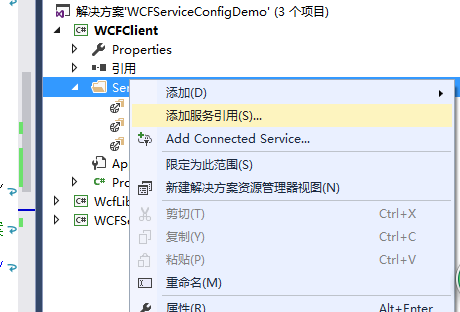
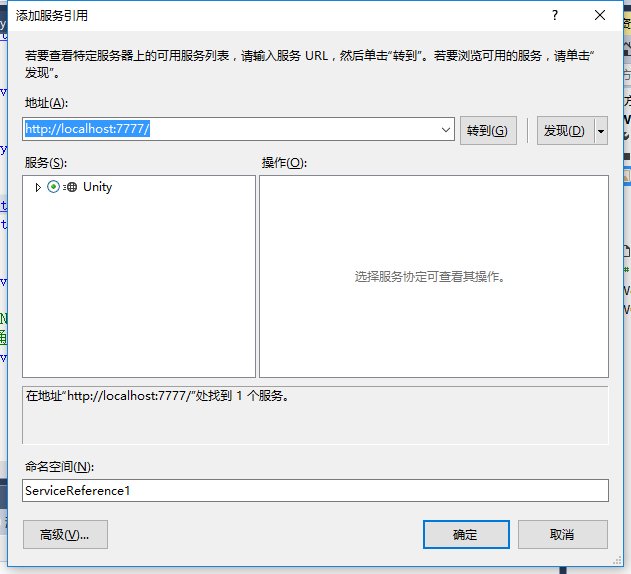
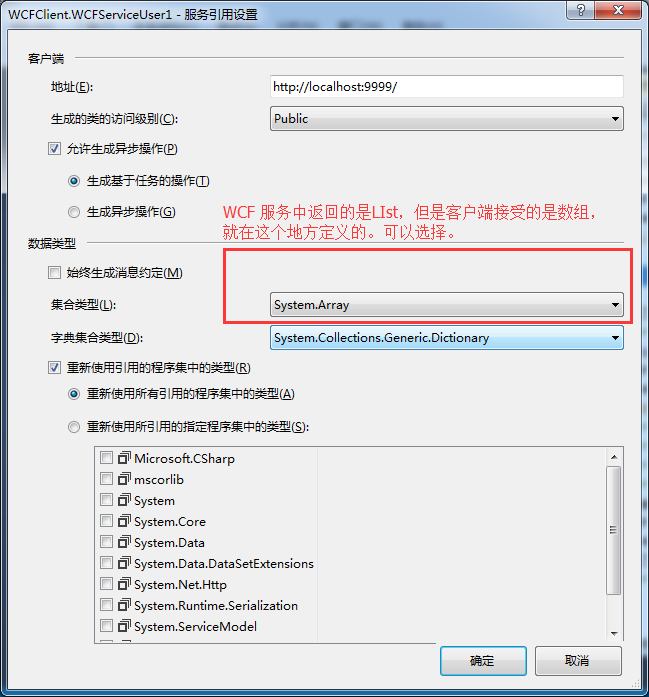
配置文件自动生成
        static void Main(string[] args)

        {

            WCFServiceUser1.User1Client cli1 = new WCFServiceUser1.User1Client();

            WCFServiceUser2.User2Client cli2 = new WCFServiceUser2.User2Client();

            WCFServiceUnity.Unity1Client cli3 = new WCFServiceUnity.Unity1Client();

            WCFServiceUnity.Unity2Client cli4 = new WCFServiceUnity.Unity2Client();

            Console.WriteLine(cli1.GetUser1Name("name1"));

            Console.WriteLine(cli2.GetUser1Name("name2"));

            Console.WriteLine(cli3.GetUnityCount());

            Console.WriteLine(cli4.GetUnityString());

        }
WCF 调用服务标准写法
static void Main(string[] args)

        {

            //不适用using,原因using在网络中断时,wcf不能关闭。websevice可以是用using释放,websevice标准写法是用using

            CustomService.UserServiceSoapClient ucli = null;

            try

            {

                ucli = new CustomService.UserServiceSoapClient();

                ucli.GetStr("");

                //手动释放,

                ucli.Close();

            }

            catch (Exception)

            {

                if (ucli != null)

                {

                    ucli.Abort();

                }

            }

        }
WCF-初识DEMO的更多相关文章
- WCF简单Demo
WCF,光看书的原理,稍微有点枯燥,通过自己动手,会更容易理解契约声明,面向服务,分布式等概念. 1.创建WCF服务. 2.WcfService1.CS中声明新的契约. namespace WcfSe ...
- WCF学习笔记之WCF初识
这篇博客将介绍WCF的最基础内容,让我们对WCF有一个基本的认识.后续的博客中将会介绍WCF其他方面内容.本篇博客将通过一个简单的例子,介绍如何创建WCF服务,并承载这个服务,让客户端来访问它.下面请 ...
- WCF初识
WCF能干什么? 在win32中,应用程序是运行在进程的线程中的,.NET出现之后,出现了AppDomain,其实就相当于在进程和线程之间又又了一层包装层,类似于子进程的概念,在一个进程或者应用程序域 ...
- WCF 初识(一)
WCF的前世今生 在.NETFramework 2.0以及前版本中,微软发展了Web Service(SOAP with HTTP communication),.NET Remoting(TCP/H ...
- C# WCF初识
原文:http://www.cnblogs.com/artech/archive/2007/02/26/656901.html 方式1: 需引用 System.ServiceModel namespa ...
- WCF:初识
结构: using System.ServiceModel; namespace MyServices { [ServiceContract] public interface IHomeServic ...
- wcf,jquery,post,跨域
参照了网上的很多资料,vs2012 项目是wcf服务. .demo地址http://files.cnblogs.com/files/dswyzx/WcfServiceDemoa.rar
- UI层调用WCF服务实例(源码)
WCF原理性的东西,暂时还没有深入研究,只是在公司的项目中使用到了,会调用,然后再多做了一些了解,现在将它抽出来了一个小实例,写了一个WCF的demo. 我写的这个WCF.Demo主要包括数据契约和服 ...
- WCF服务部署到IIS上,然后通过web服务引用方式出现错误的解决办法
本文转载:http://www.cnblogs.com/shenba/archive/2012/01/06/2313932.html 昨天在用IIS部署一个WCF服务时,碰到了如下错误: 理解了文档内 ...
- websocket初识
一.官网 官网地址:http://www.websocket.org/ 二.websocket初识demo <input id="sendTxt" type="te ...
随机推荐
- 【IOI2019】2048矩形模拟
/* dos windows 25*80 */ #include <algorithm> #include <windows.h> #include <iostream& ...
- VsCode安装Go的相关插件
今天在学习Go的时候,安装Go的相关插件,显示安装不上,但是右下角也一直会提示让你安装,当然你可以设置成忽略,为了开发效率,我选择了安装.然后出现了问题,一直Failed.在网上看到了很多的文章,不是 ...
- Android工程的合并
http://www.xuanyusong.com/archives/3395 1.游戏包名( 类似 com.xx.xxx ) Android应用程序只能有一个包名,如果两个游戏包名一样,那么后者安装 ...
- PHP全栈学习笔记26
php 验证码 <?php /* *@Author: 达叔小生 **/ header("Content-type:image/png"); // 发送头部信息,生成png图片 ...
- webkit vs v8
我们知道不同浏览器用的不同的渲染引擎: Tridend(IE).Gecko(FF).WebKit(Safari,Chrome,Andriod浏览器) 当然 Chrome 重构了一下 WebKit 然后 ...
- TTFB 时间过长
记录一个问题吧. 新上线的应用,第一次上线部署了两个节点,通过DMZ的NGINX映射出去的. 上线之后,第三天突然发现访问很慢,有50%的几率保持在7秒左右,通过日志平台观察代码处理时间在40ms左右 ...
- php手记之01-tp5框架安装
1.1.介绍 在web领域,PHP是所有编程语言中比较受欢迎的一门语言! PHP已经诞生出几十种编程框架!但国内最热门和使用率最好的框架有Thinkphp和Laravel这两款PHP框架! 1.2.为 ...
- eclipse导入maven项目有红叉及pom.xml出错的问题的解决
导入我们的项目的时候总会出现很多红叉,看着很难受,其实可以解决的(本人使用方法一解决)解决方法:1.先build project,然后右键项目->maven->update project ...
- java模拟post进行文件提交 采用httpClient方法
package com.jd.vd.manage.util.filemultipart; import java.io.BufferedReader;import java.io.File;impor ...
- nginx+lua 设置跨域
nginx 配置: header_filter_by_lua_file cros.lua; access_by_lua ' if ngx.var.request_method == "OPT ...