
socket服务端开发之测试使用threading和gevent框架
socket服务端开发之测试使用threading和gevent框架
话题是测试下多线程和gevent在socket服务端的小包表现能力,测试的方法不太严谨,也没有用event loop + pool池的概念。不管是gevent和threading有pool的情况下,确实很省资源,但是固定的pool线程池容易在突发事件中被堵塞住。 另外提一句,劲量少用multiprocessing,因为他的进程开销有些大,当然如果单纯用multiprocessing做进程池里面worker进程,那还是个好选择,毕竟他是可以跑多核心的。
Hello , 另外请大家多关注下,我的个人博客 blog.xiaorui.cc
不管怎么说,还是有点属于自娱自乐的形态,有问题之处,请大家喷之 !
话说,我们当时在搞一个回溯任务中心,说白了就是开发任务接口,通过mapreduce计算平均值,关于业务的逻辑我就不多写了,写出来,也只是浪费大家的思考。干脆点,每个连接都特意堵塞了0.5秒钟。
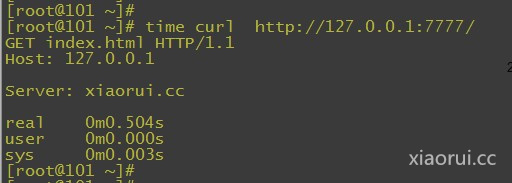
在大量的tcp短连接测试下,threading的开销越来越大,所以造成了在并发数加大的情况下,出现threading崩溃的情况 ! gevent是 libevent和协程的融合,一个线程里面都可以跑超多的协程! 利用libevent做io堵塞的调度 ,gevent体系下,同一时间只有一个任务在运行 !
先来测试下多线程: 我们就不加线程池了
|
1
2
3
4
5
6
7
8
9
10
11
12
13
14
15
16
17
18
19
20
21
22
23
24
25
26
27
28
29
30
31
32
|
#!/usr/bin/env python
# -*- coding: utf-8 -*-
#xiaorui.cc
import sys
import socket
import time
import threading
#xiaorui.cc
def threads(port):
s = socket.socket()
s.bind(('0.0.0.0', port))
s.listen(500)
while True:
cli, addr = s.accept()
t = threading.Thread(target=handle_request, args=(cli, time.sleep))
t.daemon = True
t.start()
def handle_request(s, sleep):
try:
s.recv(1024)
sleep(0.5)
s.send('''http/1.0 200 OK
Hello World! ''')
s.shutdown(socket.SHUT_WR)
print '.',
except Exception, ex:
print ex
finally:
sys.stdout.flush()
s.close()
if __name__ == '__main__':
threads(4444)
|
用threading跑socket,每个连接堵塞的时间是0.5秒
|
1
2
3
4
5
6
7
8
9
10
11
12
13
14
15
16
17
18
19
20
21
22
23
24
25
26
27
28
29
30
31
32
33
34
35
36
37
38
39
40
41
42
43
44
45
46
47
48
49
50
51
|
time ab -n 10000 -c 500 http://127.0.0.1:4444/
This is ApacheBench, Version 2.3 <$Revision: 655654 $>
Copyright 1996 Adam Twiss, Zeus Technology Ltd, http://www.zeustech.net/
Licensed to The Apache Software Foundation, http://www.apache.org/
Benchmarking 127.0.0.1 (be patient)
Completed 1000 requests
Completed 2000 requests
Completed 3000 requests
Completed 4000 requests
Completed 5000 requests
Completed 6000 requests
Completed 7000 requests
Completed 8000 requests
Completed 9000 requests
Completed 10000 requests
Finished 10000 requests
Server Software:
Server Hostname: 127.0.0.1
Server Port: 4444
Document Path: /
Document Length: 0 bytes
Concurrency Level: 500
Time taken for tests: 11.123 seconds
Complete requests: 10000
Failed requests: 0
Write errors: 0
Total transferred: 470000 bytes
HTML transferred: 0 bytes
Requests per second: 899.01 [#/sec] (mean)
Time per request: 556.166 [ms] (mean)
Time per request: 1.112 [ms] (mean, across all concurrent requests)
Transfer rate: 41.26 [Kbytes/sec] received
Connection Times (ms)
min mean[+/-sd] median max
Connect: 0 33 177.0 0 1000
Processing: 500 508 33.9 501 1132
Waiting: 500 508 33.9 501 1132
Total: 500 541 201.8 501 2132
Percentage of the requests served within a certain time (ms)
50% 501
66% 501
75% 502
80% 505
90% 522
95% 532
98% 1534
99% 1722
100% 2132 (longest request)
real 0m11.145s
user 0m0.210s
sys 0m0.961s
|
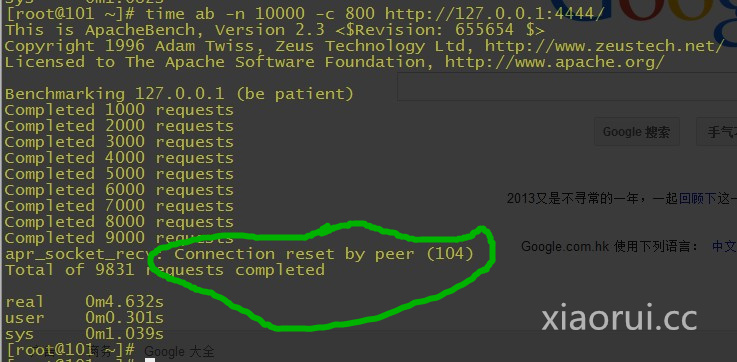
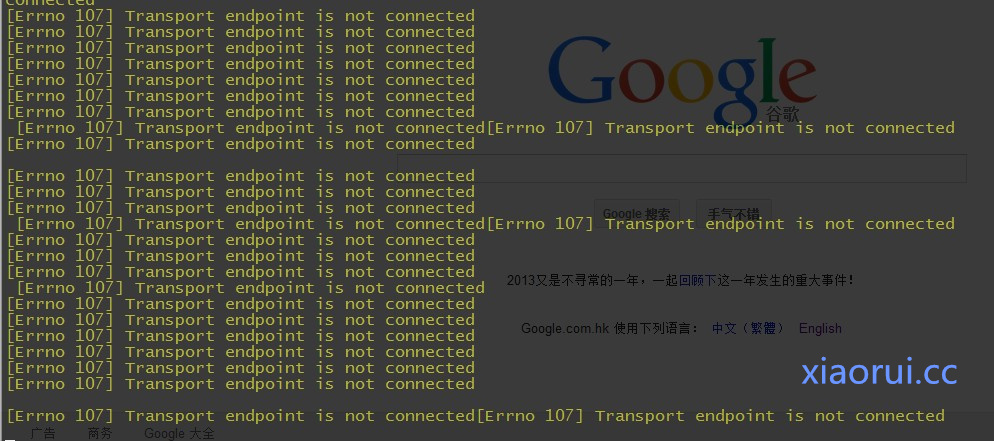 加到800的时候~ 直接跳出connection reset by peer,这个就是tcp不能正常的建立通信了。
|
1
2
3
4
5
6
7
8
9
10
11
12
13
14
15
16
17
18
19
20
21
22
23
24
25
26
27
28
29
30
31
|
#xiaorui.cc
import sys
import socket
import time
import gevent
from gevent import socket
def server(port):
s = socket.socket()
s.bind(('0.0.0.0', port))
s.listen(500)
while True:
cli, addr = s.accept()
gevent.spawn(handle_request, cli, gevent.sleep)
def handle_request(s, sleep):
try:
data=s.recv(1024)
sleep(0.5)
s.send('''http/1.0 200 OK
Hello World! this is xiaorui.cc !!!''')
print data
request_string = "GET %s HTTP/1.1\r\nHost: %s\r\n\r\nServer: xiaorui.cc\n" %('index.html', '127.0.0.1')
s.send(request_string)
s.shutdown(socket.SHUT_WR)
print '.',‘be killed’
except Exception, ex:
print ex
finally:
s.close()
if __name__ == '__main__':
server(7777)
|
那我们在开始用gevent来跑socket server服务:
首先下面是并发数值是500的时候!
|
1
2
3
4
5
6
7
8
9
10
11
12
13
14
15
16
17
18
19
20
21
22
23
24
25
26
27
28
29
30
31
32
33
34
35
36
37
38
39
40
41
42
43
44
45
46
47
48
49
50
51
|
time ab -n 10000 -c 500 http://127.0.0.1:7777/
This is ApacheBench, Version 2.3 <$Revision: 655654 $>
Copyright 1996 Adam Twiss, Zeus Technology Ltd, http://www.zeustech.net/
Licensed to The Apache Software Foundation, http://www.apache.org/
Benchmarking 127.0.0.1 (be patient)
Completed 1000 requests
Completed 2000 requests
Completed 3000 requests
Completed 4000 requests
Completed 5000 requests
Completed 6000 requests
Completed 7000 requests
Completed 8000 requests
Completed 9000 requests
Completed 10000 requests
Finished 10000 requests
Server Software:
Server Hostname: 127.0.0.1
Server Port: 7777
Document Path: /
Document Length: 0 bytes
Concurrency Level: 500
Time taken for tests: 11.312 seconds
Complete requests: 10000
Failed requests: 0
Write errors: 0
Total transferred: 20000 bytes
HTML transferred: 0 bytes
Requests per second: 884.04 [#/sec] (mean)
Time per request: 565.584 [ms] (mean)
Time per request: 1.131 [ms] (mean, across all concurrent requests)
Transfer rate: 1.73 [Kbytes/sec] received
Connection Times (ms)
min mean[+/-sd] median max
Connect: 0 44 202.7 0 1001
Processing: 500 513 10.1 511 707
Waiting: 500 513 10.1 511 707
Total: 500 557 204.1 512 1525
Percentage of the requests served within a certain time (ms)
50% 512
66% 515
75% 517
80% 519
90% 531
95% 552
98% 1521
99% 1523
100% 1525 (longest request)
real 0m11.334s
user 0m0.159s
sys 0m0.730s
|
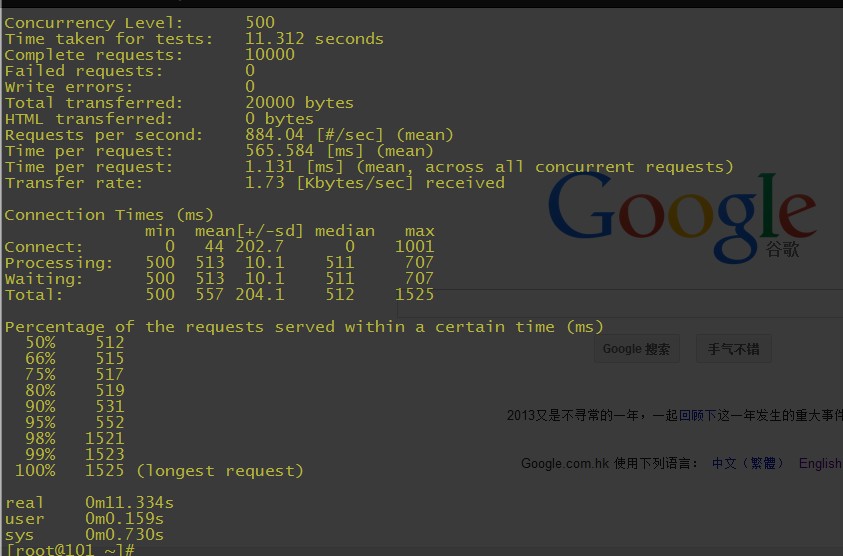
并发是1000的时候:
|
1
2
3
4
5
6
7
8
9
10
11
12
13
14
15
16
17
18
19
20
21
22
23
24
25
26
27
28
29
30
31
32
33
34
35
36
37
38
39
40
41
42
43
44
45
46
47
48
49
50
51
|
time ab -n 10000 -c 1000 http://127.0.0.1:7777/
This is ApacheBench, Version 2.3 <$Revision: 655654 $>
Copyright 1996 Adam Twiss, Zeus Technology Ltd, http://www.zeustech.net/
Licensed to The Apache Software Foundation, http://www.apache.org/
Benchmarking 127.0.0.1 (be patient)
Completed 1000 requests
Completed 2000 requests
Completed 3000 requests
Completed 4000 requests
Completed 5000 requests
Completed 6000 requests
Completed 7000 requests
Completed 8000 requests
Completed 9000 requests
Completed 10000 requests
Finished 10000 requests
Server Software:
Server Hostname: 127.0.0.1
Server Port: 7777
Document Path: /
Document Length: 0 bytes
Concurrency Level: 1000
Time taken for tests: 7.406 seconds
Complete requests: 10000
Failed requests: 0
Write errors: 0
Total transferred: 20000 bytes
HTML transferred: 0 bytes
Requests per second: 1350.22 [#/sec] (mean)
Time per request: 740.623 [ms] (mean)
Time per request: 0.741 [ms] (mean, across all concurrent requests)
Transfer rate: 2.64 [Kbytes/sec] received
Connection Times (ms)
min mean[+/-sd] median max
Connect: 0 175 491.7 0 3000
Processing: 500 520 17.7 515 707
Waiting: 500 520 17.7 515 707
Total: 500 695 492.5 517 3521
Percentage of the requests served within a certain time (ms)
50% 517
66% 523
75% 538
80% 569
90% 1515
95% 1530
98% 1539
99% 3514
100% 3521 (longest request)
real 0m7.428s
user 0m0.208s
sys 0m0.741s
|
当并发到1500的时候:
|
1
2
3
4
5
6
7
8
9
10
11
12
13
14
15
16
17
18
19
20
21
22
23
24
25
26
27
28
29
30
31
32
33
34
35
36
37
38
39
40
41
42
43
44
45
46
47
48
49
50
51
|
time ab -n 10000 -c 1500 http://127.0.0.1:7777/
This is ApacheBench, Version 2.3 <$Revision: 655654 $>
Copyright 1996 Adam Twiss, Zeus Technology Ltd, http://www.zeustech.net/
Licensed to The Apache Software Foundation, http://www.apache.org/
Benchmarking 127.0.0.1 (be patient)
Completed 1000 requests
Completed 2000 requests
Completed 3000 requests
Completed 4000 requests
Completed 5000 requests
Completed 6000 requests
Completed 7000 requests
Completed 8000 requests
Completed 9000 requests
Completed 10000 requests
Finished 10000 requests
Server Software:
Server Hostname: 127.0.0.1
Server Port: 7777
Document Path: /
Document Length: 0 bytes
Concurrency Level: 1500
Time taken for tests: 5.290 seconds
Complete requests: 10000
Failed requests: 0
Write errors: 0
Total transferred: 20000 bytes
HTML transferred: 0 bytes
Requests per second: 1890.27 [#/sec] (mean)
Time per request: 793.536 [ms] (mean)
Time per request: 0.529 [ms] (mean, across all concurrent requests)
Transfer rate: 3.69 [Kbytes/sec] received
Connection Times (ms)
min mean[+/-sd] median max
Connect: 0 214 404.9 1 1003
Processing: 500 522 23.0 514 716
Waiting: 500 522 23.0 514 716
Total: 500 736 406.7 520 1712
Percentage of the requests served within a certain time (ms)
50% 520
66% 558
75% 602
80% 1506
90% 1526
95% 1531
98% 1535
99% 1548
100% 1712 (longest request)
real 0m5.313s
user 0m0.275s
sys 0m0.763s
|
出现了少量的报错:
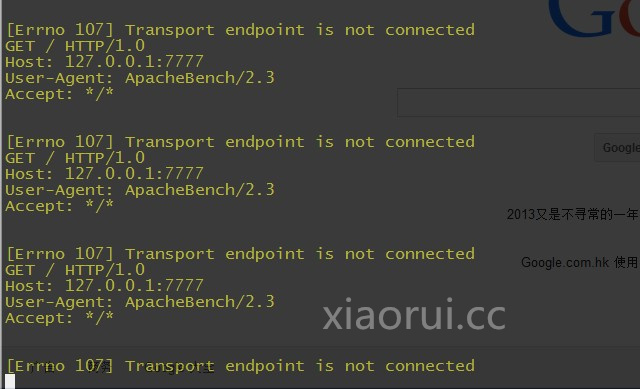
gevent 可以加个队列,来限制协程的数目,但是数目限制了,虽然稳定了,但是并发数上不去。
|
1
2
|
from gevent.pool import Pool
pool = Pool(N)
|
这里测试有点简单,其实我在线上用的方案是prefork+gevent pool,后来因为自己fork出去的进行,不太好互相的通信,pipe实在太难用,所以后来又改用multiprocessing了。 另外监听的机制也把select改成epoll了。
socket服务端开发之测试使用threading和gevent框架的更多相关文章
- Socket探索1-两种Socket服务端实现
介绍 一次简单的Socket探索之旅,分别对Socket服务端的两种方式进行了测试和解析. CommonSocket 代码实现 实现一个简单的Socket服务,基本功能就是接收消息然后加上结束消息时间 ...
- 俯瞰 Java 服务端开发
原文首发于 github ,欢迎 star . Java 服务端开发是一个非常宽广的领域,要概括其全貌,即使是几本书也讲不完,该文将会提到许多的技术及工具,但不会深入去讲解,旨在以一个俯瞰的视角去探寻 ...
- python网络编程TCP服务多客户端的服务端开发
#服务多客户端TCP服务端开发 2 #方法说明 3 """ 4 bind(host,port)表示绑定端口号,host是ip地址,ip地址一般不进 行绑定,表示本机的任何 ...
- AutoCAD.net支持后台线程-Socket服务端
最近因为公司项目的需求,CAD作为服务端在服务器中常驻运行,等待客户端远程发送执行任务的指令,最终确认用Socket-tcp通讯,CAD需要实时监听客户端发送的消息,这时就需要开启线程执行Socket ...
- socketserver及相关的类 (处理socket服务端)+ event事件的使用
编写简单的套接字服务器并不难,然而,如果要创建的并非简单服务器,还要求助于服务器模块. 模块SocketServer是标准库提供的服务器框架的基石,这个框架包括好多服务器,他们基本服务器的基础上添加了 ...
- MSDN上的异步socket 服务端例子
MSDN上的异步socket 服务端例子 2006-11-22 17:12:01| 分类: 代码学习 | 标签: |字号大中小 订阅 Imports SystemImports Syste ...
- 利用多线程使socket服务端可以与多个客户端同时通讯
利用多线程使socket服务端可以与多个客户端同时通讯 server import socket 1. 符合TCP协议的手机 server = socket.socket(socket.AF_INET ...
- 从架构师视角看是否该用Kotlin做服务端开发?
前言 自从Oracle收购Sun之后,对Java收费或加强控制的尝试从未间断,谷歌与Oracle围绕Java API的官司也跌宕起伏.虽然Oracle只是针对Oracle JDK8的升级收费,并释放了 ...
- 微服务项目开发学成在线_day01_CMS服务端开发
05-CMS需求分析-什么是CMS 什么是CMS?CMS (Content Management System)即内容管理系统,不同的项目对CMS的定位不同.CMS有哪些类型? 每个公司对每个项目的C ...
随机推荐
- C#一些不太熟悉的类——扩展学习
Process.CloseMainWindow Method 通过向进程的主窗口发送关闭消息来关闭拥有用户界面的进程. 注解 进程执行时,其消息循环处于等待状态. 每次操作系统将 Windows 消息 ...
- 基于Java+Selenium的WebUI自动化测试框架(二)-----页面操作接口
在有了基础的Position类之后,我们需要考虑我们在寻找完页面元素之后,需要做什么.这个“做”什么,可以理解为我们在页面上需要对应的一系列动作.比如:点击,输入,切换窗口,寻找元素,判断元素是否存在 ...
- JVM元空间深度解析
回顾一下上一次对于这次做的实验的一个背景说明: 这里将借助cglib这个库来完成动态类的创建,为啥要使用它?因为使用简单,二是在程序运行期可以动态的生成类,动态生成类之后生成类的元数据就会落入到元空间 ...
- k8s的包管理
1.Helm的概念和架构 每个成功的软件平台都有一个优秀的打包系统,比如 Debian.Ubuntu 的 apt,Redhat.Centos 的 yum.而 Helm 则是 Kubernetes 上的 ...
- JavaScript异步学习笔记——主线程和任务队列
任务队列 单线程就意味着,所有任务需要排队,前一个任务结束,才会执行后一个任务.如果前一个任务耗时很长,后一个任务就不得不一直等着. 同步任务指的是,在主线程上排队执行的任务,只有前一个任务执行完毕, ...
- docker常用命令以及搭建
1. 进入容器中 docker exec -it <容器的名字> /bin/bash 2. 查看镜像 docker images 3. 查看所有容器 docker ps -a 4. 运行容 ...
- vue2 路由,运动
- HTML5 Web SQL 数据库
呼和浩特seo:Web SQL 数据库 API 并不是 HTML5 规范的一部分,但是它是一个独立的规范,引入了一组使用 SQL 操作客户端数据库的 APIs. 如果你是一个 Web 后端程序员,应该 ...
- python中的函数、生成器的工作原理
1.python中函数的工作原理 def foo(): bar() def bar(): pass python的解释器,也就是python.exe(c编写)会用PyEval_EvalFramEx(c ...
- sublime 不是插件安装越多越好,如xxxsnippet 自动完成插件太多,就非常耗电脑性能,经常性的卡着不动
sublime 不是插件安装越多越好,如xxxsnippet 自动完成插件太多,就非常耗电脑性能,经常性的卡着不动