
快速设置UITableView不同section对应于不同种类的cell
快速设置UITableView不同section对应于不同种类的cell

本文主要是为了写明如何在UITableView中,一个section对应于一种类型的cell,写起来不凌乱.
在不封装任何类的前提下提供如下源码:
请自行创建出3种类型的cell,创建好了就行,你需要创建出ModelOneCell,ModelTwoCell,ModelThreeCell,内容为空
//

//  RootViewController.m

//  Sections

//

//  Copyright (c) 2014年 Y.X. All rights reserved.

//

#import "RootViewController.h"

#import "ModelOneCell.h"

#import "ModelTwoCell.h"

#import "ModelThreeCell.h"

@interface RootViewController ()<UITableViewDelegate, UITableViewDataSource>

@property (nonatomic, strong) UITableView      *tableView;  // tableView

@property (nonatomic, strong) NSMutableArray   *dataArray;  // 数据数组

@property (nonatomic, strong) NSMutableArray   *nameList;   // 数组名字

@end

@implementation RootViewController

#pragma mark - 只初始化一次

#define REUESED_SIZE  100

static NSString *reUsedStr[REUESED_SIZE] = {nil}; // 重用标示

#define REUESED_FLAG  reUsedStr[0]

+ (void)initialize

{

    if (self == [RootViewController class])

    {

        for (int i = ; i < REUESED_SIZE; i++)

        {

            reUsedStr[i] = [NSString stringWithFormat:@"GoodBoy_%d", i];

        }

    }

}

- (void)viewDidLoad

{

    [super viewDidLoad];

    // 初始化tableView

    _tableView         = [[UITableView alloc] initWithFrame:self.view.bounds

                                                      style:UITableViewStylePlain];

    [self.view addSubview:_tableView];

    _tableView.delegate       = self;

    _tableView.dataSource     = self;

    // 模拟三种类型的数据源

    NSArray *type1 = @[@"", @"", @""];

    NSArray *type2 = @[@"一", @"二", @"三"];

    NSArray *type3 = @[@"one", @"two", @"three"];

    // 添加数据源 + 数据源标签名字

    _dataArray = [NSMutableArray new];

    _nameList  = [NSMutableArray new];

    [_dataArray addObject:type1]; [_nameList addObject:@"ModelOneCell"];

    [_dataArray addObject:type2]; [_nameList addObject:@"ModelTwoCell"];

    [_dataArray addObject:type3]; [_nameList addObject:@"ModelThreeCell"];

}

#pragma mark - UITableView'delegate & dataSource

// 每个区有几个cell

- (NSInteger)tableView:(UITableView *)tableView numberOfRowsInSection:(NSInteger)section

{

    return [_dataArray[section] count];

}

// 设定tableView有几个区域

- (NSInteger)numberOfSectionsInTableView:(UITableView *)tableView

{

    return [_nameList count];

}

// cell的初始化以及重用设置

-(UITableViewCell *)tableView:(UITableView *)tableView

        cellForRowAtIndexPath:(NSIndexPath *)indexPath

{

    // 根据section区域获取几种cell的公共父类

    UITableViewCell *cell = [tableView dequeueReusableCellWithIdentifier:reUsedStr[indexPath.section]];

    // 根据不同的区域对应创建出该区域的cell

    if (cell == nil)

    {

        if ([_nameList[indexPath.section] isEqualToString:@"ModelOneCell"])

        {

            cell = [[ModelOneCell alloc] initWithStyle:UITableViewCellStyleDefault

                                       reuseIdentifier:reUsedStr[indexPath.section]];

        }

        else if ([_nameList[indexPath.section] isEqualToString:@"ModelTwoCell"])

        {

            cell = [[ModelTwoCell alloc] initWithStyle:UITableViewCellStyleDefault

                                       reuseIdentifier:reUsedStr[indexPath.section]];

        }

        else if ([_nameList[indexPath.section] isEqualToString:@"ModelThreeCell"])

        {

            cell = [[ModelThreeCell alloc] initWithStyle:UITableViewCellStyleDefault

                                         reuseIdentifier:reUsedStr[indexPath.section]];

        }

    }

    // 对cell进行设置

    if ([_nameList[indexPath.section] isEqualToString:@"ModelOneCell"])

    {

        cell = [[ModelOneCell alloc] initWithStyle:UITableViewCellStyleDefault

                                   reuseIdentifier:reUsedStr[indexPath.section]];

        cell.textLabel.text = _dataArray[indexPath.section][indexPath.row];

    }

    else if ([_nameList[indexPath.section] isEqualToString:@"ModelTwoCell"])

    {

        cell = [[ModelTwoCell alloc] initWithStyle:UITableViewCellStyleDefault

                                   reuseIdentifier:reUsedStr[indexPath.section]];

        cell.textLabel.text = _dataArray[indexPath.section][indexPath.row];

    }

    else if ([_nameList[indexPath.section] isEqualToString:@"ModelThreeCell"])

    {

        cell = [[ModelThreeCell alloc] initWithStyle:UITableViewCellStyleDefault

                                     reuseIdentifier:reUsedStr[indexPath.section]];

        cell.textLabel.text = _dataArray[indexPath.section][indexPath.row];

    }

    return cell;

}

// 点击cell获取数据

- (void)tableView:(UITableView *)tableView didSelectRowAtIndexPath:(NSIndexPath *)indexPath

{

    if ([_nameList[indexPath.section] isEqualToString:@"ModelOneCell"])

    {

        NSLog(@"%@", _dataArray[indexPath.section][indexPath.row]);

    }

    else if ([_nameList[indexPath.section] isEqualToString:@"ModelTwoCell"])

    {

        NSLog(@"%@", _dataArray[indexPath.section][indexPath.row]);

    }

    else if ([_nameList[indexPath.section] isEqualToString:@"ModelThreeCell"])

    {

        NSLog(@"%@", _dataArray[indexPath.section][indexPath.row]);

    }

}

// 设定不同种类cell的高度

- (CGFloat)tableView:(UITableView *)tableView heightForRowAtIndexPath:(NSIndexPath *)indexPath

{

    if ([_nameList[indexPath.section] isEqualToString:@"ModelOneCell"])

    {

        return ;

    }

    else if ([_nameList[indexPath.section] isEqualToString:@"ModelTwoCell"])

    {

        return ;

    }

    else if ([_nameList[indexPath.section] isEqualToString:@"ModelThreeCell"])

    {

        return ;

    }

    else

    {

        return ;

    }

}

@end
运行时候的效果如下:

核心思想:
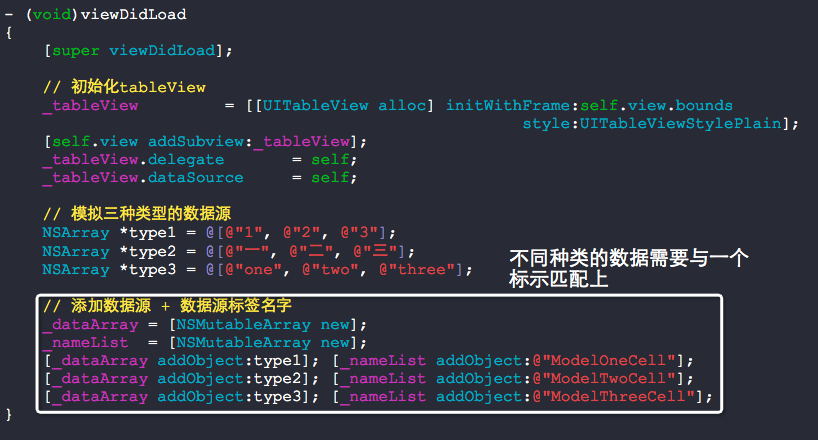
接下来,我们就要来进行封装,达到好用的目的:)
我们把数据源以及数据源标签抽象成一个对象就可以很好的管理这些东西了,以下给出源码:
//

//  TableVewData.h

//  Sections

//

//  Copyright (c) 2014年 Y.X. All rights reserved.

//

#import <Foundation/Foundation.h>

@interface TableViewData : NSObject

// 添加数据源 + 数据源标签

- (void)addDataArray:(NSArray *)array arrayFlag:(NSString *)flag;

// 对应区域中的row的个数

- (NSInteger)numberOfRowsInSection:(NSInteger)section;

// 有几个section

- (NSInteger)numberOfSections;

// 对应于Section上的flag值标签

- (NSString *)flagInSection:(NSIndexPath *)indexPath;

// 对应于indexPath中的数据

- (id)dataInIndexPath:(NSIndexPath *)indexPath;

@end
//

//  TableVewData.m

//  Sections

//

//  Copyright (c) 2014年 Y.X. All rights reserved.

//

#import "TableViewData.h"

@interface TableViewData ()

@property (nonatomic, strong) NSMutableArray  *dataArray;

@property (nonatomic, strong) NSMutableArray  *nameList;

@end

@implementation TableViewData

- (instancetype)init

{

    self = [super init];

    if (self)

    {

        _dataArray = [NSMutableArray new];

        _nameList  = [NSMutableArray new];

    }

    return self;

}

- (void)addDataArray:(NSArray *)array arrayFlag:(NSString *)flag

{

    [_dataArray addObject:array];

    [_nameList  addObject:flag];

}

- (NSInteger)numberOfRowsInSection:(NSInteger)section

{

    return [_dataArray[section] count];

}

- (NSInteger)numberOfSections

{

    return [_dataArray count];

}

- (NSString *)flagInSection:(NSIndexPath *)indexPath

{

    return _nameList[indexPath.section];

}

- (id)dataInIndexPath:(NSIndexPath *)indexPath

{

    return _dataArray[indexPath.section][indexPath.row];

}

@end
主函数使用情形如下:
//

//  RootViewController.m

//  Sections

//

//  Copyright (c) 2014年 Y.X. All rights reserved.

//

#import "RootViewController.h"

#import "ModelOneCell.h"

#import "ModelTwoCell.h"

#import "ModelThreeCell.h"

#import "TableViewData.h"

@interface RootViewController ()<UITableViewDelegate, UITableViewDataSource>

@property (nonatomic, strong) UITableView      *tableView;  // tableView

@property (nonatomic, strong) TableViewData    *tableData;

@end

@implementation RootViewController

#pragma mark - 只初始化一次

#define REUESED_SIZE  100

static NSString *reUsedStr[REUESED_SIZE] = {nil}; // 重用标示

#define REUESED_FLAG  reUsedStr[0]

+ (void)initialize

{

    if (self == [RootViewController class])

    {

        for (int i = ; i < REUESED_SIZE; i++)

        {

            reUsedStr[i] = [NSString stringWithFormat:@"GoodBoy_%d", i];

        }

    }

}

- (void)viewDidLoad

{

    [super viewDidLoad];

    // 初始化tableView

    _tableView         = [[UITableView alloc] initWithFrame:self.view.bounds

                                                      style:UITableViewStylePlain];

    [self.view addSubview:_tableView];

    _tableView.delegate       = self;

    _tableView.dataSource     = self;

    // 模拟三种类型的数据源

    NSArray *type1 = @[@"", @"", @""];

    NSArray *type2 = @[@"一", @"二", @"三"];

    NSArray *type3 = @[@"one", @"two", @"three"];

    // 添加数据源 + 数据源标签名字

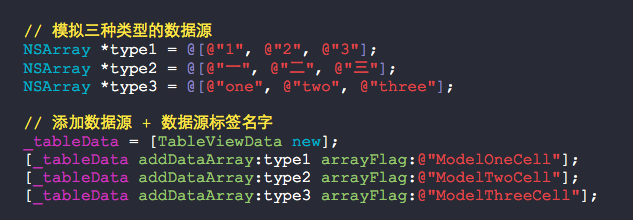
    _tableData = [TableViewData new];

    [_tableData addDataArray:type1 arrayFlag:@"ModelOneCell"];

    [_tableData addDataArray:type2 arrayFlag:@"ModelTwoCell"];

    [_tableData addDataArray:type3 arrayFlag:@"ModelThreeCell"];

}

#pragma mark - UITableView'delegate & dataSource

// 每个区有几个cell

- (NSInteger)tableView:(UITableView *)tableView numberOfRowsInSection:(NSInteger)section

{

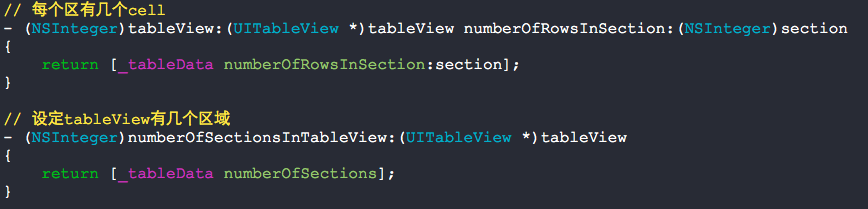
    return [_tableData numberOfRowsInSection:section];

}

// 设定tableView有几个区域

- (NSInteger)numberOfSectionsInTableView:(UITableView *)tableView

{

    return [_tableData numberOfSections];

}

// cell的初始化以及重用设置

-(UITableViewCell *)tableView:(UITableView *)tableView

        cellForRowAtIndexPath:(NSIndexPath *)indexPath

{

    // 根据section区域获取几种cell的公共父类

    UITableViewCell *cell = [tableView dequeueReusableCellWithIdentifier:reUsedStr[indexPath.section]];

    // 根据不同的区域对应创建出该区域的cell

    if (cell == nil)

    {

        if ([[_tableData flagInSection:indexPath] isEqualToString:@"ModelOneCell"])

        {

            cell = [[ModelOneCell alloc] initWithStyle:UITableViewCellStyleDefault

                                       reuseIdentifier:reUsedStr[indexPath.section]];

        }

        else if ([[_tableData flagInSection:indexPath] isEqualToString:@"ModelTwoCell"])

        {

            cell = [[ModelTwoCell alloc] initWithStyle:UITableViewCellStyleDefault

                                       reuseIdentifier:reUsedStr[indexPath.section]];

        }

        else if ([[_tableData flagInSection:indexPath] isEqualToString:@"ModelThreeCell"])

        {

            cell = [[ModelThreeCell alloc] initWithStyle:UITableViewCellStyleDefault

                                         reuseIdentifier:reUsedStr[indexPath.section]];

        }

    }

    // 对cell进行设置

    if ([[_tableData flagInSection:indexPath] isEqualToString:@"ModelOneCell"])

    {

        cell = [[ModelOneCell alloc] initWithStyle:UITableViewCellStyleDefault

                                   reuseIdentifier:reUsedStr[indexPath.section]];

        cell.textLabel.text = [_tableData dataInIndexPath:indexPath];

    }

    else if ([[_tableData flagInSection:indexPath] isEqualToString:@"ModelTwoCell"])

    {

        cell = [[ModelTwoCell alloc] initWithStyle:UITableViewCellStyleDefault

                                   reuseIdentifier:reUsedStr[indexPath.section]];

        cell.textLabel.text = [_tableData dataInIndexPath:indexPath];

    }

    else if ([[_tableData flagInSection:indexPath] isEqualToString:@"ModelThreeCell"])

    {

        cell = [[ModelThreeCell alloc] initWithStyle:UITableViewCellStyleDefault

                                     reuseIdentifier:reUsedStr[indexPath.section]];

        cell.textLabel.text = [_tableData dataInIndexPath:indexPath];

    }

    return cell;

}

// 点击cell获取数据

- (void)tableView:(UITableView *)tableView didSelectRowAtIndexPath:(NSIndexPath *)indexPath

{

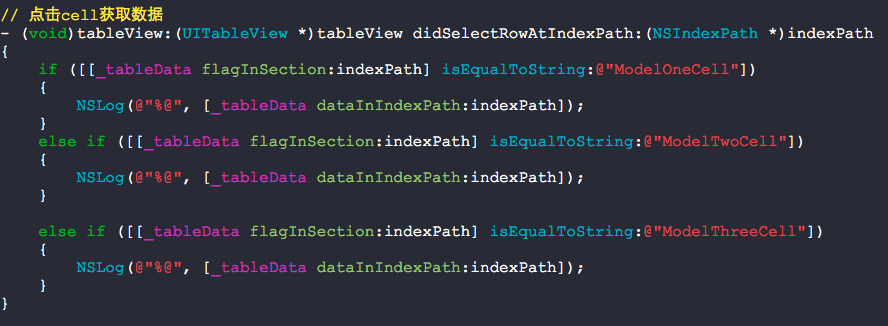
    if ([[_tableData flagInSection:indexPath] isEqualToString:@"ModelOneCell"])

    {

        NSLog(@"%@", [_tableData dataInIndexPath:indexPath]);

    }

    else if ([[_tableData flagInSection:indexPath] isEqualToString:@"ModelTwoCell"])

    {

        NSLog(@"%@", [_tableData dataInIndexPath:indexPath]);

    }

    else if ([[_tableData flagInSection:indexPath] isEqualToString:@"ModelThreeCell"])

    {

        NSLog(@"%@", [_tableData dataInIndexPath:indexPath]);

    }

}

// 设定不同种类cell的高度

- (CGFloat)tableView:(UITableView *)tableView heightForRowAtIndexPath:(NSIndexPath *)indexPath

{

    if ([[_tableData flagInSection:indexPath] isEqualToString:@"ModelOneCell"])

    {

        return ;

    }

    else if ([[_tableData flagInSection:indexPath] isEqualToString:@"ModelTwoCell"])

    {

        return ;

    }

    else if ([[_tableData flagInSection:indexPath] isEqualToString:@"ModelThreeCell"])

    {

        return ;

    }

    else

    {

        return ;

    }

}

@end
添加数据源:
见名知意:
使用很便利:

快速设置UITableView不同section对应于不同种类的cell的更多相关文章
- collectionView代理方法快速设置cell大小上下左右间隔
#define JianGe 25 #define GeShu 4 #define ScreenWidth ([UIScreen mainScreen].bounds.size.width) #def ...
- [Xcode 实际操作]五、使用表格-(5)设置UITableView的单元格背景颜色
目录:[Swift]Xcode实际操作 本文将演示单元格背景颜色的设置 在项目导航区,打开视图控制器的代码文件[ViewController.swift] import UIKit //首先添加两个协 ...
- [Xcode 实际操作]五、使用表格-(4)设置UITableView单元格数据库源
目录:[Swift]Xcode实际操作 本文将演示如何自定义表格的数据来源. 在项目导航区,打开视图控制器的代码文件[ViewController.swift] import UIKit //首先添加 ...
- [Xcode 实际操作]五、使用表格-(3)设置UITableView单元格图标
目录:[Swift]Xcode实际操作 本文将演示如何给表格行设置图标. 打开资源文件夹[Assets.xcassets], 在资源文件夹中导入两张图片:一张彩色,一张灰色,作为单元格的图标. [+] ...
- [Xcode 实际操作]五、使用表格-(2)设置UITableView单元格高度
目录:[Swift]Xcode实际操作 本文将演示如何制作一个自定义行高的表格视图 在项目导航区,打开视图控制器的代码文件[ViewController.swift] import UIKit //首 ...
- 设置UITableView的separatorInset值为UIEdgeInsetsZero,分隔线不最左端显示的问题
一.问题描述 UITableView分割线要显示到最左端 查看UITableView的属性,发现设置separatorInset的值可以自定义分割线的位置. @property (nonatomic) ...
- 分享一个快速设置背景的js 自动获取背景图的长宽
我来分享一个快速设置背景的js (需要jq支持!) 快速切图铺页面用---就是不需要手动输入背景图的长宽 自动获取背景图的长宽 : <div class="wrap"> ...
- 设置UITableView背景透明/监听cell左边的删除按钮的点击事件
_tableView = [[UITableView alloc] init]; _tableView.delegate = self; _tableView.dataSource = self; _ ...
- 【大盛】HTC one/M7 ROM 最新本地化OrDroid8.2.6 高级、快速设置 永久root 更多自定义 稳定 流畅
了解更多:点击下载ROM和学习更多 ROM版本 HTC-one_OrDroid8.2.6 ROM作者 雪狼团队·大盛 http://weibo.com/DaShengdd Android版本 Andr ...
随机推荐
- linux主机名莫名其妙变成了bogon,并解决修改为localhost
起因:公司网络接口做了接口认证,虚拟机桥接至物理网卡无法完成认证进行网络访问,无奈之下只能讲虚拟机网络模式更改为NAT模式,更改完成之后进行ssh登录,发现主机名发生了变化. 更改NAT模式之前 [r ...
- java的SSH的baseDao,巧用泛型
BaseDao接口: import java.util.List; public interface BaseDao<T,PK> { public void add(T t); publi ...
- HUE配置文件hue.ini 的impala模块详解(图文详解)(分HA集群)
不多说,直接上干货! 我的集群机器情况是 bigdatamaster(192.168.80.10).bigdataslave1(192.168.80.11)和bigdataslave2(192.168 ...
- spring使用@Value注解读取.properties文件时出现中文乱码问题的解决
解决办法 在spring中我们常常使用.properties对一些属性进行一个提前配置, spring 在读取*.properties文件时, 默认使用的是asci码, 这时 我们需要对其编码进行转换 ...
- [中英对照]Device Drivers in User Space: A Case for Network Device Driver | 用户态设备驱动: 以网卡驱动为例
前文初步介绍了Linux用户态设备驱动,本文将介绍一个典型的案例.Again, 如对Linux用户态设备驱动程序开发感兴趣,请阅读本文,否则请飘过. Device Drivers in User Sp ...
- select2插件改造之设置自定义选项 源码
改造特性: 适应业务需要,选项里面包含“其他”其它”,可以点击填写并设置自定义选项 效果图: 具体代码不做阐述,如有类似需求,请私信.主要源码: /* Copyright 2012 Igor Vayn ...
- jQuery 数据 - jQuery.data() 方法
打印出 hi
- MySQL学习基础
MySQL是被Sun公司收购了,所以也有热咖啡图标,不过MySQL的作者后来又做了一个MariaDB,小海豚图标,也很好用. MySQL学习: <MySQL网络数据库设计与开发>(电子工业 ...
- git pull和git pull --rebase的使用
使用下面的关系区别这两个操作: git pull = git fetch + git merge git pull --rebase = git fetch + git rebase 现在来看看git ...
- intellij idea Entity类报错“Cannot resolve table”
https://blog.csdn.net/u014290233/article/details/54311954 转载,以便下次查看