
[翻译] AsyncDisplayKit
AsyncDisplayKit


AsyncDisplayKit is an iOS framework that keeps even the most complex user interfaces smooth and responsive. It was originally built to make Facebook's Paper possible, and goes hand-in-hand with pop's physics-based animations — but it's just as powerful with UIKit Dynamics and conventional app designs.
AsyncDisplayKit(异步图形显示)是一个iOS的开源框架,它能改善非常复杂的用户交互卡顿的问题,并使其圆滑。最开始,开发它是用来优化Facebook的Paper应用,以及配合pop的物理引擎动画--当然,它像UIKit Dynamics框架一样高效且设计精美。
Quick start
ASDK is available on CocoaPods. Add the following to your Podfile:
ASDK可以通过CocoaPods安装,添加以下文件到Podfile中:
pod 'AsyncDisplayKit'
Import the framework header, or create an Objective-C bridging header if you're using Swift:
导入框架的头文件,或者创建Objective-C bridging header,如果你是使用Swift开发:
#import <AsyncDisplayKit/AsyncDisplayKit.h>
AsyncDisplayKit Nodes are a thread-safe abstraction layer over UIViews and CALayers:
AsyncDisplayKit的节点是一个线程安全的抽象layer,覆盖了UIView以及CALayer
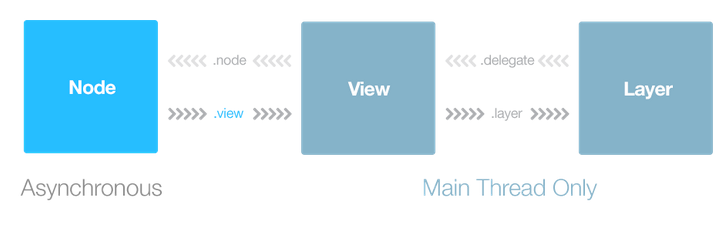
You can construct entire node hierarchies in parallel, or instantiate and size a single node on a background thread — for example, you could do something like this in a UIViewController:
你可以通过封装的方式,或者是直接在子线程中实例化一个节点对象 -- 例如,你可以在UIViewController中做如下的操作:
dispatch_async(_backgroundQueue, ^{

  ASTextNode *node = [[ASTextNode alloc] init];

  node.attributedString = [[NSAttributedString alloc] initWithString:@"hello!"

                                                          attributes:nil];

  [node measure:CGSizeMake(screenWidth, FLT_MAX)];

  node.frame = (CGRect){ CGPointZero, node.calculatedSize };

  // self.view isn't a node, so we can only use it on the main thread

  dispatch_sync(dispatch_get_main_queue(), ^{

    [self.view addSubview:node.view];

  });

});
You can use ASImageNode and ASTextNode as drop-in replacements for UIImageView and UITextView, or create your own nodes to implement node hierarchies or custom drawing. ASTableView is a node-aware UITableView subclass that can asynchronously preload cell nodes without blocking the main thread.
你可以使用ASImageNode以及ASTextNode的继承类来替换UIImageView以及UITextView,或者创建你自己的节点,用以实现你自己的绘制方式,ASTableView就是一个自定义node的UITableView的子类,它可以异步装载cell节点而不阻塞主线程。
Learn more
- Read the Getting Started guide
- Get the sample projects
- Browse the API reference
- Watch the NSLondon talk
[翻译] AsyncDisplayKit的更多相关文章
- 《Django By Example》第五章 中文 翻译 (个人学习,渣翻)
书籍出处:https://www.packtpub.com/web-development/django-example 原作者:Antonio Melé (译者@ucag注:大家好,我是新来的翻译, ...
- 《Django By Example》第四章 中文 翻译 (个人学习,渣翻)
书籍出处:https://www.packtpub.com/web-development/django-example 原作者:Antonio Melé (译者注:祝大家新年快乐,这次带来<D ...
- [翻译]开发文档:android Bitmap的高效使用
内容概述 本文内容来自开发文档"Traning > Displaying Bitmaps Efficiently",包括大尺寸Bitmap的高效加载,图片的异步加载和数据缓存 ...
- 【探索】机器指令翻译成 JavaScript
前言 前些时候研究脚本混淆时,打算先学一些「程序流程」相关的概念.为了不因太枯燥而放弃,决定想一个有趣的案例,可以边探索边学. 于是想了一个话题:尝试将机器指令 1:1 翻译 成 JavaScript ...
- 《Django By Example》第三章 中文 翻译 (个人学习,渣翻)
书籍出处:https://www.packtpub.com/web-development/django-example 原作者:Antonio Melé (译者注:第三章滚烫出炉,大家请不要吐槽文中 ...
- 《Django By Example》第二章 中文 翻译 (个人学习,渣翻)
书籍出处:https://www.packtpub.com/web-development/django-example 原作者:Antonio Melé (译者注:翻译完第一章后,发现翻译第二章的速 ...
- 《Django By Example》第一章 中文 翻译 (个人学习,渣翻)
书籍出处:https://www.packtpub.com/web-development/django-example 原作者:Antonio Melé (译者注:本人目前在杭州某家互联网公司工作, ...
- 【翻译】Awesome R资源大全中文版来了,全球最火的R工具包一网打尽,超过300+工具,还在等什么?
0.前言 虽然很早就知道R被微软收购,也很早知道R在统计分析处理方面很强大,开始一直没有行动过...直到 直到12月初在微软技术大会,看到我软的工程师演示R的使用,我就震惊了,然后最近在网上到处了解和 ...
- ASP.NET MVC with Entity Framework and CSS一书翻译系列文章之第一章:创建基本的MVC Web站点
在这一章中,我们将学习如何使用基架快速搭建和运行一个简单的Microsoft ASP.NET MVC Web站点.在我们马上投入学习和编码之前,我们首先了解一些有关ASP.NET MVC和Entity ...
随机推荐
- [问题解决]Fresco设置圆角效果不生效问题探究
[问题解决]Fresco设置圆角效果不生效问题探究 /** * Created by diql on 2017/2/21 11:07:04. */ 问题 在View中设置: fresco:rounde ...
- java算法----------常用的加密算法
散列算法(单向散列,不可逆) MD5(Message Digest Algorithm 5) SHA(Secure Hash Algorithm) 对称加密(加密解密使用同一密钥,速度快) DES ...
- 如何阅读复杂的C类型声明
阅读复杂的C类型声明,通常采用右左法则,也就是Clockwise/Spiral Rule (顺时针/螺旋法则). 本文将首先介绍工具(cdecl)(个人比较偏好使用工具提高学习和工作效率),然后中英文 ...
- spring mongo data api learn
1 索引 1.1 单列索引 @Indexed @Field(value = "delete_flag") private Boolean deleteFlag = false; @ ...
- 详解 Webpack+Babel+React 开发环境的搭建
1.认识Webpack 构建应用前我们先来了解一下Webpack, Webpack是一个模块打包工具,能够把各种文件(例如:ReactJS.Babel.Coffeescript.Less/Sass等) ...
- [转]Http请求中Content-Type讲解以及在Spring MVC中的应用
本文转自:http://blog.csdn.net/blueheart20/article/details/45174399 引言: 在Http请求中,我们每天都在使用Content-type来指定不 ...
- Knockout.js Visible绑定
<head> <meta http-equiv="Content-Type" content="text/html; charset=utf-8&quo ...
- VS中让用户选择路径
//选择文件 OpenFileDialog ofd = new OpenFileDialog(); ofd.ShowDialog(); MessageBox.Show(ofd.FileName); / ...
- windows上memecache添加多个端口命令
sc create "Memcached Server1" start= auto binPath= "D:\01_Soft\memcached\memcached.ex ...
- CSS 基础点
Part1:font:inherit 字体的设置 设置所有元素的字体保持一致: 所有元素:*{font:inherit;} /* IE8+ */ body体用percent:body{font:100 ...