
JavaScript插入节点小结
JS原生API插入节点的方式大致有innerHTML、outerHTML、appendChild、insertBefore、insertAdjacentHTML、applyElement这6种。
这里总结一下各自的用法,并封装包含before、prepend、append、after、applyElement的一系列函数。
一、六种方式的用法
innerHTML:获取标签内部的HTML内容。
outerHTML:获取包括目标标签在内,以及内部HTML的内容。
appendChild:向目标标签末尾添加子节点,返回参数节点。
insertBefore:向目标节点的第二个参数位置添加第一个参数为子节点,返回第一个参数。
insertAdjacentHTML:向目标节点的指定位置添加节点;第二个参数为要添加的节点,第一个参数指定位置,位置包括beforebegin(添加为previousSibling)、afterbegin(添加为firstChild)、beforeend(添加为lastChild)、afterend(添加为nextSibling)。它还有两个兄弟函数,分别是insertAdjacentElement和insertAdjacentText,前者添加元素并返回该元素,后者添加文本。
applyElement:IE的函数,将参数节点设置成目标节点的外包围或者内包围;第一个为参数节点,第二个参数指定方式,方式包括inside(内包围,即参数节点将目标节点的子节点包起来)、outside(外包围,即参数节点将目标节点包起来)。
上面6种方式除了前两个是属性外,另外4个都是函数。innerHTML与outerHTML没有什么好说的,直接用HTML字符串赋值就能达到插入的目的了;appendChild简单套一层函数外壳就能封装成append函数;insertBefore让节点的插入方式非常灵活;insertAdjacentHTML可以实现字符串的插入方式;applyElement函数兼容一下即可成为JQuery的Wrap系列函数。
二、实现before、prepend、append、after函数
before把参数节点插入到目标节点前面,只需获取目标节点的父节点,然后父节点调用insertBefore即可。
prepend把参数节点插入到目标节点第一个子节点的位置,获取目标节点的第一个子节点,然后调用insertBefore即可。
append的功能和原生API里appendChild的功能一样。
after把参数节点插入到目标节点的后面,只需获取目标节点的nextSibling,然后调用insertBefore即可。
具体实现如下:
var append = function(node, scope) {

    if(node.nodeType === 1 || node.nodeType === 9 || node.nodeType === 11) {

        scope.appendChild(node);

    }

};

var prepend = function(node, scope) {

    if(node.nodeType === 1 || node.nodeType === 9 || node.nodeType === 11) {

        scope.insertBefore(node, scope.firstChild);

    }

};

var before = function(node, scope) {

    if(node.nodeType === 1 || node.nodeType === 9 || node.nodeType === 11) {

        scope.parentNode.insertBefore(node, scope);

    }

};

var after = function(node, scope) {

    if(node.nodeType === 1 || node.nodeType === 9 || node.nodeType === 11) {

        scope.parentNode.insertBefore(node, scope.nextSibling);

    }

};
上面函数只能插入元素节点、文档节点以及文档碎片,都是节点类型。如果我们想要支持字符串形式的插入方式,则需要封装insertAdjacentHTML了。
这里利用策略模式,将我要实现的四个函数做成策略对象,然后动态生成,以达到精简代码的效果:
//E5才有的迭代, 所以迭代要预先兼容

Array.prototype.forEach = [].forEach || function(callback) {

    for(var i = 0, len = this.length; i < len; i++) {

        callback.call(this[i], this[i], i, this);

    }

};

/**插入策略集合**/

var insertStrategies = {

    before : function(node, scope) {

        scope.parentNode.insertBefore(node, scope);

    },

    prepend : function(node, scope) {

        scope.insertBefore(node, scope.firstChild);

    },

    append : function(node, scope) {

        scope.appendChild(node);

    },

    after : function(node, scope) {

        scope.parentNode.insertBefore(node, scope.nextSibling);

    },

    /*支持字符串格式的插入, 注意:要兼容不可直接做div子类的元素*/

    /*insertAdjace还有Element和Text,前者只能插元素,后者只能插文本*/

    beforestr : function(node, scope) {

        scope.insertAdjacentHTML('beforeBegin', node);

    },

    prependstr : function(node, scope) {

        scope.insertAdjacentHTML('afterBegin', node);

    },

    appendstr : function(node, scope) {

        scope.insertAdjacentHTML('beforeEnd', node);

    },

    afterstr : function(node, scope) {

        scope.insertAdjacentHTML('afterEnd', node);

    }

};

//响应函数

var returnMethod = function(method, node, scope) {

    //如果是字符串

    if(typeof node === 'string') {

        return insertStrategies[method + 'str'](node, scope);

    }

    //1(元素)、9(文档)、11(文档碎片)

    if(node.nodeType === 1 || node.nodeType === 9 || node.nodeType === 11) {

        return insertStrategies[method](node, scope);

    }

    //此处还可添加节点集合的处理逻辑,用于处理选择其引擎获取的节点集合。

};

['before', 'prepend', 'append', 'after'].forEach(function(method){

    window[method] = function(node, scope) {

        returnMethod(method, node, scope);

    };

});
所有函数都被实现为window的属性,所以直接当全局函数调用即可,这些函数并不属于节点对象,所以scope参数指代的是目标节点。下面兼容applyElement后,我们将所有的函数都扩展到HTMLElement的原型上面去,这样就可以省略scope参数,以达到元素节点直接调用的效果。当然对于框架来说,一般是生成框架对象,然后把这些函数扩展到其原型上去,这样可以避免修改原生对象的原型。
三、兼容applyElement
applyElement函数是IE私有实现,所以想在其他浏览器中使用,我们得类似Array的forEach一样在对象原型上兼容一下。
其实要达到新元素包含目标节点或者包含目标元素的子节点用innerHTML与outerHTML也能做到。但是这必然会存在一个问题:当新元素是dom树的一部分,并且它也有一系列子节点,那么它的子节点应该怎么处理?留在原地还是并入目标元素中?如果并入目标元素中是目标元素的在前还是新元素的在前?
wrap系列函数效果只是挪走新元素标签里的内容,它的子元素呈现的效果就是变成新元素父节点点的子节点。这种方式也可以用Range对象来实现,当然也可以用innerHTML与outerHTML来实现。我这里用Range对象实现一遍。
/*兼容IE的applyElement*/

HTMLElement.prototype.removeNode = HTMLElement.prototype.removeNode || function(deep) {

    if(this.parentNode) {

        var range = this.ownerDocument.createRange();

        range.selectNodeContents(this);

        if(!deep) {

            var fragment = range.extractContents();

            range.setStartBefore(this);

            range.insertNode(fragment);

            range.detach();

        }

        return this.parentNode.removeChild(this);

    }

};

HTMLElement.prototype.applyElement = HTMLElement.prototype.applyElement || function(node, where) {

    node = node.removeNode();

    where = (where || 'outside').toLowerCase();

    var range = this.ownerDocument.createRange();

    if(where === 'inside') {

        range.selectNodeContents(this);

        range.surroundContents(node);

        range.detach();

    }else if(where === 'outside') {

        range.selectNode(this);

        range.surroundContents(node);

        range.detach();

    }

    return node;

};
四、将所有函数扩展到HTMLElement的原型上
思路和修复applyElement一样,我们只需将window[method]替换成HTMLElement.prototype[method],批量生成时传递的scope改成this即可达成。
//E5才有的迭代, 所以迭代要预先兼容

Array.prototype.forEach = [].forEach || function(callback) {

    for(var i = 0, len = this.length; i < len; i++) {

        callback.call(this[i], this[i], i, this);

    }

};

/**插入策略集合**/

var insertStrategies = {

    before : function(node, scope) {

        scope.parentNode.insertBefore(node, scope);

    },

    prepend : function(node, scope) {

        scope.insertBefore(node, scope.firstChild);

    },

    append : function(node, scope) {

        scope.appendChild(node);

    },

    after : function(node, scope) {

        scope.parentNode.insertBefore(node, scope.nextSibling);

    },

    /*支持字符串格式的插入, 注意:要兼容不可直接做div子类的元素*/

    /*insertAdjace还有Element和Text,前者只能插元素,后者只能插文本*/

    /**/

    beforestr : function(node, scope) {

        scope.insertAdjacentHTML('beforeBegin', node);

    },

    prependstr : function(node, scope) {

        scope.insertAdjacentHTML('afterBegin', node);

    },

    appendstr : function(node, scope) {

        scope.insertAdjacentHTML('beforeEnd', node);

    },

    afterstr : function(node, scope) {

        scope.insertAdjacentHTML('afterEnd', node);

    }

};

//响应函数

var returnMethod = function(method, node, scope) {

    //如果是字符串

    if(typeof node === 'string') {

        //低版本浏览器使用机会毕竟少数,每次都要判断很划不来。这段代码舍弃

        /*if(!scope.insertAdjacentHTML){

            throw new Error('(Firefox8-、IE4-、Opera7-、Safari4-)浏览器不能插入字符串!');

        }*/

        return insertStrategies[method + 'str'](node, scope);

    }

    //1(元素)、2(属性)、3(文本)、9(文档)、11(文档碎片)

    if(node.nodeType === 1 || node.nodeType === 9 || node.nodeType === 11) {

        return insertStrategies[method](node, scope);

    }

    //此处还可添加节点集合的处理逻辑(用文档碎片)

};

['before', 'prepend', 'append', 'after'].forEach(function(method){

    HTMLElement.prototype[method] = function(node) {

        returnMethod(method, node, this);

    };

});

/*兼容IE的applyElement*/

HTMLElement.prototype.removeNode = HTMLElement.prototype.removeNode || function(deep) {

    if(this.parentNode) {

        var range = this.ownerDocument.createRange();

        range.selectNodeContents(this);

        if(!deep) {

            var fragment = range.extractContents();

            range.setStartBefore(this);

            range.insertNode(fragment);

            range.detach();

        }

        return this.parentNode.removeChild(this);

    }

};

HTMLElement.prototype.applyElement = HTMLElement.prototype.applyElement || function(node, where) {

    node = node.removeNode();

    where = (where || 'outside').toLowerCase();

    var range = this.ownerDocument.createRange();

    if(where === 'inside') {

        range.selectNodeContents(this);

        range.surroundContents(node);

        range.detach();

    }else if(where === 'outside') {

        range.selectNode(this);

        range.surroundContents(node);

        range.detach();

    }

    return node;

};
五、测试
测试代码如下:
<!DOCTYPE HTML PUBLIC "-//W3C//DTD HTML 4.01 Transitional//EN">

<html>

  <head>

    <title>插入节点.html</title>

    <script type="text/javascript" src='./insertNode.js'></script>

  </head>

  <body>

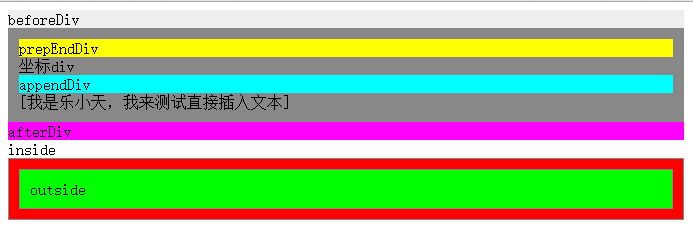
    <div id='div' style='background:#888;border:1px solid #888;padding:10px;'>坐标div</div>

    <div id='inside' style='background:#0f0;border:1px solid #888;padding:10px;'>inside</div>

    <div id='outside' style='background:#F00;border:1px solid #888;padding:10px;'>outside</div>

    <script type="text/javascript">

        var div = document.getElementById('div');

        var beforeDiv = document.createElement('div');

        beforeDiv.innerHTML = 'beforeDiv';

        beforeDiv.style.background = '#eee';

        var prepEndDiv = document.createElement('div');

        prepEndDiv.innerHTML = 'prepEndDiv';

        prepEndDiv.style.background = '#ff0';

        var appendDiv = document.createElement('div');

        appendDiv.innerHTML = 'appendDiv';

        appendDiv.style.background = '#0ff';

        var afterDiv = document.createElement('div');

        afterDiv.innerHTML = 'afterDiv';

        afterDiv.style.background = '#f0f';

        div.before(beforeDiv);

        div.prepend(prepEndDiv);

        div.append(appendDiv);

        div.after(afterDiv);

        //测试文本插入

        div.append('[我是乐小天,我来测试直接插入文本]');

        //测试外包含和内包含

        var outside = document.getElementById('outside');

        var inside = document.getElementById('inside');

        outside.applyElement(inside, 'inside');

    </script>

  </body>

</html>
结果图:
参考书目:《javascript框架设计》、《javascript高级程序设计》、《JavaScript设计模式与开发实践》
JavaScript插入节点小结的更多相关文章
- JS(JavaScript)插入节点的方法appendChild与insertBefore
首先 从定义来理解 这两个方法: appendChild() 方法:可向节点的子节点列表的末尾添加新的子节点.语法:appendChild(newchild) insertBefore() 方法:可在 ...
- JavaScript插入节点
1. document.write("<p>This is inserted.</p>"); 该方法必须加在HTML文档内,违背了结构行为分离原则,不推荐. ...
- JavaScript之节点的创建、替换、删除、插入
1.节点的创建 节点的创建使用document.creatElment();文本节点的创建使用document.creatTextNode();如想把<li>哈密瓜</li>添 ...
- javascript之DOM编程设置节点插入节点
<!DOCTYPE html PUBLIC "-//W3C//DTD XHTML 1.0 Transitional//EN" "http://www.w3.org/ ...
- javascript数据结构与算法--二叉树(插入节点、生成二叉树)
javascript数据结构与算法-- 插入节点.生成二叉树 二叉树中,相对较小的值保存在左节点上,较大的值保存在右节点中 /* *二叉树中,相对较小的值保存在左节点上,较大的值保存在右节点中 * * ...
- Javascript基础篇小结
转载请声明出处 博客原文 随手翻阅以前的学习笔记,顺便整理一下放在这里,方便自己复习,也希望你有也有帮助吧 第一课时 入门基础 知识点: 操作系统就是个应用程序 只要是应用程序都要占用物理内存 浏览器 ...
- JavaScript DOM节点和文档类型
以下的例子以此HTML文档结构为例: <!DOCTYPE html> <html lang="en"> <head> <meta char ...
- 用javascript插入样式
一.用javascript插入<style>样式 有时候我们需要利用js来动态生成页面上style标签中的css代码,方法很直接,就是直接创建一个style元素,然后设置style元素里面 ...
- JQuery_DOM 节点操作之创建节点、插入节点
一.创建节点 为了使页面更加智能化,有时我们想动态的在html 结构页面添加一个元素标签,那么在插入之前首先要做的动作就是:创建节点 <script type="text/javasc ...
随机推荐
- connect db2 by tools
- jquery综合练习--模态对话框传值,删除,新增表格行
效果示例: 个人的练习代码: <!DOCTYPE html> <html lang="en"> <head> <meta charset= ...
- 1416: Kick Ass Biu [几何]
点击打开链接 1416: Kick Ass Biu [几何] 时间限制: 1 Sec 内存限制: 128 MB 提交: 174 解决: 35 统计 题目描述 在玩Kick Ass的时候,可以发现子弹的 ...
- Spring-解决请求中文乱码问题
解决spring请求中文乱码问题 1.web.xml添加编码拦截器 <filter> <filter-name>CharacterEncoding</filter-nam ...
- android learning
https://www.cnblogs.com/kangjianwei101/p/5621238.html https://blog.csdn.net/write6/article/details/7 ...
- javascript简要笔记
零. 数据 0. 变量 分为字符串,数字,undefined, null,对象 undefined类型是只声明了变量,但是没赋值 可以使用typeof()函数来查看变量类型 例子1 var ...
- RN47 中通过 JS 调用 Native 方法
每一个模块.方法都有一个 ID,通过 ID 来调用. m_registry->callNativeMethod(call.moduleId, call.methodId, std::move(c ...
- Dota2App--第三天
一.要实现的功能 1.新特性页面 1.1.是否进入新特性界面的两种情况 1)第一次安装此APP,进入新特性界面 2)不是第一次安装,但是有版本更新,进入新特性界面 1.2.具体的代码实现 //0.版本 ...
- 基于datax的数据同步平台
一.需求 由于公司各个部门对业务数据的需求,比如进行数据分析.报表展示等等,且公司没有相应的系统.数据仓库满足这些需求,最原始的办法就是把数据提取出来生成excel表发给各个部门,这个功能已经由脚本转 ...
- PHP和javascript中url编码解码详解
在实际开发中,我们可能会遇到路径编码解码的问题,下面总结了一下: PHP中: 1.urlencode(编码),urldecode(解码) $a = urlencode('http://www.baid ...