
Yii2 UploadedFile上传文件
通过
UploadFile::getInstance($model, $attribute);
UploadFile::getInstances($model, $attribute);
UploadFile::getInstanceByName($name);
UploadFile::getInstancesByName($name);
把表单上传的文件赋值到 UploadedFile中的 private static $_files 中
 /**

      * Returns an uploaded file for the given model attribute.

      * The file should be uploaded using [[\yii\widgets\ActiveField::fileInput()]].

      * @param \yii\base\Model $model the data model

      * @param string $attribute the attribute name. The attribute name may contain array indexes.

      * For example, '[1]file' for tabular file uploading; and 'file[1]' for an element in a file array.

      * @return UploadedFile the instance of the uploaded file.

      * Null is returned if no file is uploaded for the specified model attribute.

      * @see getInstanceByName()

      */

     public static function getInstance($model, $attribute)

     {

         $name = Html::getInputName($model, $attribute);

         return static::getInstanceByName($name);

     }

     /**

      * Returns all uploaded files for the given model attribute.

      * @param \yii\base\Model $model the data model

      * @param string $attribute the attribute name. The attribute name may contain array indexes

      * for tabular file uploading, e.g. '[1]file'.

      * @return UploadedFile[] array of UploadedFile objects.

      * Empty array is returned if no available file was found for the given attribute.

      */

     public static function getInstances($model, $attribute)

     {

         $name = Html::getInputName($model, $attribute);

         return static::getInstancesByName($name);

     }

     /**

      * Returns an uploaded file according to the given file input name.

      * The name can be a plain string or a string like an array element (e.g. 'Post[imageFile]', or 'Post[0][imageFile]').

      * @param string $name the name of the file input field.

      * @return UploadedFile the instance of the uploaded file.

      * Null is returned if no file is uploaded for the specified name.

      */

     public static function getInstanceByName($name)

     {

         $files = self::loadFiles();

         return isset($files[$name]) ? $files[$name] : null;

     }

     /**

      * Returns an array of uploaded files corresponding to the specified file input name.

      * This is mainly used when multiple files were uploaded and saved as 'files[0]', 'files[1]',

      * 'files[n]'..., and you can retrieve them all by passing 'files' as the name.

      * @param string $name the name of the array of files

      * @return UploadedFile[] the array of UploadedFile objects. Empty array is returned

      * if no adequate upload was found. Please note that this array will contain

      * all files from all sub-arrays regardless how deeply nested they are.

      */

     public static function getInstancesByName($name)

     {

         $files = self::loadFiles();

         if (isset($files[$name])) {

             return [$files[$name]];

         }

         $results = [];

         foreach ($files as $key => $file) {

             if (strpos($key, "{$name}[") === 0) {

                 $results[] = $file;

             }

         }

         return $results;

     }
loadFiles()方法,把$_FILES中的键值作为参数传递到loadFilesRecursive($key, $names, $tempNames, $types, $sizes, $errors) 中
 /**

      * Creates UploadedFile instances from $_FILE.

      * @return array the UploadedFile instances

      */

     private static function loadFiles()

     {

         if (self::$_files === null) {

             self::$_files = [];

             if (isset($_FILES) && is_array($_FILES)) {

                 foreach ($_FILES as $class => $info) {

                     self::loadFilesRecursive($class, $info['name'], $info['tmp_name'], $info['type'], $info['size'], $info['error']);

                 }

             }

         }

         return self::$_files;

     }
loadFilesRecursive方法,通过递归把$_FILES中的内容保存到 self::$_files 中
 /**

      * Creates UploadedFile instances from $_FILE recursively.

      * @param string $key key for identifying uploaded file: class name and sub-array indexes

      * @param mixed $names file names provided by PHP

      * @param mixed $tempNames temporary file names provided by PHP

      * @param mixed $types file types provided by PHP

      * @param mixed $sizes file sizes provided by PHP

      * @param mixed $errors uploading issues provided by PHP

      */

     private static function loadFilesRecursive($key, $names, $tempNames, $types, $sizes, $errors)

     {

         if (is_array($names)) {

             foreach ($names as $i => $name) {

                 self::loadFilesRecursive($key . '[' . $i . ']', $name, $tempNames[$i], $types[$i], $sizes[$i], $errors[$i]);

             }

         } elseif ($errors !== UPLOAD_ERR_NO_FILE) {

             self::$_files[$key] = new static([

                 'name' => $names,

                 'tempName' => $tempNames,

                 'type' => $types,

                 'size' => $sizes,

                 'error' => $errors,

             ]);

         }

     }
实例:
html
 <form class="form-horizontal form-margin50" action="<?= \yii\helpers\Url::toRoute('upload-face') ?>"

                   method="post" enctype="multipart/form-data" id="form1">

                 <input type="hidden" name="_csrf" value="<?= Yii::$app->request->getCsrfToken() ?>">

                 <input type="file" name="head_pic" id="doc" style="display: none" onchange="setImagePreview()"/>

 </form>
php代码,打印的
  public static function uploadImage($userId = '', $tem = '')

     {

         $returnPath = '';

         $path = 'uploads/headpic/' . $userId;

         if (!file_exists($path)) {

             mkdir($path, 0777);

             chmod($path, 0777);

         }

         $patch = $path . '/' . date("YmdHis") . '_';

         $tmp = UploadedFile::getInstanceByName('head_pic');

         if ($tmp) {

             $patch = $path . '/' . date("YmdHis") . '_';

             $tmp->saveAs($patch . '1.jpg');

             $returnPath .= $patch;

         }

         return $returnPath;

     }
$tmp = UploadedFile::getInstanceByName('head_pic');
打印dump($tmp,$_FILES,$tmp->getExtension());
对应的 UploadedFile
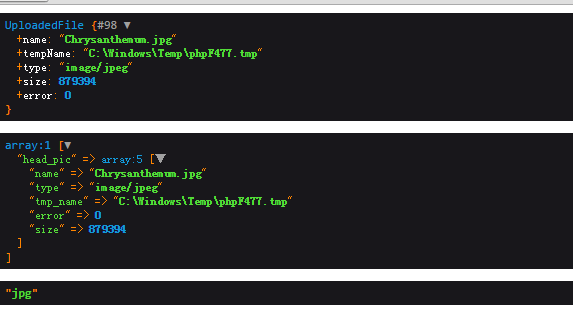
 class UploadedFile extends Object

 {

     /**

      * @var string the original name of the file being uploaded

      */

     // "Chrysanthemum.jpg"

     public $name;

     /**

      * @var string the path of the uploaded file on the server.

      * Note, this is a temporary file which will be automatically deleted by PHP

      * after the current request is processed.

      */

     //  "C:\Windows\Temp\php8CEF.tmp"

     public $tempName;

     /**

      * @var string the MIME-type of the uploaded file (such as "image/gif").

      * Since this MIME type is not checked on the server-side, do not take this value for granted.

      * Instead, use [[\yii\helpers\FileHelper::getMimeType()]] to determine the exact MIME type.

      */

     //  "image/jpeg"

     public $type;

     /**

      * @var integer the actual size of the uploaded file in bytes

      */

     //

     public $size;

     /**

      * @var integer an error code describing the status of this file uploading.

      * @see http://www.php.net/manual/en/features.file-upload.errors.php

      */

     //

     public $error;

     private static $_files;

     /**

      * String output.

      * This is PHP magic method that returns string representation of an object.

      * The implementation here returns the uploaded file's name.

      * @return string the string representation of the object

      */

     public function __toString()

     {

         return $this->name;

     }

     /**

      * Returns an uploaded file for the given model attribute.

      * The file should be uploaded using [[\yii\widgets\ActiveField::fileInput()]].

      * @param \yii\base\Model $model the data model

      * @param string $attribute the attribute name. The attribute name may contain array indexes.

      * For example, '[1]file' for tabular file uploading; and 'file[1]' for an element in a file array.

      * @return UploadedFile the instance of the uploaded file.

      * Null is returned if no file is uploaded for the specified model attribute.

      * @see getInstanceByName()

      */

     public static function getInstance($model, $attribute)

     {

         $name = Html::getInputName($model, $attribute);

         return static::getInstanceByName($name);

     }

     /**

      * Returns all uploaded files for the given model attribute.

      * @param \yii\base\Model $model the data model

      * @param string $attribute the attribute name. The attribute name may contain array indexes

      * for tabular file uploading, e.g. '[1]file'.

      * @return UploadedFile[] array of UploadedFile objects.

      * Empty array is returned if no available file was found for the given attribute.

      */

     public static function getInstances($model, $attribute)

     {

         $name = Html::getInputName($model, $attribute);

         return static::getInstancesByName($name);

     }

     /**

      * Returns an uploaded file according to the given file input name.

      * The name can be a plain string or a string like an array element (e.g. 'Post[imageFile]', or 'Post[0][imageFile]').

      * @param string $name the name of the file input field.

      * @return null|UploadedFile the instance of the uploaded file.

      * Null is returned if no file is uploaded for the specified name.

      */

     public static function getInstanceByName($name)

     {

         $files = self::loadFiles();

         return isset($files[$name]) ? new static($files[$name]) : null;

     }

     /**

      * Returns an array of uploaded files corresponding to the specified file input name.

      * This is mainly used when multiple files were uploaded and saved as 'files[0]', 'files[1]',

      * 'files[n]'..., and you can retrieve them all by passing 'files' as the name.

      * @param string $name the name of the array of files

      * @return UploadedFile[] the array of UploadedFile objects. Empty array is returned

      * if no adequate upload was found. Please note that this array will contain

      * all files from all sub-arrays regardless how deeply nested they are.

      */

     public static function getInstancesByName($name)

     {

         $files = self::loadFiles();

         if (isset($files[$name])) {

             return [new static($files[$name])];

         }

         $results = [];

         foreach ($files as $key => $file) {

             if (strpos($key, "{$name}[") === 0) {

                 $results[] = new static($file);

             }

         }

         return $results;

     }

     /**

      * Cleans up the loaded UploadedFile instances.

      * This method is mainly used by test scripts to set up a fixture.

      */

     //清空self::$_files

     public static function reset()

     {

         self::$_files = null;

     }

     /**

      * Saves the uploaded file.

      * Note that this method uses php's move_uploaded_file() method. If the target file `$file`

      * already exists, it will be overwritten.

      * @param string $file the file path used to save the uploaded file

      * @param boolean $deleteTempFile whether to delete the temporary file after saving.

      * If true, you will not be able to save the uploaded file again in the current request.

      * @return boolean true whether the file is saved successfully

      * @see error

      */

     //通过php的move_uploaded_file() 方法保存临时文件为目标文件

     public function saveAs($file, $deleteTempFile = true)

     {

         //$this->error == UPLOAD_ERR_OK UPLOAD_ERR_OK  其值为 0,没有错误发生,文件上传成功。

         if ($this->error == UPLOAD_ERR_OK) {

             if ($deleteTempFile) {

                 //将上传的文件移动到新位置

                 return move_uploaded_file($this->tempName, $file);

             } elseif (is_uploaded_file($this->tempName)) {//判断文件是否是通过 HTTP POST 上传的

                 return copy($this->tempName, $file);//copy — 拷贝文件

             }

         }

         return false;

     }

     /**

      * @return string original file base name

      */

     //获取上传文件原始名称 "name" => "Chrysanthemum.jpg"  "Chrysanthemum"

     public function getBaseName()

     {

         // https://github.com/yiisoft/yii2/issues/11012

         $pathInfo = pathinfo('_' . $this->name, PATHINFO_FILENAME);

         return mb_substr($pathInfo, 1, mb_strlen($pathInfo, '8bit'), '8bit');

     }

     /**

      * @return string file extension

      */

     //获取上传文件扩展名称  "name" => "Chrysanthemum.jpg"  "jpg"

     public function getExtension()

     {

         return strtolower(pathinfo($this->name, PATHINFO_EXTENSION));

     }

     /**

      * @return boolean whether there is an error with the uploaded file.

      * Check [[error]] for detailed error code information.

      */

     //上传文件是否出现错误

     public function getHasError()

     {

         return $this->error != UPLOAD_ERR_OK;

     }

     /**

      * Creates UploadedFile instances from $_FILE.

      * @return array the UploadedFile instances

      */

     private static function loadFiles()

     {

         if (self::$_files === null) {

             self::$_files = [];

             if (isset($_FILES) && is_array($_FILES)) {

                 foreach ($_FILES as $class => $info) {

                     self::loadFilesRecursive($class, $info['name'], $info['tmp_name'], $info['type'], $info['size'], $info['error']);

                 }

             }

         }

         return self::$_files;

     }

     /**

      * Creates UploadedFile instances from $_FILE recursively.

      * @param string $key key for identifying uploaded file: class name and sub-array indexes

      * @param mixed $names file names provided by PHP

      * @param mixed $tempNames temporary file names provided by PHP

      * @param mixed $types file types provided by PHP

      * @param mixed $sizes file sizes provided by PHP

      * @param mixed $errors uploading issues provided by PHP

      */

     private static function loadFilesRecursive($key, $names, $tempNames, $types, $sizes, $errors)

     {

         if (is_array($names)) {

             foreach ($names as $i => $name) {

                 self::loadFilesRecursive($key . '[' . $i . ']', $name, $tempNames[$i], $types[$i], $sizes[$i], $errors[$i]);

             }

         } elseif ((int)$errors !== UPLOAD_ERR_NO_FILE) {

             self::$_files[$key] = [

                 'name' => $names,

                 'tempName' => $tempNames,

                 'type' => $types,

                 'size' => $sizes,

                 'error' => $errors,

             ];

         }

     }

 }
Yii2 UploadedFile上传文件的更多相关文章
- YII2.0上传文件
针对于YII2.0官方手册来说,我稍微修改了一些内容具体的就是把model层里定义的uoload方法在controller方法里合并了 创建模型 namespace app\models; use y ...
- 记一次yii2 上传文件
1 view渲染 <form action="../src/website/import/report-flow" method="post" encty ...
- 关于commons-fileupload组件上传文件中文名乱码问题
java web开发,常用到的文件上传功能,常用的commons-fileupload和commons-io两个jar包.关于如何使用这两个jar来完成文件上传的功能,这里不做详解.使用commons ...
- [iOS 多线程 & 网络 - 2.11] - ASI框架上传文件
A.ASI的上传功能基本使用 1.实现步骤 (1)创建请求 使用ASIFormDataRequest (2)设置上传文件路径 (3)发送请求 2.上传相册相片 UIImagePickerCon ...
- Nestjs 上传文件
Docs: https://docs.nestjs.com/techniques/file-upload 上传单文件 @Post('upload') @UseInterceptors(FileInte ...
- django 基于form表单上传文件和基于ajax上传文件
一.基于form表单上传文件 1.html里是有一个input type="file" 和 ‘submit’的标签 2.vies.py def fileupload(request ...
- JSP 上传文件
<?xml version="1.0" encoding="UTF-8"?> <web-app version="2.5" ...
- Laravel 上传文件处理
文件上传 获取上传的文件 可以使用 Illuminate\Http\Request 实例提供的 file 方法或者动态属性来访问上传文件, file 方法返回 Illuminate\Http\Uplo ...
- django系列6--Ajax05 请求头ContentType, 使用Ajax上传文件
一.请求头ContentType ContentType指的是请求体的编码类型,常见的类型共有三种: 1.application/x-www-form-urlencoded 这应该是最常见的 POST ...
随机推荐
- iOS:小技巧(19-02-12更)
记录下一些不常用技巧,以防忘记,复制用. 1.UIImageView 和UILabel 等一些控件,需要加这句才能成功setCorn _myLabel.layer.masksToBounds = YE ...
- 洛谷P4602 [CTSC2018]混合果汁(主席树)
题目描述 小 R 热衷于做黑暗料理,尤其是混合果汁. 商店里有 nn 种果汁,编号为 0,1,\cdots,n-10,1,⋯,n−1 . ii 号果汁的美味度是 d_idi ,每升价格为 p_ipi ...
- 随记181120Service Fabric问题
https://github.com/Azure/service-fabric-issues/issues/1056 不能启动node one /five 问题
- python3使用bencode库实现BT种子生成磁力链接
python3 需要使用 pip install py3-bencode安装py3-bencode库. pip install py3-bencode 这里使用当前目录下的 1.torrent 文件转 ...
- SOC中的DFT和BIST对比与比较-IC学习笔记(二)
ATE:ATE是Automatic Test Equipment的缩写,根据客户的测试要求.图纸及参考方案,采用MCU.PLC.PC基于VB.VC开发平台,利用TestStand&LabVIE ...
- 20155306 2016-2017-2 《Java程序设计》第1周学习总结
20155306 2006-2007-2 <Java程序设计>第1周学习总结 教材学习内容总结 第一章 Java有三大平台:Java EE, Java SE, Java ME Java S ...
- 20155311 《Java程序设计》实验四 (Android程序设计)实验报告
20155311 <Java程序设计>实验四 (Android程序设计)实验报告 实验内容 基于Android Studio开发简单的Android应用并部署测试; 了解Android.组 ...
- 20145207 2016-2017-2 《Java程序设计》第4周学习总结
一.继承与多态 1.继承的定义 面对对象中,子类继承父类,避免重复的行为定义,不过并非为了避免重复定义行为就使用继承,滥用而继承会导致程序维护上的问题. 程序代码重复在程序设计上就是不好的信号,多个类 ...
- easyui-dialog打开多次数据串台问题
问题: 公司项目最近在用easyui写后台管理系统,发现dialog使用后总会报出莫名奇妙的问题 1.打开多次后数据显示上一次的,表单提交错误或者获取数据错误 2.来回跳转后,会有打开其它dialog ...
- 【MongoDB】如何注册windows服务
一.为什么要注册windows服务 mongodb启动比较麻烦,每次都要cmd去开启.注册windows服务,可以设置开机启动,比较友好. 二.如何注册windows服务 1.安装mongodb 2. ...