
Python笔记 #07# NumPy 文档地址 & Subsetting 2D Arrays
文档地址:np.array()
1、<class 'numpy.ndarray'>
ndarray 表示 n 维度(n D)数组 (= n 行数组)。
2、打印 array 结构 —— np_array.shape
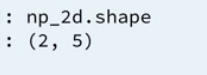
3、Subsetting 2D Arrays 的两种方式
不管是 arr[1][2] 还是 arr[1,2] 都是可行的,不过教程推荐第二种方式。
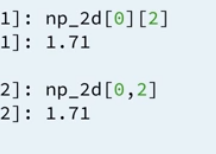
4、代码演示 & 一个取子集的小技巧
创建:
# Create baseball, a list of lists

baseball = [[180, 78.4],

            [215, 102.7],

            [210, 98.5],

            [188, 75.2]]

# Import numpy

import numpy as np

# Create a 2D numpy array from baseball: np_baseball

np_baseball = np.array(baseball)

# Print out the type of np_baseball

print(type(np_baseball))

# Print out the shape of np_baseball

print(np_baseball.shape)
打印结构:
# baseball is available as a regular list of lists

# Import numpy package

import numpy as np

# Create a 2D numpy array from baseball: np_baseball

np_baseball =  np.array(baseball)

# Print out the shape of np_baseball

print(np_baseball.shape)
小技巧:

# baseball is available as a regular list of lists

# Import numpy package

import numpy as np

# Create np_baseball (2 cols)

np_baseball = np.array(baseball)

# Print out the 50th row of np_baseball

print(np_baseball[49,:])

# Select the entire second column of np_baseball: np_weight

np_weight = np_baseball[:,1]

# Print out height of 124th player

print(np_baseball[123,0])
5、整体数学运算
# baseball is available as a regular list of lists

# updated is available as 2D numpy array

# Import numpy package

import numpy as np

# Create np_baseball (3 cols)

np_baseball = np.array(baseball)

# Print out addition of np_baseball and updated

print(np_baseball + updated)

# Create numpy array: conversion

conversion = np.array([0.0254, 0.453592, 1])

# Print out product of np_baseball and conversion

print(conversion * np_baseball)
Python笔记 #07# NumPy 文档地址 & Subsetting 2D Arrays的更多相关文章
- 使用sphinx快速为你python注释生成API文档
sphinx简介sphinx是一种基于Python的文档工具,它可以令人轻松的撰写出清晰且优美的文档,由Georg Brandl在BSD许可证下开发.新版的Python3文档就是由sphinx生成的, ...
- 使用sphinx为python注释生成docAPI文档
sphinx简介 sphinx是一种基于Python的文档工具,它可以令人轻松的撰写出清晰且优美的文档,由Georg Brandl在BSD许可证下开发. 新版的Python3文档就是由sphinx生成 ...
- python快速生成注释文档的方法
python快速生成注释文档的方法 今天将告诉大家一个简单平时只要注意的小细节,就可以轻松生成注释文档,也可以检查我们写的类方法引用名称是否重复有问题等.一看别人专业的大牛们写的文档多牛多羡慕,不用担 ...
- 找到python官方标准库文档
python中有很多标准库.我们没法记住全部标准库,但是可以在:https://docs.python.org/3/py-modindex.html 中查看标准库的索引 在python的官方文档中,如 ...
- python常用模块-配置文档模块(configparser)
python常用模块-配置文档模块(configparser) 作者:尹正杰 版权声明:原创作品,谢绝转载!否则将追究法律责任. ConfigParser模块用于生成和修改常见配置文档,当前模块的名称 ...
- EXTJS文档地址
文档地址:http://docs.sencha.com/extjs/4.2.3/#!/api/Ext.form.field.Field-event-change
- 【Swagger2】解决swagger文档地址请求404的问题
一.出现的问题背景 某个项目,本地启动后,访问swagger文档地址可以访问到, http://localhost:8203/doc.html.但是部署到开发环境就访问不到,报404资源找不到的问题 ...
- VMware vSphere ESXi 和 vCenter Server 5.1 文档地址
VMware vSphere ESXi 和 vCenter Server 5.1 文档地址 https://pubs.vmware.com/vsphere-51/index.jsp?top ...
- hugo官方相关文档地址
+++ date="2020-10-17" title="hugo官方相关文档地址" tags=["hugo"] categories=[& ...
随机推荐
- 嵌入式Linux下Qt的中文显示
一般情况下,嵌入式Qt界面需要中文显示,下面总结自己在项目中用到的可行的办法 1,下载一种中文简体字体,比如我用的是”方正准圆简体“,把字体文件放在ARM开发板系统的Qt字库中,即/usr/lib/f ...
- 说说SPI协议
SPI,是英语Serial Peripheral Interface 的缩写,顾名思义就是串行外围设备接口.SPI,是一种高速的,全双工,同步的通信总线,并且在芯片的管脚上只占用四根线,节约了芯片的管 ...
- lua常用操作
1 .Lua生成随机数: Lua 生成随机数需要用到两个函数:math.randomseed(xx), math.random([n [, m]]) 1. math.randomseed(n) 接收一 ...
- mongodb3.2系统性学习——3、update()操作
mongodb 包含众多的原子性操作: 实例: //连接数据库 dbService = connect("localhost:27017"); //选择插入集合 db = dbS ...
- poj_3580 伸展树
自己伸展树做的第一个题 poj 3580 supermemo. 题目大意 对一个数组进行维护,包含如下几个操作: ADD x, y, d 在 A[x]--A[y] 中的每个数都增加d REVERSE ...
- Deploying Cloud Foundry on OpenStack Juno and XenServer (Part I)
link http://rabbitstack.github.io/deploying-cloud-foundry-on-openstack-juno-and-xenserver-part-i/ Cl ...
- iOS 单例用法
单例模式的意思就是只有一个实例.单例模式确保某一个类只有一个实例,而且自行实例化并向整个系统提供这个实例.这个类称为单例类. 1.单例模式的要点: 显然单例模式的要点有三个:一是某个类只能有一个实例: ...
- 几种常用的SQL优化工具及方法
转自:http://blog.itpub.net/35489/viewspace-764856/ 1. sql 详细执行计划,主要检查驱动路径,索引是否合适:同一个pl/sql窗口连续执行即可:exp ...
- oneThink发生错误,获取当前执行的SQL语句!
echo D('AnswerInfoView')->getLastSql();die();
- HDCMS导航高亮显示!解决办法
第一种方法:(传递class) <channel type='top' row='8' class='cur' > <li class='{$field.class}'> &l ...