
Client tried to access password protected page without proper authorization (status code 401) 无法发布SceneService的解决方法
前不久,一客户反映原来已经部署好的WebGIS系统忽然无法正常运行了,具体配置如下:
Portal for ArcGIS 10.5
ArcGIS Server 10.5
Web Adpator 10.5
Data Store 10.5
表现出现的症状就是托管的要素服务可以正常发布,但是三维服务SceneService发布不成功。查看ArcGIS Server的日志,提示如下错误信息:

Client tried to acces password protected page without proper authorization (status code 401) 这个错误其实是ArcGIS Server底层的ArcObject类库中预定义的错误消息 MESSAGESUPPORT_E_UNAUTHORIZED,可以参考以下链接:
https://desktop.arcgis.com/en/arcobjects/latest/net/webframe.htm#messageSupportError.htm
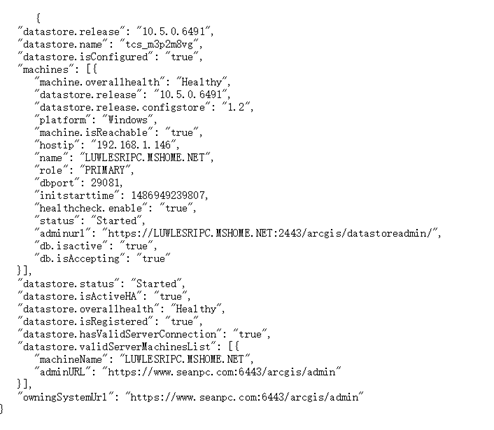
初步判断这个错误有可能是DataStore无法认证登录的问题,但通过了Server的REST管理页面验证了一下DataStore,发现状态是正常的。
Server用于验证DataStore的REST URL路径类似如下:
https://www.seanpc.com/ags/admin/data/items/nosqlDatabases/AGSDataStore_nosqldb_tcs_m3p2m8vg/machines/LUWLESRIPC.MSHOME.NET/validate
返回的结果类似如下:
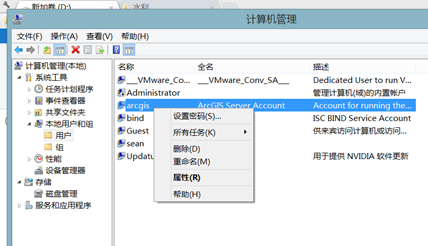
再次推测问题可能和操作系统的文件系统权限有关,询问了一下客户,原来客户在系统出问题之前做了一个重置ArcGIS Server运行账户密码的操作。客户是直接通过Windows的管理页面做账户密码重置操作的。
于是重新设置了ArcGIS Server安装目录以及系统数据目录的权限。
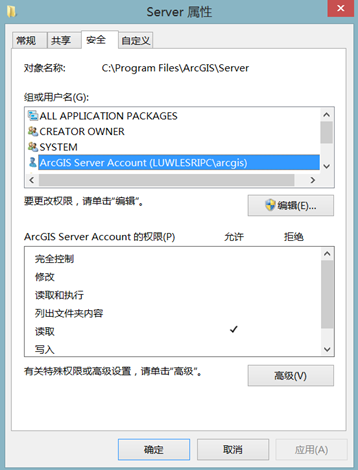
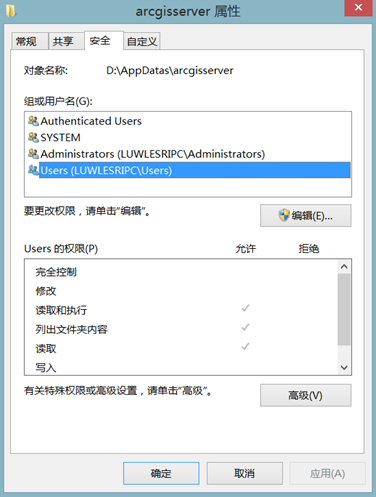
使用C:\Program Files\ArcGIS\Server\bin\ServerConfigurationUtilityUI.exe工具重新设置ArcGIS Server账号信息和目录权限。
重置后,重启ArcGIS Server,再次发布三维服务SceneService,系统恢复正常了。建议客户如果在知道原账户密码的前提下需要重置密码,必须通过Windows的控制面板账户管理来重置密码。假如是通过Windows的管理页面做账户密码重置操作的,需要重新设置相关的ArcGIS Server文件目录账户权限。因为按照微软的说法:
If an administrator resets your password, you might lose access to some of your files.
Client tried to access password protected page without proper authorization (status code 401) 无法发布SceneService的解决方法的更多相关文章
- 执行PHP脚本时遇到 mysql_connect(): Headers and client library minor version mismatch的解决方法
把服务器从Windows迁移到了centos7.2,配置好PHP运行环境后,项目运行正常. 但在命令行中运行一个PHP脚本时,遇到了标题中显示的错误 使用 php -i | grep Client 得 ...
- 实操:Could not autowire No beans of 'FastDFS Client' type found 的解决方法
前言: 今天接手了同事之前做的一个小项目,里面涉及到了 FastDFS 的使用.但是当我在本地运行项目的时候,却报了 Could not autowire No beans of 'FastDFS C ...
- [转]Blue Prism Opening a password protected Excel workbook?
本文转自:https://www.rpaforum.net/threads/opening-a-password-protected-excel-workbook.470/ 问: As the tit ...
- redis集群报Jedis does not support password protected Redis Cluster configurations异常解决办法
解决spring-data-redis操作redis集群报“Jedis does not support password protected Redis Cluster configurations ...
- MySQL------报错Access denied for user 'root'@'localhost' (using password:NO)解决方法
报错:Access denied for user 'root'@'localhost' (using password:NO) 原因:没有给用户“root'@'localhost”赋予数据库权限 解 ...
- Access denied for user 'root'@'localhost' (using password:YES)解决方法
Access denied for user 'root'@'localhost' (using password:YES)解决方法 在MySQL的使用过程中,我们可能会碰到“Access denie ...
- mysql Access denied for user root@localhost错误解决方法总结(转)
mysql Access denied for user root@localhost错误解决方法总结(转) mysql Access denied for user \'root\'@\'local ...
- mysql Access denied for user root@localhost错误解决方法总结
原文:http://www.111cn.net/database/mysql/44142.htm Access denied for user 'root'@'localhost' (using pa ...
- MySQL Access denied for user root@localhost 解决方法
今天把本地开发的项目(ThinkPHP 3.2.3)移到虚拟机上(CentOS 6.6,LNMP 1.2,MySQL 5.6.23),配置好 MySQL 之后访问首页,出现: 此时 MySQL 的用户 ...
随机推荐
- laravel框架图片上传
1.建控制器方法 2.建立路由 绑定控制器方法 3.进行图片上传的配置 修改图片上传的路径 a) config/filesystems.php 修改disks->local->root(图 ...
- 任务调度SpringTask
一.什么是任务调度 在企业级应用中,经常会制定一些“计划任务”,即在某个时间点做某件事情,核心是以时间为关注点,即在一个特定的时间点,系统执行指定的一个操作.常见的任务调度框架有Quartz和Spri ...
- android:activity知识点
一.活动流程 1.创建活动 public class firstActivity extends Activity{} 2.创建布局 新建first_layout.xml文件 3.注册活动 在andr ...
- 我最近用Python写了一个算法,不需要写任何规则就能自动识别一个网页的内容
我最近用Python写了一个算法,不需要写任何规则就能自动识别一个网页的内容,目前测试了300多个新闻网站的新闻页,都能准确识别
- (转)Linux下部署tomcat及tomcat war包应用程序
原文:http://www.cnblogs.com/smallfa/news/2017/07/17/7193620.html 1, 通过winscp将tomcat包(6和7版本都是一样的安装方法)和j ...
- javascript的HelloWorld
javascript:边解释边执行.是一种解释型语言. defer属性,延迟执行代码,(整个页面加载完之后,window.onload) 代码: <!DOCTYPE HTML PUBLIC &q ...
- ubuntu 配置 samba服务器
samba配置的安装: sudo apt-get install samba smbfs smbclient 二. 创建共享目录: mkdir /home/komy/sharesudu chmod 7 ...
- AutoMapper控件
1.下载AutoMapper控件. 2.定义类,实现Profile. 3.在定义类的构造方法中使用如下代码进行转换 // 1.匹配,o,t代表TDestination;s代表TSource,返回TDe ...
- Java SE 基础知识
常量: 常量是一种标识符,它的值在运行期间恒定不变,并且常量在程序中只能被引用,而不能被重新赋值. 常量的命名规则: 1.在 Java 中,在变量声明中加入 final 关键字代表常量,加入 stat ...
- HaspMap的新奇用法
HashMap<String, String> map = new HashMap<String,String>(){ private static final long se ...