
Oracle 11g R2 RAC with ASM存储迁移--Rman copy&ASM Rebalance(一)
ASM GROUP-Rman copy迁移
0x00--环境介绍
VMware版本:VMware12pro
主机操作系统:RHEL6.5_64
共享存储使用VMWARE创建共享磁盘文件
数据库版本:Oracle11gR2 11.2.0.4.0_RAC
Oracle数据库文件部署在ASM磁盘组上,需要在不停机或者尽量短的停机时间完成存储迁移。由于只是设计存储更换,无需借助第三方工具。采取迁移ASM DISKGROUP的方式完成迁移。模拟现实环境中,ASM磁盘组存放在存储设备上,模拟由于设备升级、存储虚拟化整合或者存储设备淘汰,需要进行存储更换。
首先使用新建ASM GROUP,使用rman copy替换旧有的存储ASM group,然后再采取ASM Rebalance进行在线迁移回来。两种方法
0x01--迁移步骤
数据为重,首先应该有完整可恢复的数据备份,确保数据的安全性。再进行迁移。迁移前首先收集数据库现有的信息。
1)      划分asm disk,并检查或更改UDEV配置文件,使得新存储的asm disk对ASM实例可识别。

2)      备份OCR、Voting Disk、ASM disk header和数据库。

3)      创建新的DISKGROUP

4)      迁移OCR和Vote Disks到新磁盘组(ASM diskgroup)

5)      迁移ASM Spfile到新磁盘组(ASM diskgroup)

6)      迁移数据库相关文件至新磁盘组(ASM diskgroup)

7)      在线修改数据库参数文件(归档路径、闪回等)

8)      删除旧磁盘组

9)      观察期。

10)   执行数据库备份
0x02--新存储划分空间
模拟环境中,是用VMware创建共享磁盘文件实现新存储划分。新创建3个10G新共享存储磁盘,ndata1,ndata2,ndata3用于存放数据文件,新建3个1GB共享存储磁盘,nocr1,nocr2,nocr3,用于存放OCR与VOTE信息,将原存储上的数据全部迁移过来。
 C:\Windows\system32>cd c:\VM\VM12

 c:\VM\VM12>vmware-vdiskmanager.exe -c -s 10240Mb -a lsilogic -t 2 C:\VM\VM12\sharedisk\ndata1.vmdk

 Creating disk 'C:\VM\VM12\sharedisk\ndata1.vmdk'

   Create: 100% done.

 Virtual disk creation successful.

 c:\VM\VM12>vmware-vdiskmanager.exe -c -s 10240Mb -a lsilogic -t 2 C:\VM\VM12\sharedisk\ndata2.vmdk

 Creating disk 'C:\VM\VM12\sharedisk\ndata2.vmdk'

   Create: 100% done.

 Virtual disk creation successful.

 c:\VM\VM12>vmware-vdiskmanager.exe -c -s 10240Mb -a lsilogic -t 2 C:\VM\VM12\sharedisk\ndata3.vmdk

 Creating disk 'C:\VM\VM12\sharedisk\ndata3.vmdk'

   Create: 100% done.

 Virtual disk creation successful.

 c:\VM\VM12>vmware-vdiskmanager.exe -c -s 1024Mb -a lsilogic -t 2 C:\VM\VM12\sharedisk\nocr1.vmdk

 Creating disk 'C:\VM\VM12\sharedisk\nocr1.vmdk'

   Create: 100% done.

 Virtual disk creation successful.

 c:\VM\VM12>vmware-vdiskmanager.exe -c -s 1024Mb -a lsilogic -t 2 C:\VM\VM12\sharedisk\nocr2.vmdk

 Creating disk 'C:\VM\VM12\sharedisk\nocr2.vmdk'

   Create: 100% done.

 Virtual disk creation successful.

 c:\VM\VM12>vmware-vdiskmanager.exe -c -s 1024Mb -a lsilogic -t 2 C:\VM\VM12\sharedisk\nocr3.vmdk

 Creating disk 'C:\VM\VM12\sharedisk\nocr3.vmdk'

   Create: 100% done.

 Virtual disk creation successful.
0x03--虚拟机添加磁盘
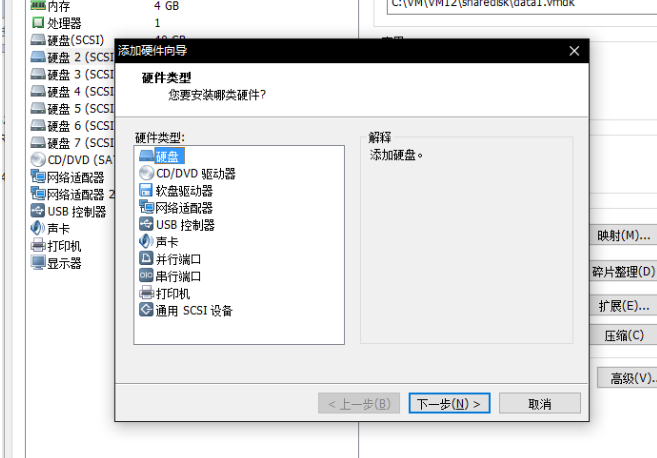
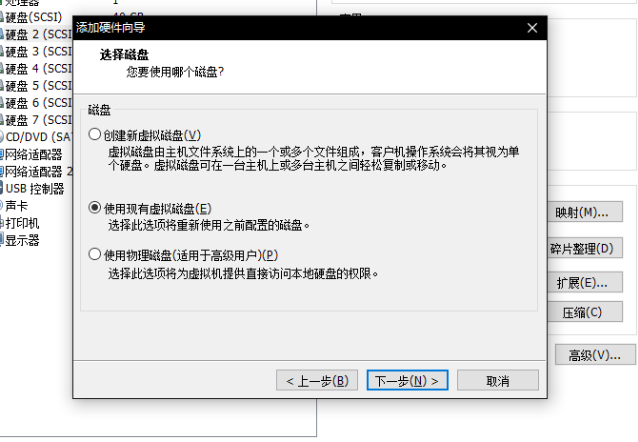
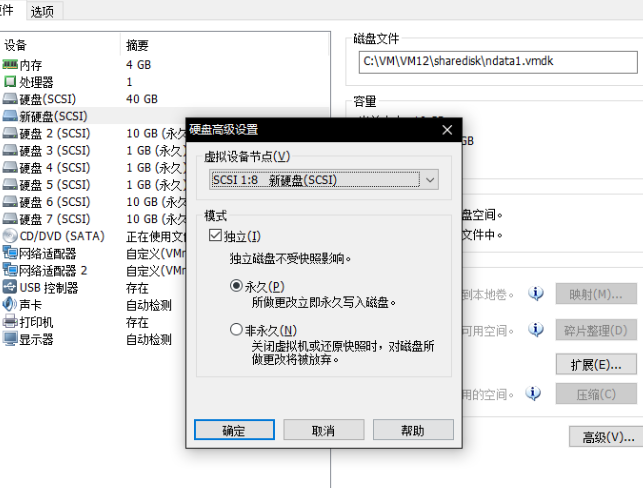
选择独立模式,保留现有格式,磁盘设置,高级设置中,修改虚拟设备节点,与本地磁盘不在同一总线上。在两节点都添加6块新盘。
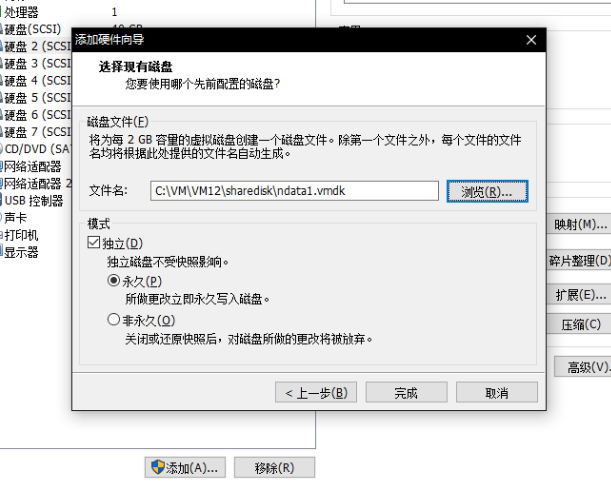
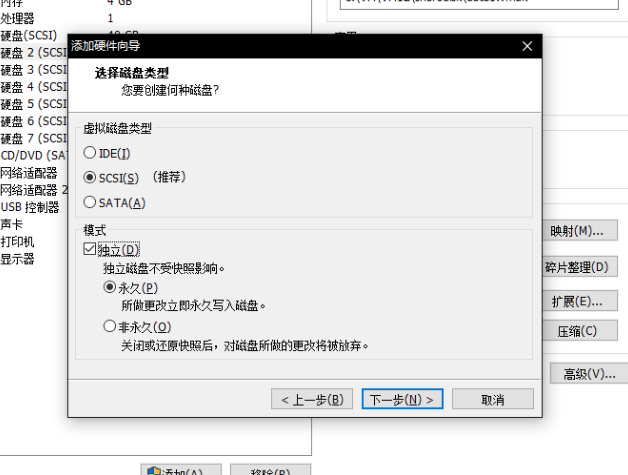

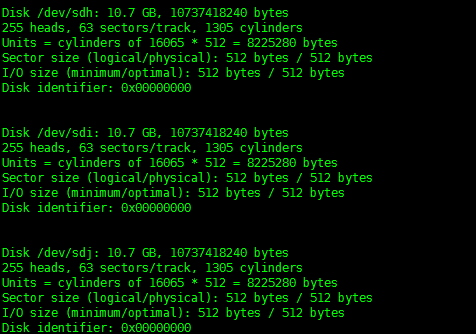
主机端识别新划盘:分别是sdh、sdi、sdj,三块10GB的磁盘,sdk,sdl,sdm,为3块1GB的磁盘。

0x04--Create New ASM diskgroup创建ASM DISKGROUP
查看当前ASM磁盘组信息
 ASMCMD> lsdg

 State    Type    Rebal  Sector  Block       AU  Total_MB  Free_MB  Req_mir_free_MB  Usable_file_MB  Offline_disks  Voting_files  Name

 MOUNTED  NORMAL  N         512   4096  1048576     23529    18226            10236            3995              0             Y  DATA/

 MOUNTED  EXTERN  N         512   4096  1048576     10236     9709                0            9709              0             N  ORADATA1/

 ASMCMD>

 [grid@myrac1 ~]$ sqlplus / as sysasm

 SQL*Plus: Release 11.2.0.4.0 Production on Thu Feb 9 05:22:17 2017

 Copyright (c) 1982, 2013, Oracle.  All rights reserved.

 Connected to:

 Oracle Database 11g Enterprise Edition Release 11.2.0.4.0 - 64bit Production

 With the Real Application Clusters and Automatic Storage Management options

 SQL> select instance_name from v$instance;

 INSTANCE_NAME

 ----------------

 +ASM1

 SQL> col name for a10

 SQL> set linesize 150

 SQL> select NAME, ALLOCATION_UNIT_SIZE, STATE, TOTAL_MB, FREE_MB USABLE_FILE_MB from gv$asm_diskgroup;

 NAME        ALLOCATION_UNIT_SIZE STATE         TOTAL_MB USABLE_FILE_MB

 ---------- -------------------- ----------- ---------- --------------

 DATA                   1048576 MOUNTED     23529           18234

 ORADATA1           1048576 MOUNTED     10236           9709

 DATA                   1048576 MOUNTED     23529           18234

 ORADATA1           1048576 MOUNTED     10236           9709

 SQL> select failgroup, name from v$asm_disk where group_number=(select group_number from v$asm_diskgroup where name = 'DATA');

 FAILGROUP                 NAME

 ------------------------------ ----------

 DATA2                         DATA2

 DATA3                         DATA3

 OCR1                          OCR1

 OCR2                          OCR2

 OCR3                          OCR3

 SQL> select NAME,PATH,total_mb,free_mb from v$asm_disk;

 NAME        PATH            TOTAL_MB   FREE_MB

 ---------- --------------- ---------- ----------

 DATA1       ORCL:DATA1          10236         9709

 DATA2       ORCL:DATA2          10236         8180

 DATA3       ORCL:DATA3          10236         8200

 OCR1        ORCL:OCR1            1019          612

 OCR2        ORCL:OCR2            1019          618

 OCR3        ORCL:OCR3            1019          616

 6 rows selected.

 SQL>
fdisk 对新划磁盘进行分区,创建ASM磁盘
 [root@myrac2 ~]# oracleasm listdisks

 DATA1

 DATA2

 DATA3

 OCR1

 OCR2

 OCR3

 [root@myrac2 ~]# oracleasm createdisk NDATA1 /dev/sdh1

 Writing disk header: done

 Instantiating disk: done

 [root@myrac2 ~]# oracleasm createdisk NDATA2 /dev/sdi1

 Writing disk header: done

 Instantiating disk: done

 [root@myrac2 ~]# oracleasm createdisk NDATA3 /dev/sdj1

 Writing disk header: done

 Instantiating disk: done

 [root@myrac2 ~]# oracleasm createdisk NOCR1 /dev/sdk1

 Writing disk header: done

 Instantiating disk: done

 [root@myrac2 ~]# oracleasm createdisk NOCR2 /dev/sdl1

 Writing disk header: done

 Instantiating disk: done

 [root@myrac2 ~]# oracleasm createdisk NOCR3 /dev/sdm1

 Writing disk header: done

 Instantiating disk: done

 [root@myrac2 ~]# oracleasm listdisks

 DATA1

 DATA2

 DATA3

 NDATA1

 NDATA2

 NDATA3

 NOCR1

 NOCR2

 NOCR3

 OCR1

 OCR2

 OCR3

 [root@myrac2 ~]#

 [root@myrac1 ~]# oracleasm scandisks

 Reloading disk partitions: done

 Cleaning any stale ASM disks...

 Scanning system for ASM disks...

 Instantiating disk "NDATA1"

 Instantiating disk "NDATA2"

 Instantiating disk "NDATA3"

 Instantiating disk "NOCR1"

 Instantiating disk "NOCR2"

 Instantiating disk "NOCR3"

 [root@myrac1 ~]# oracleasm listdisks

 DATA1

 DATA2

 DATA3

 NDATA1

 NDATA2

 NDATA3

 NOCR1

 NOCR2

 NOCR3

 OCR1

 OCR2

 OCR3

 [root@myrac1 ~]#
0x05--ASMCA创建新的ASM GROUP
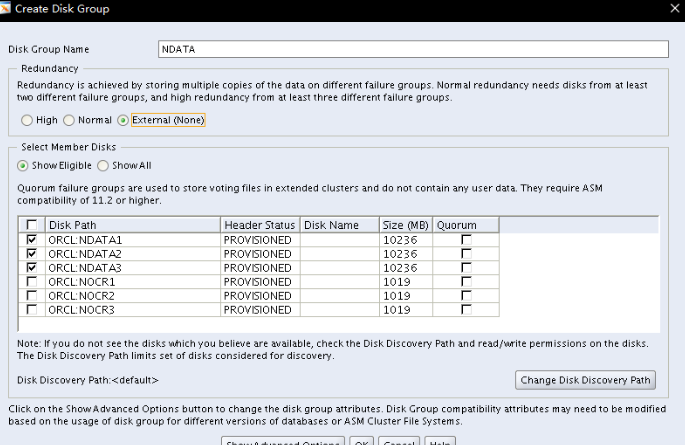
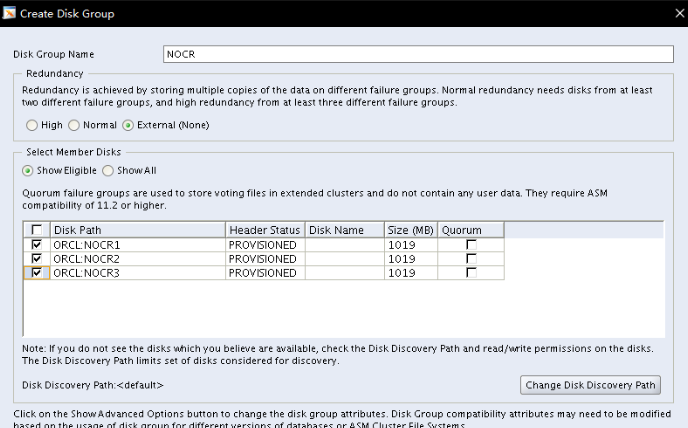
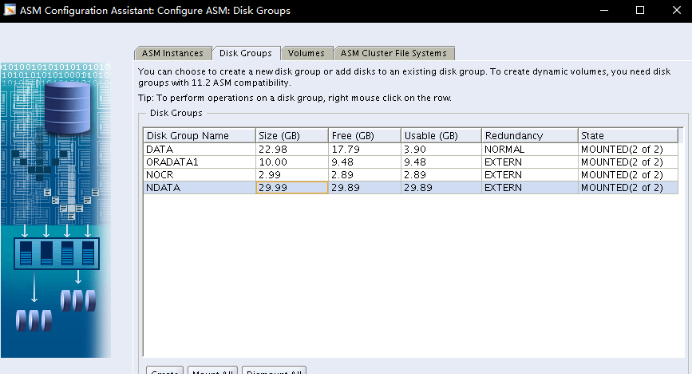
 SQL> CREATE DISKGROUP NDATA EXTERNAL REDUNDANCY  DISK ' /dev/oracleasm/disks/NDATA1' ' /dev/oracleasm/disks/NDATA2 SIZE 10240M  ATTRIBUTE 'compatible.asm'='11.2.0.0.

 0','au_size'='1M' /* ASMCA */

 SQL> CREATE DISKGROUP FRA2 EXTERNAL REDUNDANCY  DISK '/dev/asm-diskl' SIZE 5120M  ATTRIBUTE 'compatible.asm'='11.2.0.0.0'

 ,'au_size'='1M' /* ASMCA */

 [grid@myrac1 ~]$ sqlplus / as sysasm

 SQL*Plus: Release 11.2.0.4.0 Production on Thu Feb 9 06:41:11 2017

 Copyright (c) 1982, 2013, Oracle.  All rights reserved.

 Connected to:

 Oracle Database 11g Enterprise Edition Release 11.2.0.4.0 - 64bit Production

 With the Real Application Clusters and Automatic Storage Management options

 SQL> select name,state from v$asm_diskgroup;

 NAME                          STATE

 ------------------------------ -----------

 DATA                          MOUNTED

 ORADATA1                  MOUNTED

 NDATA                       MOUNTED

 NOCR                         MOUNTED

 SQL>
0x06--Moving OCR&VOTE DISK to new ASM diskgroup 迁移OCR和Vote Disks到新磁盘组
 [grid@myrac1 ~]$ ocrcheck

 Status of Oracle Cluster Registry is as follows :

         Version                  :          3

         Total space (kbytes)     :     262120

         Used space (kbytes)      :       3152

         Available space (kbytes) :     258968

         ID                       :  943942235

         Device/File Name         :  +ORADATA1

                                     Device/File integrity check succeeded

                                     Device/File not configured

                                     Device/File not configured

                                     Device/File not configured

                                     Device/File not configured

         Cluster registry integrity check succeeded

         Logical corruption check bypassed due to non-privileged user
添加OCR磁盘组
 [root@myrac1 dev]# ocrconfig -add +NOCR

 [root@myrac1 dev]# ocrcheck

 Status of Oracle Cluster Registry is as follows :

         Version                  :          3

         Total space (kbytes)     :     262120

         Used space (kbytes)      :       3152

         Available space (kbytes) :     258968

         ID                       :  943942235

         Device/File Name         :  +ORADATA1

                                     Device/File integrity check succeeded

         Device/File Name         :      +NOCR

                                     Device/File integrity check succeeded

                                     Device/File not configured

                                     Device/File not configured

                                     Device/File not configured

         Cluster registry integrity check succeeded

         Logical corruption check succeeded

 [root@myrac1 dev]#
删除旧OCR磁盘组
 [root@myrac1 ~]# ocrconfig -delete +ORADATA1

 [root@myrac1 ~]# ocrcheck

 Status of Oracle Cluster Registry is as follows :

         Version                  :          3

         Total space (kbytes)     :     262120

         Used space (kbytes)      :       3152

         Available space (kbytes) :     258968

         ID                       :  943942235

         Device/File Name         :      +NOCR

                                     Device/File integrity check succeeded

                                     Device/File not configured

                                     Device/File not configured

                                     Device/File not configured

                                     Device/File not configured

         Cluster registry integrity check succeeded

         Logical corruption check succeeded

 [root@myrac1 ~]#
查看votedisks信息,迁移至新磁盘组
 [root@myrac1 ~]# crsctl query css votedisk

 ##  STATE    File Universal Id                File Name Disk group

 --  -----    -----------------                --------- ---------

  1. ONLINE   30f8194c62ee4f94bf0da8c5cdd174b6 (ORCL:OCR1) [DATA]

  2. ONLINE   866e0b01fabc4f29bf3935f9c02bfaea (ORCL:OCR2) [DATA]

  3. ONLINE   78a869e1fa844f65bf5b2b05cc93bb27 (ORCL:OCR3) [DATA]

 Located 3 voting disk(s).

 [root@myrac1 ~]#

 [root@myrac1 ~]#

 [root@myrac1 ~]# crsctl replace votedisk +NOCR

 Successful addition of voting disk 89681e4b76bf4f0fbf09e8d5879af2d4.

 Successful deletion of voting disk 30f8194c62ee4f94bf0da8c5cdd174b6.

 Successful deletion of voting disk 866e0b01fabc4f29bf3935f9c02bfaea.

 Successful deletion of voting disk 78a869e1fa844f65bf5b2b05cc93bb27.

 Successfully replaced voting disk group with +NOCR.

 CRS-4266: Voting file(s) successfully replaced

 [root@myrac1 ~]# crsctl query css votedisk

 ##  STATE    File Universal Id                File Name Disk group

 --  -----    -----------------                --------- ---------

  1. ONLINE   89681e4b76bf4f0fbf09e8d5879af2d4 (ORCL:NOCR1) [NOCR]

 Located 1 voting disk(s).

 [root@myrac1 ~]#
0x07--Moving server side ASM SPfile to new ASM diskgroup
 [grid@myrac1 ~]$ sqlplus / as sysasm

 SQL*Plus: Release 11.2.0.4.0 Production on Thu Feb 9 06:51:27 2017

 Copyright (c) 1982, 2013, Oracle.  All rights reserved.

 Connected to:

 Oracle Database 11g Enterprise Edition Release 11.2.0.4.0 - 64bit Production

 With the Real Application Clusters and Automatic Storage Management options

 SQL> show parameter spfile

 NAME                               TYPE     VALUE

 ------------------------------------ ----------- ------------------------------

 spfile                                string    +ORADATA1/myrac-cluster/asmpar

                                            ameterfile/asmspfile.ora

 SQL> exit

 Disconnected from Oracle Database 11g Enterprise Edition Release 11.2.0.4.0 - 64bit Production

 With the Real Application Clusters and Automatic Storage Management options

 [grid@myrac1 ~]$ asmcmd

 ASMCMD> spget

 +ORADATA1/myrac-cluster/asmparameterfile/asmspfile.ora

 ASMCMD> exit

 [grid@myrac1 ~]$ sqlplus / as sysasm

 SQL*Plus: Release 11.2.0.4.0 Production on Thu Feb 9 06:52:24 2017

 Copyright (c) 1982, 2013, Oracle.  All rights reserved.

 Connected to:

 Oracle Database 11g Enterprise Edition Release 11.2.0.4.0 - 64bit Production

 With the Real Application Clusters and Automatic Storage Management options

 SQL> create pfile='/tmp/asm_pfile.ora' from spfile;

 File created.

 SQL> create spfile='+NOCR' from pfile='/tmp/asm_pfile.ora';

 File created.

 SQL>
查看ASM日志信息
 Thu Feb 09 06:54:35 2017

 NOTE: updated gpnp profile ASM diskstring:

 NOTE: updated gpnp profile ASM SPFILE to +NOCR/myrac-cluster/asmparameterfile/registry.253.935477673

 [grid@myrac1 ~]$ asmcmd

 ASMCMD> spget

 +NOCR/myrac-cluster/asmparameterfile/registry.253.935477673

 ASMCMD>
0x08--Moving database related files to new ASM diskgroup
迁移控制文件
 [oracle@myrac1 ~]$ sqlplus / as sysdba

 SQL*Plus: Release 11.2.0.4.0 Production on Thu Feb 9 07:00:06 2017

 Copyright (c) 1982, 2013, Oracle.  All rights reserved.

 Connected to:

 Oracle Database 11g Enterprise Edition Release 11.2.0.4.0 - 64bit Production

 With the Partitioning, Real Application Clusters, Automatic Storage Management, OLAP,

 Data Mining and Real Application Testing options

 SQL> show parameter control

 NAME                               TYPE     VALUE

 ------------------------------------ ----------- ------------------------------

 control_file_record_keep_time          integer  7

 control_files                      string    +DATA/myrac/controlfile/curren

                                            t.256.935374197

 control_management_pack_access          string    DIAGNOSTIC+TUNING

 SQL> alter system set control_files='+NDATA' scope=spfile sid='*';

 System altered.

 SQL> show parameter control

 NAME                               TYPE     VALUE

 ------------------------------------ ----------- ------------------------------

 control_file_record_keep_time          integer  7

 control_files                      string    +DATA/myrac/controlfile/curren

                                            t.256.935374197

 control_management_pack_access          string    DIAGNOSTIC+TUNING

 SQL>
关闭数据库
 [oracle@myrac1 ~]$ srvctl stop database -d myrac

 [oracle@myrac1 ~]$
启动实例1到nomount状态
 [oracle@myrac1 ~]$ srvctl start instance -d myrac -i myrac1 -o nomount

 [oracle@myrac1 ~]$
RMAN Restore
 [oracle@myrac1 ~]$ rman target /

 Recovery Manager: Release 11.2.0.4.0 - Production on Thu Feb 9 07:20:16 2017

 Copyright (c) 1982, 2011, Oracle and/or its affiliates.  All rights reserved.

 connected to target database: MYRAC (not mounted)

 RMAN> restore controlfile from '+DATA/myrac/controlfile/current.256.935374197';

 Starting restore at 09-FEB-17

 using target database control file instead of recovery catalog

 allocated channel: ORA_DISK_1

 channel ORA_DISK_1: SID=34 instance=myrac1 device type=DISK

 channel ORA_DISK_1: copied control file copy

 output file name=+NDATA/myrac/controlfile/current.257.935479241

 Finished restore at 09-FEB-17

 RMAN>
完成迁移
 [oracle@myrac1 ~]$ sqlplus / as sysdba

 SQL*Plus: Release 11.2.0.4.0 Production on Thu Feb 9 07:22:11 2017

 Copyright (c) 1982, 2013, Oracle.  All rights reserved.

 Connected to:

 Oracle Database 11g Enterprise Edition Release 11.2.0.4.0 - 64bit Production

 With the Partitioning, Real Application Clusters, Automatic Storage Management, OLAP,

 Data Mining and Real Application Testing options

 SQL> alter database mount;

 Database altered.

 SQL> alter database open;

 Database altered.

 SQL> show parameter control

 NAME                               TYPE     VALUE

 ------------------------------------ ----------- ------------------------------

 control_file_record_keep_time          integer  7

 control_files                      string    +NDATA/myrac/controlfile/curre

                                            nt.257.935479241

 control_management_pack_access          string    DIAGNOSTIC+TUNING

 SQL>
0x09--Moving SPfile to new ASM diskgroup
查看参数文件
 SQL> show parameter spfile

 NAME                               TYPE     VALUE

 ------------------------------------ ----------- ------------------------------

 spfile                                string    +ORADATA1/myrac/spfilemyrac.or

                                            a

 SQL> create pfile='/tmp/pfile_db.ora' from spfile;

 File created.

 SQL> create spfile='+NDATA' from pfile='/tmp/pfile_db.ora';

 File created.

 SQL>
ASMCMD移动SPFILE文件位置
 [grid@myrac1 trace]$ asmcmd

 ASMCMD> spget

 +NOCR/myrac-cluster/asmparameterfile/registry.253.935477673

 ASMCMD> ls

 DATA/

 NDATA/

 NOCR/

 ORADATA1/

 ASMCMD> cd ndata

 ASMCMD> ls

 MYRAC/

 ASMCMD> cd myrac

 ASMCMD> ls

 CONTROLFILE/

 PARAMETERFILE/

 ASMCMD> cd parameterfile

 ASMCMD> ls

 spfile.258.935480051

 ASMCMD>  mkalias +NDATA/myrac/parameterfile/spfile.258.935480051 +NDATA/myrac/spfilemyrac.ora

 ASMCMD> ls -l

 Type           Redund  Striped  Time             Sys  Name

                                                  Y    CONTROLFILE/

                                                  Y    PARAMETERFILE/

                                                  N    spfilemyrac.ora => +NDATA/MYRAC/PARAMETERFILE/spfile.258.935480051

 ASMCMD>
编辑spfile
 [oracle@myrac1 dbs]$ cat initmyrac1.ora

 SPFILE='+ORADATA1/myrac/spfilemyrac.ora'         # line added by Agent

 [oracle@myrac1 dbs]$ vim initmyrac1.ora

 [oracle@myrac1 dbs]$ cat initmyrac1.ora

 SPFILE='+NDATA/myrac/spfilemyrac.ora'         # line added by Agent

 [oracle@myrac1 dbs]$

 [oracle@myrac2 dbs]$ cat initmyrac2.ora

 SPFILE='+ORADATA1/myrac/spfilemyrac.ora'         # line added by Agent

 [oracle@myrac2 dbs]$ vim initmyrac2.ora

 [oracle@myrac2 dbs]$ cat initmyrac2.ora

 SPFILE='+NDATA/myrac/spfilemyrac.ora'         # line added by Agent

 [oracle@myrac2 dbs]$
srvctl修改数据库参数文件位置
 [oracle@myrac1 dbs]$ srvctl modify database -d myrac -p +NDATA/MYRAC/spfilemyrac.ora

 [oracle@myrac1 dbs]$ srvctl config database -d myrac

 Database unique name: myrac

 Database name: myrac

 Oracle home: /u01/app/oracle/product/11.2/db_1

 Oracle user: oracle

 Spfile: +NDATA/MYRAC/spfilemyrac.ora

 Domain: weidong.zhang

 Start options: open

 Stop options: immediate

 Database role: PRIMARY

 Management policy: AUTOMATIC

 Server pools: myrac

 Database instances: myrac1,myrac2

 Disk Groups: ORADATA1,DATA,NDATA

 Mount point paths:

 Services:

 Type: RAC

 Database is administrator managed
用新的spfile以及controlfile启动,验证正确性
 [oracle@myrac1 ~]$ srvctl start database -d myrac

 [oracle@myrac1 dbs]$ sqlplus / as sysdba

 SQL*Plus: Release 11.2.0.4.0 Production on Thu Feb 9 08:36:24 2017

 Copyright (c) 1982, 2013, Oracle.  All rights reserved.

 Connected to:

 Oracle Database 11g Enterprise Edition Release 11.2.0.4.0 - 64bit Production

 With the Partitioning, Real Application Clusters, Automatic Storage Management, OLAP,

 Data Mining and Real Application Testing options

 SQL> show parameter spfile

 NAME                               TYPE     VALUE

 ------------------------------------ ----------- ------------------------------

 spfile                                string    +NDATA/myrac/spfilemyrac.ora

 SQL>

 SQL> show parameter control

 NAME                               TYPE     VALUE

 ------------------------------------ ----------- ------------------------------

 control_file_record_keep_time          integer  7

 control_files                     string    +NDATA/myrac/controlfile/curre

                                            nt.257.935479241

 control_management_pack_access          string    DIAGNOSTIC+TUNING

 SQL>
0x0A--Moving data files to new ASM diskgroup
 SQL> archive log list;

 Database log mode             Archive Mode

 Automatic archival        Enabled

 Archive destination              +DATA

 Oldest online log sequence     35

 Next log sequence to archive   36

 Current log sequence          36

 [oracle@myrac1 dbs]$ rman target /

 Recovery Manager: Release 11.2.0.4.0 - Production on Thu Feb 9 08:41:47 2017

 Copyright (c) 1982, 2011, Oracle and/or its affiliates.  All rights reserved.

 connected to target database: MYRAC (DBID=42893065)

 RMAN> backup as copy database format '+NDATA';

 Starting backup at 09-FEB-17

 using target database control file instead of recovery catalog

 allocated channel: ORA_DISK_1

 channel ORA_DISK_1: SID=56 instance=myrac1 device type=DISK

 channel ORA_DISK_1: starting datafile copy

 input datafile file number=00001 name=+DATA/myrac/datafile/system.261.935388681

 output file name=+NDATA/myrac/datafile/system.259.935484205 tag=TAG20170209T084324 RECID=16 STAMP=935484210

 channel ORA_DISK_1: datafile copy complete, elapsed time: 00:00:07

 channel ORA_DISK_1: starting datafile copy

 input datafile file number=00002 name=+DATA/myrac/datafile/sysaux.264.935388699

 output file name=+NDATA/myrac/datafile/sysaux.260.935484213 tag=TAG20170209T084324 RECID=17 STAMP=935484218

 channel ORA_DISK_1: datafile copy complete, elapsed time: 00:00:07

 channel ORA_DISK_1: starting datafile copy

 input datafile file number=00006 name=+DATA/myrac/datafile/test_temp_tablespace.268.935388711

 output file name=+NDATA/myrac/datafile/test_temp_tablespace.261.935484219 tag=TAG20170209T084324 RECID=18 STAMP=935484222

 channel ORA_DISK_1: datafile copy complete, elapsed time: 00:00:03

 channel ORA_DISK_1: starting datafile copy

 input datafile file number=00003 name=+DATA/myrac/datafile/undotbs1.265.935388707

 output file name=+NDATA/myrac/datafile/undotbs1.262.935484223 tag=TAG20170209T084324 RECID=19 STAMP=935484223

 channel ORA_DISK_1: datafile copy complete, elapsed time: 00:00:01

 channel ORA_DISK_1: starting datafile copy

 input datafile file number=00005 name=+DATA/myrac/datafile/undotbs2.267.935388709

 output file name=+NDATA/myrac/datafile/undotbs2.263.935484225 tag=TAG20170209T084324 RECID=20 STAMP=935484224

 channel ORA_DISK_1: datafile copy complete, elapsed time: 00:00:01

 channel ORA_DISK_1: starting datafile copy

 copying current control file

 output file name=+NDATA/myrac/controlfile/backup.264.935484227 tag=TAG20170209T084324 RECID=21 STAMP=935484229

 channel ORA_DISK_1: datafile copy complete, elapsed time: 00:00:03

 channel ORA_DISK_1: starting datafile copy

 input datafile file number=00004 name=+DATA/myrac/datafile/users.266.935388709

 output file name=+NDATA/myrac/datafile/users.265.935484231 tag=TAG20170209T084324 RECID=22 STAMP=935484231

 channel ORA_DISK_1: datafile copy complete, elapsed time: 00:00:04

 channel ORA_DISK_1: starting full datafile backup set

 channel ORA_DISK_1: specifying datafile(s) in backup set

 including current SPFILE in backup set

 channel ORA_DISK_1: starting piece 1 at 09-FEB-17

 channel ORA_DISK_1: finished piece 1 at 09-FEB-17

 piece handle=+NDATA/myrac/backupset/2017_02_09/nnsnf0_tag20170209t084324_0.266.935484233 tag=TAG20170209T084324 comment=NONE

 channel ORA_DISK_1: backup set complete, elapsed time: 00:00:03

 Finished backup at 09-FEB-17

 ==================================
 [oracle@myrac1 ~]$ srvctl stop database -d myrac -o immediate

 [oracle@myrac1 ~]$ sqlplus / as sysdba

 SQL*Plus: Release 11.2.0.4.0 Production on Thu Feb 9 08:47:32 2017

 Copyright (c) 1982, 2013, Oracle.  All rights reserved.

 Connected to an idle instance.

 SQL> startup mount

 ORACLE instance started.

 Total System Global Area 1653518336 bytes

 Fixed Size                  2253784 bytes

 Variable Size         1493175336 bytes

 Database Buffers     150994944 bytes

 Redo Buffers             7094272 bytes

 Database mounted.

 SQL>

 ===============================================

 [oracle@myrac1 dbs]$ rman target /

 Recovery Manager: Release 11.2.0.4.0 - Production on Thu Feb 9 08:48:39 2017

 Copyright (c) 1982, 2011, Oracle and/or its affiliates.  All rights reserved.

 connected to target database: MYRAC (DBID=42893065, not open)

 RMAN> switch database to copy;

 using target database control file instead of recovery catalog

 datafile 1 switched to datafile copy "+NDATA/myrac/datafile/system.259.935484205"

 datafile 2 switched to datafile copy "+NDATA/myrac/datafile/sysaux.260.935484213"

 datafile 3 switched to datafile copy "+NDATA/myrac/datafile/undotbs1.262.935484223"

 datafile 4 switched to datafile copy "+NDATA/myrac/datafile/users.265.935484231"

 datafile 5 switched to datafile copy "+NDATA/myrac/datafile/undotbs2.263.935484225"

 datafile 6 switched to datafile copy "+NDATA/myrac/datafile/test_temp_tablespace.261.935484219"

 RMAN> recover database;

 Starting recover at 09-FEB-17

 allocated channel: ORA_DISK_1

 channel ORA_DISK_1: SID=37 instance=myrac1 device type=DISK

 starting media recovery

 media recovery complete, elapsed time: 00:00:01

 Finished recover at 09-FEB-17

 RMAN>
启动数据库
 [oracle@myrac1 ~]$ srvctl stop database -d myrac

 [oracle@myrac1 ~]$ srvctl start database -d myrac

 [oracle@myrac1 dbs]$ sqlplus / as sysdba

 SQL*Plus: Release 11.2.0.4.0 Production on Thu Feb 9 08:57:56 2017

 Copyright (c) 1982, 2013, Oracle.  All rights reserved.

 Connected to:

 Oracle Database 11g Enterprise Edition Release 11.2.0.4.0 - 64bit Production

 With the Partitioning, Real Application Clusters, Automatic Storage Management, OLAP,

 Data Mining and Real Application Testing options

 SQL>

 SQL> SQL> select file_name from dba_data_files;

 FILE_NAME

 --------------------------------------------------------------------------------

 +NDATA/myrac/datafile/users.265.935484231

 +NDATA/myrac/datafile/undotbs1.262.935484223

 +NDATA/myrac/datafile/sysaux.260.935484213

 +NDATA/myrac/datafile/system.259.935484205

 +NDATA/myrac/datafile/undotbs2.263.935484225

 +NDATA/myrac/datafile/test_temp_tablespace.261.935484219

 6 rows selected.

 SQL>
0x0B--Moving temp files to new ASM diskgroup
 SQL>  select file_name from dba_temp_files;

 FILE_NAME

 --------------------------------------------------------------------------------

 +DATA/myrac/tempfile/temp.258.935389865

 SQL>
修改db_create_file_dest参数
 SQL> show parameter db_c

 NAME                               TYPE     VALUE

 ------------------------------------ ----------- ------------------------------

 db_cache_advice              string    ON

 db_cache_size                          big integer 0

 db_create_file_dest                   string    +DATA

 db_create_online_log_dest_1            string

 db_create_online_log_dest_2            string

 db_create_online_log_dest_3            string

 db_create_online_log_dest_4            string

 db_create_online_log_dest_5            string

 SQL> alter system set db_create_file_dest = '+NDATA';

 System altered.

 SQL> show parameter db_c

 NAME                               TYPE     VALUE

 ------------------------------------ ----------- ------------------------------

 db_cache_advice              string    ON

 db_cache_size                          big integer 0

 db_create_file_dest                   string    +NDATA

 db_create_online_log_dest_1            string

 db_create_online_log_dest_2            string

 db_create_online_log_dest_3            string

 db_create_online_log_dest_4            string

 db_create_online_log_dest_5            string

 SQL>
增加临时文件
 ##由于已经设置了 db_create_file_dest参数,创建时会直接在NDATA上

 SQL> select file_name from dba_temp_files;

 FILE_NAME

 --------------------------------------------------------------------------------

 +DATA/myrac/tempfile/temp.258.935389865

 SQL> alter tablespace temp add tempfile;

 Tablespace altered.

 SQL> select file_name from dba_temp_files;

 FILE_NAME

 --------------------------------------------------------------------------------

 +NDATA/myrac/tempfile/temp.267.935485927

 +DATA/myrac/tempfile/temp.258.935389865
删除原有临时文件
 SQL> alter tablespace temp drop tempfile '+DATA/myrac/tempfile/temp.258.935389865';

 Tablespace altered.

 SQL> select file_name from dba_temp_files;

 FILE_NAME

 --------------------------------------------------------------------------------

 +NDATA/myrac/tempfile/temp.267.935485927

 SQL>
0x0C--Moving online redo log files to new ASM diskgroup
SQL> select group#,member from v$logfile;

    GROUP# MEMBER

---------- ---------------------------------------------

        1 +DATA/myrac/onlinelog/group_1.269.935390433

        2 +DATA/myrac/onlinelog/group_2.270.935390443

        3 +DATA/myrac/onlinelog/group_3.271.935390447

        4 +DATA/myrac/onlinelog/group_4.272.935390453

        1 +DATA/myrac/onlinelog/group_1.273.935390965

        2 +DATA/myrac/onlinelog/group_2.274.935390973

        3 +DATA/myrac/onlinelog/group_3.275.935390977

        4 +DATA/myrac/onlinelog/group_4.276.935390983

8 rows selected.
将新磁盘组添加进logfile日志组
 SQL> alter database add logfile member '+NDATA' ,'+NDATA' to group 1;

 Database altered.

 SQL> alter database add logfile member '+NDATA' ,'+NDATA' to group 2;

 Database altered.

 SQL> alter database add logfile member '+NDATA' ,'+NDATA' to group 3;

 Database altered.

 SQL> alter database add logfile member '+NDATA' ,'+NDATA' to group 4;

 Database altered.

 SQL> alter database add logfile member '+NDATA' ,'+NDATA' to group 5;

 Database altered.
删除原日志成员(注:切换为非当前日志进行删除)
依次删除原日志组成员
SQL>alter database drop logfile member '+DATA/myrac/onlinelog/group_3.275.935390977';
若无法删除,可进行手动日志切换
 alter system switch logfile;

 alter system checkpoint;
 SQL> select log.group#,log.status,logfile.member from v$log log, v$logfile logfile where log.group#=logfile.group# order by group#;

     GROUP# STATUS      MEMBER

 ---------- ---------------- ---------------------------------------------

         1 INACTIVE      +NDATA/myrac/onlinelog/group_1.277.935488433

         1 INACTIVE      +NDATA/myrac/onlinelog/group_1.278.935489653

         2 CURRENT      +NDATA/myrac/onlinelog/group_2.269.935487101

         2 CURRENT      +NDATA/myrac/onlinelog/group_2.273.935487191

         3 INACTIVE      +NDATA/myrac/onlinelog/group_3.270.935487107

         3 INACTIVE      +NDATA/myrac/onlinelog/group_3.274.935487197

         4 CURRENT      +NDATA/myrac/onlinelog/group_4.271.935487115

         4 CURRENT      +NDATA/myrac/onlinelog/group_4.275.935487203

         5 INACTIVE      +NDATA/myrac/onlinelog/group_5.276.935487665

         5 INACTIVE      +NDATA/myrac/onlinelog/group_5.272.935490035
0x0D--修改闪回区,归档路径
 SQL> show parameter recover

 NAME                               TYPE     VALUE

 ------------------------------------ ----------- ------------------------------

 db_recovery_file_dest               string    +DATA

 db_recovery_file_dest_size        big integer 4407M

 db_unrecoverable_scn_tracking       boolean       TRUE

 recovery_parallelism                 integer  0

 SQL>
 SQL>

 SQL> alter system set db_recovery_file_dest='+NDATA';

 System altered.
 SQL> show parameter recover

 NAME                               TYPE     VALUE

 ------------------------------------ ----------- ------------------------------

 db_recovery_file_dest               string    +NDATA

 db_recovery_file_dest_size        big integer 4407M

 db_unrecoverable_scn_tracking       boolean       TRUE

 recovery_parallelism                 integer  0

 SQL> archive log list

 Database log mode             Archive Mode

 Automatic archival        Enabled

 Archive destination              +DATA

 Oldest online log sequence     50

 Next log sequence to archive   51

 Current log sequence          51
 SQL> alter system set log_archive_dest_1='location=+NDATA';

 System altered.
 SQL> archive log list

 Database log mode             Archive Mode

 Automatic archival        Enabled

 Archive destination              +NDATA

 Oldest online log sequence     50

 Next log sequence to archive   51

 Current log sequence          51

 SQL>
0x0E--Dropping old disk groups,删除旧磁盘组
 [grid@myrac1 ~]$ sqlplus / as sysasm

 SQL*Plus: Release 11.2.0.4.0 Production on Thu Feb 9 10:45:50 2017

 Copyright (c) 1982, 2013, Oracle.  All rights reserved.

 Connected to:

 Oracle Database 11g Enterprise Edition Release 11.2.0.4.0 - 64bit Production

 With the Real Application Clusters and Automatic Storage Management options

 SQL> alter diskgroup data dismount;

 Diskgroup altered.

 SQL> alter diskgroup oradata1 dismount;

 Diskgroup altered.

 [grid@myrac2 ~]$ sqlplus / as sysasm

 SQL*Plus: Release 11.2.0.4.0 Production on Thu Feb 9 10:51:39 2017

 Copyright (c) 1982, 2013, Oracle.  All rights reserved.

 Connected to:

 Oracle Database 11g Enterprise Edition Release 11.2.0.4.0 - 64bit Production

 With the Real Application Clusters and Automatic Storage Management options

 SQL> alter diskgroup data dismount;

 Diskgroup altered.

 SQL>  alter diskgroup oradata1 dismount;

 Diskgroup altered.

 SQL>

 SQL> drop diskgroup data including contents;

 drop diskgroup data including contents

 *

 ERROR at line 1:

 ORA-15039: diskgroup not dropped

 ORA-15001: diskgroup "DATA" does not exist or is not mounted

 SQL> drop diskgroup data force including contents;

 drop diskgroup data force including contents

 *

 ERROR at line 1:

 ORA-15039: diskgroup not dropped

 ORA-15073: diskgroup DATA is mounted by another ASM instance

 SQL> drop diskgroup data force including contents;

 Diskgroup dropped.

 SQL> drop diskgroup oradata1 force including contents;

 Diskgroup dropped.

 SQL>
Remove the disks from OCR
 [root@myrac1 ~]# srvctl remove diskgroup -g DATA

 PRCA-1002 : Failed to remove CRS resource ora.DATA.dg for ASM Disk Group DATA

 PRCR-1028 : Failed to remove resource ora.DATA.dg

 PRCR-1072 : Failed to unregister resource ora.DATA.dg

 CRS-0222: Resource 'ora.DATA.dg' has dependency error.

 [root@myrac1 ~]# srvctl modify database -d myrac -a "NDATA,NOCR"

 [root@myrac1 ~]# srvctl remove diskgroup -g DATA

 [root@myrac1 ~]# srvctl remove diskgroup -g ORADATA1
至此已经全部完成存储迁移。其中需要多次重启数据库,有少量停机时间,做好数据备份。
---本文首发于本人的云栖社区博客
0x0F--ASM rebalance迁移详见下篇随笔
Oracle 11g R2 RAC with ASM存储迁移--Rman copy&ASM Rebalance(一)的更多相关文章
- oracle 11g r2 rac到单实例的dg
oracle 11g r2 rac到单实例的dg 1 主备环境说明 rac环境--primary CentOS release 6.5 (Final)hostname rac1 rac2ip 10.* ...
- 基于CentOS与VmwareStation10搭建Oracle11G RAC 64集群环境:4.安装Oracle RAC FAQ-4.7.Oracle 11G R2 RAC修改public网络IP
问题:Linuxrac2节点的public网IP被占用,导致集群节点2无法访问 1.禁止相关CRS资源的启动,停止这些资源(vip,listener,scan,scan_listener,databa ...
- [转]Oracle 11g R2 RAC高可用连接特性 – SCAN详解
原文地址:http://czmmiao.iteye.com/blog/2124373 昨天帮朋友解决11g RAC SCAN问题,当时为这朋友简单解答了一些SCAN特性相关的问题,但我知道这仅仅是 ...
- Oracle 11G R2 RAC中的scan ip 的用途和基本原理【转】
Oracle 11G R2 RAC增加了scan ip功能,在11.2之前,client链接数据库的时候要用vip,假如你的cluster有4个节点,那么客户端的tnsnames.ora中就对应有四个 ...
- Oracle 11G R2 RAC中的scan ip 的用途和基本原理
Oracle 11G R2 RAC增加了scan ip功能,在11.2之前,client链接数据库的时候要用vip,假如你的cluster有4个节点,那么客户端的tnsnames.ora中就对应有四个 ...
- vSphere在RedHat6.0上搭建Oracle 11g R2 RAC环境
一.前期准备工作 1.1 为方便操作,装完系统后我们先安装Vmware Tools: 1.1.1.安装工具 在VMware的菜单栏上选择"虚拟机/安装虚拟机工具(VM/Install VMw ...
- Oracle 11g R2 RAC 高可用连接特性
转自-阿里巴巴许春值 1.scan概念 什么叫 SCAN,SCAN (Single Client Access Name) 是 Oracle 从11g R2 开始推出的,客户端可以通过 SCAN 特性 ...
- ORACLE 11G R2 RAC classical install OGG12.1(LINUX) 经典抽取模式单项同步配置OGG12.1
博文结构图如下: 一.环境描述以及注意事项 1.1 环境简介 IP 系统 Oracle版本 OGG版本 源端 172.16.10.16/36 RHEL6.5 oracle11204 12.1 目标端 ...
- RHEL6.7 x64双节点安装Oracle 11g r2 RAC
基础环境 使用两台HP DL580服务器作为RAC节点,存储使用IBM V7000.具体环境如下: 设备 用途 IP地址 磁盘空间 HP DL580 RAC节点01 RAC01-pub:116.1.1 ...
随机推荐
- CSS3之word-wrap英文单词溢出强制换行
语法 word-wrap: normal|break-word; 所有主流浏览器都支持 word-wrap 属性. <div style="border:1px #f00 solid; ...
- Cloudera Manager5及CDH5在线(cloudera-manager-installer.bin)安装详细文档
问题导读:1.Cloudera Manager5如何使用cloudera-manager-installer.bin安装?2.Cloudera Manager5安装被中断该如何继续安装?还是重新安装? ...
- 用SumatraPdf实现PDF静默打印
原文:https://yutuo.net/archives/24a22d50d6001564.html 之前做一系统,有一个打印PDF文件的需求,需求如下: 能指定打印机 能两面打印 最好能静默打印 ...
- PHP array_flip() array_merge() array+array的使用总结
array_flip(array); //传递一个数组参数,对该数组的键.值进行翻转 例如: $a = array( 'a', 'b', 'c' ); print_r(array_flip($a)); ...
- DDD(领域驱动设计)总结
基本概念: 领域驱动设计(简称 ddd)概念来源于2004年著名建模专家eric evans发表的他最具影响力的书籍:<domain-driven design –tackling comple ...
- Oracle - ORA-28547: Connection to server failed,probable Oracle Net admin error (Navicat)
一.异常 用Navicat连接Oracle数据库时抛出的异常 二.方案 使用 Oracle 安装目录 \Oracle\product\11.2.0\dbhome_1\BIN 下的 oci.dll 替换 ...
- Linxu下 expect的实用实例_1
案例 例1:从本机自动登录到远程机器192.168.1.200(端口是22,密码是:PASSWORD)登录到远程机器后做以下几个操作:1)useradd wangshibo2)mkdir /opt/t ...
- 浏览器跨域访问WebApi
webapi地址:wapapi.ebcbuy.com web地址:wapweb.ebcbuy.com 在默认情况下这两个域名属于两个不同的域,他们之间的交互存在跨域的问题,但因为他们都同属于一 ...
- 栋哥你好,让我们回顾最初认识C++的时候(课堂作业)
计算器的第一步,至今还记记忆犹新,本次的课堂作业,便是那个框架.闲话少叙,代码如下传送门: Main.cpp #include "stdafx.h" #include<ios ...
- 把所有的小图标一起做成雪碧图吧 请用gulp-css-spriter.
用gulp-css-spriter很简单. 第一步: 在某个文件夹用shitf+鼠标右键 第二步: npm install gulp-css-spriter https://www.npmjs.com ...