
根据指定Word模板生成Word文件
最近业务需要批量打印准考证信息
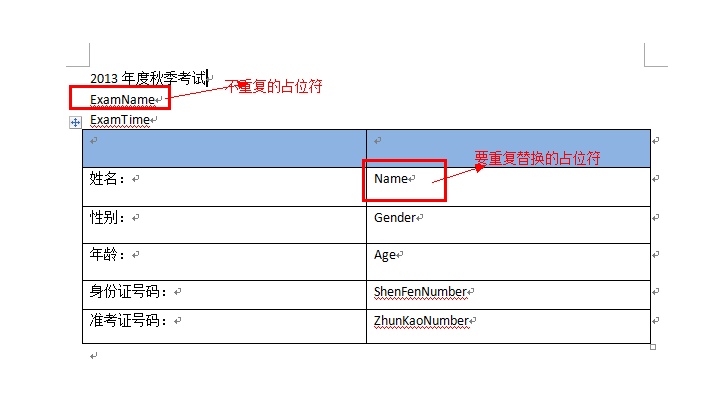
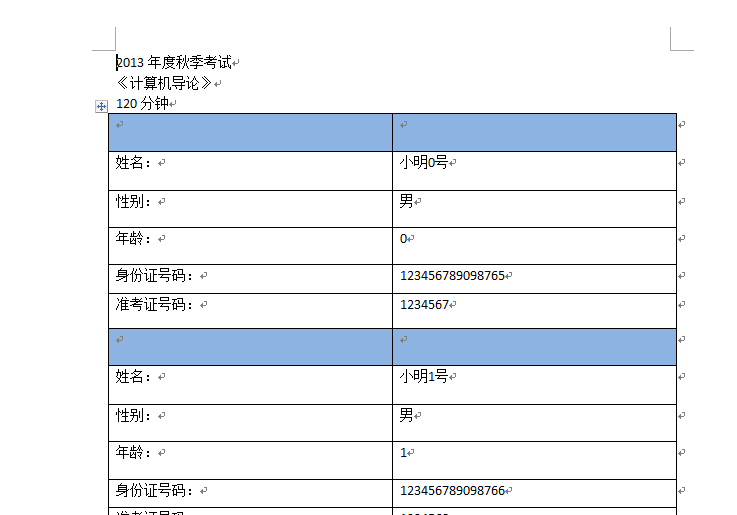
1、根据Table数据进行循环替换,每次替换的时候只替换Word中第一个Table的数据,
2、每次替换之后将Word中第一个Table数据进行复制,将复制Table和上次替换的Table合并为一个Table。由于替换后的Table中不存在占位符,只有复制的Table中存在占位符,所有每次循环根据占位符替换最新数据就可以达到批量生成Word的目的了
Word模板:
批量替换后的Word:
using System;

using System.Collections.Generic;

using System.Linq;

using System.Web;

using System.IO;

using Word = Microsoft.Office.Interop.Word;

using System.Data;

namespace WebApplication1

{

    public class WordUtility

    {

        private object tempFile = null;

        private object saveFile = null;

        private static Word._Document wDoc = null; //word文档

        private static Word._Application wApp = null; //word进程

        private object missing = System.Reflection.Missing.Value;

        public WordUtility(string tempFile, string saveFile)

        {

            this.tempFile = Path.Combine(HttpContext.Current.Server.MapPath("Word"), @tempFile);

            this.saveFile = Path.Combine(HttpContext.Current.Server.MapPath("Temp"), @saveFile);

        }

        /// <summary>

        /// 模版包含头部信息和表格,表格重复使用

        /// </summary>

        /// <param name="dt">重复表格的数据</param>

        /// <param name="expPairColumn">word中要替换的表达式和表格字段的对应关系</param>

        /// <param name="simpleExpPairValue">简单的非重复型数据</param>

        public bool GenerateWord(DataTable dt, Dictionary<string, string> expPairColumn, Dictionary<string, string> simpleExpPairValue)

        {

            if (!File.Exists(tempFile.ToString()))

            {

                HttpContext.Current.Response.Write("<script>alert('" + string.Format("{0}模版文件不存在,请先设置模版文件。", tempFile.ToString()) + "');</script>");

                return false;

            }

            try

            {

                wApp = new Word.Application();

                wApp.Visible = false;

                wDoc = wApp.Documents.Add(ref tempFile, ref missing, ref missing, ref missing);

                wDoc.Activate();// 当前文档置前

                bool isGenerate = false;

                //不重复替换

                if (simpleExpPairValue != null && simpleExpPairValue.Count > )

                    isGenerate = ReplaceAllRang(simpleExpPairValue);

                // 表格有重复

                if (dt != null && dt.Rows.Count >  && expPairColumn != null && expPairColumn.Count > )

                    isGenerate = GenerateTable(dt, expPairColumn);

                if (isGenerate)

                    wDoc.SaveAs(ref saveFile, ref missing, ref missing, ref missing, ref missing, ref missing, ref missing,

                        ref missing, ref missing, ref missing, ref missing, ref missing, ref missing, ref missing, ref missing, ref missing);

                DisposeWord();

                return true;

            }

            catch (Exception ex)

            {

                HttpContext.Current.Response.Write("<script>alert('" + "生成失败" + ex.Message + "');</script>");

                return false;

            }

        }

        /// <summary>

        /// 单个替换 模版没有重复使用的表格

        /// </summary>

        /// <param name="dc">要替换的</param>

        public bool GenerateWord(Dictionary<string, string> dc)

        {

            return GenerateWord(null, null, dc);

        }

        /// <summary>

        /// 替换文件

        /// </summary>

        /// <param name="dt">要更新的数据</param>

        /// <param name="expPairColumn">当前要替换的数据字典</param>

        /// <returns></returns>

        private bool GenerateTable(DataTable dt, Dictionary<string, string> expPairColumn)

        {

            try

            {

                int tableNums = dt.Rows.Count;

                Word.Table tb = wDoc.Tables[];

                tb.Range.Copy();

                Dictionary<string, object> dc = new Dictionary<string, object>();

                for (int i = ; i < tableNums; i++)

                {

                    dc.Clear();

                    if (i == )

                    {

                        foreach (string key in expPairColumn.Keys)

                        {

                            string column = expPairColumn[key];

                            object value = null;

                            value = dt.Rows[i][column];

                            dc.Add(key, value);

                        }

                        ReplaceTableRang(wDoc.Tables[], dc);

                        continue;

                    }

                    wDoc.Paragraphs.Last.Range.Paste();

                    foreach (string key in expPairColumn.Keys)

                    {

                        string column = expPairColumn[key];

                        object value = null;

                        value = dt.Rows[i][column];

                        dc.Add(key, value);

                    }

                    ReplaceTableRang(wDoc.Tables[], dc);

                }

                return true;

            }

            catch (Exception ex)

            {

                DisposeWord();

                HttpContext.Current.Response.Write("<script>alert('" + "生成模版里的表格失败。" + ex.Message + "');</script>");

                return false;

            }

        }

        /// <summary>

        /// 替换文件

        /// </summary>

        /// <param name="table">当前Word中表格中要替换的Table</param>

        /// <param name="dc">要替换的数据字典</param>

        /// <returns></returns>

        private bool ReplaceTableRang(Word.Table table, Dictionary<string, object> dc)

        {

            try

            {

                object replaceArea = Word.WdReplace.wdReplaceAll;

                //替换Word中指定Table的字段信息

                foreach (string item in dc.Keys)

                {

                    object replaceKey = item;

                    object replaceValue = dc[item];

                    table.Range.Find.Execute(ref replaceKey, ref missing, ref missing, ref missing,

                      ref  missing, ref missing, ref missing, ref missing, ref missing,

                      ref  replaceValue, ref replaceArea, ref missing, ref missing, ref missing,

                      ref  missing);

                }

                return true;

            }

            catch (Exception ex)

            {

                DisposeWord();

                HttpContext.Current.Response.Write("<script>alert('" + string.Format("{0}模版中没有找到指定的要替换的表达式。{1}", tempFile, ex.Message) + "');</script>");

                return false;

            }

        }

        /// <summary>

        /// 替换不重复数据

        /// 当前表格中的所有信息都替换

        /// </summary>

        /// <param name="dc">替换的数据字典</param>

        /// <returns></returns>

        private bool ReplaceAllRang(Dictionary<string, string> dc)

        {

            try

            {

                object replaceArea = Word.WdReplace.wdReplaceAll;

                //替换整个Word文档里面的字段信息

                foreach (string item in dc.Keys)

                {

                    object replaceKey = item;

                    object replaceValue = dc[item];

                    wApp.Selection.Find.Execute(ref replaceKey, ref missing, ref missing, ref missing,

                      ref  missing, ref missing, ref missing, ref missing, ref missing,

                      ref  replaceValue, ref replaceArea, ref missing, ref missing, ref missing,

                      ref  missing);

                }

                return true;

            }

            catch (Exception ex)

            {

                HttpContext.Current.Response.Write("<script>alert('" + string.Format("{0}模版中没有找到指定的要替换的表达式。{1}", tempFile, ex.Message) + "');</script>");

                return false;

            }

        }

        /// <summary>

        /// 释放资源

        /// </summary>

        private void DisposeWord()

        {

            object saveOption = Word.WdSaveOptions.wdSaveChanges;

            //释放资源并且保持Word

            wDoc.Close(ref saveOption, ref missing, ref missing);

            saveOption = Word.WdSaveOptions.wdDoNotSaveChanges;

            wApp.Quit(ref saveOption, ref missing, ref missing); //关闭Word进程

        }

    }

}
调用:
           //Word模板路径

            string word_ModelName = "SmallList - 副本.doc";

            //生成后的Word文件路径

            string word_SaveName = DateTime.Now.ToString("yyyyMMddHHmmssfffffff")+".doc";

            //重复替换字典数据

            //根据字典的Key字段,找到表格中的对应列,然后根据字典的value字段,找到Word中对应要替换的字段

            Dictionary<string, string> dict = new Dictionary<string, string>();

            dict.Add("Name", "Name");

            dict.Add("Age", "Age");

            dict.Add("ShenFenNumber", "ShenFenNumber");

            dict.Add("ZhunKaoNumber", "ZhunKaoNumber");

            dict.Add("Gender", "Gender");

            //不重复数据字典

            //Key为Word中需要替换的占位符  Value为替换后的内容

            Dictionary<string, string> dictNo = new Dictionary<string, string>();

            dictNo.Add("ExamName", "《计算机导论》");

            dictNo.Add("ExamTime", "120分钟");

            WordUtility createWord = new WordUtility(word_ModelName, word_SaveName);

            createWord.GenerateWord(GetDT(), dict, dictNo);
注:本文部分信息参考其他网络
根据指定Word模板生成Word文件的更多相关文章
- 使用word模板生成pdf文件
使用word模板生成pdf文件 源码:UserWord
- JAVA Asponse.Word Office 操作神器,借助 word 模板生成 word 文档,并转化为 pdf,png 等多种格式的文件
一,由于该 jar 包不是免费的, maven 仓库一般不会有,需要我们去官网下载并安装到本地 maven 仓库 1,用地址 https://www-evget-com/product/564 ...
- JAVA Freemarker + Word 模板 生成 Word 文档 (普通的变量替换,数据的循环,表格数据的循环,以及图片的东替换)
1,最近有个需求,动态生成 Word 文当并供前端下载,网上找了一下,发现基本都是用 word 生成 xml 然后用模板替换变量的方式 1.1,这种方式虽然可行,但是生成的 xml 是在是太乱了,整理 ...
- java通过word模板生成word文档
介绍 上次公司项目需要一个生成word文档的功能,有固定的模板根据业务填充数据即可,由于从来没做过,项目也比较着急于是去网上找有没有合适的工具类,找了好几种,看到其中有freeMark模板生成比较靠谱 ...
- JAVAWEB使用FreeMarker利用ftl把含有图片的word模板生成word文档,然后打包成压缩包进行下载
这是写的另一个导出word方法:https://www.cnblogs.com/pxblog/p/13072711.html 引入jar包,freemarker.jar.apache-ant-zip- ...
- 使用java Apache poi 根据word模板生成word报表
项目开发过程中,客户提出一堆导出报表的需求,需要导出word格式,页眉还需要加上客户公司的logo,试了几种方案,最后选择了用 Apache poi 加上自定义标签的方式实现. 目前功能还比较简单,一 ...
- 利用模板导出文件(二)之jacob利用word模板导出word文件(Java2word)
https://blog.csdn.net/Fishroad/article/details/47951061?locationNum=2&fps=1 先下载jacob.jar包.解压后将ja ...
- 利用html模板生成Word文件(服务器端不需要安装Word)
利用html模板生成Word文件(服务器端不需要安装Word) 由于管理的原因,不能在服务器上安装Office相关组件,所以只能采用客户端读取Html模板,后台对模板中标记的字段数据替换并返回给客户端 ...
- JSP利用freemarker生成基于word模板的word文档
利用freemarker生成基于word模板的word文档 freemarker简介 FreeMarker是一个用Java语言编写的模板引擎,它基于模板来生成文本输出.FreeMarker与Web容器 ...
随机推荐
- 2014年5月份第1周51Aspx源码发布详情
郑州某高校学生考评系统源码 2014-5-5 [VS2008]功能介绍: 1.用户角色有部主任.教师.学生等. 2.可添加班级考评项目.学生考评项目. 3.可指定学生对班级.学生某考评项 ...
- C# 不同版本切版时,方法不支持,加载对应dll, 相关Dll的资源
不过,有些高版本有的DLL,低版本运行时,需要引用相关DLL.我们不用在网上去下载 下面的路径,查找对应版本下的DLL,可能会给你意想不到的收获哦 C:\Program Files\Reference ...
- php大力力 [040节] 买了一天域名,整了一天后台,新网后台不懂啊
php大力力 [040节] 买了一天域名,整了一天后台,新网后台不懂啊]]] 还有万网那些域名要备案,备案,备案中...................wqnmlgb 今天摩托车的前后轮被扎了,tnn ...
- Python OpenCV —— Modifying
一些索引和修改图像像素点数据等的操作,可打印观察运行结果. # -*- coding: utf-8 -*- """ Created on Wed Sep 28 00:11 ...
- JavaScript 运行时错误: 无法获取未定义或 null 一种解决方案
脚本是肯定没有错误的!! 引用了高版本的jquery jquery-1.10.1.min.js 但在ie10下面就是报错 "JavaScript 运行时错误: 无法获取未定义或 null & ...
- 1、c#对XML文件的解析
1.XML文件 <?xml version="1.0" encoding="utf-8"?> <PersonF xmlns="&qu ...
- JavaScript作用域学习笔记
重点知识点摘要 一 函数对象和其它对象一样,拥有可以通过代码访问的属性和一系列仅供JavaScript引擎访问的内部属性 其中一个内部属性是[[Scope]],由ECMA-262标准第三版定义,该内部 ...
- HDU 2176
http://acm.hdu.edu.cn/showproblem.php?pid=2176 nim博弈的模型.要输出先手第一次取的情况,考虑角度是留给对手必败态 #include <iostr ...
- PHP中常用的函数
1.php 字符串截取函数 2.php取得当前时间函数 3.php 字符串长度函数 4.几种php 删除数组元素方法 5.php中var_dump()函数的详解说明 6.PHP preg_match正 ...
- bigworld源码分析(5)——BaseApp分析
BaseApp负载部分,核心代码缺失...网上的源码中都找不到,暂时没办法分析其核心内容,很遗憾,继续寻找吧,等找到了,再继续自己的分析.