
java web 学习 --第五天(Java三级考试)
第四天的学习内容:http://www.cnblogs.com/tobecrazy/p/3454860.html
Response对象
response对象主要是向客户端浏览器发送二进制数据,如输出Cookie、设置HTTP文件头信息等方面内容
response主要功能和方法
- getWrite() 获得PrintWrite类的对象实例,实现向浏览器输出信息
- addCookie() 在客户端计算机磁盘上创建出Cookie对象实例,在Cookie对象实例可以保存客户端信息特征,然后采用request对象的getCookies()方法获取客户机所有Cookie对象
- addHeader() 添加HTTP头文件信息,将信息传送到客户浏览器中
- containsHeader() 判断指定名字的文件头是否存在,返回布尔型true / false
- setHeader() 设置指定名字HTTP头文件的值,若该值存在则覆盖
- sendRedirect() 重定向到由参数targetURL所指示的目标JSP页面或Servlet程序,不能向客户端输出信息
- setContentType() 在相应中可以设置内容的文档数据类型和格式
- setBufferSize() 设置Web容器的缓冲区大小,配合getBufferSize()方法返回该缓冲器信息
利用response对象实现向客户机种写入Cookie信息
Cookie或称Cookies,是指Web应用系统为了辨别访问者身份而存储在客户机中的一个文本文件,其中包含特定数据,比如登陆邮箱:
可以把用户名和密码放在客户机Cookie中,下次访问不需要再输入用户名密码
读取Cookie文件信息,使用Cookie类中的getName()和getValue()返回客户端的某一个特定Cookie对象名所对应的值。而利用response对象addCookie(cookie data )方法可以写入Cookie对象中所包装的数据。
实例:在系统首页中添加读写Cookie信息
在index jsp页面中添加如下代码
<%@ page language="java" import="java.util.*" pageEncoding="utf-8"%>

<%@page import="java.util.Date" %>

<%

String path = request.getContextPath();

String basePath = request.getScheme()+"://"+request.getServerName()+":"+request.getServerPort()+path+"/";

%>

<!DOCTYPE HTML PUBLIC "-//W3C//DTD HTML 4.01 Transitional//EN">

<html>

  <head>

    <base href="<%=basePath%>">

    <title>My JSP add Cookie information </title>

    <meta http-equiv="pragma" content="no-cache">

    <meta http-equiv="cache-control" content="no-cache">

    <meta http-equiv="expires" content="0">

    <meta http-equiv="keywords" content="keyword1,keyword2,keyword3">

    <meta http-equiv="description" content="This is my page">

    <!--

    <link rel="stylesheet" type="text/css" href="styles.css">

    -->

  </head>

  <body>

    <%! String lastAccessTime=null;      //the last time view this web site

        String nowAccessTime=null;

        Cookie mycookie=null;

        Cookie[] cookies=null;

        Date now=null;

     %>

     <%

          cookies=request.getCookies();               // use request class getCookie method to get cookies if there is no cookie info then add new

          now=new Date();

          if(cookies==null)

          {

              lastAccessTime=(now.getYear()+1900+"Year"+now.getMonth()+"Month"+now.getDay()+"Day"+now.getHours()+"Hour"+now.getMinutes()+"Minute"+now.getSeconds()+"Second");

              mycookie=new Cookie("lastAccessTime",lastAccessTime);

              mycookie.setMaxAge(30*24*60*60); // 30 days 24hours 60mins 60 seconds

              response.addCookie(mycookie);

          }

          else

          for(int index=0;index<cookies.length;index++)

          {

              if(cookies[index].getName().equals("lastAccessTime"))

              {

                  lastAccessTime=cookies[index].getValue();

                  nowAccessTime=(now.getYear()+1900+"Year "+now.getMonth()+" Month "+now.getDay()+" Day "+now.getHours()+" Hour "+now.getMinutes()+" Minute "+now.getSeconds()+" Second");

                  mycookie=new Cookie("lastAccessTime",nowAccessTime);

                  mycookie.setMaxAge(30*24*60*60); // 30 days 24hours 60mins 60 seconds

                  response.addCookie(mycookie);

                  break;

              }

          }

          out.print("the last time your visit this system is "+lastAccessTime);

      %>

  </body>

</html>
首先用request的getCookie获取一下cookie,如果没有cookie信息,使用response的addCookie增加cookie信息
区分重定向与跳转方式的区别
- 请求转发过程中客户端浏览器只向server端产生一次请求,而重定向是两次;
- 请求转发时在浏览器的URL地址栏中的信息不会发生改变,仍然是原来的URL而重定向将会转向目标URL
使用HTTP请求转发:
使用转发由于只有一次请求,所以在一个页面的request.setAttribute 能够在跳转后的页面使用request.getAttribute获取其属性值
使用4个jsp页面和一个类文件
新建 login.jsp 设置登陆框,用户名密码。。。。。
<%@ page language="java" import="java.util.*" pageEncoding="utf-8"%>

<%@ page isErrorPage="true" errorPage="error.jsp"  %>

<%

String path = request.getContextPath();

String basePath = request.getScheme()+"://"+request.getServerName()+":"+request.getServerPort()+path+"/";

%>

<!DOCTYPE HTML PUBLIC "-//W3C//DTD HTML 4.01 Transitional//EN">

<html>

  <head>

    <base href="<%=basePath%>">

    <title>This is my first JSP page</title>

    <meta http-equiv="pragma" content="no-cache">

    <meta http-equiv="cache-control" content="no-cache">

    <meta http-equiv="expires" content="0">

    <meta http-equiv="keywords" content="keyword1,keyword2,keyword3">

    <meta http-equiv="description" content="This is my page">

    <!--

    <link rel="stylesheet" type="text/css" href="styles.css">

    -->

  </head>

  <body>

   <form method="post" action="response.jsp" >

   username:

   <input type="text" name="user" >

   <br>

   password:

   <input type="password" name="password">

   <br>

   userType:

   <select name="userType">

   <option value="user" >user</option>

   <option value="master"> master</option>

   </select>

   <input type="submit" name="submit" />

   </form>

  </body>

</html>
新建response.jsp页面当用户名是:young并且密码是1234跳转到index.jsp否则跳转到error.jsp,引入userInfo类,使用其verifyID方法校验用户名密码
userinfo类代码:
package mypackage;

public class userInfo {

    /**

     * @param args

     * two parameters add get/set methods

    */

    String userName=null;

    String passWord=null;

    public String getUserName() {

        return userName;

    }

    public void setUserName(String userName) {

        this.userName = userName;

    }

    public String getPassWord() {

        return passWord;

    }

    public void setPassWord(String passWord) {

        this.passWord = passWord;

    }

    public boolean  verifyID( )

    {

        if(userName.equals("young") && passWord.equals("1234"))

        {

             System.out.print("login successful\n");

             return true;

        }

        else

        {

            System.out.print("login failure\n");

            return false;

        }

    }

}
代码如下:
<%@ page language="java" import="java.util.*" pageEncoding="utf-8"%>

<jsp:useBean id="user" class="mypackage.userInfo" scope="session" ></jsp:useBean>

<%

String path = request.getContextPath();

String basePath = request.getScheme()+"://"+request.getServerName()+":"+request.getServerPort()+path+"/";

%>

<!DOCTYPE HTML PUBLIC "-//W3C//DTD HTML 4.01 Transitional//EN">

<html>

  <head>

    <base href="<%=basePath%>">

    <title>My JSP 'response.jsp' starting page</title>

    <meta http-equiv="pragma" content="no-cache">

    <meta http-equiv="cache-control" content="no-cache">

    <meta http-equiv="expires" content="0">

    <meta http-equiv="keywords" content="keyword1,keyword2,keyword3">

    <meta http-equiv="description" content="This is my page">

    <!--

    <link rel="stylesheet" type="text/css" href="styles.css">

    -->

  </head>

  <body>

    <%!

        String targetPage=null;

        RequestDispatcher rd=null;

     %>

     <%

          user.setUserName(request.getParameter("user"));

          user.setPassWord(request.getParameter("password"));

          if(user.verifyID())

          {

              request.setAttribute("userNameString",user.getUserName());

              targetPage="index.jsp";

              System.out.print(user.getUserName());

          }

          else

          {

              request.setAttribute("errorMSG","sorry,Login FAILED.\n");

              targetPage="error.jsp";

          }

          rd=request.getRequestDispatcher(targetPage);

          rd.forward(request,response);

     %>

  </body>

</html>
新建error.jsp 这个页面会获取response.jsp传递过来的errorMSG
<%@ page language="java" import="java.util.*" pageEncoding="ISO-8859-1"%>

<%

String path = request.getContextPath();

String basePath = request.getScheme()+"://"+request.getServerName()+":"+request.getServerPort()+path+"/";

%>

<!DOCTYPE HTML PUBLIC "-//W3C//DTD HTML 4.01 Transitional//EN">

<html>

  <head>

    <base href="<%=basePath%>">

    <title>My JSP 'error.jsp' starting page</title>

    <meta http-equiv="pragma" content="no-cache">

    <meta http-equiv="cache-control" content="no-cache">

    <meta http-equiv="expires" content="0">

    <meta http-equiv="keywords" content="keyword1,keyword2,keyword3">

    <meta http-equiv="description" content="This is my page">

    <!--

    <link rel="stylesheet" type="text/css" href="styles.css">

    -->

  </head>

  <body>

    errorMSG<br>

    <%=request.getAttribute("errorMSG") %>

  </body>

</html>
新建index.jsp
<%@ page language="java" import="java.util.*" pageEncoding="utf-8"%>

<%@page import="java.util.Date" %>

<%

String path = request.getContextPath();

String basePath = request.getScheme()+"://"+request.getServerName()+":"+request.getServerPort()+path+"/";

%>

<!DOCTYPE HTML PUBLIC "-//W3C//DTD HTML 4.01 Transitional//EN">

<html>

  <head>

    <base href="<%=basePath%>">

    <title>My JSP add Cookie information </title>

    <meta http-equiv="pragma" content="no-cache">

    <meta http-equiv="cache-control" content="no-cache">

    <meta http-equiv="expires" content="0">

    <meta http-equiv="keywords" content="keyword1,keyword2,keyword3">

    <meta http-equiv="description" content="This is my page">

    <!--

    <link rel="stylesheet" type="text/css" href="styles.css">

    -->

  </head>

  <body>

  welcome <%=request.getAttribute("userNameString") %>

    <%! String lastAccessTime=null;      //the last time view this web site

        String nowAccessTime=null;

        Cookie mycookie=null;

        Cookie[] cookies=null;

        Date now=null;

     %>

     <%

          cookies=request.getCookies();               // use request class getCookie method to get cookies if there is no cookie info then add new

          now=new Date();

          if(cookies==null)

          {

              lastAccessTime=(now.getYear()+1900+"Year"+now.getMonth()+"Month"+now.getDay()+"Day"+now.getHours()+"Hour"+now.getMinutes()+"Minute"+now.getSeconds()+"Second");

              mycookie=new Cookie("lastAccessTime",lastAccessTime);

              mycookie.setMaxAge(30*24*60*60); // 30 days 24hours 60mins 60 seconds

              response.addCookie(mycookie);

          }

          else

          for(int index=0;index<cookies.length;index++)

          {

              if(cookies[index].getName().equals("lastAccessTime"))

              {

                  lastAccessTime=cookies[index].getValue();

                  nowAccessTime=(now.getYear()+1900+"Year "+now.getMonth()+" Month "+now.getDay()+" Day "+now.getHours()+" Hour "+now.getMinutes()+" Minute "+now.getSeconds()+" Second");

                  mycookie=new Cookie("lastAccessTime",nowAccessTime);

                  mycookie.setMaxAge(30*24*60*60); // 30 days 24hours 60mins 60 seconds

                  response.addCookie(mycookie);

                  break;

              }

          }

          out.print("the last time your visit this system is "+lastAccessTime);

      %>

  </body>

</html>
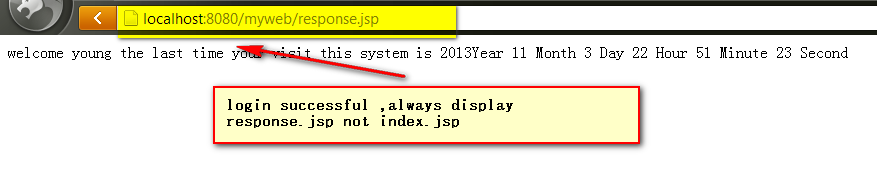
登陆成功会显示: 可以看出,跳转后的页面URL仍然是跳转前的URL并未发生任何变化,由于只进行一次请求,所以request.setAttribute 和request.getAttribute能够正常工作
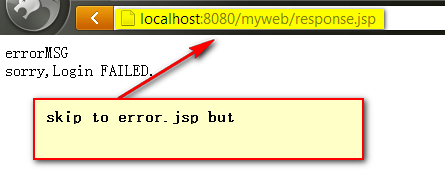
登陆失败:
而是用response.sendRedirect()会出现2次请求不能再是用request的对象包装和传递参数,可以使用session.setAttribute("NAME","VALUE")使用EL表达式语句${sesstionScope.userNameString}
从session会话对象中获取传递的参数,同时重定向后的URL为重定向页面的URL。
java web 学习 --第五天(Java三级考试)的更多相关文章
- java web学习总结(五) -------------------servlet开发(一)
一.Servlet简介 Servlet是sun公司提供的一门用于开发动态web资源的技术. Sun公司在其API中提供了一个servlet接口,用户若想用发一个动态web资源(即开发一个Java程序向 ...
- java web 学习 --第九天(Java三级考试)
第八天的学习内容如下:http://www.cnblogs.com/tobecrazy/p/3468458.html Java servlet 技术 Servlet是使用java servlet应用程 ...
- java web 学习 --第一天(Java三级考试)
1.Servlet servlet是运行在web server或 application server端的Java程序,主要用于在服务器端产生动态内容. servlet 在服务器端主要有以下作用 读取 ...
- Java Web学习(十一)Java过滤器
一.引言 上一篇文章学习了java三大器的拦截器,拦截器主要是针对于action请求进行拦截处理的,那么对于requst的一些信息如果在调用前,想先进行过滤和处理,那么就要使用到第二个神器,也就是本文 ...
- java web 学习 --第二天(Java三级考试)
第一天的学习在这http://www.cnblogs.com/tobecrazy/p/3444474.html 2.jsp 基础知识 Jsp页面中的Java脚本主要有3部分:声明(Declaratio ...
- java web 学习十五(jsp基础语法)
任何语言都有自己的语法,JAVA中有,JSP虽然是在JAVA上的一种应用,但是依然有其自己扩充的语法,而且在JSP中,所有的JAVA语句都可以使用. 一.JSP模版元素 JSP页面中的HTML内容称之 ...
- java web 学习 --第八天(Java三级考试)
第七天的学习内容:http://www.cnblogs.com/tobecrazy/p/3464231.html EL表达式 EL : Expression Language 使用EL表达式可以减少& ...
- Java Web学习(五)session、cookie、token
文章更新时间:2020/09/14 一.引言 动态网页兴起后,会话管理变成开发者需要考虑的一个问题,由于HTTP请求是无状态的,为了区分每个用户,此时引入了会话标识(sessionId)的概念,但是存 ...
- [原创]java WEB学习笔记36:Java Bean 概述,及在JSP 中的使用,原理
本博客为原创:综合 尚硅谷(http://www.atguigu.com)的系统教程(深表感谢)和 网络上的现有资源(博客,文档,图书等),资源的出处我会标明 本博客的目的:①总结自己的学习过程,相当 ...
随机推荐
- java.lang.reflect.Method
java.lang.reflect.Method 一.Method类是什么 Method是一个类,位于java.lang.reflect包下. 在Java反射中 Method类描述的是 类的方法信息, ...
- Myeclipse中的web项目审查(jquery-2.1.1.min.js)出现错误
前言,本来在把web项目搞得好看一些,从网上下载了一个很炫酷的模板导入web中,无奈出现了错误,如下:
- godaddy空间的sql server数据库没办法insert中文
原来的代码: use string007 from sysobjects where id = object_id('K_V_TEST') and type = 'U') drop table K_V ...
- 繁华模拟赛day8 科技树
/* 贪心,很明显是越容易升级的越先升级 */ #include<iostream> #include<cstdio> #include<string> #incl ...
- Windows下MySQL 5.6安装及配置详细图解
一.安装前的准备 1.下载安装程序包,可到MySQL官方网站http://www.mysql.com/下载,如图1-1: 图1-1 下载后的安装文件如图1-2所示: 图1-2 二.安装 1.双击下载的 ...
- Javascript高级程序设计——面向对象小结
ECMAScript支持面向对象编程,对象可以在代码执行时创建,具有动态扩展性而非严格意义上的实体. 创建对象方法: 工厂模式:简单的函数创建引用类型 构造函数模式:可以创建自定义引用类型,可以想创建 ...
- mongodb university week4
1.index Creation,background 如果在foreground运行index,会阻塞其他writer,如果background运行,会比较慢,但不会阻塞其他writer,可以并发写 ...
- HDU 1064 Financial Management
题目链接:http://acm.hdu.edu.cn/showproblem.php?pid=1064 解题报告:用来凑个题数吧,看题的时间比过题的时间多的多,就是输入12个浮点数,然后输出平均数,只 ...
- 简单易懂的crontab设置工具集
导读 在上一篇文章中,我介绍了crontab的配置文件以及如何设置定时任务,对于偶尔用一次crontab的同学而言,可能遗忘配置语法会很快,这里我向大家推荐几个在线设置crontab任务的网站. ge ...
- python扩展实现方法--python与c混和编程 转自:http://www.cnblogs.com/btchenguang/archive/2012/09/04/2670849.html
前言 需要扩展Python语言的理由: 创建Python扩展的步骤 1. 创建应用程序代码 2. 利用样板来包装代码 a. 包含python的头文件 b. 为每个模块的每一个函数增加一个型如PyObj ...