
Hadoop学习笔记: MapReduce Java编程简介
概述
本文主要基于Hadoop 1.0.0后推出的新Java API为例介绍MapReduce的Java编程模型。新旧API主要区别在于新API(org.apache.hadoop.mapreduce)将原来的旧API(org.apache.hadoop.mapred)中的接口转换为了抽象类。
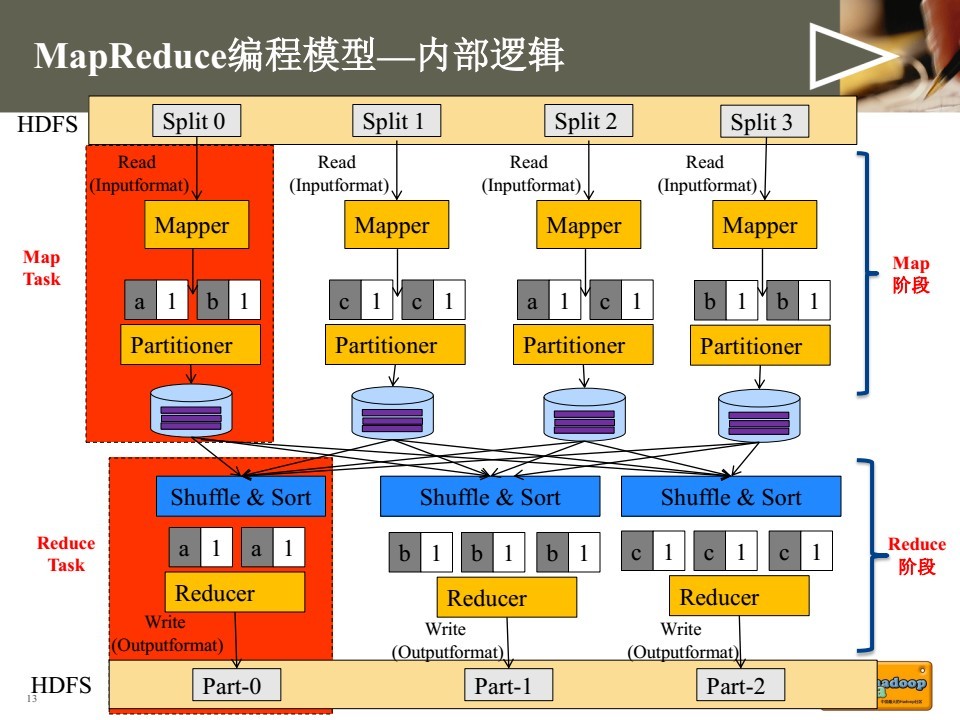
MapReduce编程主要将程序运行过程分为两个阶段:Map阶段和Reduce阶段。其中Map阶段由若干Map task组成,主要由InputFormat, Mapper, Partitioner等类完成工作。Reduce阶段由若干Reduce task组成,主要由Reducer, OutputFormat等类完成工作。

Java API
InputFormat:
InputFormat是一个抽象类,所有输入格式都继承于这个类,例如读取数据库的DBInputFormat,读取普通文件的FileInputFormat等。MapReduce程序依靠InputFormat类/子类完成如下工作:
1. 确定所有输入文件,将其划分为逻辑上的InputSplits分片。每个分片分别交给一个Mapper处理。
2. 提供对象RecordReader,提取分片中的内容。
public abstract class InputFormat<K, V> {

  public abstract List<InputSplit> getSplits(JobContext context

                               ) throws IOException, InterruptedException;

  public abstract

    RecordReader<K,V> createRecordReader(InputSplit split,

                                         TaskAttemptContext context

                                        ) throws IOException,

                                                 InterruptedException;

}
除非有特殊指明,TextInputFormat为默认类,该类是FileInputFormat的一个子类。使用TextInputFormat为输入格式时,Key为每一行内容在文件中的偏移量,Value为每一行的实际内容。InputFormat类的层次如下:

InputSplit:
InputSplit是一个抽象类,定义了如下三个方法。getLength()用来获取分片大小,以支持对分片进行排序。getLocation()用来获取分片的位置列表。从代码也可以看出,实际上Input split并不存放数据,只是存放了实际文件的位置信息。
public abstract class InputSplit {

  public abstract long getLength() throws IOException, InterruptedException;

  public abstract String[] getLocations() throws IOException, InterruptedException;

  public SplitLocationInfo[] getLocationInfo() throws IOException {

    return null;

  }

}
RecordReader
RecordReader将InputSplit解析成<K,V>对,作为Mapper的输入。
public abstract class RecordReader<KEYIN, VALUEIN> implements Closeable {

  public abstract void initialize(InputSplit split,

                                  TaskAttemptContext context

                                  ) throws IOException, InterruptedException;

  public abstract

  boolean nextKeyValue() throws IOException, InterruptedException;

  public abstract

  KEYIN getCurrentKey() throws IOException, InterruptedException;

  public abstract

  VALUEIN getCurrentValue() throws IOException, InterruptedException;

  public abstract float getProgress() throws IOException, InterruptedException;

  public abstract void close() throws IOException;

}
自定义InputFormat代码实例:
package InputFormat;

import java.io.DataInput;

import java.io.DataOutput;

import java.io.IOException;

import org.apache.hadoop.io.Text;

import org.apache.hadoop.io.Writable;

public class URLWritable implements Writable{

    private Text url;

    public URLWritable(){

        url = new Text();

    }

    public URLWritable(Text url){

        this.url = url;

    }

    public Text getUrl() {

        return url;

    }

    public void setUrl(Text url) {

        this.url = url;

    }

    @Override

    public void readFields(DataInput in) throws IOException {

        url.set(in.readUTF());

    }

    @Override

    public void write(DataOutput out) throws IOException {

        out.writeUTF(url.toString());

    }

}
package InputFormat;

import java.io.IOException;

import org.apache.hadoop.conf.Configuration;

import org.apache.hadoop.io.Text;

import org.apache.hadoop.mapreduce.InputSplit;

import org.apache.hadoop.mapreduce.RecordReader;

import org.apache.hadoop.mapreduce.TaskAttemptContext;

import org.apache.hadoop.mapreduce.lib.input.*;

public class URLRecordReader extends RecordReader<Text, URLWritable>{

    private KeyValueLineRecordReader lineReader;

    private Text key;

    private URLWritable value;

    public URLRecordReader(Configuration conf) throws IOException{

        super();

        this.lineReader = new KeyValueLineRecordReader(conf);

        this.key = new Text();

        this.value = new URLWritable();

    }

    @Override

    public void close() throws IOException {

        lineReader.close();

    }

    @Override

    public Text getCurrentKey() throws IOException, InterruptedException {

        key = lineReader.getCurrentKey();

        return key;

    }

    @Override

    public URLWritable getCurrentValue() throws IOException, InterruptedException {

        value.setUrl(lineReader.getCurrentValue());

        return value;

    }

    @Override

    public float getProgress() throws IOException, InterruptedException {

        return lineReader.getProgress();

    }

    @Override

    public void initialize(InputSplit genericSplit, TaskAttemptContext context) throws IOException, InterruptedException {

        lineReader.initialize(genericSplit, context);

    }

    @Override

    public boolean nextKeyValue() throws IOException, InterruptedException {

        return lineReader.nextKeyValue();

    }

}
package InputFormat;

import java.io.IOException;

import org.apache.hadoop.io.Text;

import org.apache.hadoop.mapreduce.*;

import org.apache.hadoop.mapreduce.lib.input.FileInputFormat;

public class URLInputFormat extends FileInputFormat<Text, URLWritable>{

    @Override

    public RecordReader<Text, URLWritable> createRecordReader(InputSplit genericSplit, TaskAttemptContext context)

            throws IOException, InterruptedException {

        context.setStatus(genericSplit.toString());

        return new URLRecordReader(context.getConfiguration());

    }

}
package InputFormat;

import java.io.IOException;

import org.apache.hadoop.conf.Configuration;

import org.apache.hadoop.conf.Configured;

import org.apache.hadoop.fs.Path;

import org.apache.hadoop.io.Text;

import org.apache.hadoop.mapreduce.Job;

import org.apache.hadoop.mapreduce.Mapper;

import org.apache.hadoop.mapreduce.Reducer;

import org.apache.hadoop.mapreduce.lib.input.FileInputFormat;

import org.apache.hadoop.mapreduce.lib.output.FileOutputFormat;

import org.apache.hadoop.mapreduce.lib.output.TextOutputFormat;

import org.apache.hadoop.util.Tool;

import org.apache.hadoop.util.ToolRunner;

public class InputFormatTest extends Configured implements Tool{

    public static class MapperTest extends Mapper<Text, URLWritable, Text, Text>{

        public void map(Text key, URLWritable value, Context context)

                throws IOException, InterruptedException {

            context.write(key, value.getUrl());

        }

    }

    public static class ReducerTest extends Reducer<Text, Text, Text, Text>{

        public void reduce(Text key, Iterable<Text> values, Context context)

                throws IOException, InterruptedException {

            String out="";

            for(Text val : values) {

                out+=val.toString()+"|";

            }

            context.write(key, new Text(out));

        }

    }

    public static void main(String[] args) {

        try {

            int returnCode = ToolRunner.run(new InputFormatTest(), args);

            System.exit(returnCode);

        } catch (Exception e) {

            e.printStackTrace();

        }

    }

    @Override

    public int run(String[] arg0) throws Exception {

        Configuration conf = new Configuration();

        conf.set("fs.default.name","hdfs://localhost:9001");

//        String[] otherArgs = new GenericOptionsParser(conf, args).getRemainingArgs();

//        if (otherArgs.length < 2) {

//            System.err.println("Usage: Test_1 <in> [<in>...] <out>");

//            System.exit(2);

//        }

//

        Job job = Job.getInstance(conf, "InputFormatTest");

        job.setJarByClass(InputFormatTest.class);

        job.setMapperClass(MapperTest.class);

        job.setCombinerClass(ReducerTest.class);

        job.setReducerClass(ReducerTest.class);

        job.setInputFormatClass(URLInputFormat.class); // 设置文件输入格式

        job.setOutputFormatClass(TextOutputFormat.class);// 使用默认的output格格式

        job.setMapOutputKeyClass(Text.class);

        job.setMapOutputValueClass(Text.class);

        job.setOutputKeyClass(Text.class);

        job.setOutputValueClass(Text.class);

        FileInputFormat.addInputPath(job, new Path("/home/test_input/"));

        FileOutputFormat.setOutputPath(job, new Path("/home/test_output"));

//        for (int i = 0; i < otherArgs.length - 1; ++i) {

//            FileInputFormat.addInputPath(job, new Path(otherArgs[i]));

//        }

        //FileOutputFormat.setOutputPath(job, new Path(otherArgs[otherArgs.length - 1]));

        job.waitForCompletion(true);

        return job.isSuccessful() ? 0 : 1;

    }

}
Mapper
MapReduce框架对于每一个从InputFormat产生的InputSplit,都生成一个map task来进行处理,因此分片数也就等于map task的数量。Mapper类包含如下四个方法,setup方法会在map方法执行前被调用一次,而cleanup在map结束时执行一次,默认不做任何事。run方法也就是每个map task调用的方法。map task具体的业务逻辑我们一般通过重写Mapper子类的map方法来实现。
public class Mapper<KEYIN, VALUEIN, KEYOUT, VALUEOUT> {

  public abstract class Context

    implements MapContext<KEYIN,VALUEIN,KEYOUT,VALUEOUT> {

  }

  protected void setup(Context context

                       ) throws IOException, InterruptedException {

    // NOTHING

  }
  protected void map(KEYIN key, VALUEIN value,

                     Context context) throws IOException, InterruptedException {

    context.write((KEYOUT) key, (VALUEOUT) value);

  }

  protected void cleanup(Context context

                         ) throws IOException, InterruptedException {

    // NOTHING

  }

  public void run(Context context) throws IOException, InterruptedException {

    setup(context);

    try {

      while (context.nextKeyValue()) {

        map(context.getCurrentKey(), context.getCurrentValue(), context);

      }

    } finally {

      cleanup(context);

    }

  }

}
Partitioner
由Mapper生成的中间键值对将由Partitioner来决定交由哪一个Reducer进行处理,partition的数量也就等于reducer的数量。Hadoop目前提供了四种不同的Partitioner: BinaryPartitioner, HashPartitioner, KeyFieldBasedPartitioner, TotalOrderPartitioner,默认为HashPartitioner。我们也可以通过继承Partitioner抽象类来实现自己特殊的Partitoner逻辑。
public abstract class Partitioner<KEY, VALUE> {

  public abstract int getPartition(KEY key, VALUE value, int numPartitions);

}
HashPartitioner代码:
public class HashPartitioner<K, V> extends Partitioner<K, V> {

  public int getPartition(K key, V value,

                          int numReduceTasks) {

    return (key.hashCode() & Integer.MAX_VALUE) % numReduceTasks;

  }

}
Reducer
Reducer中的方法类似于Mapper,一般我们通过重写Reducer子类的reduce方法来实现具体业务逻辑。
public class Reducer<KEYIN,VALUEIN,KEYOUT,VALUEOUT> {

  public abstract class Context

    implements ReduceContext<KEYIN,VALUEIN,KEYOUT,VALUEOUT> {

  }

  protected void setup(Context context

                       ) throws IOException, InterruptedException {

    // NOTHING

  }

  protected void reduce(KEYIN key, Iterable<VALUEIN> values, Context context

                        ) throws IOException, InterruptedException {

    for(VALUEIN value: values) {

      context.write((KEYOUT) key, (VALUEOUT) value);

    }

  }

  protected void cleanup(Context context

                         ) throws IOException, InterruptedException {

    // NOTHING

  }

  public void run(Context context) throws IOException, InterruptedException {

    setup(context);

    try {

      while (context.nextKey()) {

        reduce(context.getCurrentKey(), context.getValues(), context);

        // If a back up store is used, reset it

        Iterator<VALUEIN> iter = context.getValues().iterator();

        if(iter instanceof ReduceContext.ValueIterator) {

          ((ReduceContext.ValueIterator<VALUEIN>)iter).resetBackupStore();

        }

      }

    } finally {

      cleanup(context);

    }

  }

}
OutputFormat
MapReduce程序依靠OutputFormat类/子类完成如下工作:
1. 验证任务的输出,比如输出目录是否存在等。
2. 提供对象RecordWriter,将内容写到文件系统上。
Hadoop默认的是TextOutputFormat,我们也可以自定义自己特殊的outputFormat,代码可以参考之前给出的自定义InputFormat。
public abstract class OutputFormat<K, V> {

  public abstract RecordWriter<K, V>

    getRecordWriter(TaskAttemptContext context

                    ) throws IOException, InterruptedException;

  public abstract void checkOutputSpecs(JobContext context

                                        ) throws IOException,

                                                 InterruptedException;

  public abstract

  OutputCommitter getOutputCommitter(TaskAttemptContext context

                                     ) throws IOException, InterruptedException;

}
MapReduce Java程序框架
public class Test extends Configured implements Tool{

    public static class MapperTest extends Mapper<Text, Text, Text, Text>{

        public void map(Text key, Text value, Context context)

                throws IOException, InterruptedException {

                        //map logic

            context.write(key, value);

        }

    }

    public static class ReducerTest extends Reducer<Text, Text, Text, Text>{

        public void reduce(Text key, Iterable<Text> values, Context context)

                throws IOException, InterruptedException {

            String out="";

            //reduce logic

            context.write(key, value);

        }

    }

    public static void main(String[] args) {

        try {

            int returnCode = ToolRunner.run(new InputFormatTest(), args);

            System.exit(returnCode);

        } catch (Exception e) {

            e.printStackTrace();

        }

    }

    @Override

    public int run(String[] arg0) throws Exception {

        Configuration conf = new Configuration();

        String[] otherArgs = new GenericOptionsParser(conf, args).getRemainingArgs();

        if (otherArgs.length < 2) {

            System.err.println("Usage: Test_1 <in> [<in>...] <out>");

            System.exit(2);

        }

        Job job = Job.getInstance(conf, "Test");

        job.setJarByClass(InputFormatTest.class);

        job.setMapperClass(MapperTest.class);

        job.setCombinerClass(ReducerTest.class);

        job.setReducerClass(ReducerTest.class);

        job.setInputFormatClass(TextInputFormat.class); // 设置文件输入格式

        job.setOutputFormatClass(TextOutputFormat.class);// 使用默认的output格格式

        job.setMapOutputKeyClass(Text.class);

        job.setMapOutputValueClass(Text.class);

        job.setOutputKeyClass(Text.class);

        job.setOutputValueClass(Text.class);

        for (int i = 0; i < otherArgs.length - 1; ++i) {

            FileInputFormat.addInputPath(job, new Path(otherArgs[i]));

        }

        FileOutputFormat.setOutputPath(job, new Path(otherArgs[otherArgs.length - 1]));

        job.waitForCompletion(true);

        return job.isSuccessful() ? 0 : 1;

    }

}
MapReduce Java doc:http://hadoop.apache.org/docs/current/api/
MapReduce Shuffle详解:http://langyu.iteye.com/blog/992916
Hadoop学习笔记: MapReduce Java编程简介的更多相关文章
- Hadoop学习笔记(7) ——高级编程
Hadoop学习笔记(7) ——高级编程 从前面的学习中,我们了解到了MapReduce整个过程需要经过以下几个步骤: 1.输入(input):将输入数据分成一个个split,并将split进一步拆成 ...
- Hadoop学习笔记—MapReduce的理解
我不喜欢照搬书上的东西,我觉得那样写个blog没多大意义,不如直接把那本书那一页告诉大家,来得省事.我喜欢将我自己的理解.所以我会说说我对于Hadoop对大量数据进行处理的理解.如果有理解不对欢迎批评 ...
- 【学习笔记】JAva编程思想之多态
1.如果java的基类拥有某个已被多次重载的方法名称,那么在导出类中重新定义该方法名称并不会屏蔽在基类的任何版本.因此,无论是在该层或者他的基类中对方法进行定义,重载机制都可以正常工作. 2.使用@O ...
- java学习笔记15--多线程编程基础2
本文地址:http://www.cnblogs.com/archimedes/p/java-study-note15.html,转载请注明源地址. 线程的生命周期 1.线程的生命周期 线程从产生到消亡 ...
- java学习笔记14--多线程编程基础1
本文地址:http://www.cnblogs.com/archimedes/p/java-study-note14.html,转载请注明源地址. 多线程编程基础 多进程 一个独立程序的每一次运行称为 ...
- Hadoop学习笔记—22.Hadoop2.x环境搭建与配置
自从2015年花了2个多月时间把Hadoop1.x的学习教程学习了一遍,对Hadoop这个神奇的小象有了一个初步的了解,还对每次学习的内容进行了总结,也形成了我的一个博文系列<Hadoop学习笔 ...
- Hadoop学习笔记(5) ——编写HelloWorld(2)
Hadoop学习笔记(5) ——编写HelloWorld(2) 前面我们写了一个Hadoop程序,并让它跑起来了.但想想不对啊,Hadoop不是有两块功能么,DFS和MapReduce.没错,上一节我 ...
- Hadoop学习笔记—5.自定义类型处理手机上网日志
转载自http://www.cnblogs.com/edisonchou/p/4288737.html Hadoop学习笔记—5.自定义类型处理手机上网日志 一.测试数据:手机上网日志 1.1 关于这 ...
- Hadoop学习笔记(9) ——源码初窥
Hadoop学习笔记(9) ——源码初窥 之前我们把Hadoop算是入了门,下载的源码,写了HelloWorld,简要分析了其编程要点,然后也编了个较复杂的示例.接下来其实就有两条路可走了,一条是继续 ...
随机推荐
- 再探CSS 中 class 命名规范
一直以来我的CSS 的 class命名都是比较随意,有时采用驼峰式.有时采用下划线,好像没有什么统一的标准,想到什么英文单词就拿过来用,这对于自己瞎写的小项目无伤大雅,遇到冲突的问题可稍加调整改变即可 ...
- Codeforces Beta Round #8
A题,小小的模拟题,没看懂题意啊. #include <iostream> #include <cstdio> #include <cmath> #include ...
- HDU 4750 Count The Pairs(并查集)
题目链接 没有发现那个点,无奈. #include <cstdio> #include <cstring> #include <cmath> #include &l ...
- 【BZOJ3207】花神的嘲讽计划I 可持久化线段树/莫队
看到题目就可以想到hash 然后很自然的联想到可持久化权值线段树 WA:base取了偶数 这道题还可以用莫队做,比线段树快一些 可持久化线段树: #include<bits/stdc++.h&g ...
- BZOJ2844: albus就是要第一个出场
Description 已知一个长度为n的正整数序列A(下标从1开始), 令 S = { x | 1 <= x <= n }, S 的幂集2^S定义为S 所有子集构成的集合. 定义映射 f ...
- iOS应用内付费(IAP)开发步骤列表
iOS应用内付费(IAP)开发步骤列表 前两天和服务端同事一起,完成了应用内付费(以下简称IAP, In app purchase)的开发工作.步骤繁多,在此把开发步骤列表整理如下.因为只是步骤列表, ...
- SQL Server2008清空日志文件
USE[master] GO ALTER DATABASE mydbname SET RECOVERY SIMPLE WITH NO_WAIT GO ALTER DATABASE mydbname S ...
- Hibernate学习笔记1
xml文件[封装]写SQL语句<class class='com.briup.user',table='s_emp'> <property name='id' column='id' ...
- RestTemplate实践
什么是RestTemplate? RestTemplate是Spring提供的用于访问Rest服务的客户端,RestTemplate提供了多种便捷访问远程Http服务的方法,能够大大提高客户端的编写效 ...
- Docker1.12 新增swarm集群
在Docker1.12新版本中,一个新增加的功能点是swarm集群,通过docker命令可以直接实现docker-engine相互发现,并组建成为一个容器集群.有关集群的docker命令如下: (1) ...