
filter应用案例一:分IP统计访问次数
统计工作需要在所有资源之前都执行,那么就可以放到Filter中了。
用Map<String,Integer>装载统计的数据。Map创建时间(使用ServletContextListener,在服务器启动时完成创建),Map保存到ServletContext中!!Map需要在Filter中用来保存数据
代码:
 import java.util.HashMap;

 import java.util.Map;

 import javax.servlet.ServletContext;

 import javax.servlet.ServletContextEvent;

 import javax.servlet.ServletContextListener;

 public class MyListener implements ServletContextListener {

     public void contextInitialized(ServletContextEvent sce) {

         ServletContext application= sce.getServletContext();

         Map<String, Integer>map=new HashMap<String, Integer>();

         application.setAttribute("map", map);

     }

     public void contextDestroyed(ServletContextEvent sce) {

     }

 }
MyListener
 import java.io.IOException;

 import java.util.Map;

 import javax.servlet.Filter;

 import javax.servlet.FilterChain;

 import javax.servlet.FilterConfig;

 import javax.servlet.ServletContext;

 import javax.servlet.ServletException;

 import javax.servlet.ServletRequest;

 import javax.servlet.ServletResponse;

 public class CountIPFilter implements Filter {

     private FilterConfig config;

     public void destroy() {}

     public void doFilter(ServletRequest request, ServletResponse response, FilterChain chain) throws IOException, ServletException {

         ServletContext application= config.getServletContext();

         Map<String, Integer>map=(Map<String, Integer>) application.getAttribute("map");

         String ip=request.getRemoteAddr();

         if(map.containsKey(ip))

         {

             int t=map.get(ip);

             map.put(ip, t+1);

         }

         else map.put(ip, 1);

         chain.doFilter(request, response);

     }

     public void init(FilterConfig fConfig) throws ServletException {

         config=fConfig;

     }

 }
CountIPFilter
 <%@ page language="java" import="java.util.*" pageEncoding="UTF-8"%>

 <%@ taglib prefix="c" uri="http://java.sun.com/jsp/jstl/core" %>

 <!DOCTYPE HTML PUBLIC "-//W3C//DTD HTML 4.01 Transitional//EN">

 <html>

   <head>

     <title>My JSP 'show.jsp' starting page</title>

     <meta http-equiv="pragma" content="no-cache">

     <meta http-equiv="cache-control" content="no-cache">

     <meta http-equiv="expires" content="0">

     <meta http-equiv="keywords" content="keyword1,keyword2,keyword3">

     <meta http-equiv="description" content="This is my page">

   </head>

   <body>

 <h1 align="center">显示结果</h1>

 <table align="center" width="60%" border="1">

     <tr>

         <th>IP</th>

         <th>次数</th>

     </tr>

 <c:forEach items="${applicationScope.map }" var="entry">

     <tr>

         <td>${entry.key }</td>

         <td>${entry.value }</td>

     </tr>

 </c:forEach>

 </table>

   </body>

 </html>
show.jsp
 <?xml version="1.0" encoding="UTF-8"?>

 <web-app xmlns:xsi="http://www.w3.org/2001/XMLSchema-instance" xmlns="http://java.sun.com/xml/ns/javaee" xmlns:web="http://java.sun.com/xml/ns/javaee/web-app_2_5.xsd" xsi:schemaLocation="http://java.sun.com/xml/ns/javaee http://java.sun.com/xml/ns/javaee/web-app_2_5.xsd" version="2.5">

   <display-name></display-name>

   <welcome-file-list>

     <welcome-file>index.jsp</welcome-file>

   </welcome-file-list>

   <listener>

     <listener-class>MyListener</listener-class>

   </listener>

   <filter>

     <display-name>CountIPFilter</display-name>

     <filter-name>CountIPFilter</filter-name>

     <filter-class>CountIPFilter</filter-class>

   </filter>

   <filter-mapping>

     <filter-name>CountIPFilter</filter-name>

     <url-pattern>/*</url-pattern>

   </filter-mapping>

 </web-app>
web.xml
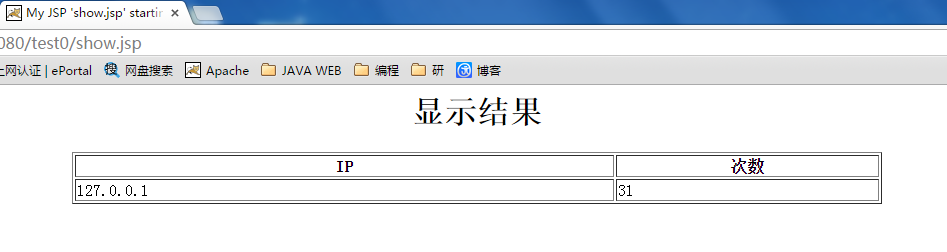
运行示例:
filter应用案例一:分IP统计访问次数的更多相关文章
- 使用javaWeb的二大(Listener、Filter)组件实现分IP统计访问次数
分析: 统计工作需要在所有资源之前都执行,那么就可以放到Filter中. 我们这个过滤器不打算做拦截操作!因为我们只是用来做统计 用什么东西来装载统计的数据.Map<String,Integer ...
- Java web--Filter过滤器分IP统计访问次数
分IP统计访问次数即网站统计每个IP地址访问本网站的次数. 分析 因为一个网站可能有多个页面,无论哪个页面被访问,都要统计访问次数,所以使用过滤器最为方便. 因为需要分IP统计,所以可以在过滤器中创建 ...
- 学习笔记_过滤器应用_1(分ip统计网站的访问次数)
分ip统计网站的访问次数 ip count 192.168.1.111 2 192.168.1.112 59 统计工作需要在所有资源之前都执行,那么就可以放到Filter中了. 我们这个过滤器不打算做 ...
- 分ip统计网站访问次数
package web.listener; import javax.servlet.ServletContext; import javax.servlet.ServletContextEvent; ...
- nginx日志中访问最多的100个ip及访问次数
nginx日志中访问最多的100个ip及访问次数 awk '{print $1}' /opt/software/nginx/logs/access.log| sort | uniq -c | sort ...
- Filter和Listener的应用——分IP统计网站访问次数
一:分析 统计工作需要在所有资源执行前进行,所以需要放在filter中 这个拦截器仅仅进行统计工作,不进行拦截,所以请求必须继续传递下去 用Map<String,integer>来保存数据 ...
- [JS12] 统计访问次数
<html> <head> <meta http-equiv="Content-Type" content="text/html; char ...
- iis 限制动态IP地址访问次数
An IP Address Blocking HttpModule for ASP.NET in 9 minutes namespace YourModuleNameHere 10 { 11 publ ...
- Java web 实现 之 Filter分析ip统计网站的访问次数
统计工作需要在所有资源之前都执行,那么就可以放到Filter中了. 我们这个过滤器不打算做拦截操作!因为我们只是用来做统计的. 用什么东西来装载统计的数据.Map<String,Integer& ...
随机推荐
- MongoDB 副本集管理(不定时更新)
简介: 前面介绍完了副本集的搭建.用户的管理.参数和日常操作的说明,那副本集搭建好该如何管理呢?现在来说明下副本集的日常查看和管理. 说明: 1)查看命令行参数:db.serverCmdLineOpt ...
- 3.SpringMVC修改配置文件路径和给界面传递数据
1.修改配置文件路径 达到 配置多文件的目的 web.xml文件中基础配置有springMVC配置的servlet路径 <servlet-name>SpringMVC</serv ...
- Enum:Face The Right Way(POJ 3276)
面朝大海,春暖花开 题目大意:农夫有一群牛,牛排成了一排,现在需要把这些牛都面向正确的方向,农夫买了一个机器,一次可以处理k只牛,现在问你怎么处理这些牛才可以使操作数最小? 这道题很有意思,其实这道题 ...
- 20145213《Java程序设计》实验五Java网络编程及安全
20145213<Java程序设计>实验五Java网络编程及安全 实验内容 1.掌握Socket程序的编写. 2.掌握密码技术的使用. 3.设计安全传输系统. 实验预期 1.客户端与服务器 ...
- Jquery如何判断Radiobutton是否选中
<!DOCTYPE html PUBLIC "-//W3C//DTD XHTML 1.0 Transitional//EN" "http://www.w3.org/ ...
- Java抽象类接口、内部类题库
一. 选择题 1. Person类和Test类的代码如下所示,则代码中的错误语句是( C ).(选择一项) public class Person { public String nam ...
- Android笔记:获取屏幕信息
像素密度(dpi) float xdpi = getResources().getDisplayMetrics().xdpi;float ydpi = getResources().getDispla ...
- July 3rd, Week 28th Sunday, 2016
2016-07-03 First-hand experience is often necessary for personal growth. 亲身体验通常是成长所必须的. Although som ...
- UbuntuLinux安装Mysql
1.安装Mysql5.7 方法:手动安装5.7 One: $ wget http://dev.mysql.com/get/mysql-apt-config_0.6.0-1_all.deb 下载 ...
- Java中length,length(),size()区别
length属性:用于获取数组长度. eg: int ar[] = new int{1,2,3} /** * 数组用length属性取得长度 */ int lenAr = ar.length;//此处 ...