
从 Tapable 中得到的启发
Tapable
Why Tapable
前端开发中 Webpack 本质上是基于事件流的运行机制,它的工作流程是将特定的任务分发到指定的事件钩子中去完成。而实现这一切的核心就是 tapable,Webpack 中的两个基础模块:负责编译的 Compiler 和负责创建 bundle 的 Compilation 都是 tapable 构造函数的实例。
在 Webpack 4.0 的源码中会看到下面这些以 Sync、Async 开头,以 Hook 结尾的方法,这些都tapable 核心库的构造类,它为我们提供不同的事件流机制:
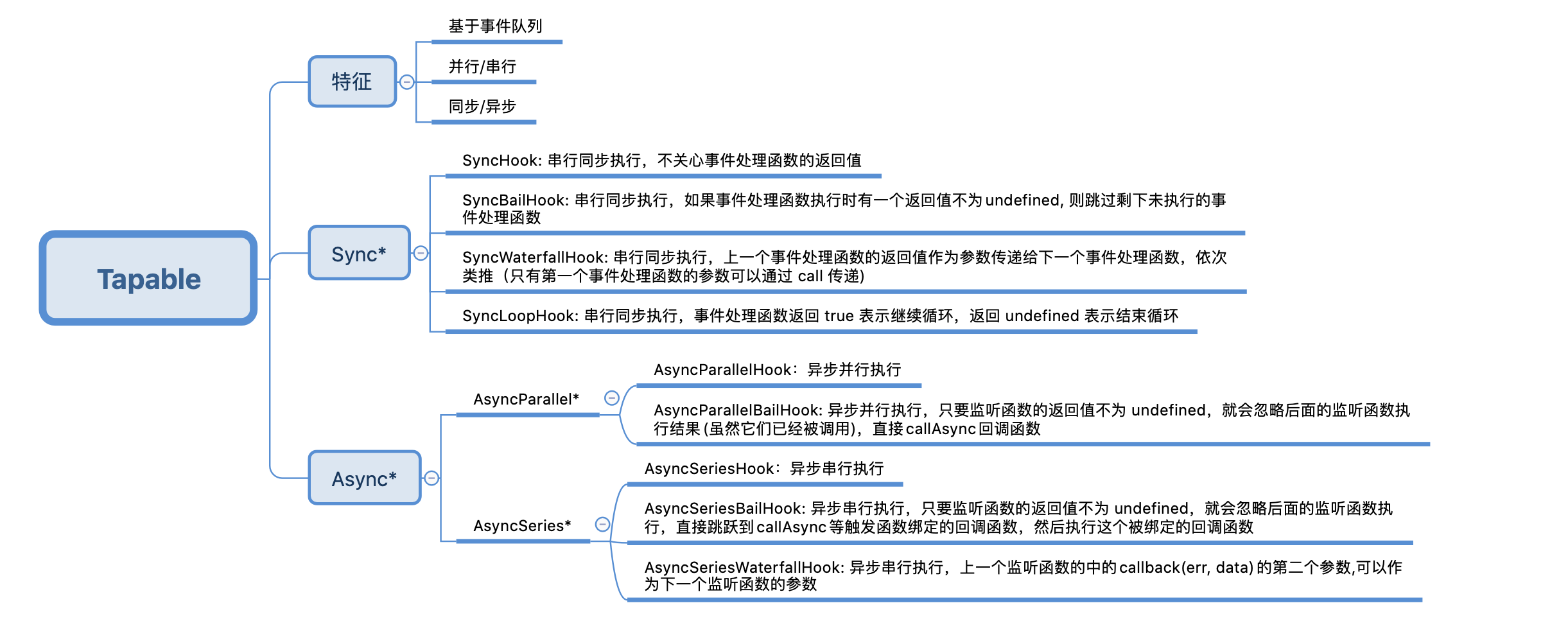
- SyncBailHook:同步执行,前一步返回是 undefined 才会进入下一个函数,否则直接结束
- SyncWaterfallHook:同步执行,前一个函数的执行结果作为下一个函数的参数传入
- SyncLoopHook:同步执行每个函数,若某个函数返回不为 undefined 则继续循环执行该函数,直至该函数返回 undefined 再进入下一个函数
- AsyncParallelHook:异步并行执行,知道所有异步函数执行结束再进入最后的 finalCallback
- AsyncParallelBailHook:异步并行执行,只要监听函数的返回值不为 undefined,就会忽略后面的监听函数执行,直接跳跃到callAsync等触发函数绑定的回调函数,然后执行这个被绑定的回调函数
- AsyncSeriesHook:异步串行执行,函数参数都来自于最初传入的参数
- AsyncSeriesBailHook:异步串行执行,只要监听函数的返回值不为 undefined,就会忽略后面的监听函数执行,直接跳跃到callAsync等触发函数绑定的回调函数,然后执行这个被绑定的回调函数
- AsyncSeriesWaterfallHook:异步串行执行,上一个监听函数的中的callback(err, data)的第二个参数,可以作为下一个监听函数的参数
Tapable and EventEmitter
Tapable 和 EventEmitter 都是实现了 事件的订阅与发布 功能,很多刚接触Tapable的同学可能会懵逼,这玩意和 EventEmitter 有什么区别呢?
- tapable 在创建订阅中心时需要指定回调函数的参数列表
- tapable 触发事件时不需要指定事件名,所有的事件都会被调用
// SyncHook 钩子的使用

const { SyncHook } = require("tapable");

// 创建实例

let syncHook = new SyncHook(["name"]);

// 注册事件

syncHook.tap("login", (name) => console.log(name)); // gaollard

syncHook.tap("register", (name) => console.log(name)); // gaollard

// 触发事件

syncHook.call("gaollard");
// 引入 events 模块

const events = require('events');

// 创建 eventEmitter 对象

const userEvent = new events.EventEmitter();

userEvent.addListener('login', function(name) {

  console.log(name)

})

userEvent.addListener('register', function(name) {

  console.log(name) // 打印 gaollard

})

userEvent.emit('login', 'gaollard')
Sync 类型钩子
- 注册事件 tap
- 触发事件 call
SyncHook
SyncHook 为串行同步执行,什么都不需要关心,在触发事件之后,会按照事件注册的先后顺序执行所有的事件处理函数,参数就是调用call传入的参数:
// SyncHook 钩子的使用

const { SyncHook } = require("tapable");

// 创建实例 ["name"] 用于声明回调函数的参数个数

let userSyncHook = new SyncHook(["name"]);

// 注册事件 第一个参数为事件名, 第二个参数为注册的回调函数

userSyncHook.tap("login", (name) => console.log(name));

userSyncHook.tap("register", (name) => console.log(name));

// 触发事件

userSyncHook.call("gaollard");

console.log(userSyncHook);
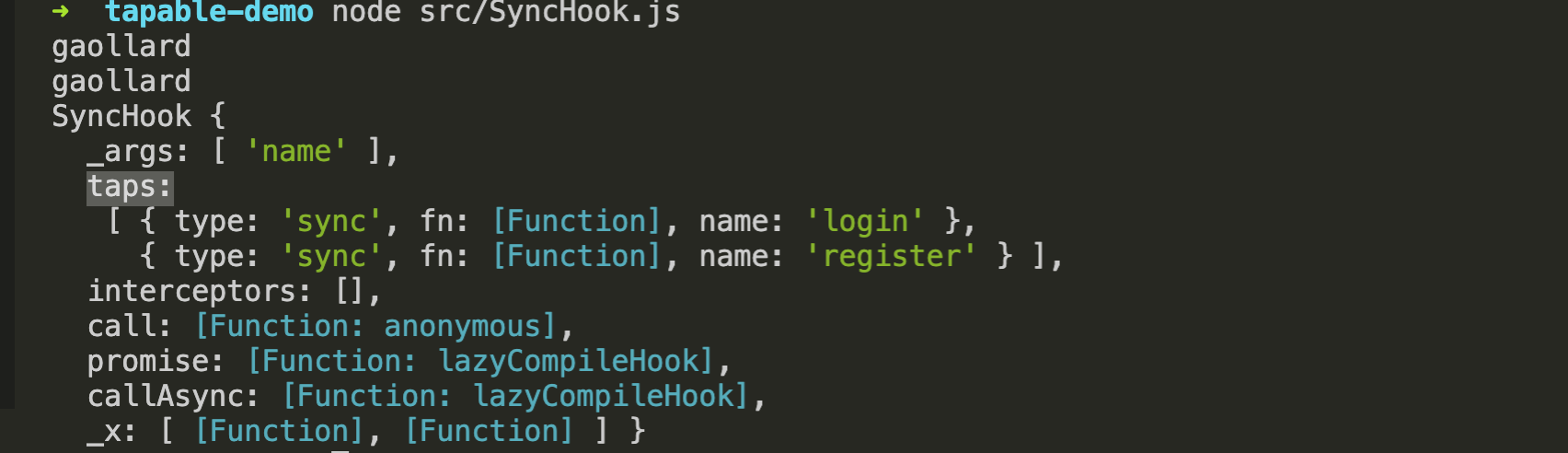
在 tapable 解构的 SyncHook 是一个类,注册事件需先创建实例,创建实例时支持传入一个数组,数组内存储事件触发时传入的参数,实例的 tap 方法用于注册事件,支持传入两个参数,第一个参数为事件名称,在 Webpack 中一般用于存储事件对应的插件名称, 第二个参数为事件处理函数,函数参数为执行 call 方法触发事件时所传入的参数的形参。
SyncBailHook
SyncBailHook 为串行同步执行,如果事件处理函数执行时有一个返回值不为 undefined,则跳过剩下未执行的事件处理函数:
// 创建实例

let userSyncHook = new SyncBailHook(["name"]);

// 注册事件

userSyncHook.tap("login", (name) => {

  console.log(name)

  return null // 返回值不为 undefined

});

userSyncHook.tap("register", (name) => {

  console.log(name)

});

// 触发事件,让监听函数执行

userSyncHook.call("gaollard");  // 只会打印一次
SyncWaterfallHook
SyncWaterfallHook 为串行同步执行,上一个事件处理函数的返回值作为参数传递给下一个事件处理函数,依次类推,当然,只有第一个事件处理函数的参数可以通过 call 传递,而 call 的返回值为最后一个事件处理函数的返回值:
// 创建实例

let userSyncHook = new SyncWaterfallHook(["name"]);

// 注册事件

userSyncHook.tap("login", (name) => {

  console.log('login', name) // 打印 gaollard

});

userSyncHook.tap("register", (name) => {

  console.log('register', name) // login回调未返回值, 所以参数为 "gaollard"

  return "hello"

});

userSyncHook.tap("enroll", (name) => {

  console.log("enroll", name) // register回调返回"hello", 所以参数为 "hello"

});

// 触发事件

userSyncHook.call("gaollard");

SyncLoopHook
SyncLoopHook 为串行同步执行,但是 SyncLoopHook 中的每一个事件回调函数都会被循环执行,事件处理函数返回 undefined 表示结束循环,当前的事件回调循环结束后进入到下一个回调函数中,直到整个流程结束:
// 创建实例

let userSyncHook = new SyncLoopHook(["name"]);

let num1 = 1

// 注册事件

userSyncHook.tap("login", (name) => {

  console.log('login', name, num1)

  return (++num1) > 10 ? undefined : true

});

userSyncHook.tap("register", (name) => {

  console.log('login', name, num1)

  return (++num1) > 20 ? undefined : true

});

// 触发事件

userSyncHook.call("manbax");
卧槽,连 21 也被打印出来了??? 发现了 tapable 一个BUG(写完去github提issue)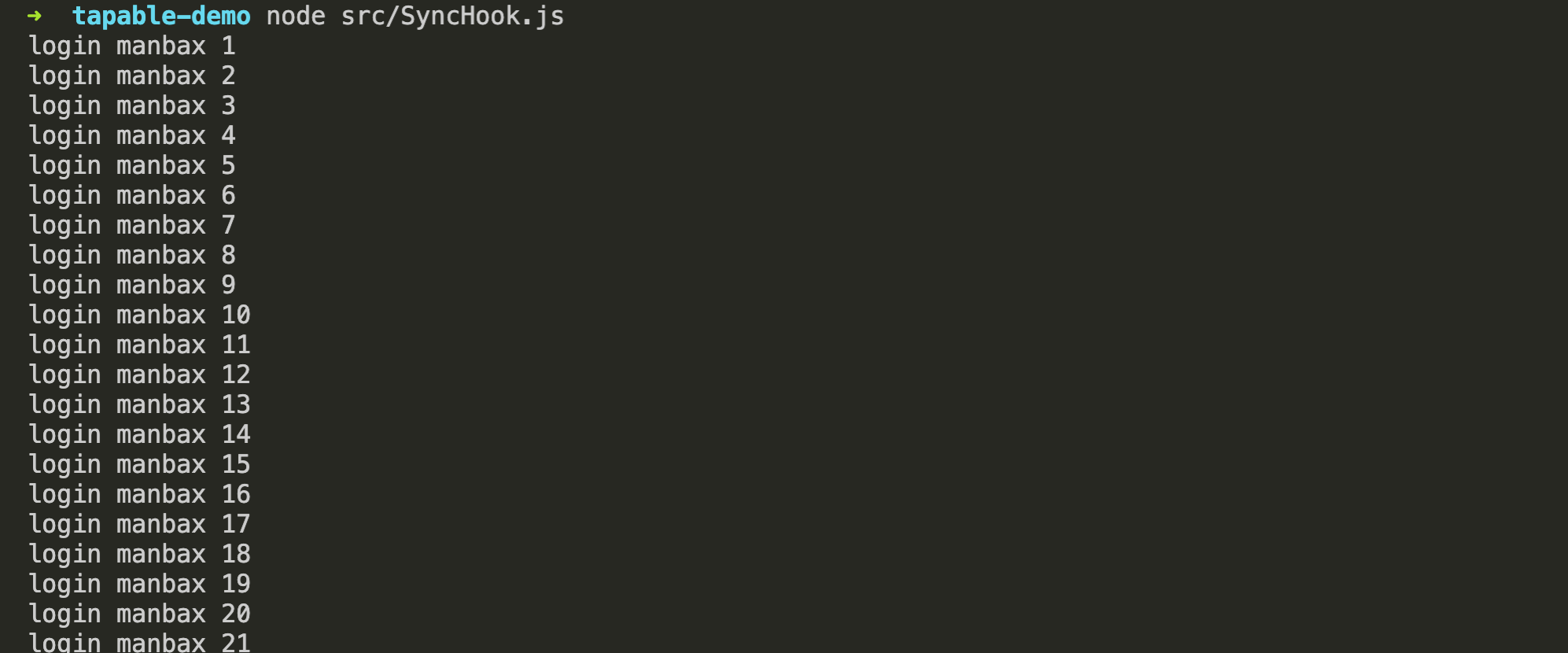
Async 类型钩子
Async 类型可以使用 tap、tapSync 和 tapPromise 注册不同类型的插件 “钩子”,分别通过 call、callAsync 和 promise 方法调用,我们下面会针对 AsyncParallelHook 和 AsyncSeriesHook 的 async 和 promise 两种方式分别介绍和模拟。
AsyncParallelHook
AsyncParallelHook 为异步并行执行,通过 tapAsync 注册的事件,通过 callAsync 触发;通过 tapPromise 注册的事件,通过 promise 触发(返回值可以调用 then 方法)
- tapAsync/callAsync
const { AsyncParallelHook } = require("tapable");

// 创建实例

let asyncParallelHook = new AsyncParallelHook(["name"]);

console.time("time");

// 注册事件

asyncParallelHook.tapAsync("login", (name, done) => {

  setTimeout(() => {

    console.log("login", name, new Date());

    done();

  }, 1000);

});

asyncParallelHook.tapAsync("register", (name, done) => {

  setTimeout(() => {

    console.log("register", name, new Date());

    done();

    console.timeEnd("time");

  }, 2000);

});

// 触发事件, callAsync 的最后一个参数为回调函数,在所有事件处理函数执行完毕后执行。

asyncParallelHook.callAsync("manbax", () => {

  console.log("complete");

});

上面的代码中:两个事件处理函数会并行的执行,都执行完成后(done 被调用),触发 callAsync 回调函数。所有 tapAsync 注册的事件处理函数最后一个参数都为一个回调函数 done,每个事件处理函数在异步代码执行完毕后调用 done 函数,则可以保证 callAsync 会在所有异步函数都执行完毕后执行,接下来看一看 callAsync 是如何实现的:
// 模拟 SyncLoopHook 类

class AsyncParallelHook {

  constructor(args) {

    this.args = args;

    this.taps = [];

  }

  tapAsync(name, task) {

    this.taps.push({

      name: name,

      fn: task,

      type: 'sync',

    });

  }

  callAsync(...args) {

      if (args.length < this.args.length) {

        throw new Error("参数不足");

      }

      let sum = 0

      const fn = args.pop();

      const params = args.splice(0, this.args.length);

      const done = () => {

        (++sum === this.taps.length) && fn()

      }

      this.taps.forEach(task => {

        task.fn(params, done)

      })

  }

}
- tapPromise/promise
要使用 tapPromise 注册事件,对事件处理函数有一个要求,必须返回一个 Promise 实例,而 promise 方法也返回一个 Promise 实例,callAsync 的回调函数在 promise 方法中用 then 的方式代替:
const { AsyncParallelHook } = require("tapable");

// 创建实例

let asyncParallelHook = new AsyncParallelHook(["name"]);

console.time("time");

// 注册事件

asyncParallelHook.tapPromise("login", (name) => {

  return new Promise((resolve, reject) => {

    setTimeout(() => {

      console.log("login", name, new Date());

      resolve();

    }, 1000);

  })

});

asyncParallelHook.tapAsync("register", (name) => {

  return new Promise((resolve, reject) => {

    setTimeout(() => {

      console.log("register", name, new Date());

      resolve();

      console.timeEnd("time");

    }, 2000);

  })

});

// 触发事件

asyncParallelHook.promise("manbax").then(() => {

  console.log("complete");

});

AsyncParallelHook 的实现:
class AsyncParallelHook {

  constructor(args) {

    this.args = args;

    this.taps = [];

  }

  tapPromise(name, task) {

    this.taps.push({

      name: name,

      fn: task,

      type: 'async',

    });

  }

  promise(...args) {

      if (args.length < this.args.length) {

        throw new Error("参数不足");

      }

      return new Promise.all(this.taps.map(task => task.fn(...args)))

  }

}
AsyncParallelBailHook
- tapPromise/promise
const { AsyncParallelBailHook } = require("tapable");

// 创建实例

let userHook = new AsyncParallelBailHook(["name"]);

console.time("time");

// 注册事件

userHook.tapPromise("login", (name) => {

  return new Promise((resolve, reject) => {

    setTimeout(() => {

      console.log("login", name, new Date());

      resolve(undefined) // 此处为 undefined 进入到下一个回调

    }, 1000);

  })

});

userHook.tapPromise("register", (name) => {

  return new Promise((resolve, reject) => {

    setTimeout(() => {

      console.log("register", name, new Date());

      resolve("2"); // 这个回调完成后直接触发最后回调

    }, 2000);

  })

});

userHook.tapPromise("enroll", (name) => {

  return new Promise((resolve, reject) => {

    setTimeout(() => {

      console.log("enroll", name, new Date());

      reject("2");

      console.timeEnd("time");

    }, 3000);

  })

});

// 触发事件

userHook.promise("manbax").then((res) => {

  console.log("complete", res)

}).catch(err => {

  console.log("error", err)

})
AsyncSeriesHook
AsyncSeriesHook 为异步串行执行,与 AsyncParallelHook 相同,通过 tapAsync 注册的事件,通过 callAsync 触发,通过 tapPromise 注册的事件,通过 promise 触发,可以调用 then 方法。
- tapAsync/callAsync
const { AsyncSeriesHook } = require("tapable");

// 创建实例

let userHook = new AsyncSeriesHook(["name"]);

console.time()

userHook.tapAsync('login', function(name, done) {

  setTimeout(() => {

    console.log('login--', name, new Date())

    done()

  }, 1000)

})

userHook.tapAsync('register', function(name, done){

  setTimeout(() => {

    console.log('register--', name, new Date())

    done()

  }, 2000)

})

// 整个调用花费了 3S

userHook.callAsync('manbax', () => {

  console.log('complete')

  console.timeEnd()

})
- tapPromise/promise
const { AsyncSeriesHook } = require("tapable");

// 创建实例

let userHook = new AsyncSeriesHook(["name"]);

console.time()

userHook.tapPromise('login', function(name){

  return new Promise((resolve) => {

    setTimeout(() => {

      console.log('login--', name, new Date())

      resolve()

    }, 1000)

  })

})

userHook.tapPromise('register', function(name){

  return new Promise((resolve) => {

    setTimeout(() => {

      console.log('register--', name, new Date())

      resolve()

    }, 2000)

  })

})

// 整个调用花费了 3S

userHook.promise('manbax').then(res => {

  console.log('complete')

  console.timeEnd()

})
AsyncSeriesBailHook
const { AsyncSeriesBailHook } = require("tapable");

// 创建实例

let userHook = new AsyncSeriesBailHook(["name"]);

console.time()

userHook.tapAsync('login', function(name, done) {

  setTimeout(() => {

    console.log('login--', name, new Date())

    done(1) // 这里返回1, 第二个不会执行(register)

  }, 1000)

})

userHook.tapAsync('register', function(name, done){

  setTimeout(() => {

    console.log('register--', name, new Date())

    done(2)

  }, 2000)

})

// 整个调用花费了 3S

userHook.callAsync('manbax', (_, data) => {

  console.log('complete')

  console.timeEnd()

})
AsyncSeriesWaterfallHook
- tapAsync/callAsync: tapAsync 中的 done 回调函数需要传入两个参数,第一个表示是否有异常,第二个为返回值。
const { AsyncSeriesWaterfallHook } = require("tapable");

// 创建实例

let userHook = new AsyncSeriesWaterfallHook(["name"]);

console.time()

userHook.tapAsync('login', function(name, done) {

  setTimeout(() => {

    console.log('login--', name, new Date())

    done(null, "1")

  }, 1000)

})

userHook.tapAsync('register', function(name, done){

  setTimeout(() => {

    console.log('register--', name, new Date())

    done(null, "2")

  }, 2000)

})

// 整个调用花费了 3S

userHook.callAsync('manbax', (_, data) => {

  console.log('complete', data)

  console.timeEnd()

})
API模拟实现
SyncHook
// 模拟 SyncHook 类

class MySyncHook {

  constructor(args) {

    this.args = args;

    this.taps = [];

  }

  tap(name, task) {

    this.taps.push({

      name: name,

      fn: task,

      type: 'sync',

    });

  }

  call(...args) {

      if (args.length < this.args.length) {

        // 参数不足时抛出异常

        throw new Error("参数不足");

      }

      // 参数长度与创建实例传入数组长度一直,不足补 undefined

      // 因为长度不足时已经抛出异常,故注释

      // args = args.slice(0, this.args.length);

      // 依次执行事件处理函数

      this.taps.forEach(task => task.fn(...args));

  }

}
SyncBailHook
// 模拟 SyncBailHook 类

class SyncBailHook {

  constructor(args) {

    this.args = args;

    this.taps = [];

  }

  tap(name, task) {

    this.taps.push({

      name: name,

      fn: task,

      type: 'sync',

    });

  }

  call(...args) {

      if (args.length < this.args.length) {

        throw new Error("参数不足");

      }

      let i = 0, res;

      do {

        res = this.taps[i++].fn(...args)

      } while (res === undefined && i < this.taps.length)

  }

}
SyncWaterfallHook
// 模拟 SyncWaterfallHook 类

class SyncWaterfallHook {

  constructor(args) {

    this.args = args;

    this.taps = [];

  }

  tap(name, task) {

    this.taps.push({

      name: name,

      fn: task,

      type: 'sync',

    });

  }

  call(...args) {

      if (args.length < this.args.length) {

        throw new Error("参数不足");

      }

      return this.taps.reduce((res, current) => {

        let _res = current.fn(res)

        // 若当前的回调函数没有返回值,那么就使用上一个参数

        return _res !== undefined ? _res : res

      }, ...args)

  }

}
SyncLoopHook
// 模拟 SyncLoopHook 类

class SyncLoopHook {

  constructor(args) {

    this.args = args;

    this.taps = [];

  }

  tap(name, task) {

    this.taps.push({

      name: name,

      fn: task,

      type: 'sync',

    });

  }

  call(...args) {

      if (args.length < this.args.length) {

        throw new Error("参数不足");

      }

      let i = 0

      while (i < this.taps.length) {

        const task = this.taps[i++].fn

        const magic = function () {

          let res = task(...args)

          if (res !== undefined) {

            magic()

          }

        };

        magic();

      }

  }

}
AsyncSeriesHook
class AsyncSeriesHook {

  constructor(args) {

    this.args = args;

    this.taps = [];

  }

  tapAsync(name, task) {

    this.taps.push({

      name: name,

      fn: task,

    });

  }

  callAsync(...args) {

    if (args.length < this.args.length) {

      throw new Error("参数不足");

    }

    let i = 0

    const cb = args.pop()

    const _args = args.splice(0, args.length)

    const next = () => {

      const task = this.taps[i++]

      if (task) {

        task.fn(..._args, next)

      } else {

        cb()

      }

    }

    next()

  }

}
AsyncSeriesWaterfallHook
 class AsyncSeriesWaterfallHook {

     constructor() {

         this.tasks = [];

     }

     tap(name, task) {

         this.tasks.push(task);

     }

     call(...args, finalCb) {

         let count = 0;

         const len = this.tasks.length;

         const next = (err, data) => {

             if(count === len) return finalCb()

             let task = this.tasks[count];

             if (count === 0) {

                 task(...args, next);

             } else {

                 task(data, next);

             }

             count++;

         };

         next()

     }

 }
总结
仔细思考发现 Tapable 事件机制 就像工厂里面生产线:
- 前序工位的输出是后序工位的输入
- 当某个产品在流产线上的工位发生异常时,这个产品的后序流程终止
它非常适合用于解决流水作业,就像 Webpack 对文件进行处理正是这样的场景。学习 tapable 有助于帮助我们更高的理解 Webpack。
tapable的注册事件的方法有:tab/tapSync/tapPromise 和触发事件的方法 call/callAsync/promise,在 Webpack 中,我们通过这些API来设计钩子,这些 “钩子” 能够将 Webpack 中插件/加载器/功能独立的模块连接起来,以减少耦合性和提高扩展性。
从 Tapable 中得到的启发的更多相关文章
- 这才是官方的tapable中文文档
起因 搜索引擎搜索tapable中文文档,你会看见各种翻译,点进去一看,确实是官方的文档翻译过来的,但是webpack的文档确实还有很多需要改进的地方,既然是开源的为什么不去github上的tapab ...
- webpack4.0各个击破(8)—— tapable篇
webpack作为前端最火的构建工具,是前端自动化工具链最重要的部分,使用门槛较高.本系列是笔者自己的学习记录,比较基础,希望通过问题 + 解决方式的模式,以前端构建中遇到的具体需求为出发点,学习we ...
- Photoshop中的高斯模糊、高反差保留和Halcon中的rft频域分析研究
在Halcon的rft变换中,我们经常可以看到这样的算子组合: rft_generic (Image, ImageFFT2, 'to_freq', 'none', 'complex', Width) ...
- Tapable 0.2.8 入门
[原文:Tapable 0.2.8 入门] tapable是webpack的核心框架(4.0以上版本的API已经发生了变化),是一个基于事件流的框架,或者叫做发布订阅模式,或观察者模式,webpack ...
- IntelliJ IDEA+SpringBoot中静态资源访问路径陷阱:静态资源访问404
IntelliJ IDEA+SpringBoot中静态资源访问路径陷阱:静态资源访问404 .embody{ padding:10px 10px 10px; margin:0 -20px; borde ...
- webpack4核心模块tapable源码解析
_ 阅读目录 一:理解Sync类型的钩子 1. SyncHook.js 2. SyncBailHook.js 3. SyncWaterfallHook.js 4. SyncLoopHook.js 二: ...
- webpack4.0源码分析之Tapable
1 Tapable简介 webpack本质上是一种事件流的机制,它的工作流程就是将各个插件串联起来,而实现这一切的核心就是Tapable,webpack中最核心的负责编译的Compiler和负责创建b ...
- Webpack 核心模块 tapable 解析(转)
原文出自:https://www.pandashen.com 前言 Webpack 是一个现代 JavaScript 应用程序的静态模块打包器,是对前端项目实现自动化和优化必不可少的工具,We ...
- 将Lambda表达式作为参数传递并解析-在构造函数参数列表中使用Lambda表达式
public class DemoClass { /// <summary> /// 通过Lambda表达式,在构造函数中赋初始值 /// </summary> /// < ...
随机推荐
- Java实现 LeetCode 449 序列化和反序列化二叉搜索树
449. 序列化和反序列化二叉搜索树 序列化是将数据结构或对象转换为一系列位的过程,以便它可以存储在文件或内存缓冲区中,或通过网络连接链路传输,以便稍后在同一个或另一个计算机环境中重建. 设计一个算法 ...
- Java实现 蓝桥杯VIP 算法训练 阶乘末尾
问题描述 给定n和len,输出n!末尾len位. 输入格式 一行两个正整数n和len. 输出格式 一行一个字符串,表示答案.长度不足用前置零补全. 样例输入 6 5 样例输出 00720 数据规模和约 ...
- java实现蔬菜价格计算
** 蔬菜价格计算** 计算蔬菜总价 为了丰富群众菜篮子,平抑菜价,相关部分组织了蔬菜的调运.今某箱中有多个品种的蔬菜.蔬菜的单价(元/公斤)存放在price数组中,蔬菜的重量(公斤)存放在weigh ...
- java实现第五届蓝桥杯生物芯片
生物芯片 X博士正在研究一种生物芯片,其逻辑密集度.容量都远远高于普通的半导体芯片. 博士在芯片中设计了 n 个微型光源,每个光源操作一次就会改变其状态,即:点亮转为关闭,或关闭转为点亮. 这些光源的 ...
- java实现第六届蓝桥杯分机号
分机号 X老板脾气古怪,他们公司的电话分机号都是3位数,老板规定,所有号码必须是降序排列,且不能有重复的数位.比如: 751,520,321 都满足要求,而, 766,918,201 就不符合要求. ...
- 对LinkedList源码的一些个人理解
由于转行的原因,最近打算开始好好学习,昨天看到了部分的LinkedList源码,并且看了一点数据结构的视频,现总结部分自己的心得体会,以供后期给现在的自己拍砖~ 双向链表每一个元素都有数据本身加指向前 ...
- 经典文本特征表示方法: TF-IDF
引言 在信息检索, 文本挖掘和自然语言处理领域, IF-IDF 这个名字, 从它在 20 世纪 70 年代初被发明, 已名震江湖近半个世纪而不曾衰歇. 它表示的简单性, 应用的有效性, 使得它成为不同 ...
- @Ajax.ActionLink跳转页面的问题解决方案 MVC Ajax不支持问题
[JavaScriptResult]在客户端执行服务器返回的JavaScript代码当一个内置的Ajax辅助方法请求一个操作方法,该方法会返回一个在客户端执行立即的脚本. public ActionR ...
- iOS -实现UIView圆角显示的方法
添加一个UIView时,默认直角显示有时对于有强迫症的患者还真有点不舒服! eg: 怎么实现UIview的圆角显示呢? 首先包含一个头文件: #import <QuartzCore/Quartz ...
- WinUI 3试玩报告
1. 什么是 WinUI 3 在微软 Build 2020 开发者大会上,WinUI 团队宣布可公开预览的 WinUI 3 Preview 1,它让开发人员可以在 Win32 中使用 WinUI.Wi ...