
Link Analysis_2_Application
US Cities Distribution Network
1.1 Task Description
Nodes: Cities with attributes (1) location, (2) population;
%matplotlib notebook

import networkx as nx

import matplotlib.pyplot as plt

G = nx.read_gpickle('major_us_cities')
G.nodes(data=True)
[('El Paso, TX', {'location': (-106, 31), 'population': 674433}),

 ('Long Beach, CA', {'location': (-118, 33), 'population': 469428}),

 ('Dallas, TX', {'location': (-96, 32), 'population': 1257676}),

 ('Oakland, CA', {'location': (-122, 37), 'population': 406253}),

 ('Albuquerque, NM', {'location': (-106, 35), 'population': 556495}),

 ('Baltimore, MD', {'location': (-76, 39), 'population': 622104}),

 ('Raleigh, NC', {'location': (-78, 35), 'population': 431746}),

 ('Mesa, AZ', {'location': (-111, 33), 'population': 457587}),

 ('Arlington, TX', {'location': (-97, 32), 'population': 379577}),

 ('Sacramento, CA', {'location': (-121, 38), 'population': 479686}),

 ('Wichita, KS', {'location': (-97, 37), 'population': 386552}),

 ('Tucson, AZ', {'location': (-110, 32), 'population': 526116}),

 ('Cleveland, OH', {'location': (-81, 41), 'population': 390113}),

 ('Louisville/Jefferson County, KY',

  {'location': (-85, 38), 'population': 609893}),

 ('San Jose, CA', {'location': (-121, 37), 'population': 998537}),

 ('Oklahoma City, OK', {'location': (-97, 35), 'population': 610613}),

 ('Atlanta, GA', {'location': (-84, 33), 'population': 447841}),

 ('New Orleans, LA', {'location': (-90, 29), 'population': 378715}),

 ('Miami, FL', {'location': (-80, 25), 'population': 417650}),

 ('Fresno, CA', {'location': (-119, 36), 'population': 509924}),

 ('Philadelphia, PA', {'location': (-75, 39), 'population': 1553165}),

 ('Houston, TX', {'location': (-95, 29), 'population': 2195914}),

 ('Boston, MA', {'location': (-71, 42), 'population': 645966}),

 ('Kansas City, MO', {'location': (-94, 39), 'population': 467007}),

 ('San Diego, CA', {'location': (-117, 32), 'population': 1355896}),

 ('Chicago, IL', {'location': (-87, 41), 'population': 2718782}),

 ('Charlotte, NC', {'location': (-80, 35), 'population': 792862}),

 ('Washington D.C.', {'location': (-77, 38), 'population': 646449}),

 ('San Antonio, TX', {'location': (-98, 29), 'population': 1409019}),

 ('Phoenix, AZ', {'location': (-112, 33), 'population': 1513367}),

 ('San Francisco, CA', {'location': (-122, 37), 'population': 837442}),

 ('Memphis, TN', {'location': (-90, 35), 'population': 653450}),

 ('Los Angeles, CA', {'location': (-118, 34), 'population': 3884307}),

 ('New York, NY', {'location': (-74, 40), 'population': 8405837}),

 ('Denver, CO', {'location': (-104, 39), 'population': 649495}),

 ('Omaha, NE', {'location': (-95, 41), 'population': 434353}),

 ('Seattle, WA', {'location': (-122, 47), 'population': 652405}),

 ('Portland, OR', {'location': (-122, 45), 'population': 609456}),

 ('Tulsa, OK', {'location': (-95, 36), 'population': 398121}),

 ('Austin, TX', {'location': (-97, 30), 'population': 885400}),

 ('Minneapolis, MN', {'location': (-93, 44), 'population': 400070}),

 ('Colorado Springs, CO', {'location': (-104, 38), 'population': 439886}),

 ('Fort Worth, TX', {'location': (-97, 32), 'population': 792727}),

 ('Indianapolis, IN', {'location': (-86, 39), 'population': 843393}),

 ('Las Vegas, NV', {'location': (-115, 36), 'population': 603488}),

 ('Detroit, MI', {'location': (-83, 42), 'population': 688701}),

 ('Nashville-Davidson, TN', {'location': (-86, 36), 'population': 634464}),

 ('Milwaukee, WI', {'location': (-87, 43), 'population': 599164}),

 ('Columbus, OH', {'location': (-82, 39), 'population': 822553}),

 ('Virginia Beach, VA', {'location': (-75, 36), 'population': 448479}),

 ('Jacksonville, FL', {'location': (-81, 30), 'population': 842583})]
1.2 Create Layouts for Plotting
Dictionary for node positioning methods:
[x for x in nx.__dir__() if x.endswith('_layout')]
['circular_layout',

 'random_layout',

 'shell_layout',

 'spring_layout',

 'spectral_layout',

 'fruchterman_reingold_layout']
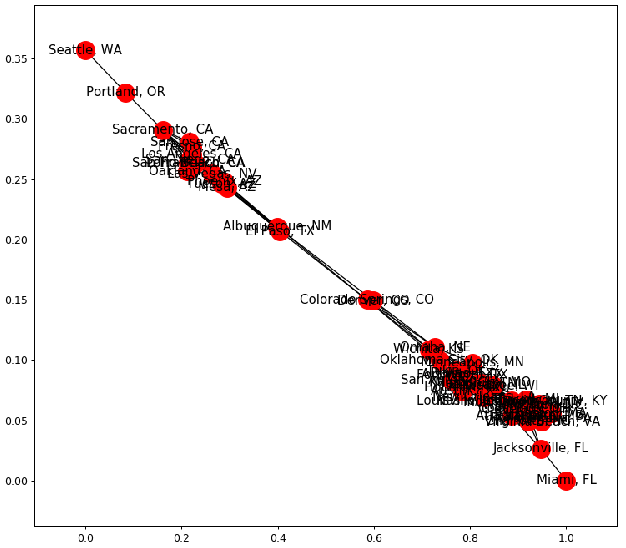
1.2.1 Spring Layout (default) Node Positioning: (1) As few crossing edges as possible; (2) Keep edge length similar.
plt.figure(figsize=(10,9))

nx.draw_networkx(G)
1.2.2 Random Layout
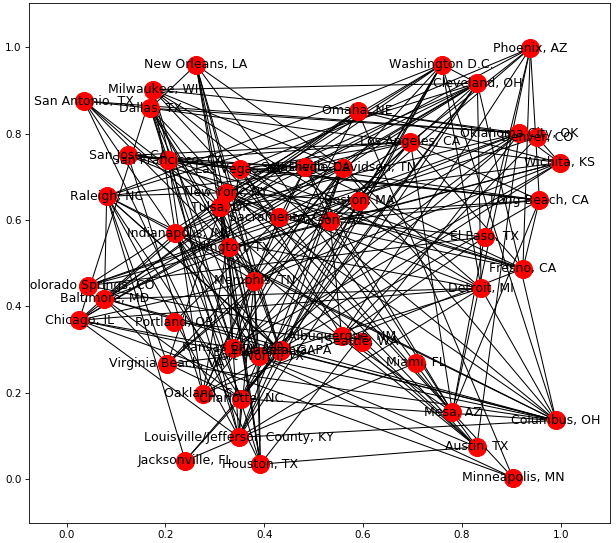
plt.figure(figsize=(10,9))

pos = nx.random_layout(G)

nx.draw_networkx(G, pos)
1.2.3 Cicular Layout
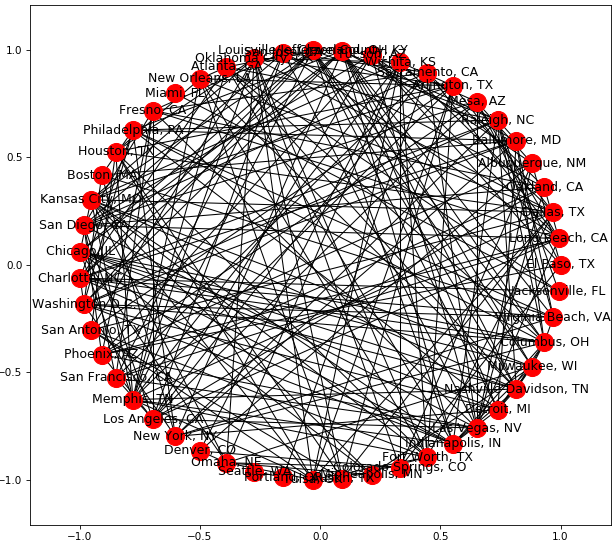
plt.figure(figsize=(10,9))

pos = nx.circular_layout(G)

nx.draw_networkx(G, pos)
1.2.4 Custom Layout
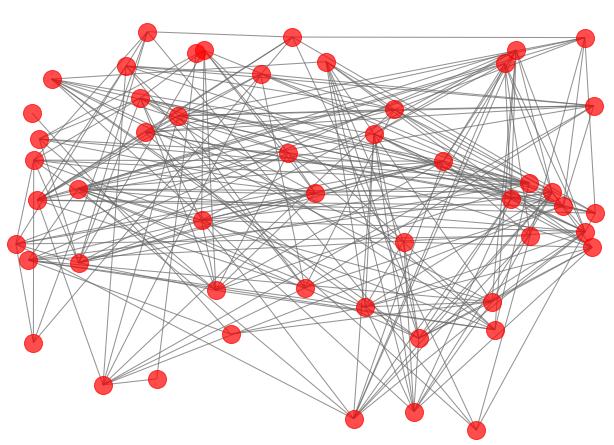
plt.figure(figsize=(10,7))

pos = nx.get_node_attributes(G, 'location')

nx.draw_networkx(G, pos)

plt.figure(figsize=(10,7))

nx.draw_networkx(G, pos, alpha=0.7, with_labels=False, edge_color='.4')

plt.axis('off')

plt.tight_layout();
Set size of nodes based on population, multiply pop with small number so plots won't be large.
Get weights of transportation costs and pass it to edges.
plt.figure(figsize=(10,7))

node_color = [G.degree(v) for v in G]

node_size = [0.0005 * nx.get_node_attributes(G, 'population')[v] for v in G]

edge_width = [0.0015*G[u][v]['weight'] for u,v in G.edges()]

nx.draw_networkx(G, pos, node_size=node_size,

                 node_color=node_color, alpha=0.7, with_labels=False,

                 width=edge_width, edge_color='.4', cmap=plt.cm.Blues)

plt.axis('off')

plt.tight_layout();
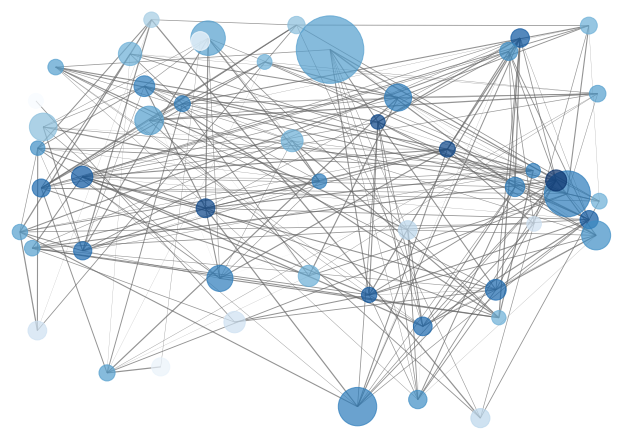
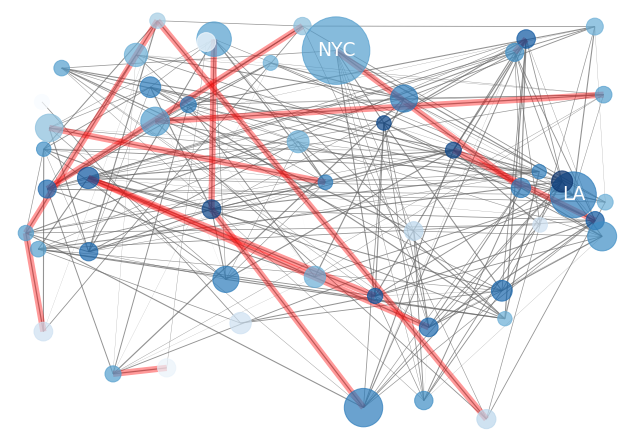
Display the most expensive costs, i.e., separately add specific labels and edges.
plt.figure(figsize=(10,7))

node_color = [G.degree(v) for v in G]

node_size = [0.0005*nx.get_node_attributes(G, 'population')[v] for v in G]

edge_width = [0.0015*G[u][v]['weight'] for u,v in G.edges()]

nx.draw_networkx(G, pos, node_size=node_size,

                 node_color=node_color, alpha=0.7, with_labels=False,

                 width=edge_width, edge_color='.4', cmap=plt.cm.Blues)

greater_than_770 = [x for x in G.edges(data=True) if x[2]['weight']>770]

nx.draw_networkx_edges(G, pos, edgelist=greater_than_770, edge_color='r', alpha=0.4, width=6)

nx.draw_networkx_labels(G, pos, labels={'Los Angeles, CA': 'LA', 'New York, NY': 'NYC'}, font_size=18, font_color='w')

plt.axis('off')

plt.tight_layout();
1.3 Degree Distribution
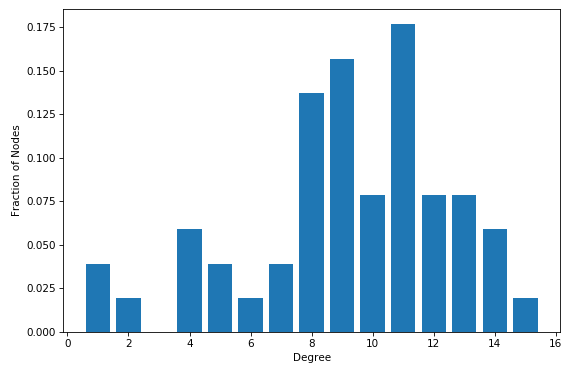
Probability distributions over entire network
# function degree() returns a dictionary with keys being nodes and

# values being degrees of nodes

degrees = G.degree()

degree_values = sorted(set(degrees.values()))

histogram = [list(degrees.values()).count(i)/float(nx.number_of_nodes(G)) for i in degree_values]

import matplotlib.pyplot as plt

plt.bar(degree_values, histogram)

plt.xlabel('Degree')

plt.ylabel('Fraction of Nodes')

plt.show()
1.4 Extracting Attributes
1.4.1 Node-based Method
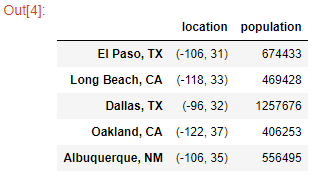
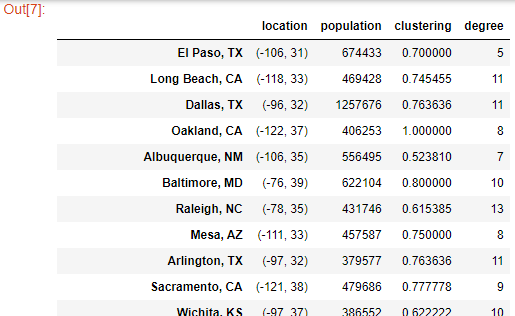
Transform into DataFrame columns, initialize the dataframe, using the nodes as the index:
df = pd.DataFrame(index = G.nodes())
df['location'] = pd.Series(nx.get_node_attributes(G, 'location'))

df['population'] = pd.Series(nx.get_node_attributes(G, 'population'))

df.head()
Add features:
df['clustering'] = pd.Series(nx.clustering(G))

df['degree'] = pd.Series(G.degree())

df
1.4.2 Edge-based Features
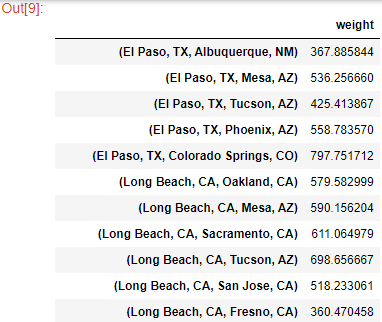
Initialize the DataFrame, using the edges as the index:
G.edges(data=True)

df = pd.DataFrame(index=G.edges())

df['weight'] = pd.Series(nx.get_edge_attributes(G, 'weight'))

df
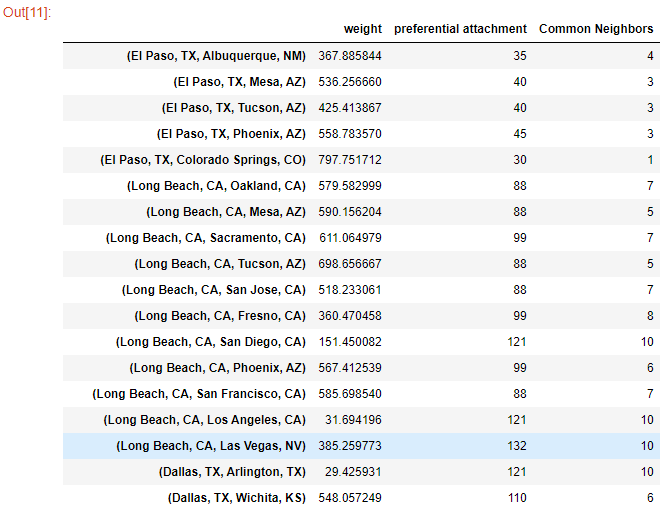
df['preferential attachment'] = [i[2] for i in nx.preferential_attachment(G, df.index)]

df['Common Neighbors'] = df.index.map(lambda city: len(list(nx.common_neighbors(G, city[0], city[1]))))

df
Link Analysis_2_Application的更多相关文章
- oracle db link的查看创建与删除
1.查看dblink select owner,object_name from dba_objects where object_type='DATABASE LINK'; 或者 select * ...
- 解决Java程序连接mysql数据库出现CommunicationsException: Communications link failure错误的问题
一.背景 最近在家里捣鼓一个公司自己搭建的demo的时候,发现程序一启动就会出现CommunicationsException: Communications link failure错误,经过一番排 ...
- 解决绝对定位div position: absolute 后面的<a> Link不能点击
今天布局的时候,遇到一个bug,当DIV设置为绝对定位时,这个div后面的相对定位的层里面的<a>Link标签无法点击. 网上的解决方案是在绝对定位层里面添加:pointer-events ...
- LINK : fatal error LNK1123: 转换到 COFF 期间失败: 文件无效或损坏
同时安装了VS2012和VS2010,用VS2010 时 >LINK : fatal error LNK1123: 转换到 COFF 期间失败: 文件无效或损坏 问题说明:当安装VS2012之后 ...
- VS2013的 Browser Link 引起的问题
环境:vs2013 问题:在调用一个WebApi的时候出现了错误: 于是我用Fiddler 4直接调用这个WebApi,状态码是200(正常的),JSon里却提示在位置9409处文本非法, 以Text ...
- angular中的compile和link函数
angular中的compile和link函数 前言 这篇文章,我们将通过一个实例来了解 Angular 的 directives (指令)是如何处理的.Angular 是如何在 HTML 中找到这些 ...
- AngularJS之指令中controller与link(十二)
前言 在指令中存在controller和link属性,对这二者心生有点疑问,于是找了资料学习下. 话题 首先我们来看看代码再来分析分析. 第一次尝试 页面: <custom-directive& ...
- Visual Studio 2013中因SignalR的Browser Link引起的Javascript错误一则
众所周知Visual Studio 2013中有一个由SignalR机制实现的Browser Link功能,意思是开发人员可以同时使用多个浏览器进行调试,当按下IDE中的Browser Link按钮后 ...
- link与@import的区别
我们都知道link与@import都可以引入css样式表,那么这两种的区别是什么呢?先说说它们各自的链接方式,然后说说它们的区别~~~ link链入的方式: <link rel="st ...
随机推荐
- HYSBZ-2038小Z的袜子
作为一个生活散漫的人,小Z每天早上都要耗费很久从一堆五颜六色的袜子中找出一双来穿.终于有一天,小Z再也无法忍受这恼人的找袜子过程,于是他决定听天由命-- 具体来说,小Z把这N只袜子从1到N编号,然后从 ...
- 关闭AnyConnect登录安全警告窗口
一.问题描述:使用AnyConnect client连接时,如何关闭的安全警告窗口? 二.原因分析: AnyConnect Server(ASA)和AnyConect client(PC)上没有受 ...
- linux和windows系统的区别
在21世纪的今天,互联网可以说是当代发展最为迅速的行业,举个很简单的例子,现在的我们不论什么年龄阶层,几乎人手都有一部手机,上面的某博,某音,末手等软件,更是受到多数人的热爱,并且人们不仅仅用其来消遣 ...
- 查看服务器CPU相关信息!
# 查看物理CPU个数 cat /proc/cpuinfo| grep "physical id"| sort| uniq| wc -l # 查看每个物理CPU中core的个数(即 ...
- Nginx安装部署!
安装Nginx方法一:利用u盘导入Nginx软件包 二nginx -t 用于检测配置文件语法 如下报错1:配置文件43行出现错误 [root@www ~]# nginx -tnginx: [emerg ...
- SyntaxError: (unicode error) 'utf-8' codec can't decode byte 0xd0 in position 2: invalid continuation byte
[root@hostuser src]# python3 subprocess_popen.py File "subprocess_popen.py", line 23Syntax ...
- redhat 7.6 iptables 配置
1.查看iptables默认表(filter) iptables -L -n 2.iptables 默认内链(filter)表三种: INPUT:处理进入防火墙的数据包 FORWARD:源自其他计算机 ...
- lnmp1.5安装memcache
1.安装libevent 由于Memcache用到了libevent这个库用于Socket的处理,所以需要安装libevent. # wget http://www.monkey.org/~provo ...
- Python 爬取的类封装【将来可能会改造,持续更新...】(2020年寒假小目标09)
日期:2020.02.09 博客期:148 星期日 按照要求,我来制作 Python 对外爬取类的固定部分的封装,以后在用 Python 做爬取的时候,可以直接使用此类并定义一个新函数来处理CSS选择 ...
- GIS中DTM/DEM/DSM/DOM的含义
DTM(Digital Terrain Model):数字地面模型,是一个表示地面特征空间分布的数据库,一般用一系列地面点坐 标(x,y,z)及地表属性(目标类别.特征等)绗成数据阵列,以此组成数字地 ...