
Day 15:缓冲输入输出常用方法和小练习
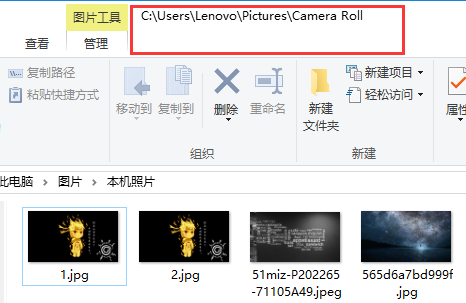
以拷贝图片为例子,演示异常处理的代码: 拷贝一张图片
import java.io.File;
import java.io.FileInputStream;
import java.io.FileOutputStream;
import java.io.IOException;
public class Demo1 {
public static void main(String[] args) throws IOException {
//找到目标文件
File inFile = new File("C:\\Users\\Lenovo\\Pictures\\Camera Roll\\1.jpg");
File destFile = new File("C:\\Users\\Lenovo\\Pictures\\Camera Roll\\2.jpg");
//建立数据的输入输出通道
FileInputStream fileInputStream = new FileInputStream(inFile);
FileOutputStream fileOutputStream = new FileOutputStream(destFile);
//每新创建一个FileOutputStream的时候,默认情况下FileOutputStream 的指针是指向了文件的开始的位置。 每写出一次,指向都会出现相应移动。
//建立缓冲数据,边读边写
byte[] buf = new byte[1024];
int length = 0 ;
while((length = fileInputStream.read(buf))!=-1){ //最后一次只剩下了824个字节
fileOutputStream.write(buf,0,length); //写出很多次数据,所以就必须要追加。
}
//关闭资源 原则: 先开后关,后开先关。
fileOutputStream.close();
fileInputStream.close();
}
}
异常处理:关闭执行后面的代码,并将异常抛给调用对象
import java.io.File;

import java.io.FileInputStream;

import java.io.FileNotFoundException;

import java.io.FileOutputStream;

import java.io.IOException;

public class Demo1 {

      public static void main(String[] args){

          //找到目标文件

          File inFile = new File("C:\\Users\\Lenovo\\Pictures\\Camera Roll\\1.jpg");

          File destFile = new File("C:\\Users\\Lenovo\\Pictures\\Camera Roll\\2.jpg");

          //建立数据的输入输出通道

          FileInputStream fileInputStream;

              try {

                fileInputStream = new  FileInputStream(inFile);

            } catch (FileNotFoundException e) {

                throw new RuntimeException(e);

            }

              FileOutputStream fileOutputStream;

            try {

                fileOutputStream = new FileOutputStream(destFile);

            } catch (FileNotFoundException e) {

                throw new RuntimeException(e);

            }

          //每新创建一个FileOutputStream的时候,默认情况下FileOutputStream 的指针是指向了文件的开始的位置。 每写出一次,指向都会出现相应移动。

          //建立缓冲数据,边读边写

          byte[] buf = new byte[1024];

          int length = 0 ;

          try {

            while((length = fileInputStream.read(buf))!=-1){ //最后一次只剩下了824个字节

                  try {

                    fileOutputStream.write(buf,0,length);

                } catch (IOException e) {

                    throw new RuntimeException(e);

                } //写出很多次数据,所以就必须要追加。

              }

          } catch (IOException e1) {

            // TODO Auto-generated catch block

            throw new RuntimeException(e1);

          }

         finally { //关闭资源 原则: 先开后关,后开先关。

             if(fileOutputStream!=null) {

                  try {

                    fileOutputStream.close();

                    System.out.println("关闭成功");

                  } catch (IOException e) {

                    throw new RuntimeException(e);

                  }

                  try {

                    fileInputStream.close();

                    System.out.println("关闭成功");

                  } catch (IOException e) {

                    throw new RuntimeException(e);

                  }

            }

         }

     }

}
这样做虽然代码更长了,但是可以更好的处理异常使得代码更加灵活

读取文件数据使用缓冲数组读取效率更高,所以缓冲输入字节流对象,让我们可以更高效率读取文件。
输入字节流体系:
InputStream 输入字节流的基类 是抽象类
FileInputStream 读取文件数据的输入字节流
BufferedInputStream 缓冲输入字节流缓冲输入字节流的出现主要是为了提高读取文件数据的效率。
其实该类内部只不过是维护了一个8kb的字节数组而已。
注意: 凡是缓冲流都不具备读写文件的能力
使用BufferedInputStream的步骤 :
1. 找到目标文件。
2. 建立数据 的输入通道
3. 建立缓冲 输入字节流流
4. 关闭资源
import java.io.BufferedInputStream;

import java.io.BufferedOutputStream;

import java.io.File;

import java.io.FileInputStream;

import java.io.FileOutputStream;

import java.io.IOException;

public class Demo2 {

    public static void main(String[] args) throws IOException {

        readTest2();

    }

    public static void readTest2() throws IOException{

        File file = new File("F:\\a.txt");

        FileInputStream fileInputStream= new FileInputStream(file);

        BufferedInputStream bufferedInputStream= new BufferedInputStream(fileInputStream);

        bufferedInputStream.read();

        FileOutputStream fileOutputStream= new FileOutputStream(file);

        BufferedOutputStream bufferedOutputStream= new BufferedOutputStream(fileOutputStream);

        fileOutputStream.write(null);

        int content = 0 ;

        while((content = fileInputStream.read())!=-1){

            System.out.print((char)content);

        }

        bufferedInputStream.close();

    }

}
Q:FileInputStream和BufferedInputStream 都一次只读一个字节为什么后者效率会高
A:BufferedInputStream的Read方法维护了一个8kb的缓冲数组,他会一次性读入8kb并且放在内存中,然后再从内存中一个字节一个字节读取,所以快。FileInputStream是从硬盘中一个字节一个字节读取的所以慢
输出字节流
OutputStream 所有输出字节流的基类 抽象类
FileOutputStream 向文件 输出数据 的输出字节流
Bufferedoutputstream 缓冲输出字节流 BufferedOutputStream出现的目的是为了提高写数据的效率。
内部也是维护了一个8kb的字节数组而已。
使用BufferedOutputStream的步骤:
1. 找到目标文件
2. 建立数据的输出通道
BufferedOutputStream 要注意的细节
使用BufferedOutStream写数据的时候,它的write方法是是先把数据写到它内部维护的字节数组中,如果需要把数据真正的写到硬盘上面,需要
调用flush方法或者是close方法、 或者是内部维护的字节数组已经填满数据的时候。
import java.io.BufferedOutputStream;

import java.io.File;

import java.io.FileNotFoundException;

import java.io.FileOutputStream;

import java.io.IOException;

public class Demo3 {

    public static void main(String[] args) throws IOException {

        File file = new File("F:\\1.jpg");

        FileOutputStream  fileOutputStream = new FileOutputStream(file);

        BufferedOutputStream bufferedOutputStream  = new BufferedOutputStream(fileOutputStream);

        bufferedOutputStream.write("hello world".getBytes());

        //bufferedOutputStream.flush();

        bufferedOutputStream.close();

    }

}
import java.io.BufferedInputStream;

import java.io.BufferedOutputStream;

import java.io.File;

import java.io.FileInputStream;

import java.io.FileOutputStream;

import java.io.IOException;

public class Demo4 {

    public static void main(String[] args) throws IOException {

        File  inFile = new File("F:\\1.jpg");

        File outFile = new File("E:\\2.jpg");

        FileInputStream fileInputStream = new FileInputStream(inFile);

        FileOutputStream fileOutputStream = new FileOutputStream(outFile);

        BufferedInputStream bufferedInputStream = new BufferedInputStream(fileInputStream);

        BufferedOutputStream bufferedOutputStream = new BufferedOutputStream(fileOutputStream);

        int content = 0;

        while((content = bufferedInputStream.read())!=-1){

            bufferedOutputStream.write(content);

        bufferedInputStream.close();

        bufferedOutputStream.close();

        }

    }

}
Day 15:缓冲输入输出常用方法和小练习的更多相关文章
- Day 17:缓冲输出字符流和用缓冲输入输出实现登录、装饰者设计模式
输出字符流 Writer 所有输出字符流的基类, 抽象类. FileWriter 向文件输出字符数据的输出字符流. BufferedWriter 缓冲输出字符流 缓冲输出字符流作用: ...
- 15.Selenium+Python滑动解锁小案例
1.代码实现 from selenium import webdriver from selenium.webdriver.common.action_chains import ActionChai ...
- 第1-5章 慕课网微信小程序开发学习笔记
第1章 前言:不同的时代,不同的Web --微信小程序商城构建全栈应用 http://note.youdao.com/noteshare?id=a0e9b058853dbccf886c1a890594 ...
- KVO的使用二:常用方法及小技巧
(文章及代码接上一篇) options详解: KVO的注册方法中有一个options枚举,用来确定观察者的接收消息方法接收的信息,那么具体有什么关联呢?下面通过一段代码来验证是如何关联的.依次选择op ...
- 【java】学习路径41-使用缓冲输入输出复制文件
结论:Buffered+数组 这种方式速度是最快的. public void testBufferedIO(String source,String target){ BufferedInputStr ...
- mysql的缓冲查询和非缓冲查询
最近在开发一个PHP程序时遇到了下面的错误: PHP Fatal error: Allowed memory size of 268 435 456 bytes exhausted 错误信息显示允许的 ...
- Monyer.cn黑客小游戏
花了一天的时间,Monyer给大家带来了一个有趣的东东——拥有15个关卡的黑客小游戏. 入口http://monyer.com/game/game1 因为一直以来都是大家跟我一起学习网络技术嘛,所以这 ...
- php 非缓冲查询
最近在开发一个PHP程序时遇到了下面的错误: PHP Fatal error: Allowed memory size of 268 435 456 bytes exhausted 错误信息显示允许的 ...
- php+mysql非缓冲查询(如何循环大数组)
另外一种PHP查询模式是非缓冲查询,数据库服务器会一条一条的返回数据,而不是一次全部返回,这样的结果就是PHP程序消耗较少的内存,但却增加了数据库服务器的压力,因为数据库会一直等待PHP来取数据,一直 ...
随机推荐
- 【转载】Oracle创建数据库和用户
以前开发的时候用得比较多的是mysql和sql server,oracle用的比较少,用起来比较生疏,mysql和sql server用起来比较类似,就oracle的使用方式和他们不同,oracle在 ...
- Windows驱动开发-派遣函数
一个简单的派遣函数格式 NTSTATUS DispatchFunction(PDEVICE_OBJECT pDeviceObject, PIRP pIrp) { //业务代码区 //设置返回状态 pI ...
- 068、Java面向对象之声明两个对象
01.代码如下: package TIANPAN; class Book { // 定义一个新的类 String title; // 书的名字 double price; // 书的价格 public ...
- Windows Mysql Server重启, log-bin路径配置
Windows Mysql Server重启, log-bin路径配置 分类: mysql数据库2014-03-16 14:49 1313人阅读 评论(0) 收藏 举报 Mysqlmysql serv ...
- 使用loadrunner监控apcahe资源
一般要修改的内容在Httpd.conf文件中已经存在,如果不存在请自行添加相应内容. (1)修改Apache中Httpd.conf文件, (2)添加ExtendedStatus,设置ExtendedS ...
- JMeter学习-图形化 HTML 报表概要说明
JMeter 3.0开始支持动态生成图形化 HTML dashboard报告,当前生成报告有一下两种方式: 1.脚本测试执行结束后,即生成HTML测试报告 2.通过之前生成的测试结果,生成HTML测试 ...
- 单片机ADC检测4-20mA电路,以及计算方法
单片机ADC检测4-20mA电路,以及计算方法 转载:https://www.hongchangzidonghua.com/?id=24 1,手里有一个4-20mA输出的压力传感器,假设测量范围是0M ...
- Python实现的远程登录windows系统功能示例
https://www.jb51.net/article/142326.htm 重点是这几本书要好好读读!: 更多关于Python相关内容感兴趣的读者可查看本站专题:<Python进程与线程操作 ...
- 侯捷C++学习(一)
//c++学习//标准库非常重要//要规范自己的代码complex c1(2,1);complex c2;complex* pc = new complex(0,1);string s1(" ...
- 洛谷 P4391 [BOI2009]Radio Transmission 无线传输
题目传送门 解题思路: 本题所要求的循环节,其实就是最长公共前缀的前缀长度减去前后缀重叠的一部分 AC代码: #include<iostream> #include<cstdio&g ...