
vue系列---identify(生成图片验证码)插件
identify
这是一个vue的插件,使用canvas来生成图形验证码。
具体参数如下:
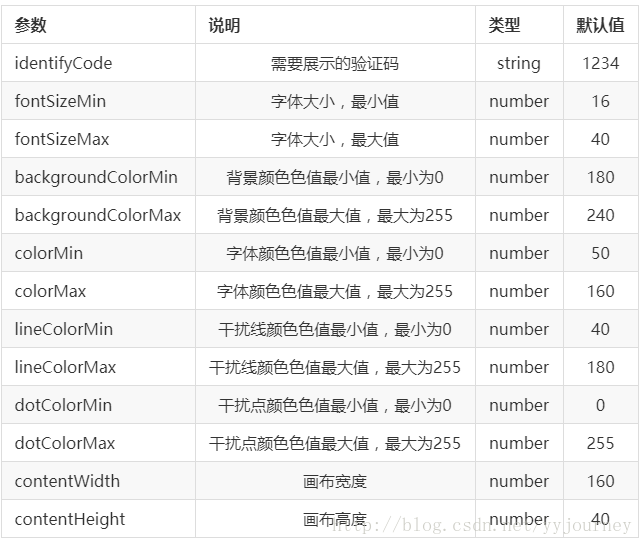
identify.vue组件(主要用于定义参数和方法)
<template>

  <div class="s-canvas">

    <canvas id="s-canvas" :width="contentWidth" :height="contentHeight"></canvas>

  </div>

</template>

<script>

  export default{

    name: 'SIdentify',

    props: {

      identifyCode: {

        type: String,

        default: '1234'

      },

      fontSizeMin: {

        type: Number,

        default: 16

      },

      fontSizeMax: {

        type: Number,

        default: 40

      },

      backgroundColorMin: {

        type: Number,

        default: 180

      },

      backgroundColorMax: {

        type: Number,

        default: 240

      },

      colorMin: {

        type: Number,

        default: 50

      },

      colorMax: {

        type: Number,

        default: 160

      },

      lineColorMin: {

        type: Number,

        default: 40

      },

      lineColorMax: {

        type: Number,

        default: 180

      },

      dotColorMin: {

        type: Number,

        default: 0

      },

      dotColorMax: {

        type: Number,

        default: 255

      },

      contentWidth: {

        type: Number,

        default: 112

      },

      contentHeight: {

        type: Number,

        default: 38

      }

    },

    methods: {

      // 生成一个随机数

      randomNum (min, max) {

        return Math.floor(Math.random() * (max - min) + min)

      },

      // 生成一个随机的颜色

      randomColor (min, max) {

        let r = this.randomNum(min, max)

        let g = this.randomNum(min, max)

        let b = this.randomNum(min, max)

        return 'rgb(' + r + ',' + g + ',' + b + ')'

      },

      drawPic () {

        let canvas = document.getElementById('s-canvas')

        let ctx = canvas.getContext('2d')

        ctx.textBaseline = 'bottom'

        // 绘制背景

        ctx.fillStyle = this.randomColor(this.backgroundColorMin, this.backgroundColorMax)

        ctx.fillRect(0, 0, this.contentWidth, this.contentHeight)

        // 绘制文字

        for (let i = 0; i < this.identifyCode.length; i++) {

          this.drawText(ctx, this.identifyCode[i], i)

        }

        this.drawLine(ctx)

        this.drawDot(ctx)

      },

      drawText (ctx, txt, i) {

        ctx.fillStyle = this.randomColor(this.colorMin, this.colorMax)

        ctx.font = this.randomNum(this.fontSizeMin, this.fontSizeMax) + 'px SimHei'

        let x = (i + 1) * (this.contentWidth / (this.identifyCode.length + 1))

        let y = this.randomNum(this.fontSizeMax, this.contentHeight - 5)

        var deg = this.randomNum(-45, 45)

        // 修改坐标原点和旋转角度

        ctx.translate(x, y)

        ctx.rotate(deg * Math.PI / 180)

        ctx.fillText(txt, 0, 0)

        // 恢复坐标原点和旋转角度

        ctx.rotate(-deg * Math.PI / 180)

        ctx.translate(-x, -y)

      },

      drawLine (ctx) {

        // 绘制干扰线

        for (let i = 0; i < 8; i++) {

          ctx.strokeStyle = this.randomColor(this.lineColorMin, this.lineColorMax)

          ctx.beginPath()

          ctx.moveTo(this.randomNum(0, this.contentWidth), this.randomNum(0, this.contentHeight))

          ctx.lineTo(this.randomNum(0, this.contentWidth), this.randomNum(0, this.contentHeight))

          ctx.stroke()

        }

      },

      drawDot (ctx) {

        // 绘制干扰点

        for (let i = 0; i < 100; i++) {

          ctx.fillStyle = this.randomColor(0, 255)

          ctx.beginPath()

          ctx.arc(this.randomNum(0, this.contentWidth), this.randomNum(0, this.contentHeight), 1, 0, 2 * Math.PI)

          ctx.fill()

        }

      }

    },

    watch: {

      identifyCode () {

        this.drawPic()

      }

    },

    mounted () {

      this.drawPic()

    }

  }

</script>
login.vue(在页面进行使用):
<template>

    <div class="code" @click="refreshCode">

    <s-identify :identifyCode="identifyCode"></s-identify>

  </div>

</template>

<script>
import SIdentify    from '@/components/public/identify/identify'

export default {

  name: "codetest",
components: {
Footer,
SIdentify
},
  data() {

    return {

      identifyCodes: "1234567890",

      identifyCode: ""

    };

  },

  mounted() {

    this.identifyCode = "";

    this.makeCode(this.identifyCodes, 4);

  },

  methods: {

    randomNum(min, max) {

      return Math.floor(Math.random() * (max - min) + min);

    },

    refreshCode() {

      this.identifyCode = "";

      this.makeCode(this.identifyCodes, 4);

    },

    makeCode(o, l) {

      for (let i = 0; i < l; i++) {

        this.identifyCode += this.identifyCodes[

          this.randomNum(0, this.identifyCodes.length)

        ];

      }

      console.log(this.identifyCode);

    }

  }

};

</script>

<style>

.code {

  margin: 400px auto;

  width: 114px;

  height: 40px;

  border: 1px solid red;

}

</style>
注意图片验证码的宽高是由参数 contentWidth 和 contentHeight 决定的,所以更改宽高的时候,直接在声明的参数中进行更改就可。
测试效果:

vue系列---identify(生成图片验证码)插件的更多相关文章
- Django学习系列之captcha 验证码插件
安装部署 安装captcha pip3. install django-simple-captcha== settings.py中引入captcha INSTALLED_APPS = [ 'djang ...
- vue生成图片验证码
最近做项目接触Vue,前端生成验证码.原理其实很简单,首先是生成随机数,然后用canvas绘制. 网上有一些现成的资料,没必要重复造轮子,我是在他们基础上完善了父组件,简化了子组件的调用: ident ...
- Vue系列(一):简介、起步、常用指令、事件和属性、模板、过滤器
一. Vue.js简介 1. Vue.js是什么 Vue.js也称为Vue,读音/vju:/,类似view,错误读音v-u-e 是一个轻量级MVVM(Model-View-ViewModel)框架,和 ...
- Vue系列(二):发送Ajax、JSONP请求、Vue生命周期及实例属性和方法、自定义指令与过渡
上一篇:Vue系列(一):简介.起步.常用指令.事件和属性.模板.过滤器 一. 发送AJAX请求 1. 简介 vue本身不支持发送AJAX请求,需要使用vue-resource.axios等插件实现 ...
- Vue系列(三):组件及数据传递、路由、单文件组件、vue-cli脚手架
上一篇:Vue系列(二):发送Ajax.JSONP请求.Vue生命周期及实例属性和方法.自定义指令与过渡 一. 组件component 1. 什么是组件? 组件(Component)是 Vue.js ...
- Vue系列:在vux的popup组件中使用百度地图遇到显示不全的问题
问题描述: 将百度地图封装成一个独立的组件BMapComponent,具体见 Vue系列:如何将百度地图包装成Vue的组件(http://www.cnblogs.com/strinkbug/p/576 ...
- PHP生成图片验证码demo【OOP面向对象版本】
下面是我今天下午用PHP写的一个生成图片验证码demo,仅供参考. 这个demo总共分为4个文件,具体代码如下: 1.code.html中的代码: <!doctype html> < ...
- [js高手之路] vue系列教程 - 事件专题(4)
本文主要讲解事件冒泡,事件绑定的简写,事件默认行为,按键码等一系列与事件相关的知识. 一.事件绑定的简写,@事件类型. 之前我的[js高手之路] vue系列教程 - vue的事件绑定与方法(2) 用 ...
- 【vue系列之三】从一个vue-pdf-shower,说说vue组件和npm包
前言 从去年年初开始,自己便下决心要写一个vue系列的博客,但时至今日,才写系列的第三篇博客,想来甚是惭愧. 但是慢归慢,每一篇都要保证质量,以及要写出自己的心路历程,防止自己工作中填的坑再让读者走一 ...
随机推荐
- [bzoj1131][POI2008]Sta_树形dp
Sta bzoj-1131 POI-2008 题目大意:给定一棵n个点的树,求一个根,使得深度和最大. 注释:$1\le n \le 10^6$. 想法:扭一扭即可. 扭的时候看看这个点当没当过根. ...
- Linxu用户管理(转)
说明:用户管理的操作涉及root权限,所以以下实例中应该使用sudo或者root用户进行操作. 背景: Linux系统是一个多用户多任务的分时操作系统,任何一个要使用系统资源的用户,都必须首先向系统管 ...
- CF #319 div 2 E
在一个边长为10^6正方形中,可以把它x轴分段,分成1000段.奇数的时候由底往上扫描,偶数的时候由上往下扫描.估计一下这个最长的长度,首先,我们知道有10^6个点,则y邮方向最多移动10^3*10^ ...
- VMware镜像文件下载
VMware镜像文件下载 http://blog.sina.com.cn/s/blog_517c21c00102x5ja.html 貌似Centos 6不能下载啊: 其他的没有测试:
- 被AppStore拒绝理由(一)
July 8, 2015 at 7:06 AM 发件人 Apple 17.1 - Apps cannot transmit data about a user without obtaining th ...
- 开源 java CMS - FreeCMS2.2 工作流管理
项目地址:http://www.freeteam.cn/ 工作流管理 从FreeCMS 2.2開始支持 管理系统中使用到的工作流,如信息审核工作流. 1. 工作流组管理 从左側管理菜单点击工作流组管理 ...
- spring+springmvc+hibernate架构、maven分模块开发样例小项目案例
maven分模块开发样例小项目案例 spring+springmvc+hibernate架构 以用户管理做測试,分dao,sevices,web层,分模块开发測试!因时间关系.仅仅測查询成功.其它的准 ...
- [NOIP 2014] 寻找道路
[题目链接] http://uoj.ac/problem/19 [算法] 首先,在反向图上从终点广搜,求出每个点是否可以在答案路径中 然后在正向图中求出源点至终点的最短路,同样可以使用广搜 时间复杂度 ...
- 【POJ 3740】 Easy Finding
[题目链接] http://poj.org/problem?id=3740 [算法] Dancing Links算法解精确覆盖问题 详见这篇文章 : https://www.cnblogs.com/g ...
- E20170809-mk
collapse n. 垮台; (身体的) 衰弱; vt. 使倒塌; 使坍塌; 使瓦解; vi. 崩溃; 倒塌; 折叠; (尤指工作劳累后 ...