
vue 父子组件传值以及方法调用,平行组件之间传值以及方法调用大全
vue项目经常需要组件间的传值以及方法调用,具体场景就不说了,都知道。基本上所有的传值都可以用vuex状态管理来实现,只要在组件内监听vuex就好。
vue常用的传值方式以及方法有:
1. 父值传子(props)
1-1:解决一个项目中遇到的问题,父组件给子组件传值第一次子组件是可以接受的,
但是在父组件中这个值改变了,在子组件中这个prop的值还是第一次父组件传给的值。
2. 子值传父($emit) == 子调用父方法($emit):此方法较为常用。
3. 子调用父方法(props)== 子传父值:此方法不常见。
4. 父主动获取子方法以及数据($refs)
5. 子主动获取父方法以及数据:一种方法就是父先把值,方法通过props传给子,然后子在用即可,此法同3。这里讲另外方法一个方法。
6. 非父子 (eventBus)
7. vuex传值
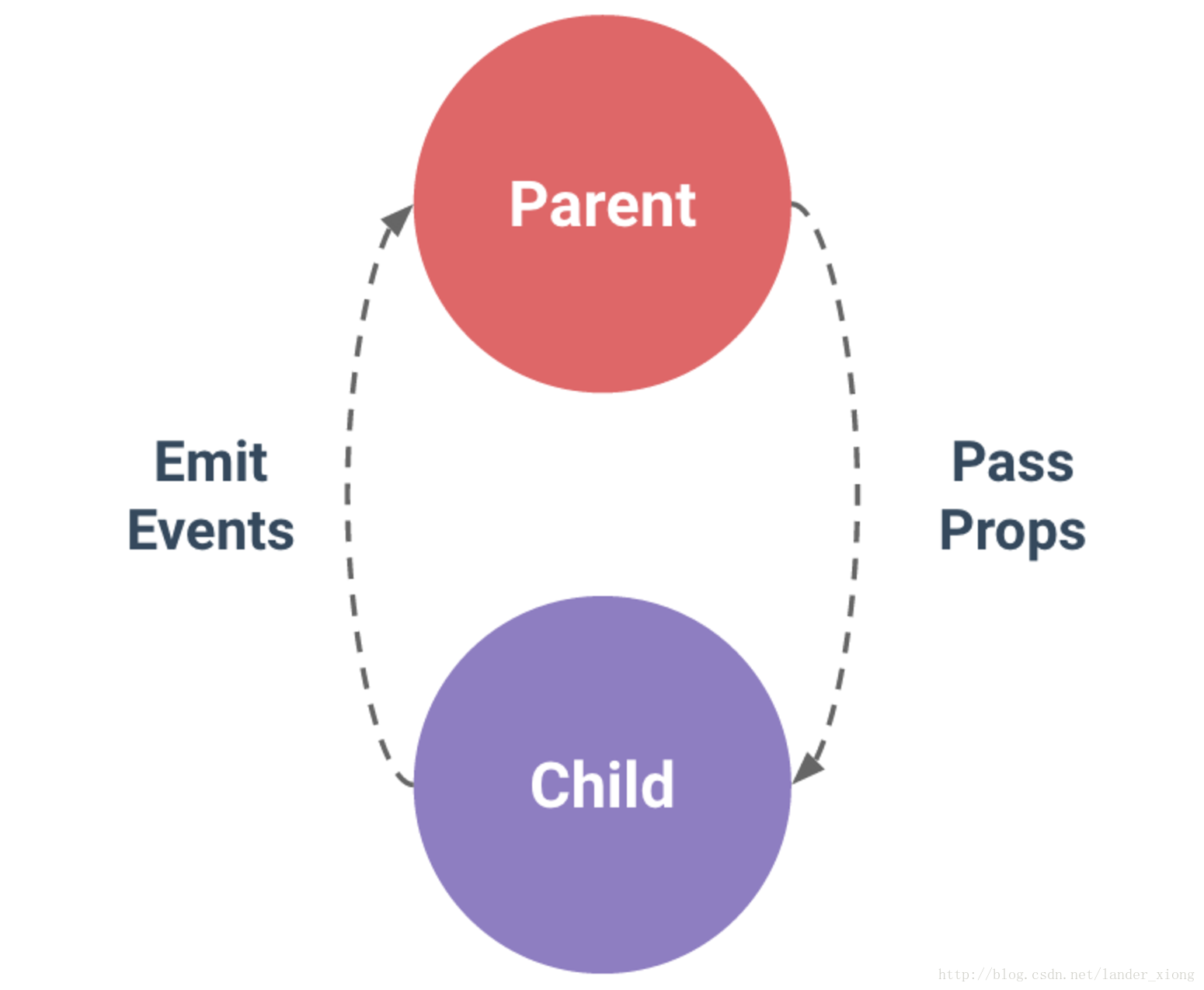
补充:父子组件的关系可以总结为 prop 向下传递,事件向上传递。父组件通过 prop 给子组件下发数据,子组件通过事件给父组件发送消息,如下图所示:
详细示例:
1. 父组件向子组件进行传值
父组件:
<template>

    <div>

        父组件:

        <input type="text" v-model="name">

        <!-- 引入子组件 -->

        <child :inputName="name"></child>

    </div>

</template>

<script>

import child from "./child";

export default {

  components: {

    child

  },

  data() {

    return {

      name: ""

    };

  }

};

</script>
子组件:
<template>

    <div>

        子组件:

        <span>{{inputName}}</span>

    </div>

</template>

<script>

export default {

  // 接受父组件的值

  props: {

    inputName: String,

    required: true

  }

};

</script>
1-1:子组件接受props的值一次后,任父组件传的值怎么变,子组件就不变了。
解决方法:用一个中间值,页面绑定这个中间值。观察props值得变化->变化后把新值赋值给中间值。这样就同步了
<template>

    <input type="text" v-model="currentValue" @change="change" />

</template>

<script>

export default {

    data() {

        return {

            // 中间值来承接父组件传过来的值

            currentValue: this.value,

            other:{},

        };

    },

    props: {

        value: {//父传过来的值

            type: String

        }

    },

    watch: {

        value(val) {

            // value变换赋值给currentValue

            this.currentValue = val;

        },

        other: {

            //深度观察对象

            handler(val) {

            },

            deep: true

        }

    },

    methods: {

    }

};

</script>
2. 子组件向父组件传值 -> 是通过方法传递的,也相当于子组件调用父组件方法。
父组件:
<template>

    <div>

        父组件:

        <span>{{name}}</span>

        <!-- 引入子组件 定义一个on的方法监听子组件的状态-->

        <child v-on:onChildByValue="childByValue"></child>

    </div>

</template>

<script>

import child from "./child";

export default {

  components: {

    child

  },

  data() {

    return {

      name: ""

    };

  },

  methods: {

    childByValue: function(childValue) {

      // childValue就是子组件传过来的值

      this.name = childValue;

    }

  }

};

</script>
子组件:
<template>

    <div>

        子组件:

        <span>{{childValue}}</span>

        <!-- 定义一个子组件传值的方法 -->

        <input type="button" value="点击触发" @click="childClick">

    </div>

</template>

<script>

export default {

  data() {

    return {

      childValue: "我是子组件的数据"

    };

  },

  methods: {

    childClick() {

      // childByValue是在父组件on监听的方法

      // 第二个参数this.childValue是需要传的值

      this.$emit("onChildByValue", this.childValue);

    }

  }

};

</script>
3. 子调用父方法:
父组件:
<template>

    <editor :onSubmit="cccc"></editor>

</template>

<script>

export default {
 //省略了引入注册等代码

  methods: {

    cccc: function (str) {

      alert(str)

    }

  }

}

</script>
子组件:
<template>

    <button @click="submit">提交</button>

</template>

<script>

export default {

  props: {

    onSubmit: {//父组件把方法传过来

      type: Function,

      default: null

    }

  },

  methods: {

    submit: function () {

      if (this.onsubmit) {
     // 调用父方法也相当于通过方法传值了

        this.onsubmit('传给父组件ok')

      }

    }

  }

}

</script>
4. 父主动获取子方法以及数据
1. 调用子组件的时候 定义一个ref
<child ref="headerChild"></child>
2. 在父组件里面通过
  this.$refs.headerChild.属性

  this.$refs.headerChild.方法
5. 子主动获取父方法以及数据
在子组件里面通过以下方法获取,获取不到数据可以输出this.$parent看看数据是什么样的,有时候得通过this.$parent.$parent.属性 ...
用此方法前提得知道父组件有没有,如果有?是谁,不推荐用这个方法,如果组件嵌套过多就比较麻烦。
  this.$parent.属性

  this.$parent.方法
6. 非父子组件进行传值(不推荐平行组件相互传值,能避免就避免)
a: 方法一:如果相互传值的组件都公有一个父组件的话,共同父组件中设定一个data用于储存你要传递的数据,
然后两个子组件都通过props连接父组件的这个data,实现一个三方同步。
b: 方法二:通过url,缓存来传数据,这个得看组件间怎么设计的。
c: 方法三:event bus,vue2.0里面的event bus(其实就是个发布订阅模式):
可以在main.js里面设置全局方法:window.eventBus = new Vue();

组件A:订阅方法。
<template>

    <div>

        A组件:

        <input type="button" value="点击触发" @click="getData">

        <span>{{name}}</span>

    </div>

</template>

<script>

export default {

    data () {

        return {

            name:

        }

    },

    methods: {

        getData: function () {

            this.name++

        },

        showLog: function (){

            console.log('调用了A组件方法')

        }

    }

    mounted: function () {

        var that = this

        // 用$on事件来接收

        eventBus.$on('sendEvent', function(data){

            // 在这里处理数据或者调用要执行的方法

            console.log(data)

            that.name = data;

            that.showLog();

        })

    },

}
组件B:调用方法
<template>

    <div>

        B组件:

        <span>{{elementValue}}</span>

        <input type="button" value="点击触发" @click="elementByValue">

    </div>

</template>

<script>

export default {

    data() {

        return {

            elementValue:

        };

    },

    methods: {

        elementByValue: function() {

            // 在这里触发这个让别的组件观察的方法。

            eventBus.$emit("sendEvent", this.elementValue);

        }

    }

};

</script>
7.vuex传值:只需要在相应组件改变,以及监听变化就可以。
<template>

    <div>

        <el-button @click="change">change</el-button>

        {{this.$store.state.sendData}}

        {{getSendData}}

    </div>

</template>

<script>

export default {

    data() {

        return {};

    },

    computed: {

        getSendData(){

            return this.$store.state.sendData;

        },

    },

    watch: {

        //观察数据变化,执行相应的方法

        getSendData(val,oldval){

            console.log(val);

        },

    },

    methods: {

        change(){

            this.$store.commit("newSendData", this.$store.state.sendData+);

        }

    },

    mounted() {}

};

</script>
基本上所有的方法都在这里了,有问题可以留言。
vue 父子组件传值以及方法调用,平行组件之间传值以及方法调用大全的更多相关文章
- Vue父子组件相互传值及调用方法的方案
Vue父子组件相互传值及调用方法的方案 一.调用方法: 1.父组件调用子组件方法: 2.子组件调用父组件方法: 参考:https://www.cnblogs.com/jin-zhe/p/9523782 ...
- Vue(2)- v-model、局部组件和全局组件、父子组件传值、平行组件传值
一.表单输入绑定(v-model 指令) 可以用 v-model 指令在表单 <input>.<textarea> 及 <select> 元素上创建双向数据绑定. ...
- Vue 2 --v-model、局部组件和全局组件、父子组件传值、平行组件传值
一.表单输入绑定(v-model 指令) 可以用 v-model 指令在表单 <input>.<textarea> 及 <select> 元素上创建双向数据绑定. ...
- 【vue】父组件主动调用子组件 /// 非父子组件传值
一 父组件主动调用子组件: 注意:在父组件使用子组件的标签上注入ref属性,例如: <div id="home"> <v-header ref="he ...
- vue父组件调用子组件方法、父组件向子组件传值、子组件向父组件传值
一.父组件调用子组件方法 父组件代码 parent.vue <template> <div> <button @click="parentFun" ...
- Vue父子组件传值以及父调子方法、子调父方法
稍微总结了一下Vue中父子间传值以及相互调方法的问题,非常基础.希望可以帮到你!先来个最常用的,直接上代码: 1.父传值给子组件 父组件: <template> <div> & ...
- vue:父子组件间通信,父组件调用子组件方法进行校验子组件的表单
参考: ElementUI多个子组件表单的校验管理:https://www.jianshu.com/p/541d8b18cf95 Vue 子组件调用父组件方法总结:https://juejin.im/ ...
- vue父子组件之间互相获取data值&调用方法(非props)
vue 子组件调用父组件方法&数据 vue有$parent这么一个属性,在子组件中就能拿到父组件的数据 this.$parent.xxx 就能调用父组件的方法 this.$parent.xxx ...
- vue 父子组件的方法调用
$emit 子组件触发父组件的方法: <!-- 子组件 --> <template> <div id="child"> <button @ ...
随机推荐
- nyoj--1185--最大最小值(线段树)
最大最小值 时间限制:1000 ms | 内存限制:65535 KB 难度:2 描述 给出N个整数,执行M次询问. 对于每次询问,首先输入三个整数C.L.R: 如果C等于1,输出第L个数到第R个数 ...
- adplus 抓取dump
工具所在路径 C:\Program Files\Windows Kits\10\Debuggers\x64 cmd窗口切换目录倒adplus所在路径下,输入抓取命令.adplus -hang -p ...
- Core篇——初探Core的Http请求管道&&Middleware
目录: 1.Core 处理HTTP请求流程 2.中间件(Middleware)&&处理流程 3.创建自定义中间件&&模拟Core的请求管道 Core 处理HTTP请求流 ...
- Web api 测试 工具WebApiTestClient
1.打开Nuget 安装 WebApiTestClient 2.在HelpPageConfig.cs 里面添加这段文字 config.SetDocumentationProvider(new Xml ...
- 在C#中运行PowerShell
C#中运行PowerShell需要用到System.Management.Automation.dll.在Visual Studio中可以通过NuGet添加引用,package名字为"Sys ...
- DirectUI界面编程(六)实现右键弹出菜单
本节向大家介绍一下右键弹出菜单是如何实现的.效果如下,在窗口中点击鼠标右键弹出菜单,点击菜单项能够响应菜单点击事件. 使用Duilib库实现的弹出菜单,实际上也是一个Windows窗口,因此我们需要创 ...
- Axios 网络请求组件封装 (鉴权、刷新、拦截)
一.前言 注意:本教程需要你对axios有一定的了解,不适用于小白(只能借鉴,希望你能自己动手),注释都写的很清楚.此封装并非完整版,已进行部分删减修改操作,但仍然适用于大部分业务场景,如果不适用于你 ...
- gbk编码
GBK 编码 GBK编码范围:8140-FEFE,汉字编码范围见第二节:码位分配及顺序. GBK编码,是对GB2312编码的扩展,因此完全兼容GB2312-80标准.GBK编码依然采用双字节编码方 ...
- 粘包_Server
from socket import *# import subprocessip_port = ('127.0.0.1',8080)back_log = 5buffer_size = 1024tcp ...
- Unity5.X 创建基本的3D游戏场景
点New(新建懒得写了,反正不是智障应该都会) 创建好的项目会自带一个场景,场景会自带Main Camera (主摄像机),Directional Light (方向光) 系统自带几个可以创建的3 ...