
微信小程序之登录页实例
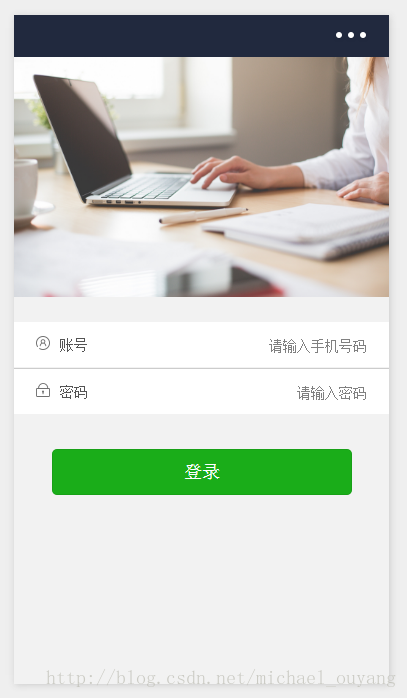
项目效果图:
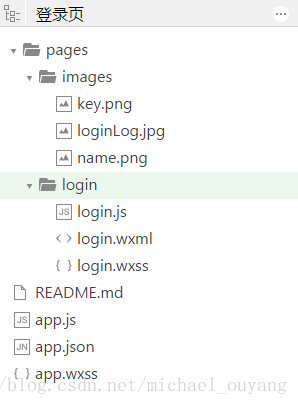
目录结构:
login.wxml:
 <view class="container">

   <view class="login-icon">

     <image class="login-img" src="../images/loginLog.jpg"></image>

   </view>

   <view class="login-from">

     <!--账号-->

     <view class="inputView">

       <image class="nameImage" src="../images/name.png"></image>

       <label class="loginLab">账号</label>

       <input class="inputText" placeholder="请输入账号" bindinput="phoneInput" />

     </view>

     <view class="line"></view>

     <!--密码-->

     <view class="inputView">

       <image class="keyImage" src="../images/key.png"></image>

       <label class="loginLab">密码</label>

       <input class="inputText" password="true" placeholder="请输入密码" bindinput="passwordInput" />

     </view>

     <!--按钮-->

     <view class="loginBtnView">

       <button class="loginBtn" type="primary" size="{{primarySize}}" loading="{{loading}}" plain="{{plain}}" disabled="{{disabled}}" bindtap="login">登录</button>

     </view>

   </view>

 </view>
login.wxss:
 page{

   height: 100%;

 }

 .container {

   height: 100%;

   display: flex;

   flex-direction: column;

   padding:;

   box-sizing: border-box;

   background-color: #f2f2f2

 }

 /*登录图片*/

 .login-icon{

   flex: none;

 }

 .login-img{

   width: 750rpx;

 }

 /*表单内容*/

 .login-from {

   margin-top: 20px;

   flex: auto;

   height:100%;

 }

 .inputView {

   background-color: #fff;

   line-height: 44px;

 }

 /*输入框*/

 .nameImage, .keyImage {

   margin-left: 22px;

   width: 14px;

   height: 14px

 }

 .loginLab {

   margin: 15px 15px 15px 10px;

   color: #545454;

   font-size: 14px

 }

 .inputText {

   flex: block;

   float: right;

   text-align: right;

   margin-right: 22px;

   margin-top: 11px;

   color: #cccccc;

   font-size: 14px

 }

 .line {

   width: 100%;

   height: 1px;

   background-color: #cccccc;

   margin-top: 1px;

 }

 /*按钮*/

 .loginBtnView {

   width: 100%;

   height: auto;

   background-color: #f2f2f2;

   margin-top: 0px;

   margin-bottom: 0px;

   padding-bottom: 0px;

 }

 .loginBtn {

   width: 80%;

   margin-top: 35px;

 }
login.js:
 Page({

   data: {

     phone: '',

     password:''

   },

 // 获取输入账号

   phoneInput :function (e) {

     this.setData({

       phone:e.detail.value

     })

   },

 // 获取输入密码

   passwordInput :function (e) {

     this.setData({

       password:e.detail.value

     })

   },

 // 登录

   login: function () {

     if(this.data.phone.length == 0 || this.data.password.length == 0){

       wx.showToast({

         title: '用户名和密码不能为空',

         icon: 'loading',

         duration: 2000

       })

 }else {

   // 这里修改成跳转的页面

       wx.showToast({

         title: '登录成功',

         icon: 'success',

         duration: 2000

       })

     }

   }

 })
微信小程序之登录页实例的更多相关文章
- 完整微信小程序授权登录页面教程
完整微信小程序授权登录页面教程 1.前言 微信官方对getUserInfo接口做了修改,授权窗口无法直接弹出,而取而代之是需要创建一个button,将其open-type属性绑定getUseInfo方 ...
- php(ThinkPHP)实现微信小程序的登录过程
源码也在我的github中给出 https://github.com/wulongtao/think-wxminihelper 下面结合thinkPHP框架来实现以下微信小程序的登录流程,这些流程是结 ...
- 微信小程序实现标签页滑块效果
微信小程序实现标签页滑块效果 小程序完整代码: wxml: <view class="swiper-tab"> <view class="swiper- ...
- ES6中Class的用法及在微信小程序中的应用实例
1.ES6的基本用法 ES6 提供了更接近传统语言的写法,引入了 Class(类)这个概念,作为对象的模板.通过class关键字,可以定义类.基本上,ES6 的class可以看作只是一个语法糖,它的绝 ...
- 使用Shiro+JWT完成的微信小程序的登录(含讲解)
使用Shiro+JWT完成的微信小程序的登录 源码地址https://github.com/Jirath-Liu/shiro-jwt-wx 微信小程序用户登陆,完整流程可参考下面官方地址,本例中是按此 ...
- Django基于JWT实现微信小程序的登录和鉴权
什么是JWT? JWT,全称Json Web Token,用于作为JSON对象在各方之间安全地传输信息.该信息可以被验证和信任,因为它是数字签名的. 与Session的区别 一.Session是在服务 ...
- 微信小程序获取登录手机号
小程序获取登录用户手机号. 因为需要用户主动触发才能发起获取手机号接口,所以该功能不由 API 来调用,需用 <button> 组件的点击来触发. 首先,放置一个 button 按钮,将 ...
- 微信小程序之登录连接django,以及用户的信息授权认证
小结: 1 如何自定义组件 - 组件和页面一样,也是由四个文件组成,所以我们自定义组件的时候,模拟pages文件夹,把所有的所有的组件都放在一个文件夹中,每个组件又由一个文件夹包裹,方便管理,在对应目 ...
- 微信小程序授权登录将open_id传至后台并入库
要求能把用户昵称.头像以及open_id写入数据库,服务端保持用户登录状态 wxml: <block wx:else> <button type="primary" ...
随机推荐
- ZOJ Special AC String 水
http://acm.zju.edu.cn/onlinejudge/showProblem.do?problemId=3702 题目大意: 对于给定的一个字符串,满足如下要求输出AC,否则WA(好吧我 ...
- JAVA学习路线图---(JAVA1234) 分类: B1_JAVA 2013-10-05 10:22 502人阅读 评论(1) 收藏
转自:http://blog.csdn.net/pplcheer/article/details/12276999 第一阶段-Java基础 这一阶段很重要,关系到你后面阶段的学习,所以务 ...
- tomcat 设置session过期时间(四种方式)
1.在tomcat-->conf-->servler.xml文件中定义: <Context path="/test" docBase="/test&qu ...
- Sift算子特征点提取、描述及匹配全流程解析
Sift之前的江湖 在Sift横空出世之前,特征点检测与匹配江湖上占据霸主地位的是角点检测家族.先来探究一下角点家族不为人知的恩怨情仇. 角点家族的族长是Moravec在1977年提出的Moravec ...
- pycharm highlight
https://www.jetbrains.com/help/pycharm/2017.1/highlighting-usages.html Highlighting usages in the cu ...
- 【codeforces 768B】Code For 1
[题目链接]:http://codeforces.com/contest/768/problem/B [题意] 一开始给你一个数字n; 让你用这个数字n根据一定的规则生成序列; (如果新生成的序列里面 ...
- 常用Java开发工具类
common: LruLinkedHashMap:一个支持Lru算法的LinkedHashMap. 源码地址:点击打开链接 MD5:MD5工具类 源码地址:点击打开链接 Slicer:可以将List切 ...
- cellForRowAtIndexPath 设置图片
#import "UIImageView+MJWebCache.h" #import "MJPhotoBrowser.h" #import "MJPh ...
- ORACLE中死锁
ORACLE中死锁的知识点总结 死锁的概念 什么是死锁呢? 其实我们生活中也有很多类似死锁的例子. 我先举一个生活中的例子:过年回家,父亲买了一把水弹枪,儿子和侄子争抢着要先玩,谁也不让谁,拆开包 ...
- 检索05 --static静态方法 和 非静态方法
C#静态变量使用static 修饰符进行声明,在类被实例化时创建,通过类进行访问不带有 static 修饰符声明的变量称做非静态变量,在对象被实例化时创建,通过对象进行访问一个类的所有实例的同一C#静 ...