
vue项目中引入element-ui时,如何更改主题色
在我们做项目时,我们经常会遇到切换主题色的功能,下面我们就来说一下通过颜色选择器我们就能改变项目的主题颜色

代码如下:
颜色选择器所在组件:

top-theme.vue内容如下:
 <template>

     <el-color-picker size="small" class="theme-picker" popper-class="theme-picker-dropdown" v-model="themeVal"></el-color-picker>

 </template>

 <script>

 import theme from "@/mixins/theme";

 export default {

   name: "topTheme",

   mixins: [theme()],

   data() {

     return {

       chalk: ""

     };

   },

 };

 </script>

 <style scoped>

 .theme-picker .el-color-picker__trigger {

   vertical-align: middle;

 }

 .theme-picker-dropdown .el-color-dropdown__link-btn {

   display: none;

 }

 </style>
其中mixins下的theme.js如下:

内容为:
 /*

  *    Copyright (c) 2018-2025, lengleng All rights reserved.

  *

  * Redistribution and use in source and binary forms, with or without

  * modification, are permitted provided that the following conditions are met:

  *

  * Redistributions of source code must retain the above copyright notice,

  * this list of conditions and the following disclaimer.

  * Redistributions in binary form must reproduce the above copyright

  * notice, this list of conditions and the following disclaimer in the

  * documentation and/or other materials provided with the distribution.

  * Neither the name of the pig4cloud.com developer nor the names of its

  * contributors may be used to endorse or promote products derived from

  * this software without specific prior written permission.

  * Author: lengleng (wangiegie@gmail.com)

  */

 import {

   mapGetters

 } from "vuex";

 const version = require("element-ui/package.json").version; // element-ui version from node_modules

 const ORIGINAL_THEME = "#409EFF"; // default color

 export default function () {

   return {

     data() {

       return {

         themeVal: ORIGINAL_THEME

       }

     },

     created() {

       this.themeVal = this.theme;

     },

     watch: {

       themeVal(val, oldVal) {

         this.$store.commit("SET_THEME", val);

         this.updateTheme(val, oldVal);

       }

     },

     computed: {

       ...mapGetters(["theme"])

     },

     methods: {

       updateTheme(val, oldVal) {

         if (typeof val !== "string") return;

         const head = document.getElementsByTagName("head")[0];

         const themeCluster = this.getThemeCluster(val.replace("#", ""));

         const originalCluster = this.getThemeCluster(oldVal.replace("#", ""));

         const getHandler = (variable, id) => {

           return () => {

             const originalCluster = this.getThemeCluster(

               ORIGINAL_THEME.replace("#", "")

             );

             const newStyle = this.updateStyle(

               this[variable],

               originalCluster,

               themeCluster

             );

             let styleTag = document.getElementById(id);

             if (!styleTag) {

               styleTag = document.createElement("style");

               styleTag.setAttribute("id", id);

               head.appendChild(styleTag);

             }

             styleTag.innerText = newStyle;

           };

         };

         const chalkHandler = getHandler("chalk", "chalk-style");

         if (!this.chalk) {

           const url = `https://unpkg.com/element-ui@${version}/lib/theme-chalk/index.css`;

           this.getCSSString(url, chalkHandler, "chalk");

         } else {

           chalkHandler();

         }

         const link = [].slice.call(

           document.getElementsByTagName("head")[0].getElementsByTagName("link")

         );

         for (let i = link.length - 3; i < link.length; i++) {

           const style = link[i];

           this.getCSSString(style.href, innerText => {

             const originalCluster = this.getThemeCluster(

               ORIGINAL_THEME.replace("#", "")

             );

             const newStyle = this.updateStyle(

               innerText,

               originalCluster,

               themeCluster

             );

             let styleTag = document.getElementById(i);

             if (!styleTag) {

               styleTag = document.createElement("style");

               styleTag.id = i;

               styleTag.innerText = newStyle;

               head.appendChild(styleTag);

             }

           });

         }

         const styles = [].slice

           .call(document.querySelectorAll("style"))

           .filter(style => {

             const text = style.innerText;

             return (

               new RegExp(oldVal, "i").test(text) && !/Chalk Variables/.test(text)

             );

           });

         styles.forEach(style => {

           const {

             innerText

           } = style;

           if (typeof innerText !== "string") return;

           style.innerText = this.updateStyle(

             innerText,

             originalCluster,

             themeCluster

           );

         });

       },

       updateStyle(style, oldCluster, newCluster) {

         let newStyle = style;

         oldCluster.forEach((color, index) => {

           newStyle = newStyle.replace(new RegExp(color, "ig"), newCluster[index]);

         });

         return newStyle;

       },

       getCSSString(url, callback, variable) {

         const xhr = new XMLHttpRequest();

         xhr.onreadystatechange = () => {

           if (xhr.readyState === 4 && xhr.status === 200) {

             if (variable) {

               this[variable] = xhr.responseText.replace(/@font-face{[^}]+}/, "");

             }

             callback(xhr.responseText);

           }

         };

         xhr.open("GET", url);

         xhr.send();

       },

       getThemeCluster(theme) {

         const tintColor = (color, tint) => {

           let red = parseInt(color.slice(0, 2), 16);

           let green = parseInt(color.slice(2, 4), 16);

           let blue = parseInt(color.slice(4, 6), 16);

           if (tint === 0) {

             // when primary color is in its rgb space

             return [red, green, blue].join(",");

           } else {

             red += Math.round(tint * (255 - red));

             green += Math.round(tint * (255 - green));

             blue += Math.round(tint * (255 - blue));

             red = red.toString(16);

             green = green.toString(16);

             blue = blue.toString(16);

             return `#${red}${green}${blue}`;

           }

         };

         const shadeColor = (color, shade) => {

           let red = parseInt(color.slice(0, 2), 16);

           let green = parseInt(color.slice(2, 4), 16);

           let blue = parseInt(color.slice(4, 6), 16);

           red = Math.round((1 - shade) * red);

           green = Math.round((1 - shade) * green);

           blue = Math.round((1 - shade) * blue);

           red = red.toString(16);

           green = green.toString(16);

           blue = blue.toString(16);

           return `#${red}${green}${blue}`;

         };

         const clusters = [theme];

         for (let i = 0; i <= 9; i++) {

           clusters.push(tintColor(theme, Number((i / 10).toFixed(2))));

         }

         clusters.push(shadeColor(theme, 0.1));

         return clusters;

       }

     }

   }

 }
涉及到的vuex相关模块为:
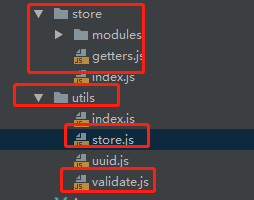
其中validate.js中有一系列正则校验的相关代码:
 /*

  *    Copyright (c) 2018-2025, lengleng All rights reserved.

  *

  * Redistribution and use in source and binary forms, with or without

  * modification, are permitted provided that the following conditions are met:

  *

  * Redistributions of source code must retain the above copyright notice,

  * this list of conditions and the following disclaimer.

  * Redistributions in binary form must reproduce the above copyright

  * notice, this list of conditions and the following disclaimer in the

  * documentation and/or other materials provided with the distribution.

  * Neither the name of the pig4cloud.com developer nor the names of its

  * contributors may be used to endorse or promote products derived from

  * this software without specific prior written permission.

  * Author: lengleng (wangiegie@gmail.com)

  */

 /**

  * Created by jiachenpan on 16/11/18.

  */

 export function isvalidUsername(str) {

     const valid_map = ['admin', 'editor']

     return valid_map.indexOf(str.trim()) >= 0

 }

 /* 合法uri*/

 export function validateURL(textval) {

     const urlregex = /^(https?|ftp):\/\/([a-zA-Z0-9.-]+(:[a-zA-Z0-9.&%$-]+)*@)*((25[0-5]|2[0-4][0-9]|1[0-9]{2}|[1-9][0-9]?)(\.(25[0-5]|2[0-4][0-9]|1[0-9]{2}|[1-9]?[0-9])){3}|([a-zA-Z0-9-]+\.)*[a-zA-Z0-9-]+\.(com|edu|gov|int|mil|net|org|biz|arpa|info|name|pro|aero|coop|museum|[a-zA-Z]{2}))(:[0-9]+)*(\/($|[a-zA-Z0-9.,?'\\+&%$#=~_-]+))*$/

     return urlregex.test(textval)

 }

 /* 小写字母*/

 export function validateLowerCase(str) {

     const reg = /^[a-z]+$/

     return reg.test(str)

 }

 /* 大写字母*/

 export function validateUpperCase(str) {

     const reg = /^[A-Z]+$/

     return reg.test(str)

 }

 /* 大小写字母*/

 export function validatAlphabets(str) {

     const reg = /^[A-Za-z]+$/

     return reg.test(str)

 }

 /*验证pad还是pc*/

 export const vaildatePc = function () {

     const userAgentInfo = navigator.userAgent;

     const Agents = ["Android", "iPhone",

         "SymbianOS", "Windows Phone",

         "iPad", "iPod"];

     let flag = true;

     for (var v = 0; v < Agents.length; v++) {

         if (userAgentInfo.indexOf(Agents[v]) > 0) {

             flag = false;

             break;

         }

     }

     return flag;

 }

 /**

  * validate email

  * @param email

  * @returns {boolean}

  */

 export function validateEmail(email) {

     const re = /^(([^<>()\[\]\\.,;:\s@"]+(\.[^<>()\[\]\\.,;:\s@"]+)*)|(".+"))@((\[[0-9]{1,3}\.[0-9]{1,3}\.[0-9]{1,3}\.[0-9]{1,3}\])|(([a-zA-Z\-0-9]+\.)+[a-zA-Z]{2,}))$/

     return re.test(email)

 }

 /**

  * 判断身份证号码

  */

 export function cardid(code) {

     let list = [];

     let result = true;

     let msg = '';

     var city = {

         11: "北京",

         12: "天津",

         13: "河北",

         14: "山西",

         15: "内蒙古",

         21: "辽宁",

         22: "吉林",

         23: "黑龙江 ",

         31: "上海",

         32: "江苏",

         33: "浙江",

         34: "安徽",

         35: "福建",

         36: "江西",

         37: "山东",

         41: "河南",

         42: "湖北 ",

         43: "湖南",

         44: "广东",

         45: "广西",

         46: "海南",

         50: "重庆",

         51: "四川",

         52: "贵州",

         53: "云南",

         54: "西藏 ",

         61: "陕西",

         62: "甘肃",

         63: "青海",

         64: "宁夏",

         65: "新疆",

         71: "台湾",

         81: "香港",

         82: "澳门",

         91: "国外 "

     };

     if (!validatenull(code)) {

         if (code.length == 18) {

             if (!code || !/(^\d{18}$)|(^\d{17}(\d|X|x)$)/.test(code)) {

                 msg = "证件号码格式错误";

             } else if (!city[code.substr(0, 2)]) {

                 msg = "地址编码错误";

             } else {

                 //18位身份证需要验证最后一位校验位

                 code = code.split('');

                 //∑(ai×Wi)(mod 11)

                 //加权因子

                 var factor = [7, 9, 10, 5, 8, 4, 2, 1, 6, 3, 7, 9, 10, 5, 8, 4, 2];

                 //校验位

                 var parity = [1, 0, 'X', 9, 8, 7, 6, 5, 4, 3, 2, 'x'];

                 var sum = 0;

                 var ai = 0;

                 var wi = 0;

                 for (var i = 0; i < 17; i++) {

                     ai = code[i];

                     wi = factor[i];

                     sum += ai * wi;

                 }

                 var last = parity[sum % 11];

                 if (parity[sum % 11] != code[17]) {

                     msg = "证件号码校验位错误";

                 } else {

                     result = false;

                 }

             }

         } else {

             msg = "证件号码长度不为18位";

         }

     } else {

         msg = "证件号码不能为空";

     }

     list.push(result);

     list.push(msg);

     return list;

 }

 /**

  * 判断手机号码是否正确

  */

 export function isvalidatemobile(phone) {

     let list = [];

     let result = true;

     let msg = '';

     var isPhone = /^0\d{2,3}-?\d{7,8}$/;

     //增加134 减少|1349[0-9]{7},增加181,增加145,增加17[678]

     var isMob = /^((\+?86)|(\(\+86\)))?(13[0123456789][0-9]{8}|15[012356789][0-9]{8}|18[012356789][0-9]{8}|14[57][0-9]{8}|17[3678][0-9]{8})$/;

     if (!validatenull(phone)) {

         if (phone.length == 11) {

             if (isPhone.test(phone)) {

                 msg = '手机号码格式不正确';

             } else {

                 result = false;

             }

         } else {

             msg = '手机号码长度不为11位';

         }

     } else {

         msg = '手机号码不能为空';

     }

     list.push(result);

     list.push(msg);

     return list;

 }

 /**

  * 判断姓名是否正确

  */

 export function validatename(name) {

     var regName = /^[\u4e00-\u9fa5]{2,4}$/;

     if (!regName.test(name)) return false;

     return true;

 };

 /**

  * 判断是否为整数

  */

 export function validatenum(num, type) {

     let regName = /[^\d.]/g;

     if (type == 1) {

         if (!regName.test(num)) return false;

     } else if (type == 2) {

         regName = /[^\d]/g;

         if (!regName.test(num)) return false;

     }

     return true;

 };

 /**

  * 判断是否为小数

  */

 export function validatenumord(num, type) {

     let regName = /[^\d.]/g;

     if (type == 1) {

         if (!regName.test(num)) return false;

     } else if (type == 2) {

         regName = /[^\d.]/g;

         if (!regName.test(num)) return false;

     }

     return true;

 };

 /**

  * 判断是否为空

  */

 export function validatenull(val) {

     if (val instanceof Array) {

         if (val.length == 0) return true;

     } else if (val instanceof Object) {

         if (JSON.stringify(val) === '{}') return true;

     } else {

         if (val == 'null' || val == null || val == 'undefined' || val == undefined || val == '') return true;

         return false;

     }

     return false;

 };
utils下store.js内容如下:
 /*

  *    Copyright (c) 2018-2025, lengleng All rights reserved.

  *

  * Redistribution and use in source and binary forms, with or without

  * modification, are permitted provided that the following conditions are met:

  *

  * Redistributions of source code must retain the above copyright notice,

  * this list of conditions and the following disclaimer.

  * Redistributions in binary form must reproduce the above copyright

  * notice, this list of conditions and the following disclaimer in the

  * documentation and/or other materials provided with the distribution.

  * Neither the name of the pig4cloud.com developer nor the names of its

  * contributors may be used to endorse or promote products derived from

  * this software without specific prior written permission.

  * Author: lengleng (wangiegie@gmail.com)

  */

 import { validatenull } from '@/utils/validate'

 /**

  * 存储localStorage

  */

 export const setStore = (params) => {

   const {

     name,

     content,

     type,

     datetime

   } = params

   const obj = {

     dataType: typeof (content),

     content: content,

     type: type,

     datetime: new Date().getTime()

   }

   if (type) window.sessionStorage.setItem(name, JSON.stringify(obj))

   else window.localStorage.setItem(name, JSON.stringify(obj))

 }

 /**

  * 获取localStorage

  */

 export const getStore = (params) => {

   const {

     name,

     type

   } = params

   let obj = {}

   let content

   obj = window.localStorage.getItem(name)

   if (validatenull(obj)) obj = window.sessionStorage.getItem(name)

   if (validatenull(obj)) return

   obj = JSON.parse(obj)

   if (obj.dataType === 'string') {

     content = obj.content

   } else if (obj.dataType === 'number') {

     content = Number(obj.content)

   } else if (obj.dataType === 'boolean') {

     content = eval(obj.content)

   } else if (obj.dataType === 'object') {

     content = obj.content

   }

   return content

 }

 /**

  * 删除localStorage

  */

 export const removeStore = params => {

   let {

     name

   } = params

   window.localStorage.removeItem(name)

   window.sessionStorage.removeItem(name)

 }
store文件夹下index.js内容如下:
 /**

  * Created by xieli on 2018/8/7 0007.

  */

 import Vue from 'vue'

 import Vuex from 'vuex'

 import common from './modules/common'

 import getters from './getters'

 Vue.use(Vuex)

 const store = new Vuex.Store({

     modules: {

         common,

     },

     getters,

 })

 export default store
modules文件夹下common.js内容如下:
 /*

  *    Copyright (c) 2018-2025, lengleng All rights reserved.

  *

  * Redistribution and use in source and binary forms, with or without

  * modification, are permitted provided that the following conditions are met:

  *

  * Redistributions of source code must retain the above copyright notice,

  * this list of conditions and the following disclaimer.

  * Redistributions in binary form must reproduce the above copyright

  * notice, this list of conditions and the following disclaimer in the

  * documentation and/or other materials provided with the distribution.

  * Neither the name of the pig4cloud.com developer nor the names of its

  * contributors may be used to endorse or promote products derived from

  * this software without specific prior written permission.

  * Author: lengleng (wangiegie@gmail.com)

  */

 import {

     setStore,

     getStore,

     removeStore

 } from '@/utils/store'

 import {

     validatenull

 } from '@/utils/validate'

 const common = {

   state: {

     theme: getStore({

       name: 'theme'

     }) || '#409EFF',

       bg:"主题颜色"

   },

   mutations: {

       SET_THEME: (state, color) => {

       state.theme = color

       setStore({

         name: 'theme',

         content: state.theme

       })

     },

   }

 }

 export default common
store文件夹下getters.js内容如下:
 /*

  *    Copyright (c) 2018-2025, lengleng All rights reserved.

  *

  * Redistribution and use in source and binary forms, with or without

  * modification, are permitted provided that the following conditions are met:

  *

  * Redistributions of source code must retain the above copyright notice,

  * this list of conditions and the following disclaimer.

  * Redistributions in binary form must reproduce the above copyright

  * notice, this list of conditions and the following disclaimer in the

  * documentation and/or other materials provided with the distribution.

  * Neither the name of the pig4cloud.com developer nor the names of its

  * contributors may be used to endorse or promote products derived from

  * this software without specific prior written permission.

  * Author: lengleng (wangiegie@gmail.com)

  */

 const getters = {

   theme: state => state.common.theme,

     /*bg:    state => state.common.bg,*/

 }

 export default getters
其中核心文件为mixins下的theme.js
项目地址:
https://github.com/yuwenjing0727/electric-ui.git
vue项目中引入element-ui时,如何更改主题色的更多相关文章
- 在Vue项目中使用Element UI:按需引入和完整引入
下面操作在main.js文件中进行 完整引入: import Element from 'element-ui'; //样式文件,需单独引入 import 'element-ui/lib/theme- ...
- vue项目中使用element ui上传图片到七牛
1.获取token值 后台有接口调用直接返回token值 //请求后台拿七牛云token async getQiniuToken() { //token let uploadtoken = await ...
- 在vue项目中引入jquery
在vue项目中引入jquerycnpm install jquery --save在main.js中引入,加入下面这行代码:import 'jquery'注:有些项目是按需加载的,在main.js里面 ...
- vue项目中引入Sass
Sass作为目前成熟,稳定,强大的css扩展语言,让越来越多的前端工程师喜欢上它.下面介绍了如何在vue项目 中引入Sass. 首先在项目文件夹执行命令 npm install vue-cli -g, ...
- 前端学习笔记系列一:10整体移动vscode代码块、VSCode 使用 stylus,配置格式化设置、在vue项目中引入bootstrap
1.整体移动vscode代码块 凭借操作的经验我们能够轻松地知道将代码整体往右移只需选中代码按Tab键即可.其实往左移也很简单: 选中之后按下 shift+Tab键 即可. 2.VSCode 使用 s ...
- 在vue项目中引入阿里图标库小记
使用Vue技术栈开发不仅效率高,而且很友好,而且还有很多基于vue的UI框架,例如:element等,但是这类框架美中不足的是,图标太少.为了解决这个问题,不得不引入第三方字体库,今天以阿里图标库为例 ...
- 如何在Vue项目中引入jQuery?
假设你的项目由vue-cli初始化 (e.g. vue init webpack my-project). 在你的vue项目目录下执行: npm install jquery --save-dev 打 ...
- vue项目中引入循环执行setInterval或者requestAnimationFrame的用法等
项目中循环计时处理某些方法的情况还是比较常见的,一般会用setInterval来处理,但是这个方法会似的页面卡顿等使用体验不好. 所以就使用浏览器提供的requestAnimationFrame方法, ...
- php项目中使用element.ui和vue
1.plugins中添加axios,element-ui 2.全局文件下引入 <script src="/static/plugins/vue@2.5.13/vue.js"& ...
随机推荐
- C# 函数2
//读写INI public class GF_INI { [DllImport("kernel32")] private stat ...
- 【Zookeeper】初识zookeeper
单机模式 安装并解压: 修改配置文件,conf/zoo.cfg(配置完成后,启动后,可以通过netstat-ano命令查看是否有你配置的clientPort端口号在监听服务) tickTime: zo ...
- marquee标记
页面的自动滚动效果,可由javascript来实现, 但是有一个html标签 - <marquee></marquee>可以实现多种滚动效果,无需js控制. 使用marquee ...
- Loadrunder脚本篇——Run-time Settings之Preferences
打开Preferences设置对话框,这里提供了对运行时的参数选择设置 Enable Image and Text Check 开启图片和文本检查.允许用户在回放期间通过web_find(文本检测)或 ...
- oc字符串+数组+字典操作题目
1. 判断中间目录是否存在 (10分) 比如 传入字符串 @"/home/qianfeng/oc.txt" 和 @"qianfeng" 返回:YES 传入字符串 ...
- vue 项目结构说明
eslink:规范es6的代码风格检测工具. npm install node-sass -g :全局安装,即使安装之后可以全局使用dode-sass,不用进到工具目录. .babel:把es6转换成 ...
- python__Django 分页
自定义分页的类: #!/usr/bin/env python # -*- coding: utf-8 -*- # Created by Mona on 2017/9/20 from django.ut ...
- Django框架之cookie和session及开发登录功能
1.cookie是什么? Web应用程序是使用HTTP协议传输数据的.HTTP协议是无状态的协议.一旦数据交换完毕,客户端与服务器端的连接就会关闭,再次交换数据需要建立新的连接.这就意味着服务器无法从 ...
- C++中容器的使用(一)
C++中有两种类型的容器:顺序容器和关联容器. 顺序容器主要有vector.list.deque等.其中vector表示一段连续的内存,基于数组实现,list表示非连续的内存,基于链表实现,deque ...
- java string 细节原理分析(2016.5)
看到了以前2016.5月学习java写的笔记,这里放在一起. String实现的细节原理分析 一.jdk源码中String 的实现 public final class String implemen ...