
Java基于注解和反射导入导出Excel
1. 构建项目
使用Spring Boot快速构建一个Web工程,并导入与操作Excel相关的POI包以及一些常用的工具类包,pom文件中添加如下一些依赖:
		<dependency>

			<groupId>org.apache.poi</groupId>

			<artifactId>poi</artifactId>

			<version>3.9</version>

		</dependency>

        <dependency>

            <groupId>org.apache.poi</groupId>

            <artifactId>poi-ooxml</artifactId>

            <version>3.9</version>

        </dependency>

        <dependency>

            <groupId>org.apache.commons</groupId>

            <artifactId>commons-lang3</artifactId>

            <version>3.3.2</version>

        </dependency>

        <dependency>

            <groupId>com.google.collections</groupId>

            <artifactId>google-collections</artifactId>

            <version>1.0</version>

        </dependency>
2. 自定义Excel注解
使用注解的形式,自定义一些与操作Excel相关的基本信息,如生成Excel模板时,需要有哪些字段名、字段标题、字段之间的排序、字段中内容的位置、对齐方式等信息。然后通过在JavaBean中的需要的字段对应的getter方法上添加这些注解,就可以将其标记为Excel相关的字段。自定义注解内容主要如下(为了节省篇幅,一下代码中的注解已删除,详细代码可以看下载附件)
@Target({ElementType.FIELD,ElementType.TYPE,ElementType.METHOD})

@Retention(RetentionPolicy.RUNTIME)

public @interface ExcelField {

    String value() default "";

    String title();

    int type() default 0;

    int align() default 0;

    int sort() default 0;

    String dictType() default "";

    Class<?> fieldType() default Class.class;

    int[] groups() default {};

}
3. 通过反射创建Excel模板
使用反射的方式获取类的信息、类中方法、属性,为了创建一个可供用户填写的Excel模板,我们需要在模板中定义系统需要收集的数据字段,即在JavaBean中,通过注解定义的相关字段。伪代码及关键代码如下:
 public ExportExcel(String title, Class<?> cls, int type, int... groups){

        // Get annotation field

        Field[] fs = cls.getDeclaredFields();

        for (Field f : fs){

            //获取字段上加的@Excel注解

            ExcelField ef = f.getAnnotation(ExcelField.class);

            if (ef != null && (ef.type()==0 || ef.type()==type)){

	            //根据字段注解中配置的groups进行分组

	            //....

                }else{

	            //若无group属性,则直接将字段和对应的注解加入到一个全局的注解链表中,用于之后进行统一的排序

                    annotationList.add(new Object[]{ef, f});

                }

            }

        }

        // Get annotation method

        Method[] ms = cls.getDeclaredMethods();

        for (Method m : ms){

	        //获取方法上的注解

            ExcelField ef = m.getAnnotation(ExcelField.class);

            if (ef != null && (ef.type()==0 || ef.type()==type)){

	              //操作同对字段的操作

                }else{

                    annotationList.add(new Object[]{ef, m});

                }

            }

        }

        // 对字段进行排序

        Collections.sort(annotationList, new Comparator<Object[]>() {

	         //排序规则

        });

        // Initialize

        List<String> headerList = Lists.newArrayList();

        for (Object[] os : annotationList){

            //获取注解title属性值

            String t = ((ExcelField)os[0]).title();

            //将字段名称保存在一个list中,交给初始化方法使用

            headerList.add(t);

        }

        //初始化操作,创建Excel,设置文件名称,表格标题,表头内容及单元格的格式等信息

        initialize(title, headerList);

    }
4. 导入Excel文件
导入Excel文件,意味着需要将一个根据我们生成模板填好的Excel文件导入到系统中。在这个过程中,需要使用一个接口去接收文件,并对文件进行解析。在Excel文件中,每一行都对应着我们定义的一个实体对象,所以解析之后,我们得到的是一个存放着多个对象的List。
在解析文件的过程中,首先需要对文件格式校验,保证是一个有效的Excel文件,然后循环读取每一行的数据,并将其赋值给对象。
5. 导出Excel文件
导出Excel的原理同导出模板一样,只是需要将数据填充到Excel文件中。填充数据过程中,还是需要通过@Excel注解将JavaBean中的字段找出,并将值设置到单元格中
6. 测试
1. 定义实体类并为其中字段方法添加@Excel注解
public class User {

    private String userName;

    private String nickName;

    private Integer age;

    private Date birth;

    @NotNull(message = "User Name 不能为空")

    @ExcelField(title="User Name", align=2, sort=1)

    public String getUserName() {

        return userName;

    }

    public void setUserName(String userName) {

        this.userName = userName;

    }

    @ExcelField(title="Nick Name", align=2, sort=2)

    public String getNickName() {

        return nickName;

    }

    public void setNickName(String nickName) {

        this.nickName = nickName;

    }

    @ExcelField(title="Age", align=2, sort=3)

    public Integer getAge() {

        return age;

    }

    public void setAge(Integer age) {

        this.age = age;

    }

    @JsonFormat(pattern = "mm/dd/YYYY")

    @NotNull(message="Birth Day不能为空")

    @ExcelField(title="Birth Day", align=2, sort=4)

    public Date getBirth() {

        return birth;

    }

    public void setBirth(Date birth) {

        this.birth = birth;

    }

}
2. 定义接口方法
1. 下载输入数据的模板
    @RequestMapping("import/template")

    public void importFileTemplate(HttpServletResponse response){

        try {

            //定义文件名称

            String fileName = "User_Data_import_template.xlsx";

            List<User> list = Lists.newArrayList();

            new ExportExcel("User Data", User.class, 1).setDataList(list).write(response, fileName).dispose();

        } catch (IOException e) {

            e.printStackTrace();

        }

    }
2. 导入Excel文件到系统
  @RequestMapping(value = "import",method = RequestMethod.POST)

    public void importFile(MultipartFile multipartFile){

        try {

            int successNum = 0;

            int failureNum = 0;

            StringBuilder failureMsg = new StringBuilder();

            ImportExcel ei = new ImportExcel(multipartFile, 1, 0);

            List<User> list = ei.getDataList(User.class);

            for (User user : list){

                try{

                    //to do: 保存/处理数据

                    //userService.save(user);

                    logger.info(user.toString());

                    successNum++;

                }catch(ConstraintViolationException ex){

                    failureNum++;

                }catch (Exception ex) {

                    failureNum++;

                }

            }

            if (failureNum>0){

                failureMsg.insert(0, ", Failures: "+failureNum);

            }

            logger.info("Had Operation "+successNum+" Data;"+" "+"Failure "+failureNum);

        } catch (Exception e) {

            logger.error("导入失败",e);

        }

    }
3. 导出Excel文件
 @RequestMapping("export")

    public void export(HttpServletResponse response){

        try {

            String fileName = "User Data"+ DateUtils.getDate("yyyyMMddHHmmss")+".xlsx";

            List<User> users=new ArrayList<>();

            User user1=new User();

            user1.setUserName("小明");

            user1.setNickName("猪小明");

            user1.setAge(20);

            user1.setBirth(DateUtils.parseDate("1992-10-10"));

            users.add(user1);

            User user2=new User();

            user2.setUserName("小红");

            user2.setNickName("小小红");

            user2.setAge(18);

            user2.setBirth(DateUtils.parseDate("1998-11-09"));

            users.add(user2);

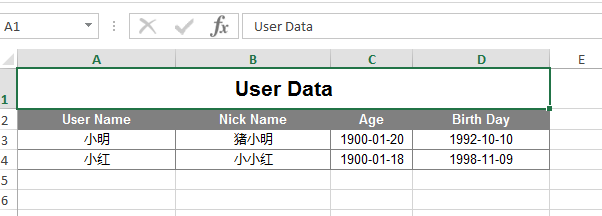
            new ExportExcel("Test Over View Define", User.class,2).setDataList(users).write(response, fileName).dispose();

        } catch (Exception e) {

        }

    }
3. 演示
端口号可以自己通过在application.properties文件中,添加server.port=8000进行定义
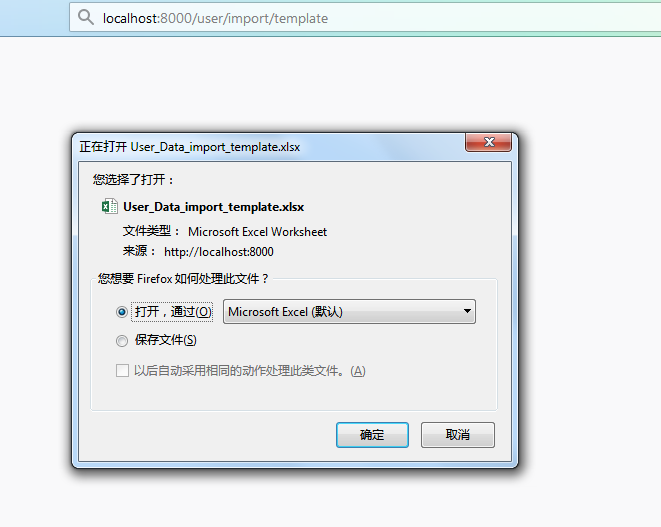
通过浏览器访问接口http://localhost:8000/user/import/template,下载模板:
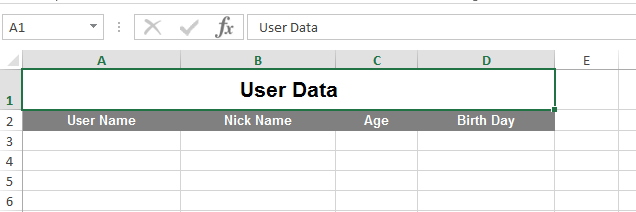
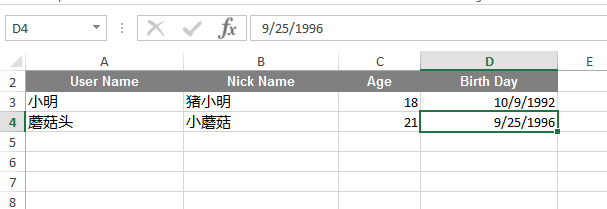
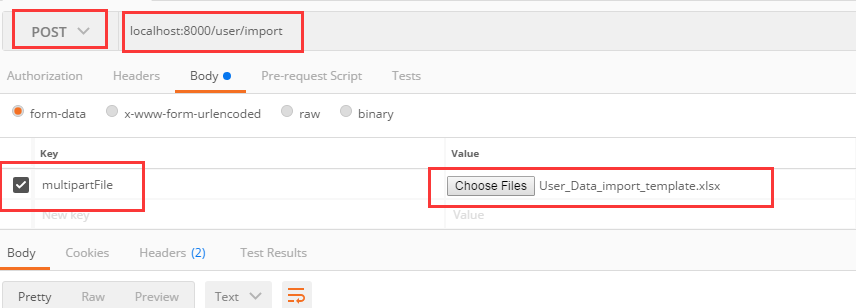
编辑Excel文件,并通过接口测试工具Postman访问接口localhost:8000/user/import:
接口测试工具中,上传文件,并访问:
上传之后,通过日志输出文件解析的结果:
2017-11-24 19:56:15.186  INFO 37428 --- [nio-8000-exec-5] com.shexd.Controller.UserController      : User{userName='小明', nickName='猪小明', age=18, birth=1992-10-09}

2017-11-24 19:56:15.187  INFO 37428 --- [nio-8000-exec-5] com.shexd.Controller.UserController      : User{userName='蘑菇头', nickName='小蘑菇', age=21, birth=1996-09-25}

2017-11-24 19:56:15.187  INFO 37428 --- [nio-8000-exec-5] com.shexd.Controller.UserController      : Had Operation 2 Data; Failure 0
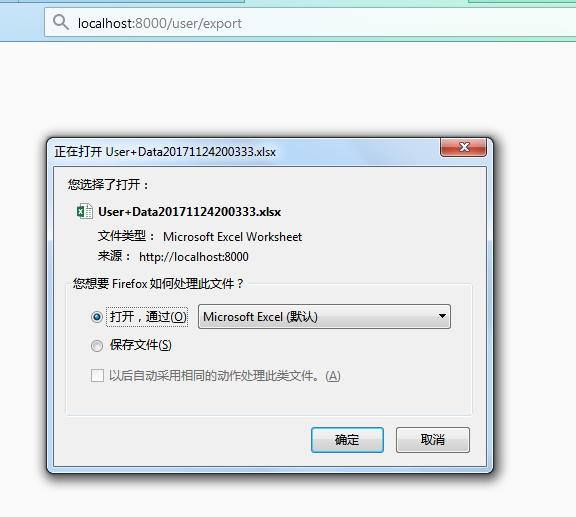
访问接口http://localhost:8000/user/export,从系统导出Excel文件
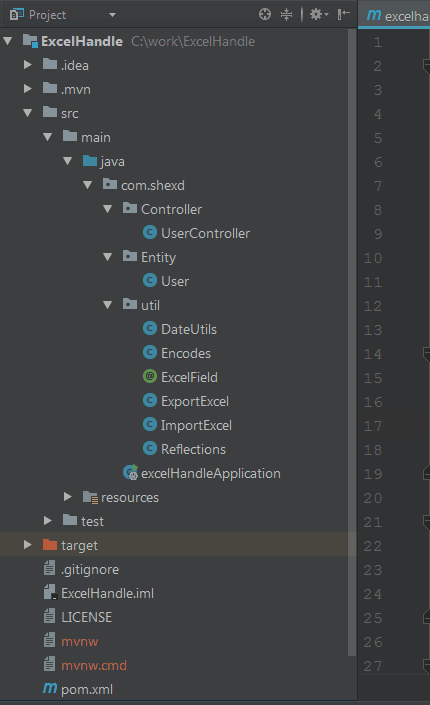
7. 项目目录结构
8. 小结
本文简单介绍了利用Java注解和反射对Excel进行操作的基本原理,并实例进行详细说明。
Java基于注解和反射导入导出Excel
注:本文著作权归作者,由demo大师代发,拒绝转载,转载需要作者授权
Java基于注解和反射导入导出Excel的更多相关文章
- java通过注解顺序通过映射导出excel
import java.lang.annotation.ElementType; import java.lang.annotation.Retention; import java.lang.ann ...
- java通过jxls框架实现导入导出excel
//使用jxls报表生成工具,把java实体类导出生成 Excel文件或导入 Excel 插入数据库 02 03//读取04 05public class ReadExcel {06 private ...
- C#中缓存的使用 ajax请求基于restFul的WebApi(post、get、delete、put) 让 .NET 更方便的导入导出 Excel .net core api +swagger(一个简单的入门demo 使用codefirst+mysql) C# 位运算详解 c# 交错数组 c# 数组协变 C# 添加Excel表单控件(Form Controls) C#串口通信程序
C#中缓存的使用 缓存的概念及优缺点在这里就不多做介绍,主要介绍一下使用的方法. 1.在ASP.NET中页面缓存的使用方法简单,只需要在aspx页的顶部加上一句声明即可: <%@ Outp ...
- java使用户EasyExcel导入导出excel
使用alibab的EasyExce完成导入导出excel 一.准备工作 1.导包 <!-- poi 相关--> <dependency> <groupId>org. ...
- Java利用POI导入导出Excel中的数据
首先谈一下今天发生的一件开心的事,本着一颗android的心我被分配到了PB组,身在曹营心在汉啊!好吧,今天要记录和分享的是Java利用POI导入导出Excel中的数据.下面POI包的下载地 ...
- .Net MVC 导入导出Excel总结(三种导出Excel方法,一种导入Excel方法) 通过MVC控制器导出导入Excel文件(可用于java SSH架构)
.Net MVC 导入导出Excel总结(三种导出Excel方法,一种导入Excel方法) [原文地址] 通过MVC控制器导出导入Excel文件(可用于java SSH架构) public cl ...
- 导入导出Excel的Java工具类ExcelUtil
在编写ExcelUtil之前,在网上查了一些资料.java中用来处理Excel的第三方开源项目主要就是POI和JXL.poi功能强大,但是比较耗资源,对于大数据量的导入导出性能不是太好:jxl功能简单 ...
- EasyPOI导入导出Excel
EasyPOI工具可以方便的写出Excel导出,Excel模板导出,Excel导入,Word模板导出,通过简单的注解和模板 导入maven依赖 <dependency> <group ...
- 导入导出Excel工具类ExcelUtil
前言 前段时间做的分布式集成平台项目中,许多模块都用到了导入导出Excel的功能,于是决定封装一个ExcelUtil类,专门用来处理Excel的导入和导出 本项目的持久化层用的是JPA(底层用hibe ...
随机推荐
- 《深入理解Java虚拟机》学习笔记
<深入理解Java虚拟机>学习笔记 一.走近Java JDK(Java Development Kit):包含Java程序设计语言,Java虚拟机,JavaAPI,是用于支持 Java 程 ...
- AC日记——[FJOI2007]轮状病毒 bzoj 1002
1002 思路: 打表找规律: dp[i]=dp[i-1]*3-dp[i-2]+2; 套个高精就a了: 代码: #include <cstdio> #include <cstring ...
- qt资源下载网站
1. 所有Qt版本下载地址: http://download.qt.io/archive/qt/ 2. 所有Qt Creator下载地址: http://download.qt.io/archive/ ...
- 树形DP求树的最小支配集,最小点覆盖,最大独立集
一:最小支配集 考虑最小支配集,每个点有两种状态,即属于支配集合或者不属于支配集合,其中不属于支配集合时此点还需要被覆盖,被覆盖也有两种状态,即被子节点覆盖或者被父节点覆盖.总结起来就是三种状态,现对 ...
- Ubuntu 安装 tensorflow-gpu + keras
转载请注明: 仰望大牛的小清新:http://www.cnblogs.com/luruiyuan/ 本文原网址:http://www.cnblogs.com/luruiyuan/p/6660142.h ...
- Java中byte与(16进制)字符串的互相转换
java中byte用二进制表示占用8位,而我们知道16进制的每个字符需要用4位二进制位来表示,所以我们就可以把每个byte转换成两个相应的16进制字符,即把byte的高4位和低4位分别转换成相应的16 ...
- shell 查看 具体某行的值
sed: sed '5!d' file awk: awk 'NR==5' file
- 设计模式-设计原则(Design Principle)
本文由@呆代待殆原创,转载请注明出处. 写在前面:所谓设计原则并不是一定要遵守的法则,只是一种建议,因为保持这些原则本身会有一定代价,若是这些代价超过了带来的好处就得不偿失了,所以一切还是以简单为准. ...
- [xsy1294]sub
给出一棵$N$个节点的无根树,节点$i$有权值$v_i$.现在有$M$次操作,操作有如下两种: $1\ x\ y$ 将节点$x$的权值$v_x$修改为$y$ $2$ 选择一个联通块(也可以不选择),使 ...
- 【博弈论】【SG函数】hdu1848 Fibonacci again and again
某个状态的SG函数被定义为 除该状态能一步转移到的状态的SG值以外的最小非负整数. 有如下性质:从SG值为x的状态出发,可以转移到SG值为0,1,...,x-1的状态. 不论SG值增加与否,我们都可以 ...