
使用Vue做评论+localStorage存储(js模块化)
未分模块化
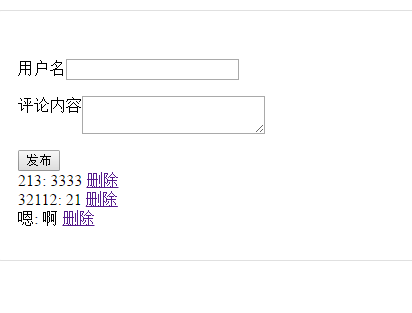
html
<!DOCTYPE html>

<html>

    <head>

        <meta charset="utf-8">

        <title>评论模块</title>

        <style>

            #root{

                width: 400px;

                padding: 2em;

                margin: 2em auto;

                border: 1px solid #e0e0e0;

                border-radius: 1em;

            }

            label{

                display: flex;

                margin: 1em 0;

            }

        </style>

    </head>

    <body>

        <div id="root">

            <c-input @wybc='zhendeyaobaocuoa'></c-input>

            <c-list :comments="comments" @dodel="zhendeshanc"></c-list>

        </div>

            <script src="js/comment-input.js"></script>

            <script src="js/comment-list.js"></script>

            <script src="js/Vue.js"></script>

            <script>

                Vue.component('c-input',commentInput);

                Vue.component('c-list',commentList);

                Vue.component('comment',commentItem);

                var app = new Vue({

                    el:"#root",

                    data:{

                        comments:[

                        ]

                    },

                    methods:{

                        zhendeyaobaocuoa(res){

                            this.comments.push(res);

                            this.updaLocalStorage();

                        },

                        updaLocalStorage(){

                            localStorage.setItem("data",JSON.stringify(this.comments));

                        },

                        zhendeshanc(id){

                             this.comments=this.comments.filter((c) => c.id!=id)

                            this.updaLocalStorage();

                        }

                    },

                    created(){

                        const cs=localStorage.getItem("data");

                        if(cs){

                            this.comments=JSON.parse(cs);

                        }

                    }

                })

            </script>

    </body>

</html>
comment-input.js
                    var commentInput={

                    template:`

                    <div class='cinput'>

                    <label>

                    <span>用户名</span>

                    <input v-model='author'/>

                    </label>

                    <label>

                        <span>评论内容</span>

                        <textarea v-model='content'></textarea>

                    </label>

                    <button @click='doSave()'>发布</button>

                    </div>

                    `,

                    data(){

                        return {

                            author:'',

                            content:''

                        }},

                        methods:{

                            doSave(){

                                this.$emit('wybc',{

                                    id:+new Date(),

                                    author:this.author,

                                    content:this.content

                                })

                            }

                        }

                    }
comment-list.js
                var  commentList={

                    props:['comments'],

                    template:`

                    <div class='clist'>

                        <comment v-for='c in comments'

                            v-bind:comment='c'

                            @dodel="dodel">

                        </comment>

                    </div>

                    `,

                    methods:{

                        dodel(id){

                            this.$emit("dodel",id);

                        }

                    }

                };

                var commentItem={

                    props:['comment'],

                    template:`

                    <div>

                    {{comment.author}}:

                        <span ></span>

                        <span>{{comment.content}}</span>

                        <a href @click.prevent='del'>删除</a>

                    </div>

                    `,

                    methods:{

                        del(){

                            this.$emit("dodel",this.comment.id);

                        }

                    }

                }
分好模块化
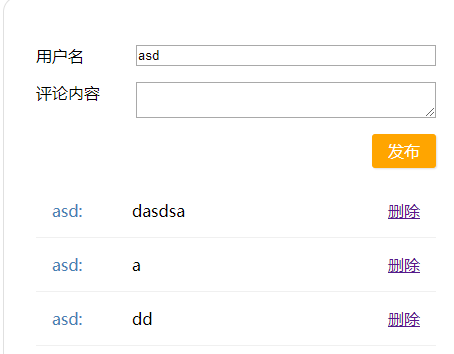
html
<!doctype html>

<html lang="en">

    <head>

        <meta charset="UTF-8"/>

        <title>评论模块</title>

        <link rel="stylesheet" href="css/index.css">

        <script src="https://cdn.bootcss.com/vue/2.5.13/vue.js"></script>

    </head>

    <body>

        <div id="root">

            <comment></comment>

        </div>

        <script type="module">

         import commentComp from './component/comment/comment-comp.js';

         Vue.component('comment', commentComp);

         var vm = new Vue({

             el: '#root'

         });

        </script>

    </body>

</html>
comment-comp.js
import commentInput from './comment-input.js';

import commentList from './comment-list.js';

export default {

        template:`

        <div>

            <cinput @wybc='zhendeyaobaocuoa' ></cinput>

            <clist :comments="comments" @dodel="zhendeshanc"></clist>

            </div>`,

            data() { return {

            comments: []

            }},

                    methods:{

                        zhendeyaobaocuoa(res){

                            this.comments.push(res);

                            this.updaLocalStorage();

                        },

                        updaLocalStorage(){

                            localStorage.setItem("data",JSON.stringify(this.comments));

                        },

                        zhendeshanc(id){

                             this.comments=this.comments.filter((c) => c.id!=id)

                            this.updaLocalStorage();

                        }

                    },

                    created(){

                        const cs=localStorage.getItem("data");

                        if(cs){

                            this.comments=JSON.parse(cs);

                        }

                    },

                    components:{

                        cinput:commentInput,

                        clist:commentList

                    }

                    }
注意

comment-input.js
                    var commentInput={

                    template:`

                    <div class='cinput'>

                    <label>

                    <span>用户名</span>

                    <input v-model='author'/>

                    </label>

                    <label>

                        <span>评论内容</span>

                        <textarea v-model='content'></textarea>

                    </label>

                    <button @click='doSave()'>发布</button>

                    </div>

                    `,

                    data(){

                        return {

                            author:'',

                            content:''

                        }},

                        methods:{

                            doSave(){

                                this.$emit('wybc',{

                                    id:+new Date(),

                                    author:this.author,

                                    content:this.content

                                })

                            }

                        }

                    }

export  default commentInput;
comment-item.js
export default {

                    props:['comment'],

                    template:`

                    <div>

                    {{comment.author}}:

                        <span ></span>

                        <span>{{comment.content}}</span>

                        <a href @click.prevent='del'>删除</a>

                    </div>

                    `,

                    methods:{

                        del(){

                            this.$emit("dodel",this.comment.id);

                        }

                    }

};
comment-list.js
            import commentItem from './comment-item.js';

                export default{

                    props:['comments'],

                    template:`

                    <div class='clist'>

                        <comment v-for='c in comments'

                            v-bind:comment='c'

                            @dodel="dodel"

                            v-bind:key=c.id>

                        </comment>

                    </div>

                    `,

                    methods:{

                        dodel(id){

                            this.$emit("dodel",id);

                        }

                    },

                     components: {

                comment: commentItem

                    }

                };
index.css
#root {

    width: 400px;

    padding: 2em;

    margin: 2em auto;

    border: 1px solid #e0e0e0;

    border-radius: 1em;

}

.cinput {

    margin-bottom: 1em;

}

label {

    display: flex;

    margin: 1em 0;

}

label span {

    flex-basis: 100px;

}

input, textarea {

    flex:;

}

.cinput footer {

    text-align: right;

}

.cinput button {

    border: none;

    background-color: orange;

    padding: .4em 1em;

    color: white;

    font-size: 16px;

    border-radius: 3px;

    box-shadow: 1px 1px 1px #e0e0e0;

}

.comment {

    padding: 1em;

    border-bottom: 1px solid #f0f0f0;

    display: flex;

}

.comment-author {

    color: steelblue;

    flex-basis: 80px;

}

.comment-delete {

    margin-left: auto;

}
使用Vue做评论+localStorage存储(js模块化)的更多相关文章
- 使用Vue做个简单的评论 + localstorage存储
1.引入Vue.js 2.编写代码 代码 <!DOCTYPE html> <html lang="zh"> <head> <meta c ...
- vue中使用localStorage存储信息
一 什么是localStorage 对浏览器来说,使用 Web Storage 存储键值对比存储 Cookie 方式更直观,而且容量更大,它包含两种:localStorage 和 sessionSto ...
- Android WebView js混合cookie和localStorage存储
一.cookie存储和取出: (1)存储: ------------------- **在loadURL之前调用** -------------------- /** * 同步一下cookie */ ...
- 在vue中继续使用layer.js来做弹出层---切图网
layer.js是一个方便的弹出层插件,切图网专注于PSD2HTML等前端切图多年,后转向Vue开发.在vue开发过程中引入layer.js的时候遇到了麻烦.原因是layer.js不支持import导 ...
- 使用sessionStorage、localStorage存储数组与对象(转)
http://my.oschina.net/crazymus/blog/371757 使用sessionStorage.localStorage存储数组与对象 发表于3个月前(2015-01-26 1 ...
- 闲聊——浅谈前端js模块化演变
function时代 前端这几年发展太快了,我学习的速度都跟不上演变的速度了(门派太多了,后台都是大牛公司支撑类似于facebook的react.google的angular,angular的1.0还 ...
- LocalStorage存储
1.localStorage存储服务: .factory('storageSvc', [function () { return { //保存数据 save: function (key, valu ...
- 使用sessionStorage、localStorage存储数组与对象
先介绍一下localStorage localStorage对象是HTML5的客户端存储持久化数据的方案.为了能访问到同一个localStorage对象,页面必须来自同一个域名(子域名无效),使用同一 ...
- 面试指南」JS 模块化、组件化、工程化相关的 15 道面试题
JS 模块化.组件化.工程化相关的 15 道面试题 1.什么是模块化? 2.简述模块化的发展历程? 3.AMD.CMD.CommonJS 与 ES6 模块化的区别? 4.它们是如何使用的? 5.exp ...
随机推荐
- AWS and OpenStack
AWS OpenStack EC2 Nova EBS Cinder EFS Manila S3 Swift Storage Gateway 本地上云 ClondFront 内容发布服务 VPC Neu ...
- Android触摸事件传递机制
简单梳理一下Android触摸事件传递机制的知识点. 一.View与ViewGroup的关系 View和ViewGroup二者的继承关系如下图所示: View是Android中最基本的一种UI组件,它 ...
- git win7 dos下设置代理
git config --global http.proxy http://username:pwd@my.you.com:port
- C和C++中include 搜索路径的一般形式以及gcc搜索头文件的路径
C和C++中include 搜索路径的一般形式 对于include 搜索的路径: C中可以通过 #include <stdio.h> 和 #include "stidio.h&q ...
- Linux 下安装 Memcached 和 PHP 开启 Memcached 扩展 及 LAMP 环境的安装
http://blog.csdn.net/liruxing1715/article/details/8269563
- ul+js模拟select
html css .select_box{ float: left; } .select_box input{ width: 160px; height: 30px; text-align: ce ...
- 两个三汇API使用的坑
最近呼叫中心走火入魔了,我的<一步一步开发呼叫中心>系列编写过程中,遇到各种的问题,今天晚上,来记录一下纠结了我N久的一个问题: 内线通过板卡外呼时,如果对方的呼叫中心需要发送按键响应(如 ...
- JavaScript typeof运算符和数据类型
// js有6种数据类型:Undefined.Null.Boolean.String.Number.Object //(01)typeof console.log(typeof undefined); ...
- intellij idea里神坑的@autowire
当你写完项目的时侯serviceimpl层下的@autowire->对应的是dao层的注入,其下面会出现一条红线 在Intellij Idea开发工具在@Autowired或者@Resource ...
- Django——model进阶(待完成)
https://www.cnblogs.com/yuanchenqi/articles/7570003.html 一.QuerySet 1.可切片 使用Python 的切片语法来限制查询集记录的数目 ...