
php-fpm docker 容器 搭建
继续上一篇文章(centos 7 容器的搭建)
下面构建一个php-fpm镜像:

dockerfile 文件如下:
#

# MAINTAINER

# DOCKER-VERSION    1.6.

#

# Dockerizing php-fpm: Dockerfile for building php-fpm images

#

FROM       csphere/centos:7.1

MAINTAINER XXXXX <xxx@xxxx.com>

# Set environment variable

#网站根目录

ENV    APP_DIR /app

RUN     yum -y swap -- remove fakesystemd -- install systemd systemd-libs && \

        yum -y install nginx php-cli php-mysql php-pear php-ldap php-mbstring php-soap php-dom php-gd php-xmlrpc php-fpm php-mcrypt && \

    yum clean all

ADD nginx_nginx.conf /etc/nginx/nginx.conf

ADD    nginx_default.conf /etc/nginx/conf.d/default.conf

ADD    php_www.conf /etc/php-fpm.d/www.conf

RUN    sed -i 's/;cgi.fix_pathinfo=1/cgi.fix_pathinfo=0/' /etc/php.ini

RUN    mkdir -p /app && echo "<?php phpinfo(); ?>" > ${APP_DIR}/info.php

EXPOSE

ADD    supervisor_nginx.conf /etc/supervisor.conf.d/nginx.conf

ADD    supervisor_php-fpm.conf /etc/supervisor.conf.d/php-fpm.conf

#在下一个镜像生效

ONBUILD ADD . /app

ONBUILD RUN chown -R nginx:nginx /app
nginx_default.conf:
server {

    listen        default_server;

    server_name  localhost;

    #charset koi8-r;

    location / {

        root   /app;

        index  index.php index.html index.htm;

    }

    # redirect server error pages to the static page /50x.html

    #

    error_page        /50x.html;

    location = /50x.html {

        root   /app;

    }

    # Disable nginx log write favicon.ico

    location = /favicon.ico {

    log_not_found off;

    access_log off;

    }

    # pass the PHP scripts to FastCGI server listening on port

    #

    location ~ \.php$ {

        root           /app;

        fastcgi_pass   127.0.0.1:;

        #fastcgi_pass  unix:/tmp/php-fpm.sock;

        fastcgi_index  index.php;

        fastcgi_param  SCRIPT_FILENAME  $document_root$fastcgi_script_name;

        include        fastcgi_params;

    }

}
nginx_nginx.conf:
user  nginx;

worker_processes  ;

daemon  off;

error_log  /var/log/nginx/error.log warn;

pid        /var/run/nginx.pid;

events {

    worker_connections  ;

}

http {

    include       /etc/nginx/mime.types;

    default_type  application/octet-stream;

    log_format  main  '$remote_addr - $remote_user [$time_local] "$request" '

                      '$status $body_bytes_sent "$http_referer" '

                      '"$http_user_agent" "$http_x_forwarded_for"';

    access_log  /var/log/nginx/access.log  main;

    sendfile       on;

    tcp_nopush     on;

    tcp_nodelay    on;

    keepalive_timeout  ;

    types_hash_max_size ;

    gzip  on;

    gzip_disable  "msie6";

    gzip_vary  on;

    gzip_proxied  any;

    gzip_comp_level  ;

    gzip_types text/plain text/css application/json application/x-javascript text/xml application/xml application/xml+rss text/javascript;

    include /etc/nginx/conf.d/*.conf;

}
php_www.conf:
; Start a new pool named 'www'.

[www]

; The address on which to accept FastCGI requests.

; Valid syntaxes are:

;   'ip.add.re.ss:port'    - to listen on a TCP socket to a specific address on

;                            a specific port;

;   'port'                 - to listen on a TCP socket to all addresses on a

;                            specific port;

;   '/path/to/unix/socket' - to listen on a unix socket.

; Note: This value is mandatory.

listen = 127.0.0.1:

; Set listen() backlog. A value of '-1' means unlimited.

; Default Value: -

;listen.backlog = -

; List of ipv4 addresses of FastCGI clients which are allowed to connect.

; Equivalent to the FCGI_WEB_SERVER_ADDRS environment variable in the original

; PHP FCGI (5.2.+). Makes sense only with a tcp listening socket. Each address

; must be separated by a comma. If this value is left blank, connections will be

; accepted from any ip address.

; Default Value: any

listen.allowed_clients = 127.0.0.1

; Set permissions for unix socket, if one is used. In Linux, read/write

; permissions must be set in order to allow connections from a web server. Many

; BSD-derived systems allow connections regardless of permissions.

; Default Values: user and group are set as the running user

;                 mode is set to

;listen.owner = nobody

;listen.group = nobody

;listen.mode =

; Unix user/group of processes

; Note: The user is mandatory. If the group is not set, the default user's group

;       will be used.

; RPM: apache Choosed to be able to access some dir as httpd

user = nginx

; RPM: Keep a group allowed to write in log dir.

group = nginx

; Choose how the process manager will control the number of child processes.

; Possible Values:

;   static  - a fixed number (pm.max_children) of child processes;

;   dynamic - the number of child processes are set dynamically based on the

;             following directives:

;             pm.max_children      - the maximum number of children that can

;                                    be alive at the same time.

;             pm.start_servers     - the number of children created on startup.

;             pm.min_spare_servers - the minimum number of children in 'idle'

;                                    state (waiting to process). If the number

;                                    of 'idle' processes is less than this

;                                    number then some children will be created.

;             pm.max_spare_servers - the maximum number of children in 'idle'

;                                    state (waiting to process). If the number

;                                    of 'idle' processes is greater than this

;                                    number then some children will be killed.

; Note: This value is mandatory.

pm = dynamic

; The number of child processes to be created when pm is set to 'static' and the

; maximum number of child processes to be created when pm is set to 'dynamic'.

; This value sets the limit on the number of simultaneous requests that will be

; served. Equivalent to the ApacheMaxClients directive with mpm_prefork.

; Equivalent to the PHP_FCGI_CHILDREN environment variable in the original PHP

; CGI.

; Note: Used when pm is set to either 'static' or 'dynamic'

; Note: This value is mandatory.

pm.max_children =

; The number of child processes created on startup.

; Note: Used only when pm is set to 'dynamic'

; Default Value: min_spare_servers + (max_spare_servers - min_spare_servers) /

pm.start_servers =

; The desired minimum number of idle server processes.

; Note: Used only when pm is set to 'dynamic'

; Note: Mandatory when pm is set to 'dynamic'

pm.min_spare_servers =

; The desired maximum number of idle server processes.

; Note: Used only when pm is set to 'dynamic'

; Note: Mandatory when pm is set to 'dynamic'

pm.max_spare_servers =

; The number of requests each child process should execute before respawning.

; This can be useful to work around memory leaks in 3rd party libraries. For

; endless request processing specify ''. Equivalent to PHP_FCGI_MAX_REQUESTS.

; Default Value:

;pm.max_requests =

; The URI to view the FPM status page. If this value is not set, no URI will be

; recognized as a status page. By default, the status page shows the following

; information:

;   accepted conn    - the number of request accepted by the pool;

;   pool             - the name of the pool;

;   process manager  - static or dynamic;

;   idle processes   - the number of idle processes;

;   active processes - the number of active processes;

;   total processes  - the number of idle + active processes.

; The values of 'idle processes', 'active processes' and 'total processes' are

; updated each second. The value of 'accepted conn' is updated in real time.

; Example output:

;   accepted conn:

;   pool:             www

;   process manager:  static

;   idle processes:

;   active processes:

;   total processes:

; By default the status page output is formatted as text/plain. Passing either

; 'html' or 'json' as a query string will return the corresponding output

; syntax. Example:

;   http://www.foo.bar/status

;   http://www.foo.bar/status?json

;   http://www.foo.bar/status?html

; Note: The value must start with a leading slash (/). The value can be

;       anything, but it may not be a good idea to use the .php extension or it

;       may conflict with a real PHP file.

; Default Value: not set

;pm.status_path = /status

; The ping URI to call the monitoring page of FPM. If this value is not set, no

; URI will be recognized as a ping page. This could be used to test from outside

; that FPM is alive and responding, or to

; - create a graph of FPM availability (rrd or such);

; - remove a server from a group if it is not responding (load balancing);

; - trigger alerts for the operating team (/).

; Note: The value must start with a leading slash (/). The value can be

;       anything, but it may not be a good idea to use the .php extension or it

;       may conflict with a real PHP file.

; Default Value: not set

;ping.path = /ping

; This directive may be used to customize the response of a ping request. The

; response is formatted as text/plain with a  response code.

; Default Value: pong

;ping.response = pong

; The timeout for serving a single request after which the worker process will

; be killed. This option should be used when the 'max_execution_time' ini option

; does not stop script execution for some reason. A value of '' means 'off'.

; Available units: s(econds)(default), m(inutes), h(ours), or d(ays)

; Default Value:

;request_terminate_timeout =

; The timeout for serving a single request after which a PHP backtrace will be

; dumped to the 'slowlog' file. A value of '0s' means 'off'.

; Available units: s(econds)(default), m(inutes), h(ours), or d(ays)

; Default Value:

;request_slowlog_timeout =

; The log file for slow requests

; Default Value: not set

; Note: slowlog is mandatory if request_slowlog_timeout is set

slowlog = /var/log/php-fpm/www-slow.log

; Set open file descriptor rlimit.

; Default Value: system defined value

;rlimit_files =

; Set max core size rlimit.

; Possible Values: 'unlimited' or an integer greater or equal to

; Default Value: system defined value

;rlimit_core =

; Chroot to this directory at the start. This value must be defined as an

; absolute path. When this value is not set, chroot is not used.

; Note: chrooting is a great security feature and should be used whenever

;       possible. However, all PHP paths will be relative to the chroot

;       (error_log, sessions.save_path, ...).

; Default Value: not set

;chroot =

; Chdir to this directory at the start. This value must be an absolute path.

; Default Value: current directory or / when chroot

;chdir = /var/www

; Redirect worker stdout and stderr into main error log. If not set, stdout and

; stderr will be redirected to /dev/null according to FastCGI specs.

; Default Value: no

;catch_workers_output = yes

; Limits the extensions of the main script FPM will allow to parse. This can

; prevent configuration mistakes on the web server side. You should only limit

; FPM to .php extensions to prevent malicious users to use other extensions to

; exectute php code.

; Note: set an empty value to allow all extensions.

; Default Value: .php

;security.limit_extensions = .php .php3 .php4 .php5

; Pass environment variables like LD_LIBRARY_PATH. All $VARIABLEs are taken from

; the current environment.

; Default Value: clean env

;env[HOSTNAME] = $HOSTNAME

;env[PATH] = /usr/local/bin:/usr/bin:/bin

;env[TMP] = /tmp

;env[TMPDIR] = /tmp

;env[TEMP] = /tmp

; Additional php.ini defines, specific to this pool of workers. These settings

; overwrite the values previously defined in the php.ini. The directives are the

; same as the PHP SAPI:

;   php_value/php_flag             - you can set classic ini defines which can

;                                    be overwritten from PHP call 'ini_set'.

;   php_admin_value/php_admin_flag - these directives won't be overwritten by

;                                     PHP call 'ini_set'

; For php_*flag, valid values are on, off, , , true, false, yes or no.

; Defining 'extension' will load the corresponding shared extension from

; extension_dir. Defining 'disable_functions' or 'disable_classes' will not

; overwrite previously defined php.ini values, but will append the new value

; instead.

; Default Value: nothing is defined by default except the values in php.ini and

;                specified at startup with the -d argument

;php_admin_value[sendmail_path] = /usr/sbin/sendmail -t -i -f www@my.domain.com

;php_flag[display_errors] = off

php_admin_value[error_log] = /var/log/php-fpm/www-error.log

php_admin_flag[log_errors] = on

;php_admin_value[memory_limit] = 128M

; Set session path to a directory owned by process user

php_value[session.save_handler] = files

php_value[session.save_path] = /var/lib/php/session
supervisor_nginx.conf:
[program:nginx]

directory=/

command=/usr/sbin/nginx -c /etc/nginx/nginx.conf

user=root

autostart=true

autorestart=true

stdout_logfile=/var/log/supervisor/%(program_name)s.log

stderr_logfile=/var/log/supervisor/%(program_name)s.log
supervisor_php-fpm.conf:
[program:php-fpm]

directory=/

command=/usr/sbin/php-fpm

user=root

autostart=true

autorestart=true

stdout_logfile=/var/log/supervisor/%(program_name)s.log

stderr_logfile=/var/log/supervisor/%(program_name)s.log
构建镜像:

查看镜像:
docker images

启动容器:


浏览器查看:
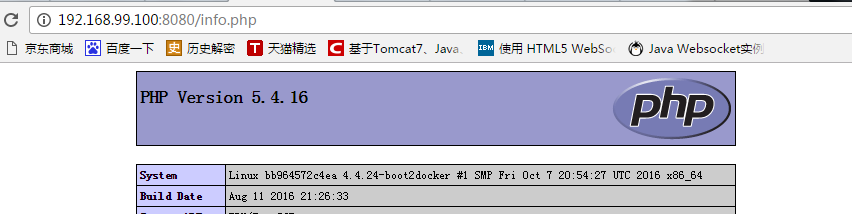
因为我的机器的docker的ip地址为:192.168.99.100.
进入(容器):


这里说明nginx 和 php-form 已经启动好了。这里是可以使用superisorctl 是因为该镜像是基于上一个基础镜像搭建的。
下一篇构建一个db镜像(mysql)
php-fpm docker 容器 搭建的更多相关文章
- Docker容器搭建android编译环境
Docker容器搭建android编译环境 目录 1 部署容器 1.1 手动部署 1.1.1 配置docker 1.1.2 启动容器 1.1.3 配置环境 1.2 Dockerfile 2 镜像管理 ...
- 基于docker容器搭建fastdfs分布式文件系统
本次环境的搭建参考了 https://blog.csdn.net/qq_43455410/article/details/84797814, 感谢博主. 主要流程如下: 1. 下载fastdfs镜像 ...
- Centos7 docker容器 搭建
Dockerfile 文件如下: # # MAINTAINER Carson,C.J.Zeong <zcy@nicescale.com> # DOCKER-VERSION # # Dock ...
- 基于 docker容器搭建机器学习环境
下载docker镜像 docker pull ubuntu:18.04 进入ubuntu系统命令 docker run -ti ubuntu /bin/bash 正确退出系统方式 先按,ctrl+p ...
- 利用远程服务器在docker容器搭建pyspider运行时出错的问题
This system supports the C.UTF-8 locale which is recommended. You might be able to resolve your issu ...
- 浅析Docker容器的应用场景
本文来自网易云社区 作者:娄超 过去几年开源界以openstack为代表的云计算持续火了好久,这两年突然又冒出一个叫Docker的容器技术,其发展之迅猛远超预料.网上介绍Docker容器的文章已经很多 ...
- 搭建ubuntu14.04的hadoop集群【docker容器充当服务器】
首先弄出来装有hadoop.java.ssh.vim的镜像起名badboyf/hadoop.做镜像有两种方法,一种是用Dockerfile来生成一个镜像,一种是基于ubuntu14.04的基础镜像生成 ...
- 利用 ELK 搭建 Docker 容器化应用日志中心
利用 ELK 搭建 Docker 容器化应用日志中心 概述 应用一旦容器化以后,需要考虑的就是如何采集位于 Docker 容器中的应用程序的打印日志供运维分析.典型的比如SpringBoot应用的日志 ...
- [转]Docker容器可视化监控中心搭建
[原文链接]https://www.jianshu.com/p/9e47ffaf5e31?hmsr=toutiao.io&utm_medium=toutiao.io&utm_sourc ...
随机推荐
- DHCP动态主机配置协议
1.DHCP简述 某组织一旦获得了一个地址,它就可以为本组织内的主机与路由器接口逐个分配IP地址.系统管理通常可以手工配置路由器中的IP地址(静态分配).但这项任务目前通常更多是使用动态主机配置协议( ...
- Charles常用设置
一.软件说明 Charles 通过将自己设置成系统的网络访问代理服务器,使得所有的网络访问请求都通过它来完成,从而实现了网络封包的截取和分析. 二.mock数据 场景说明: 使用步骤: 1.保存待测试 ...
- cocos2d-x设计模式发掘之一:单例模式
作者: firedragonpzy 原地址:http://www.firedragonpzy.com.cn/index.php/archives/1781 本系列文章我将和大家一起来发掘coc ...
- IIPP迷你项目(一)“Rock-paper-scissor-lizard-Spock”
0 前言——关于IIPP 本系列博客的内容均来自<An Introduction to Interactive Programming in Python (Part 1)>(在此我简称为 ...
- 注册Asp4.0到iis
- 一个经验丰富的网站建设程序员的CSS资料
没有就不能活的 53 个 CSS 技术 对新手实用的 20 个 CSS 建议 快速编写更好 CSS 代码的 5 种方法 50+ 个 CSS 创意案例和教程 101 个 CSS 小贴士.教程和范例 CS ...
- <2013 08 20> -----澳大利亚博士研究生申请-----
1.澳大利亚昆士兰大学博士的申请一年中什么时间都可以,但奖学金的评选每年只有四轮.和美国不同的是,在提交申请材料之前,个人必须联系好愿意接收你的导师,这个可以自己套磁联系,也可以和那边学院的小秘联系, ...
- QChart 如何放大缩小?
#if 0 //QChart 放大缩小 double z = 1.0; QPoint numDegrees = e->angleDelta()/8; double zi = qAbs(0.1*n ...
- element-UI ,Table组件实现拖拽效果
拖拽效果,先放效果图,步骤放在后面~~ 一.引入三方插件 1.引入sortable.js的包: npm install sortable.js --save 2.或者npm i -S vuedragg ...
- PEP8 Python 编码规范整理(Python)
add by zhj: 这个是豆瓣网友整理的PEP8,算是PEP8的一个简易版本,因为原PEP8内容太多,所以建议先看这篇文章,然后再看PEP8中文翻译 原文:http://www.douban.co ...